 PluginStats
ChatGPT Plugins does not publish install or usage counts, so PluginStats tracks Rawnd's listing placement instead, currently position #1152 in the marketplace's popularity-sorted listing.
Category positions: #441 in Creativity
About Rawnd
Rawnd opens camera RAW photos inside the conversation. ChatGPT reads JPEG, PNG, WebP and GIF; a NEF, CR3, ARW or RAF file shows it nothing. Rawnd adds a panel where you drop the RAW file. The file is read on your device, inside the panel, and never uploaded: not to Rawnd, not to OpenAI.
What it does
- Shows the JPEG the camera stored inside the RAW file, in under a second, with the shooting data: camera, lens, shutter speed, aperture, ISO and focal length.
- Lets you keep that JPEG (right-click the preview, "Save image as…") or show it to ChatGPT with one click, stripped of its metadata, so you can talk about the photo.
- Offers eight hand-written looks: Dark film, Warm film, High-contrast B&W, Cool & muted, Golden hour, Matte, Crisp & vivid and Teal & orange. ChatGPT picks the one that matches what you describe, can adjust it within narrow bounds ("a bit less warm"), and shows a card that opens it in Rawnd's editor, in the browser.
Who it is for Photographers with RAW files from Nikon, Canon, Sony, Fujifilm, Panasonic, Olympus, Pentax, Samsung, Leica, Phase One and other cameras, who want to see a RAW file, get a JPEG out of it or pick a look for it, without installing anything. Sixteen formats: CR2, CR3, CRW, NEF, NRW, ARW, SRF, SR2, RAF, DNG, RW2, ORF, PEF, SRW, IIQ and RAW.
Limits
- The panel shows the camera's own rendering, at the size the camera stored: full size on most Nikon and Canon bodies, 1920 × 1280 on Fujifilm. Developing the RAW itself (exposure, white balance) happens in Rawnd's editor.
- Camera RAW files only: it does not open JPEG, PNG or HEIC.
- A look opens in the editor; it is not applied inside the conversation.
- One file at a time.
Privacy Rawnd's server receives only the tool arguments, a look's name and slider values, and counts one row per call: the tool and the assistant. No account, no sign-in, no photo.
Description from the ChatGPT Plugins listing.
- Read
README badge
Show your rank in a README or on your website. The badge updates automatically.
Charts
Images: 30d · 1y · all time · 1600×900 dark
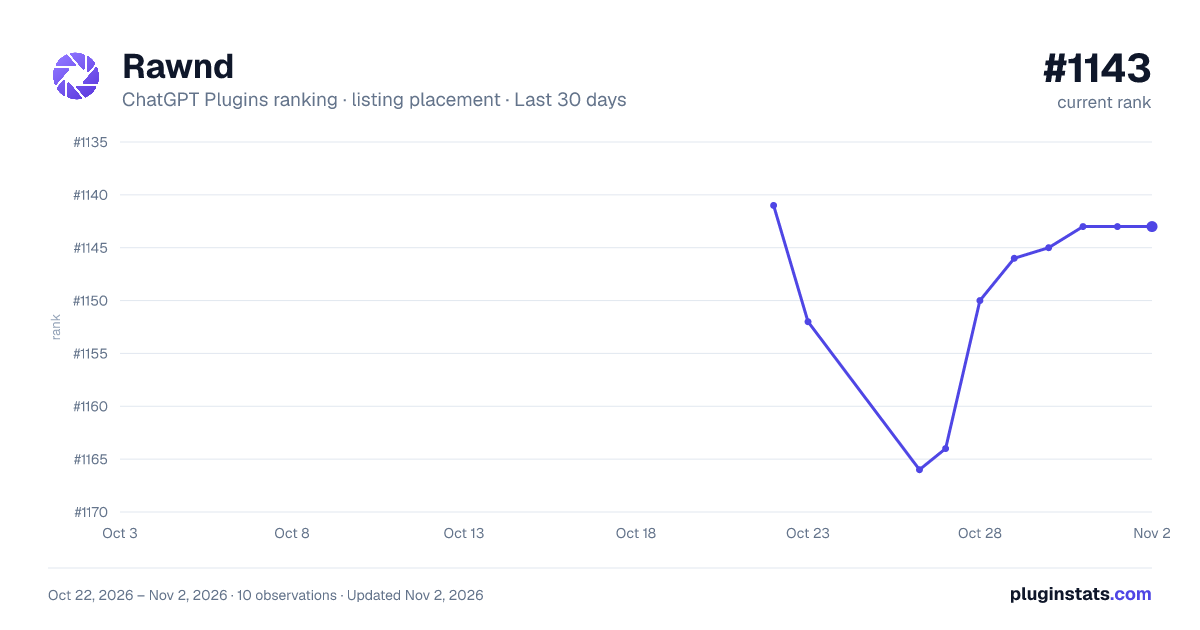
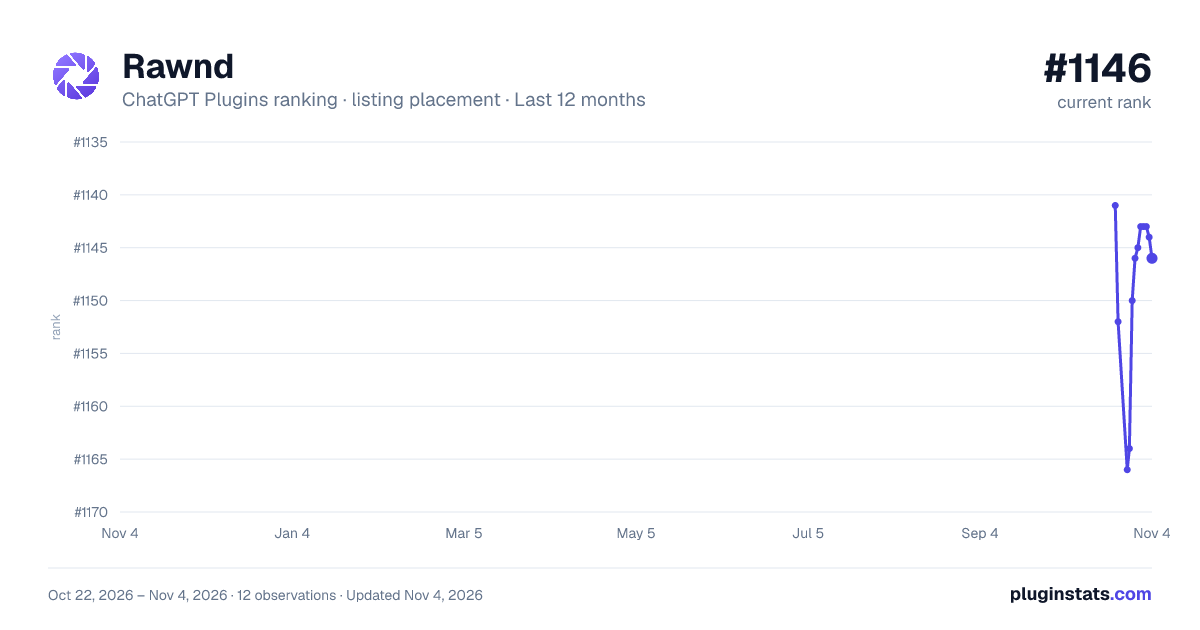
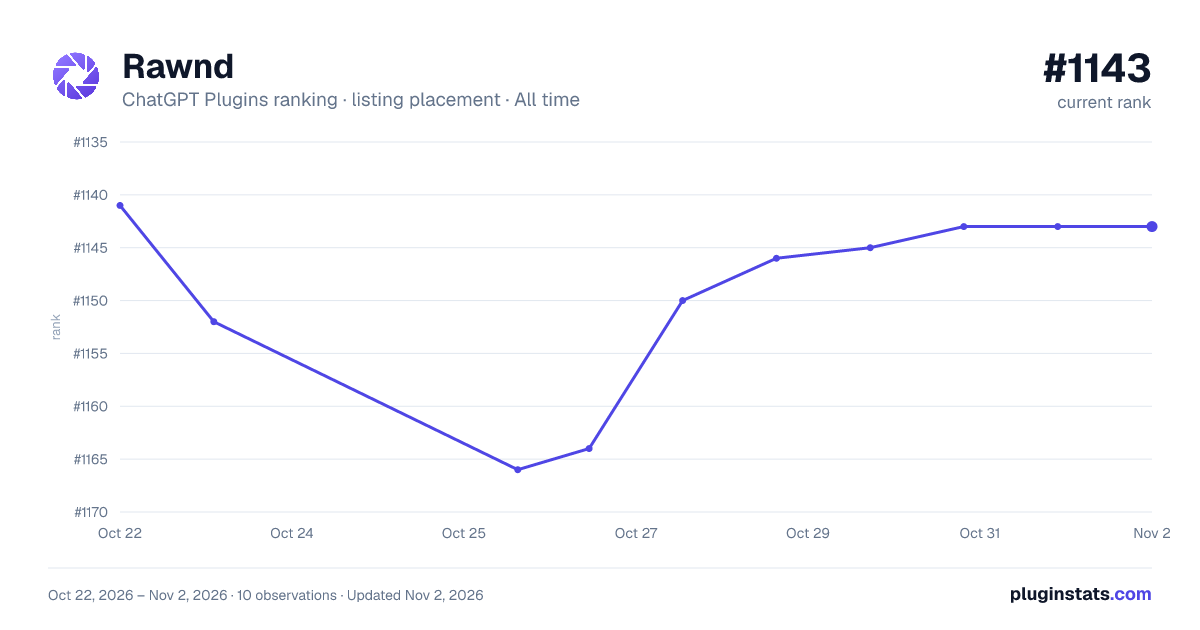

Ranking history
Filled points are observed values; hollow points come from Internet Archive snapshots of the listing page. Dashed segments span periods with no observations — values between points are not interpolated.
Similar ChatGPT Plugins Creativity plugins
All 20 Rawnd alternativesData source
OpenAI does not publish install counts or ratings for ChatGPT plugins. PluginStats records listing details and each plugin's placement in the directory over time: overall position follows the Popular list, then New & Noteworthy, then each category in directory order.
Listing: https://chatgpt.com/plugins/plugin_asdk_app_6ac4e939a13c8191997bc3bbb8beee3d. First seen Oct 22, 2026; last successful collection Oct 23, 2026. See the methodology.