 PluginStats
PDF Tools listing history
By Open Document Alliance · Claude Connectors
Open any PDF already on your computer and work with it: read and search it in an interactive viewer, fill and sign forms, extract text and data, merge, split, and compare documents. Your files never leave your machine.
Claude Connectors does not publish install or usage counts, so PluginStats tracks PDF Tools's listing placement instead, currently position #702 in the marketplace's popularity-sorted listing.
About PDF Tools
PDF Tools turns Claude Desktop into a complete PDF workstation with local file operations. Claude can fetch PDFs from URLs, inspect them visually, fill forms, manage pages, add signature/date zones, apply local signatures or text, extract structured data, and return document content to the selected MCP host for analysis.
This package targets Claude Desktop and other local MCP hosts today. It does not yet include a remote Claude/Cowork connector.
Interactive PDF Viewer: • View PDFs with page navigation, zoom, search, text selection, and fullscreen • See form fields in a sidebar with fill status • Use visual page management to reorder, rotate, and remove pages before saving • Switch into Sign mode to work with signature/date zones on the PDF
Sign Mode & Local Signatures: • Detect signature, initials, printed-name, and date zones with visible coordinates Claude can reason from • Draw or reuse saved local signatures • Place signatures, dates, or other text on detected or custom zones • Inspect a region, preview it, and turn it into a typed signing zone when the automatic detector is not enough • Keep edits local, with active-document tracking and automatic backup behavior for same-file mutations
URL-to-PDF Workflows: • Fetch PDFs from HTTP(S) URLs to the user's local machine, including cases where Claude's WebFetch is blocked • Open downloaded PDFs immediately in the viewer for fill, sign, page management, extraction, or analysis • Use page-bounded reads, text search, page renders, and region renders instead of one brittle all-document operation
Forms & Reusable Profiles: • Fill W-9s, 1099s, rental applications, waivers, and any fillable PDF • Save personal or business details as reusable profiles • List, load, and apply saved profiles so repeated forms take seconds instead of minutes • Bulk fill many PDFs from CSV data and validate required fields before submission
Page Organization Tools: • Merge multiple PDFs into one document • Split PDFs by exact page ranges or regular intervals • Rotate and reorder pages, or apply a full page plan in one pass • Keep the original intact by saving organized output as a new file
Extraction, Rendering & Analysis:
• Read existing PDF text layers for summarization, question answering, and research workflows
• Read specific page ranges and search PDF text with page-numbered snippets
• Convert supported born-digital page ranges to deterministic Markdown with explicit coverage gaps
• Render full pages or bounded regions to PNG for host/model vision on scanned or image-heavy documents
• If a selected read_pdf_content extraction has no text, return a rendered image of page 1 when available
• Keep rendering and text recognition distinct: page and region renders are raster images, not OCR text
• Treat mixed text/raster documents and raster pages after page 1 as potentially unrecognized by broad text reads
• Extract structured data to CSV
• Inspect page-level details like orientation, text presence, images, and likely blank pages
• Review metadata such as page count, dimensions, form fields, and file size
Local file operations and host-aware privacy: PDF Tools reads, renders, edits, and saves files on the user's machine and does not upload them to a separate PDF service. Text, images, or metadata returned through MCP may be processed under the selected host or model provider's data terms. Claude Desktop users choose which folders PDF Tools may read from or write to.
Works with many PDF types: Forms, contracts, research papers, technical manuals, invoices, financial statements, scanned documents, municipal packets, and encrypted PDFs. The local runtime does not currently bundle OCR; optional local OCR remains planned rather than shipped.
Best for: People who need more than a viewer: operators processing forms, lawyers organizing contracts, accountants handling tax documents, researchers reviewing papers, and anyone who wants local PDF file operations with their chosen MCP host.
Description from the Claude Connectors listing.
README badge
Show your rank in a README or on your website. The badge updates automatically.
Charts
Images: 30d · 1y · all time · 1600×900 dark
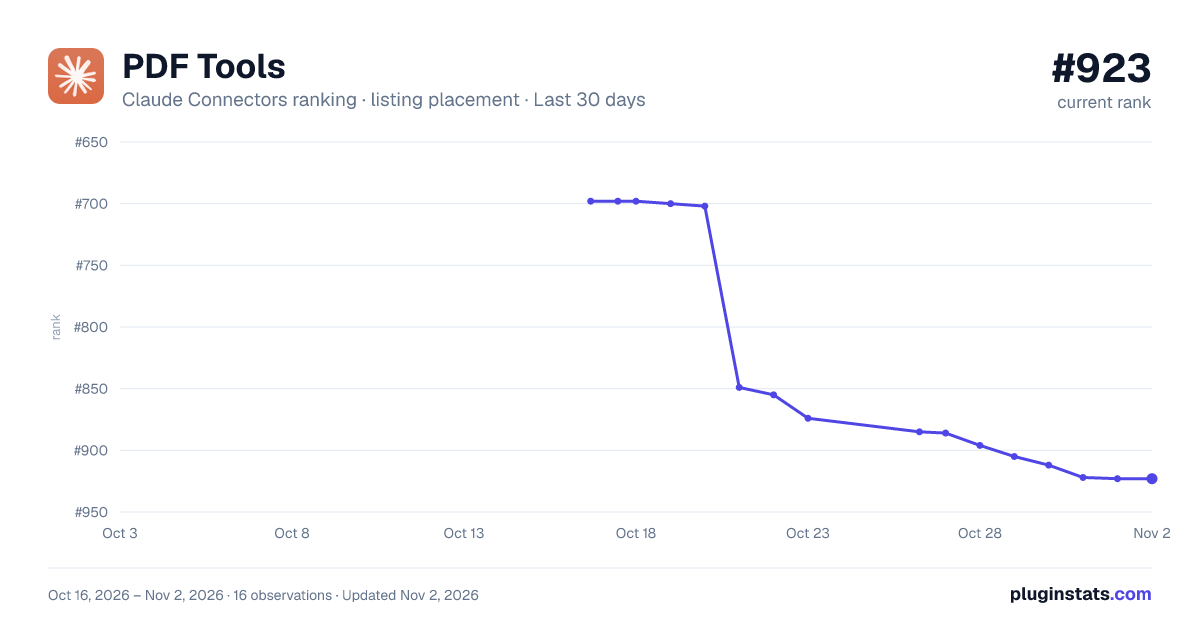
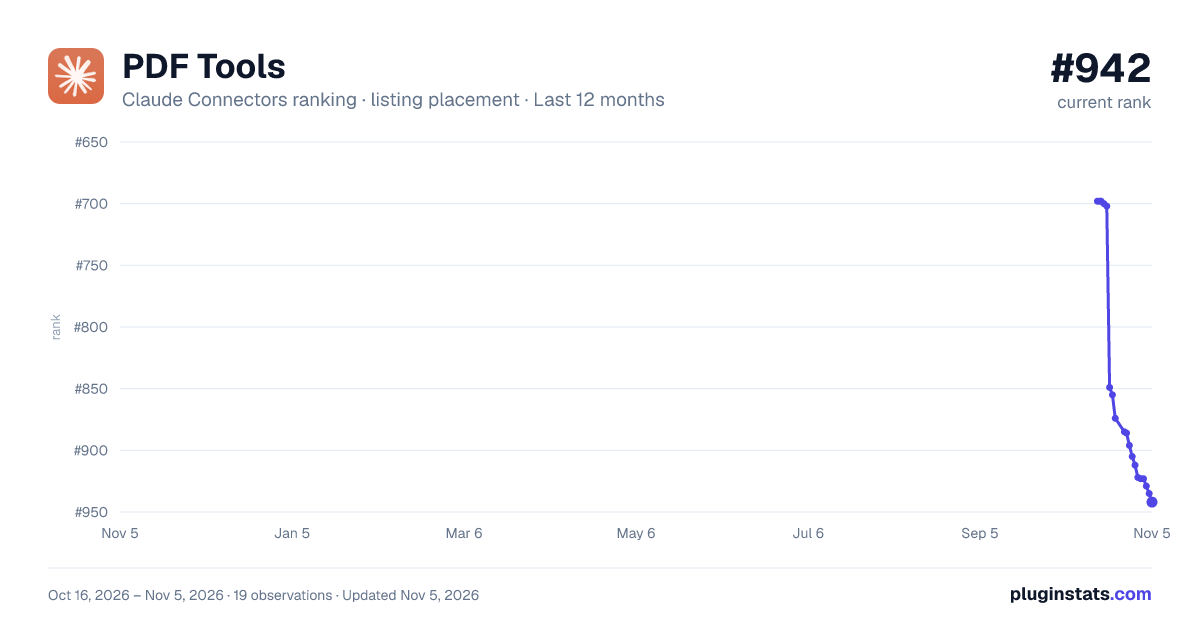
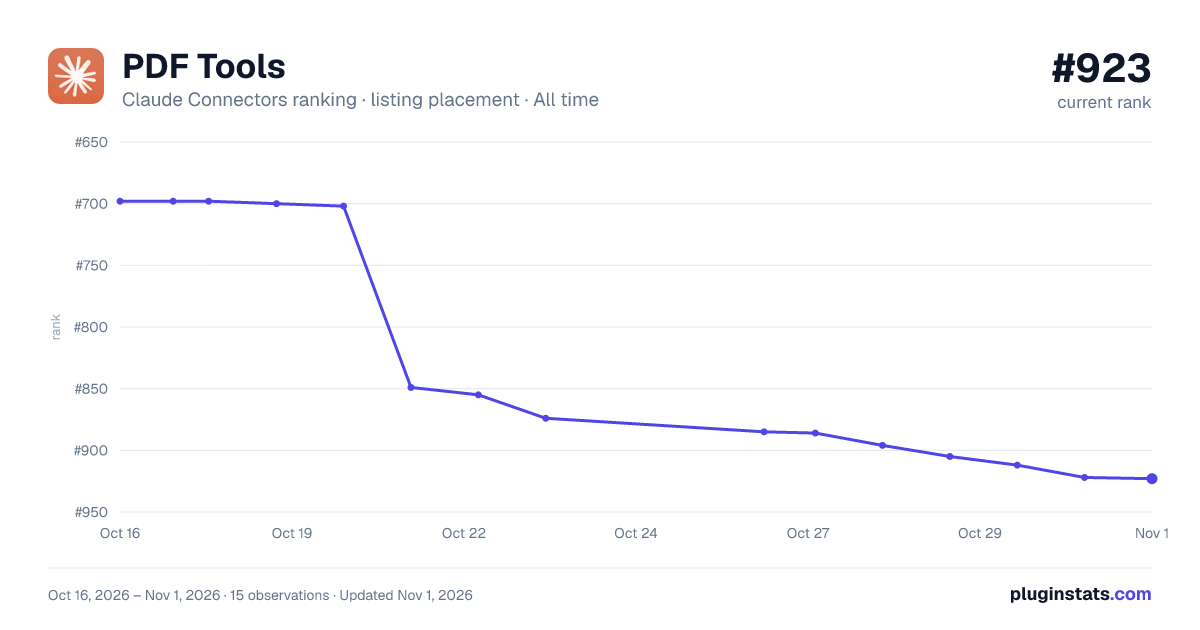

Ranking history
Filled points are observed values; hollow points come from Internet Archive snapshots of the listing page. Dashed segments span periods with no observations — values between points are not interpolated.
Similar Claude Connectors plugins
All 20 PDF Tools alternativesData source
Anthropic does not publish install counts for connectors. PluginStats records each Anthropic and partner connector's position in the official Claude directory, which Anthropic orders by its own ranking, so movement in position over time is the signal.
Listing: https://claude.com/marketplace/connectors. First seen Oct 16, 2026; last successful collection Oct 20, 2026. See the methodology.