 PluginStats
Azure DevOps Integration downloads statistics
By Paol0B · JetBrains Marketplace · Code Tools
Azure DevOps Integration for JetBrains IDEs The complete Azure DevOps experience without leaving your editor. Manage pull requests, work items, pipelines, and code...
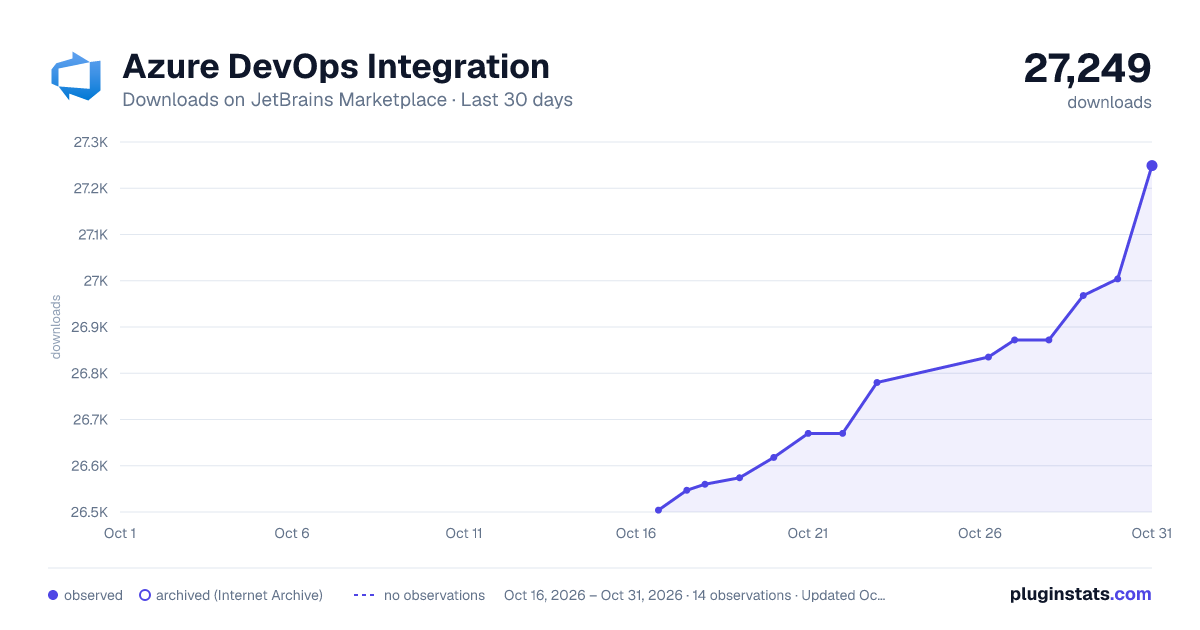
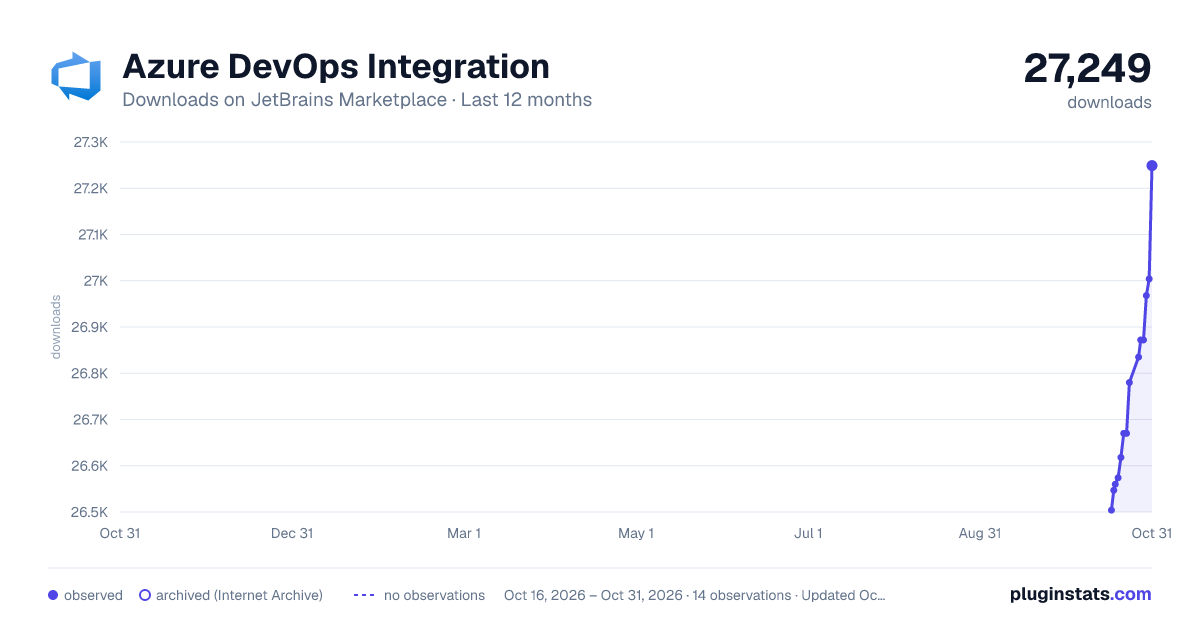
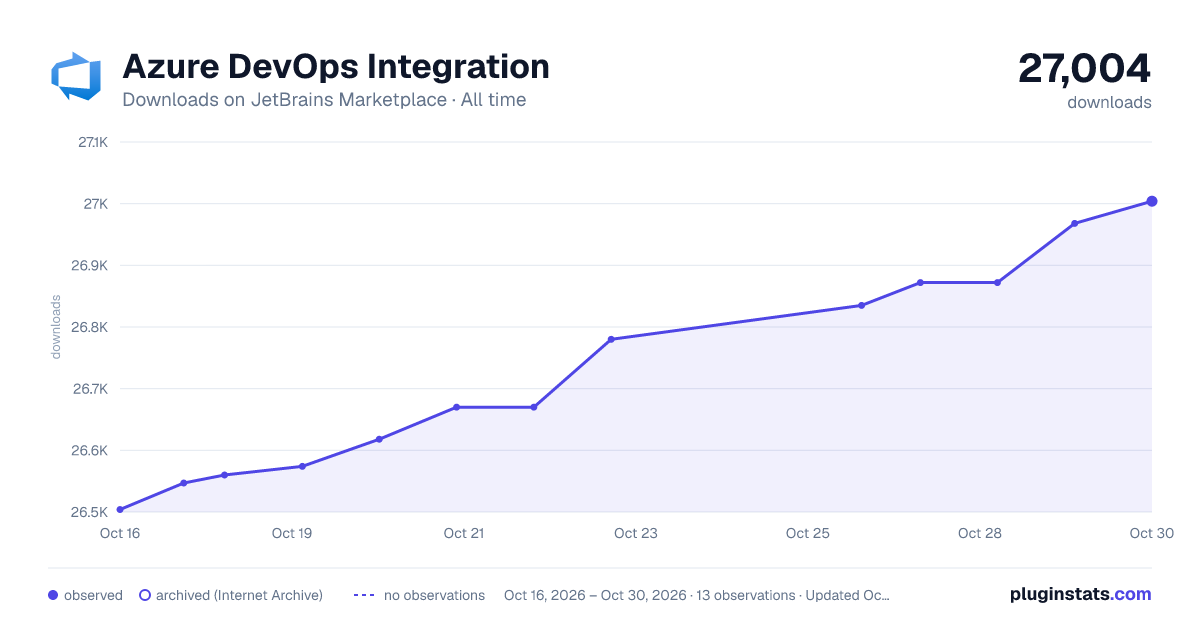
Azure DevOps Integration has 26,618 recorded downloads on JetBrains Marketplace, ranking #1881 of 2,502 tracked listings.
Rating: 2.33 / 5 from 3 ratings
About Azure DevOps Integration
Azure DevOps Integration for JetBrains IDEs
The complete Azure DevOps experience without leaving your editor. Manage pull requests, work items, pipelines, and code reviews — all from your JetBrains IDE.
✨ Core Features:
📦 Clone Repositories from Azure DevOps
• Browse by Organization: See all your Azure DevOps organizations • Project & Repository Listing: Easy navigation through projects and repos • One-Click Clone: Clone directly into your IDE with automatic setup • Multiple Accounts: Switch between different Azure DevOps accounts
📋 Pull Request Management
• View All PRs: Browse PRs filtered by status (Active, Completed, Abandoned, Draft) • PR Details: See title, description, author, reviewers, and source/target branches • Create PRs: Redesigned creation panel with integrated diff preview in editor tabs • Quick Actions: Approve, Complete, Abandon, Draft/Publish PRs directly from the IDE • Review Experience: Full diffs, timeline, comments, and file tree — no browser needed • Inline Comments: Add feedback directly on code lines with threaded discussions • PR Metrics Dashboard: Visual analytics with bar charts, donut charts, leaderboard, and key metrics
📌 Work Items Management
• Browse Work Items: List view with advanced filtering by type, state, assigned to, and area path • Kanban Board: Visual board view with work items organized by state columns • Sprint View: Track work items within sprints and iterations • Work Item Details: Rich detail panel with description, comments, history, and related items • Create & Edit: Full dialogs for creating and editing work items with all fields • Create Branch from Work Item: One-click branch creation linked to a work item • Auto Commit Messages: Commit messages auto-populated with linked work item ID
🚦 Pipelines Visualization
• Full Pipeline View: Visualize stages, jobs, and steps in a single diagram • Advanced Filtering: Filter pipelines by name, status, branch, and date range • Logs at Hand: Stream pipeline logs with search and auto-refresh • Status Bar Widget: Real-time build status and metrics in the IDE status bar
💬 Comment Browser Tool
• Find Comments: See all PR comments with one-click navigation to the code • Filter By Status: Show all, active, resolved, or general comments • Search Comments: Filter by file, author, or content • Jump to Code: Click any comment to go directly to that line in the editor • View Threads: Read full comment conversations and discussions • Comment Counts: See badges on files showing how many comments they have
🔐 Authentication & Security
• OAuth 2.0: Sign in with your Microsoft account (no token copy/paste needed) • Personal Access Token (PAT): Authenticate with PAT for manual control and self-hosted instances • Azure DevOps On-Premise: Full support for self-hosted Azure DevOps Server instances • Multiple Accounts: Add and switch between different organizations • Auto-Detection: Plugin automatically finds the right account for your repository • Secure Storage: Credentials safely stored in IDE's password manager • Token Refresh: OAuth tokens update automatically - no manual renewal
📋 Requirements:
• IntelliJ IDEA 2025.3 or newer (supports all JetBrains IDEs) • Git repository cloned from Azure DevOps • Microsoft account with access to your Azure DevOps organization
🚀 Getting Started:
• Install & Restart: Install plugin and restart your IDE • Add Account: Go to Settings → Tools → Azure DevOps Accounts → Add • Sign In: Click "Sign in with Browser" and authenticate with Microsoft • Explore: Open "Azure DevOps PRs", "Azure DevOps Pipelines", or "Azure DevOps Work Items" tool windows • Start Managing: View PRs, track work items, monitor pipelines, and collaborate
📚 Documentation:
• Getting Started Guide - Complete setup and feature tour • Authentication Setup - Configure OAuth 2.0 login • Common Workflows - Step-by-step examples for creating PRs and reviewing code
🆘 Support & Bug Reports:
Found a bug or need help? Please open an issue on GitHub instead of leaving a bad review!
• Report bugs: Help us fix issues faster by reporting them with details • Request features: Share your ideas to help the plugin grow • Get support: Ask questions and get help from the community
Issues are much more helpful than negative reviews. With your feedback, we can make this plugin better for everyone! 💪
Description from the JetBrains Marketplace listing.
- Code Tools
- TeamWork
- Tools Integration
- VCS
README badge
Show your rank in a README or on your website. The badge updates automatically.
Charts
Images: 30d · 1y · all time · 1600×900 dark
Adoption over time
7/30/90-day growth
Ranking history
Ratings over time
Listing placement
Listing placement
Listing placement
Listing placement
Filled points are observed values; hollow points come from Internet Archive snapshots of the listing page. Dashed segments span periods with no observations — values between points are not interpolated.
Each band is one page of 20. Downloads on a linear scale. Placement is projected from downloads, so it can differ from the marketplace's own sort order. Hover a dot to see the listing.
Recent observations
Full history (5)Similar JetBrains Marketplace Code Tools plugins
All 20 Azure DevOps Integration alternatives



Data source
Cumulative download counts come from the public JetBrains Marketplace API. JetBrains reports downloads, not active installs. Ratings are the mean of public votes.
Listing: https://plugins.jetbrains.com/plugin/28889-azure-devops-integration. First seen Oct 16, 2026; last successful collection Oct 20, 2026. See the methodology.