 PluginStats
FlutterAssetsGenerator downloads statistics
By Ray · JetBrains Marketplace · Code Tools
A powerful Android Studio / IntelliJ plugin that automatically generates a type-safe, hierarchical asset index for your Flutter projects. Support Found a bug or...
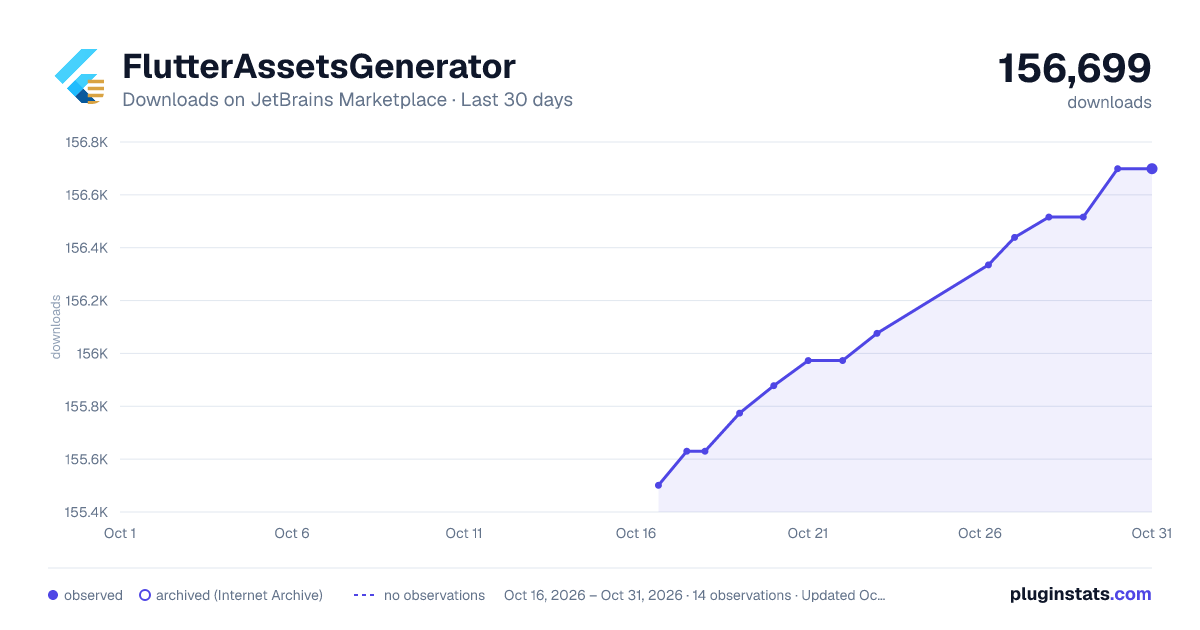
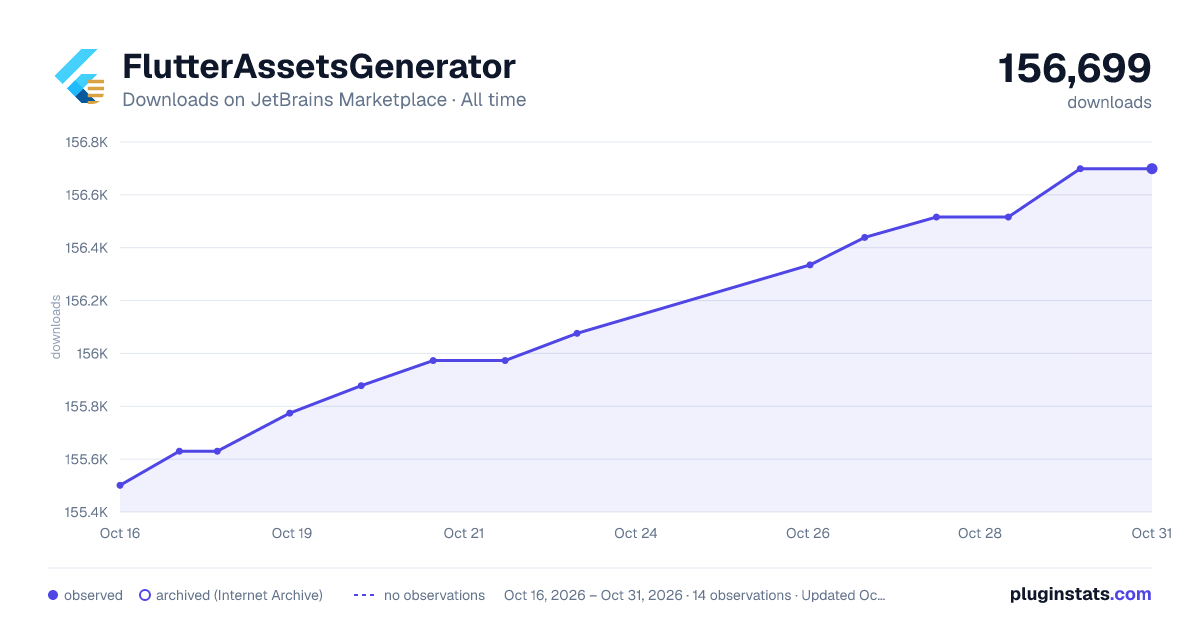
FlutterAssetsGenerator has 155,630 recorded downloads on JetBrains Marketplace.
It ranks #731 of 2,500 tracked JetBrains Marketplace listings by downloads.
It is rated 4.8 out of 5 from 8 ratings.
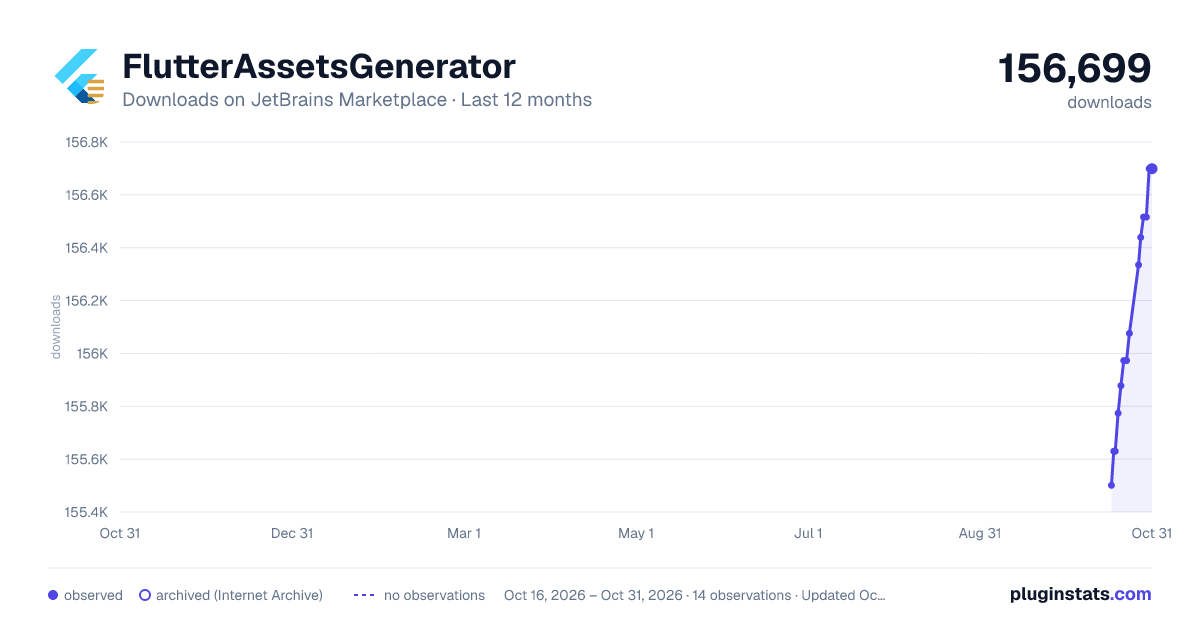
PluginStats has 3 daily observations since Oct 16, 2026; the latest is from Oct 18, 2026.
Rating: 4.75 / 5 from 8 ratings
About FlutterAssetsGenerator
A powerful Android Studio / IntelliJ plugin that automatically generates a type-safe, hierarchical asset index for your Flutter projects.
Support
• Found a bug or unexpected behavior? Please report it at GitHub Issues. • Release notes for each version are listed in the Changelog.
Core Features
• Hierarchical Generation: Generates classes that mirror your directory structure (e.g., Assets.images.logo). • Multi-Module Support: Seamlessly supports nested Flutter modules and monorepos (e.g. example/ or packages/). • Legacy Compatibility: Supports style: legacy to generate flat variable names (e.g. Assets.imagesLogo) for easy migration. • Smart Type Support: Automatically detects SVG, Lottie and Rive files. • Widget Integration: Generates .svg(), .lottie() and .rive() methods directly on asset objects. • Auto Dependency Management: Automatically checks and adds flutter_svg, lottie or rive dependencies. • YAML as Source of Truth: In 3.x, behavior is driven by pubspec.yaml. Modules without flutter_assets_generator config are not watched or generated automatically. • Disable Cleanup: Setting enable: false stops generation for that module and removes the previously generated Dart file. • Smart Auto Update: • Assets: Watch for image additions/deletions and regenerate automatically. • Config: Triggered on File Save (Cmd+S) in pubspec.yaml. Smart diffing ensures builds only run when necessary. • Performance: Setup and generation run asynchronously in the background, module configs are cached per project, and generated-file formatting is skipped to keep EDT writes minimal even in large monorepos.
Usage
1. Quick Setup (Recommended)
For first-time users, use the one-click setup:
• Menu: Click Tools -> Flutter Assets Generator -> Setup Project Configuration. • Project View: Right-click the root directory of a Flutter module, then click Flutter: Setup Current Module to configure only that module.
Project activation and module setup follow these rules:
• The plugin treats a project as available when it can find at least one valid Flutter module in the current workspace. • A valid Flutter module must be rooted at its own pubspec.yaml directory and contain Flutter configuration (flutter: or Flutter SDK dependency). • Temporary generated directories such as .dart_tool, build, .symlinks, .plugin_symlinks, and ephemeral are excluded from module detection. • The Project View setup entry is shown only when the selected directory exactly matches a Flutter module root. Child folders such as lib/ or assets/ do not show the entry. • package_parameter_enabled defaults to false for Flutter apps and add-to-app Flutter modules, and defaults to true for other Flutter packages. • Both project-level setup and current-module setup use the same automatic defaults.
This will automatically add the default configuration to your pubspec.yaml:
flutter_assets_generator: enable: true output_dir: generated/ output_filename: assets class_name: Assets auto_detection: true auto_add_dependencies: true style: robust # Options: robust (default), legacy (legacy) leaf_type: class # Options: class (default for robust), string (default for legacy) name_style: camel # Options: camel (default), snake package_parameter_enabled: false # Flutter packages default to true path_ignore: []
2. Manual Configuration (Optional)
flutter_assets_generator: # Enable/Disable this plugin for the current module. Default: true when the block exists enable: true # When set to false, generation stops and the previous generated Dart file is removed # Sets the directory of generated files. Default: generated/ output_dir: generated/ # Sets the name for the generated file. Default: assets output_filename: assets # Enable package parameter generation (package: 'your_package_name'). Default: false package_parameter_enabled: false # Sets the name for the root class. Default: Assets class_name: Assets # Enable/Disable auto monitoring and dependency management. Default: true auto_detection: true # Add dependencies to pubspec.yaml automatically. Default: true auto_add_dependencies: true # Generation style: robust (Hierarchical) or legacy (Flat legacy). Default: robust style: robust # Leaf type: class (typed wrappers) or string (raw asset path). Default: class for robust, string for legacy leaf_type: class # Name style for generated identifiers. Default: camel name_style: camel # For legacy style: Prefix variable names with parent directory names. Default: true named_with_parent: true # Ignore specific paths. Default: [] path_ignore: ["assets/fonts"]
When leaf_type: string, asset references return raw String paths (e.g., Assets.icons.user returns a string). In this mode the plugin will not auto-add flutter_svg, lottie, or rive.
When style: legacy and leaf_type: class, the generator keeps flat access paths but wraps known asset types with typed helpers:
// legacy + leaf_type: class static const AssetGenImage imagesLogo = AssetGenImage('assets/images/logo.png'); static const SvgGenImage iconsHome = SvgGenImage('assets/icons/home.svg'); // Unknown types (e.g. mp4, json) still fall back to String static const String videosIntro = 'assets/videos/intro.mp4';
Modules without a flutter_assets_generator block are not monitored automatically. If you run Generate Assets before initialization, the plugin will ask you to run Setup Project Configuration first.
3. Generate File
• Menu: Click Tools -> Flutter Assets Generator -> Generate Assets. • Shortcut: Press Option(Mac) / Alt(Win) + G. • Generated File Writes: Generated Dart files are written directly without an additional IDE reformat pass, reducing EDT stalls in large monorepos.
4. Access Assets in Code
The plugin generates a strict, type-safe hierarchy:
// Standard Image Assets.images.logo.image(width: 24, height: 24);
// SVG (Requires flutter_svg dependency) Assets.icons.home.svg(color: Colors.blue);
// Lottie (Requires lottie dependency) Assets.anim.loading.lottie(repeat: true);…
Description from the JetBrains Marketplace listing.
- Code Tools
Where FlutterAssetsGenerator sits in the listing
Each band is one page of 20. Downloads on a log scale. Placement is projected from downloads, so it can differ from the marketplace's own sort order. Hover a dot to see the listing.
Charts
Images: 30d · 1y · all time · 1600×900 dark
Adoption over time
7/30/90-day growth
Ranking history
Filled points are observed values; hollow points come from Internet Archive snapshots of the listing page. Dashed segments span periods with no observations — values between points are not interpolated.
Recent observations
Full history (3)Similar JetBrains Marketplace Code Tools plugins




Data source
Cumulative download counts come from the public JetBrains Marketplace API. JetBrains reports downloads, not active installs. Ratings are the mean of public votes.
Listing: https://plugins.jetbrains.com/plugin/15427-flutterassetsgenerator. First seen Oct 16, 2026; last successful collection Oct 18, 2026. See the methodology.