 PluginStats
OllamAssist downloads statistics
By Baretto · JetBrains Marketplace · Code Tools
OllamAssist Plugin for IntelliJ IDEA OllamAssist is a plugin designed to integrate seamlessly with IntelliJ IDEA, leveraging the power of Ollama to enhance developer...
OllamAssist has 49,393 recorded downloads on JetBrains Marketplace.
It ranks #1315 of 2,500 tracked JetBrains Marketplace listings by downloads.
It is rated 4.1 out of 5 from 16 ratings.
PluginStats has 3 daily observations since Oct 16, 2026; the latest is from Oct 18, 2026.
Rating: 4.06 / 5 from 16 ratings
About OllamAssist
OllamAssist Plugin for IntelliJ IDEA
OllamAssist is a plugin designed to integrate seamlessly with IntelliJ IDEA, leveraging the power of Ollama to enhance developer productivity. This intelligent assistant offers conversational interactions with your code, insightful discussions, and smart code autocompletion, making it your ultimate coding companion. All processing is done locally, ensuring maximum privacy and allowing you to work without an internet connection.
Key Features
• In-IDE Chat with Ollama Models: Engage directly with AI for insights and explanations, all within your JetBrains IDE. The model has access to your project's indexed sources via RAG (Retrieval-Augmented Generation), enabling context-aware responses based on your codebase. • Enhanced Context Awareness: Boost model accuracy by providing your workspace for tailored suggestions. • Generate commit message: OllamAssist can generate a commit message based on the current git diff, following the Conventional Commits specification.. • Offline Mode: Enjoy full functionality offline after loading the model and data. • Experimental Smart Code Autocomplete: Anticipates your next steps in coding, offering intelligent suggestions when pressing Shift+Space. • Press Enter to insert the suggested code. • Press any other key to dismiss the suggestion.
Customizable Model Settings
Developers can choose the AI model to be used via the plugin's Settings page, ensuring flexibility and alignment with their specific requirements.
Minimum Requirements
For the latest system requirements, please refer to the official Ollama requirements page.
Get Started in 5 Minutes
• Download and start Ollama. • Open a terminal and download a model using the command: ollama run llama3.1. • Start IntelliJ IDEA, go to Plugins > Marketplace, and search for "OllamAssist". • Install the "OllamAssist" plugin. • In the OllamAssist settings window, select the Ollama model if it isn't already set to llama3.1. • Start coding with your smart OllamAssist!
Description from the JetBrains Marketplace listing.
- Code Tools
- Completion
- JEE
- Plugin Development
Where OllamAssist sits in the listing
Each band is one page of 20. Downloads on a log scale. Placement is projected from downloads, so it can differ from the marketplace's own sort order. Hover a dot to see the listing.
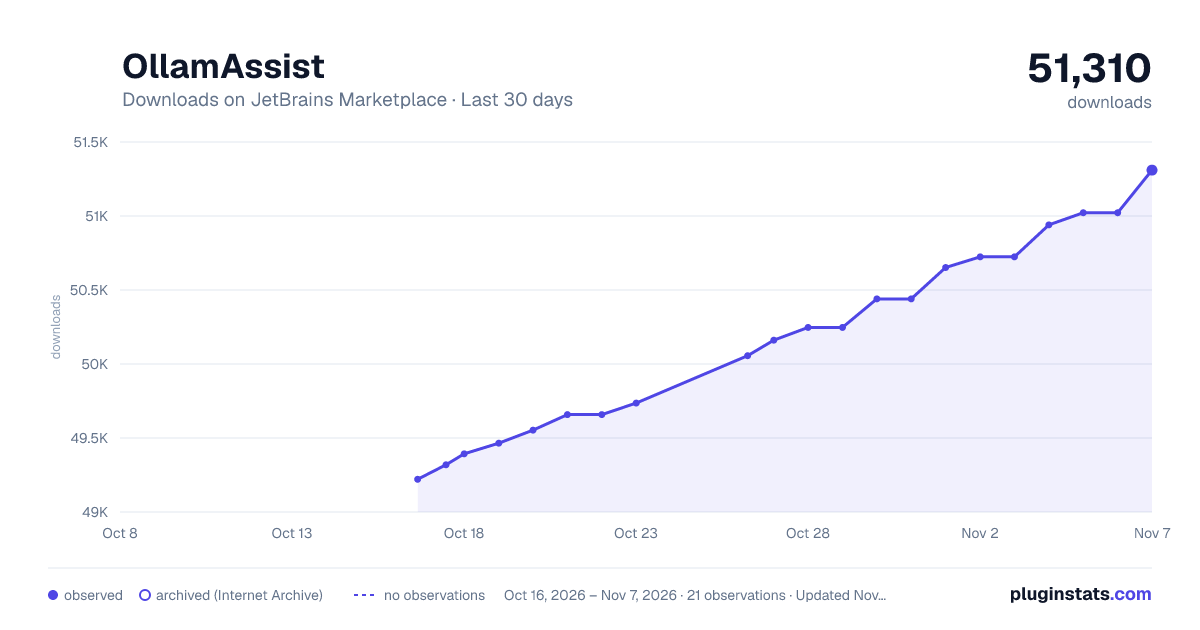
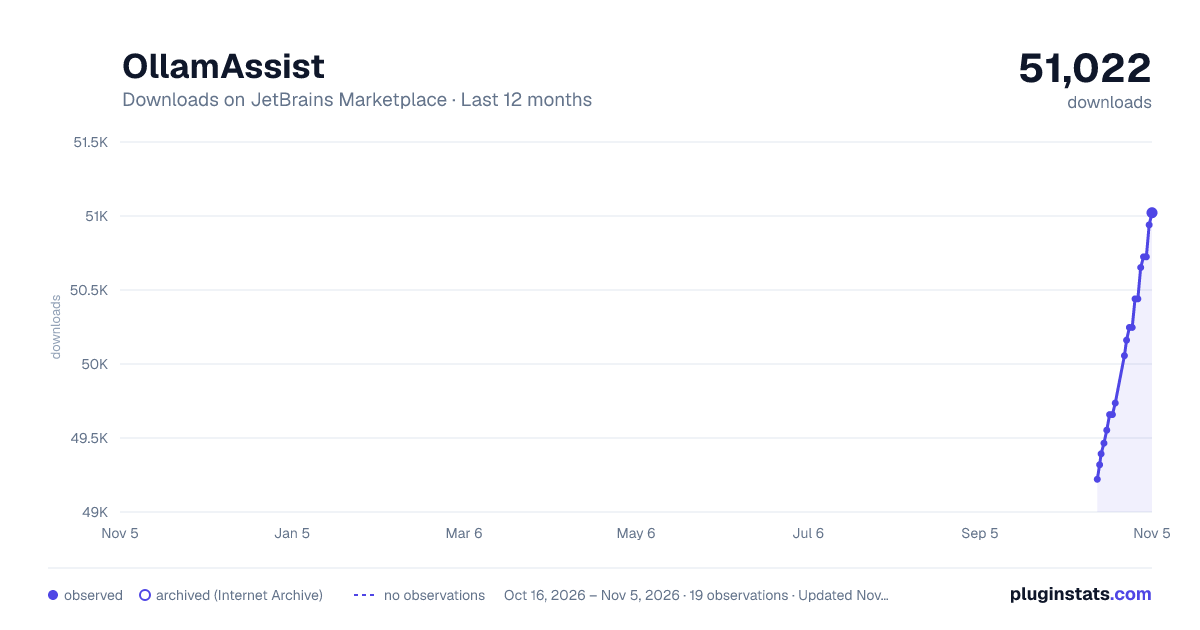
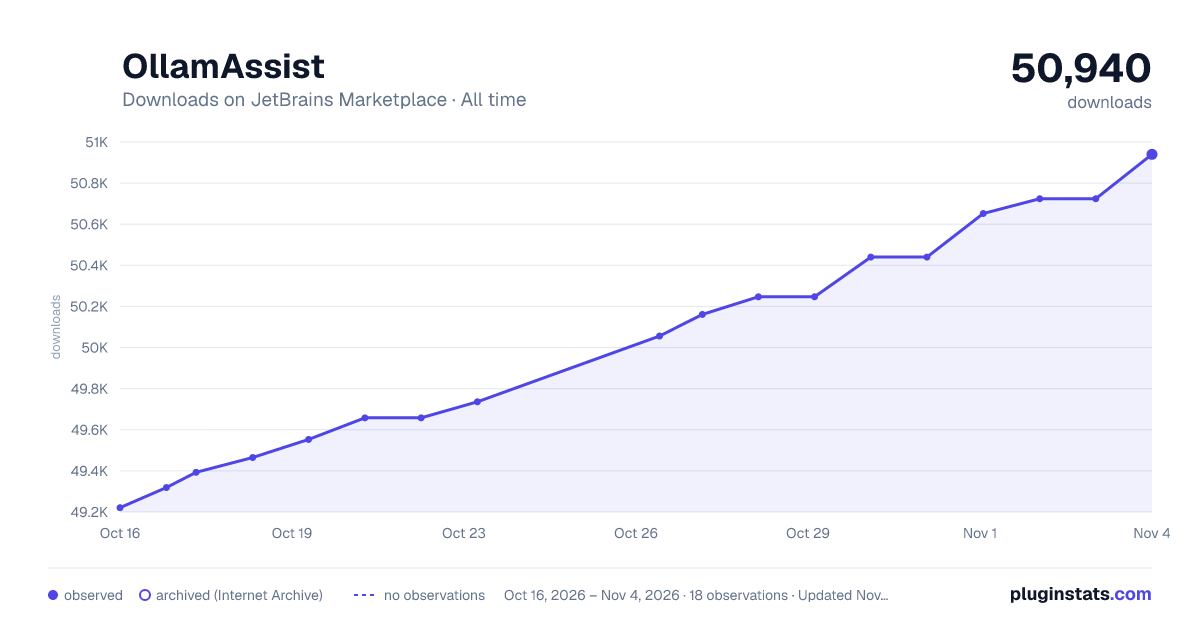
Charts
Images: 30d · 1y · all time · 1600×900 dark
Adoption over time
7/30/90-day growth
Ranking history
Filled points are observed values; hollow points come from Internet Archive snapshots of the listing page. Dashed segments span periods with no observations — values between points are not interpolated.
Recent observations
Full history (3)Similar JetBrains Marketplace Code Tools plugins




Data source
Cumulative download counts come from the public JetBrains Marketplace API. JetBrains reports downloads, not active installs. Ratings are the mean of public votes.
Listing: https://plugins.jetbrains.com/plugin/26388-ollamassist. First seen Oct 16, 2026; last successful collection Oct 18, 2026. See the methodology.