 PluginStats
Claude Code Chat downloads statistics
By Brother · JetBrains Marketplace · AI
Claude Code for JetBrains IDE Bring the full power of Claude Code directly into your IDE. Chat with Claude in a side panel, edit code inline with natural-language...
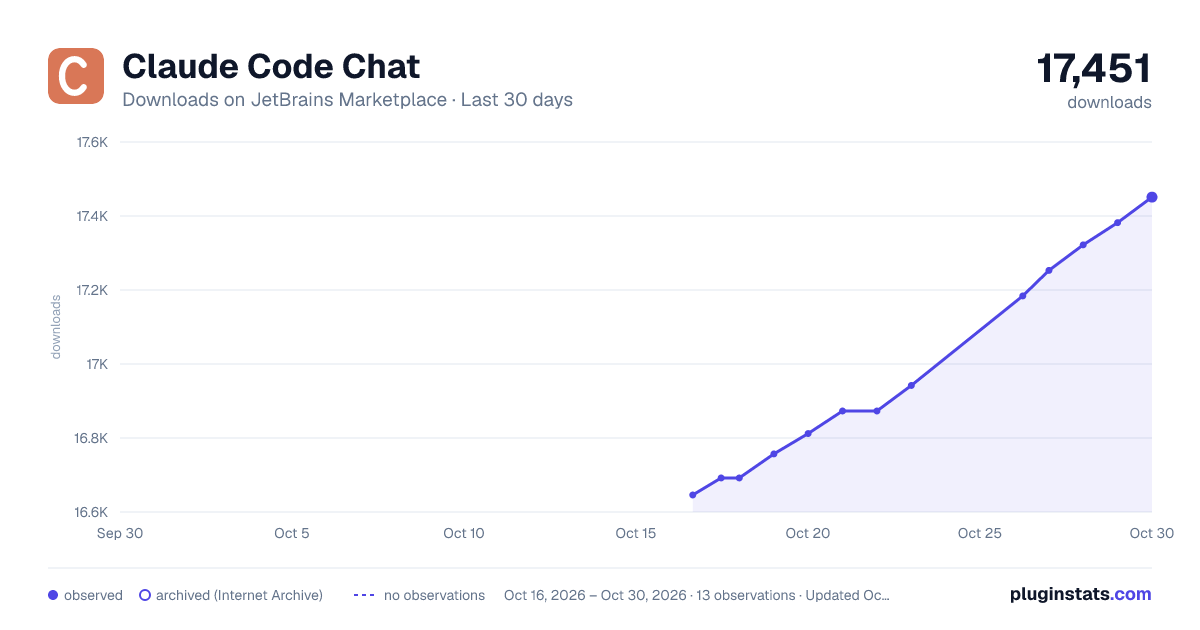
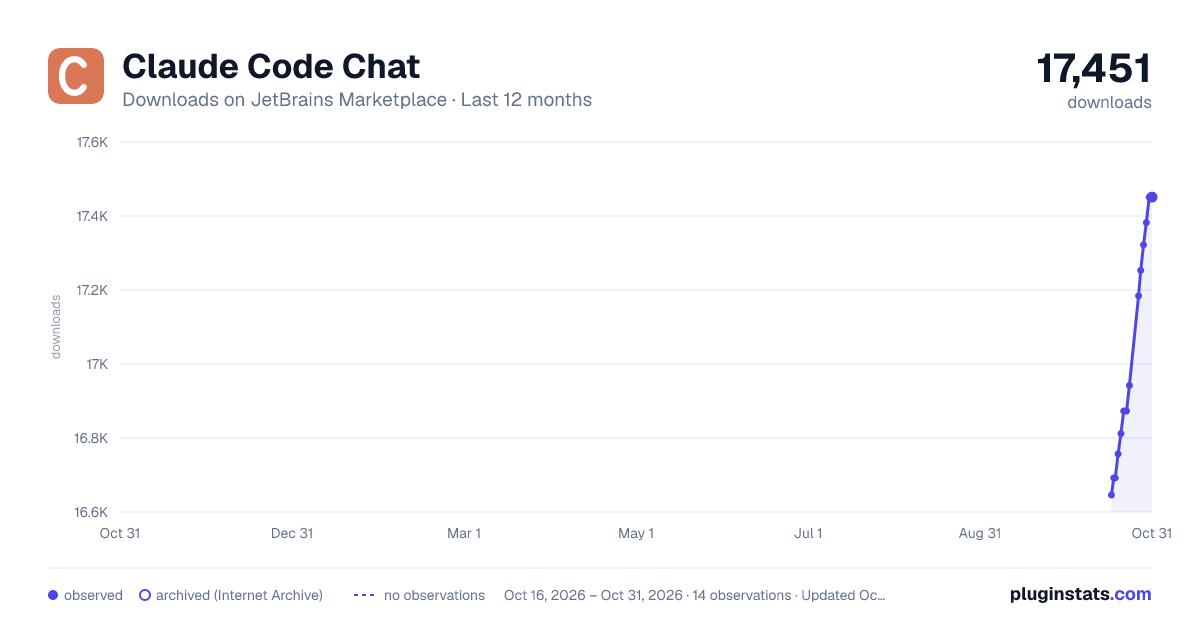
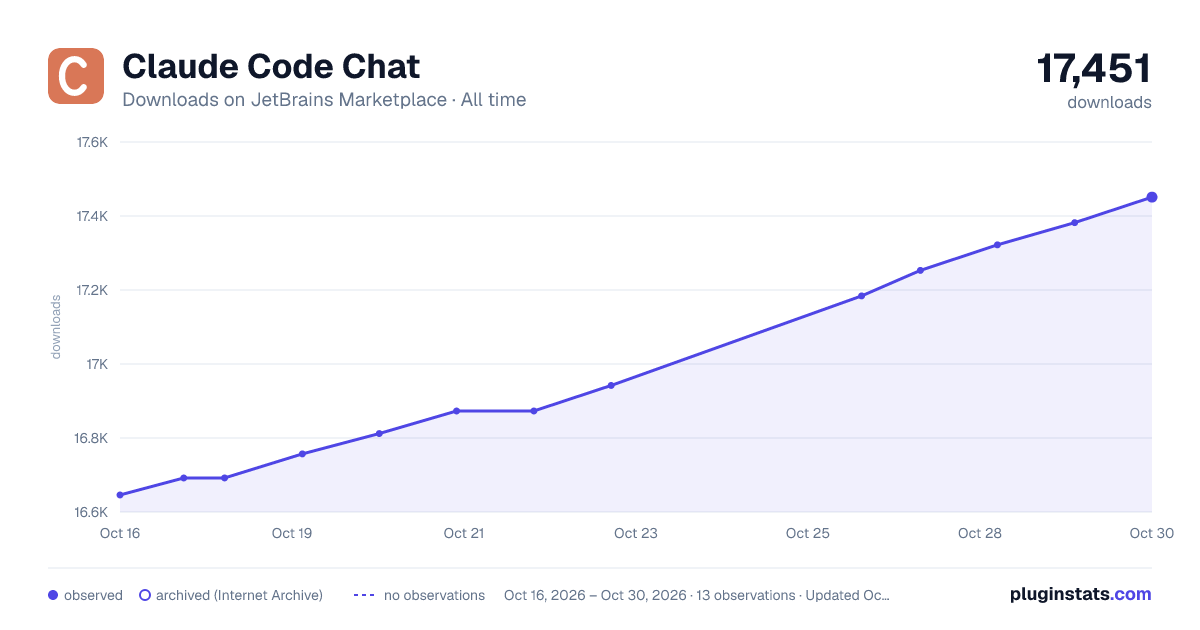
Claude Code Chat has 16,692 recorded downloads on JetBrains Marketplace.
It ranks #2338 of 2,500 tracked JetBrains Marketplace listings by downloads.
It is rated 5.0 out of 5 from 3 ratings.
PluginStats has 3 daily observations since Oct 16, 2026; the latest is from Oct 18, 2026.
Rating: 5.00 / 5 from 3 ratings
About Claude Code Chat
Claude Code for JetBrains IDE
Bring the full power of Claude Code directly into your IDE. Chat with Claude in a side panel, edit code inline with natural-language instructions, fix errors with one click in the Alt+Enter menu, generate commit messages from your staged diff, and let Claude read, edit, and create files in your project — all without leaving IntelliJ or your favorite IDE.
Inline AI Actions
• Edit with Claude (Cmd+Alt+K / Ctrl+Alt+K, or the Claude icon in the floating code toolbar) — select code, describe a change in plain English, review the diff, and accept or reject. • Fix with Claude — Alt+Enter on any IDE-detected error or warning to get an AI-powered quick-fix that lives next to IntelliJ's own intentions. • Generate Commit Message — one click in the VCS commit dialog turns your staged diff into a Conventional Commits-style message. • Apply link on every chat code block — replace the selection in your active editor with the suggested code after a diff review.
Chat Panel
• Multiple parallel Claude Code sessions in a side panel • Project-aware: Claude works in your open project's directory • Session memory: Claude remembers context across messages • Resume past chats — a clock-icon dropdown in the tool window header lists recent sessions per project. Pick one and the previous conversation auto-loads inline (read straight from Claude's local transcript, no API cost) so you can continue from where you left off after closing the IDE. Inline pencil / trash icons rename or remove entries. • Markdown rendering with syntax-highlighted code blocks • Tool-use indicators with colored status signals and diff summaries • File chips — drag/drop, copy/paste, or type a filename to attach files as context; resolves bare filenames against your project • Image paste — paste a screenshot or any clipboard image; saved to a temp PNG and sent to Claude as a multimodal input on submit • Large-text paste chips — long pastes collapse into a compact chip; double-click to expand back into the input • Queue messages while Claude works — type a follow-up (or /btw <message>) while a response is streaming and it queues instead of being lost, then sends automatically when the turn finishes; remove queued items before they go • Smart auto-scroll — follows new output unless you've scrolled up to read; "Jump to latest" button keeps you in control • Inline diffs: expandable old vs. new for every edit Claude makes, with consolidated stats per file • Clickable file links and a changed-files summary grouped by folder • Copy and re-edit buttons on messages and code blocks
Right-Click Context Menu
• Explain — understand code, methods, files, or entire folders (recursive summaries) • Refactor — get suggestions for readability, performance, and best practices • Generate Tests — create unit tests for selected code, whole files, or every source file in a folder (14+ languages) • Fix — identify and fix bugs in selected code • Open Claude Session Here — right-click any folder to start a new session rooted there • Debug with Claude — right-click in the Run/Debug console to send exceptions, log flows, or output to Claude
Works from the editor, project tree, and Run/Debug console.
Productivity
• Auto-updating model catalog — the model dropdown refreshes every 24h from a published list (with bundled offline fallback), so new Claude releases become available without a plugin update. Deprecated models get a (deprecated) badge and a one-click swap to the recommended replacement. • Keyboard shortcuts: Cmd+Shift+I to toggle the chat panel, Cmd+Alt+K for inline edit (Ctrl variants on Windows/Linux) • Stop requests with Escape • Permission mode: Plan (read-only Read/Grep/Glob), Content Only (file writes/edits OK, shell blocked), or Unrestricted (allow all) — maps to the CLI's --permission-mode • Project tree auto-refreshes when Claude creates, modifies, or deletes files • Cost tracking per response
Settings — Model & inference
• Extended thinking budget — Off / Low (1k) / Medium (8k) / High (32k). Sets MAX_THINKING_TOKENS for Opus/Sonnet 4.x; other models ignore it. Trade speed and cost for deeper reasoning on harder tasks. • Append system prompt — multi-line text appended to Claude's system prompt every spawn via --append-system-prompt. Use for project conventions, preferred tone, persona instructions. • Max agentic turns — hard cap on the tool-call loop via --max-turns. 0 = unlimited (CLI default).
MCP Servers
• MCP server management UI — a server icon in the tool-window header (and a button in Settings) opens a manager that aggregates every MCP server Claude can see for the project: project .mcp.json, plus the user and project-local scopes inside ~/.claude.json. Add, edit, and remove servers across all three scopes. • All transports — stdio (command + args + env) and remote SSE / HTTP (URL + headers, optional OAuth client id / callback port). • Live status — connection/auth badges (✓ connected, ✗ failed, ⏸ pending approval, 🔒 needs authentication) from a health-checked claude mcp list. • Authentication, your way — choose API Key / Token, OAuth, or No Auth per server. OAuth sign-in runs in the background and simply opens your browser to finish (no terminal); Authenticate All walks every server that needs it, one at a time, with a live progress panel (skip/remove, countdown). Your chat sessions then use the servers automatically. • All writes go through the claude mcp add-json / remove CLI, so your large, live ~/.claude.json is never hand-edited.
Settings Files Editor
• Edit Claude Code's settings.json at project, project-local, or global scope — a JSON-file icon in the header (and a Settings button) opens it. • Structured or raw — a key/value Form tab adds/edits/removes top-level settings (with common keys suggested and typed JSON values), or switch to the JSON tab for raw edits. Both are validated as a JSON object before saving, and unrelated keys (including the plugin's permission grants) are preserved.…
Description from the JetBrains Marketplace listing.
- AI
- Code Editing
- Code Tools
- Tools Integration
Where Claude Code Chat sits in the listing
Each band is one page of 20. Downloads on a log scale. Placement is projected from downloads, so it can differ from the marketplace's own sort order. Hover a dot to see the listing.
Charts
Images: 30d · 1y · all time · 1600×900 dark
Adoption over time
7/30/90-day growth
Ranking history
Filled points are observed values; hollow points come from Internet Archive snapshots of the listing page. Dashed segments span periods with no observations — values between points are not interpolated.
Recent observations
Full history (3)Similar JetBrains Marketplace AI plugins




Data source
Cumulative download counts come from the public JetBrains Marketplace API. JetBrains reports downloads, not active installs. Ratings are the mean of public votes.
Listing: https://plugins.jetbrains.com/plugin/31507-claude-code-chat. First seen Oct 16, 2026; last successful collection Oct 18, 2026. See the methodology.