 PluginStats
GitHub Actions Manager downloads statistics
By D Software Inc · JetBrains Marketplace · Build
The missing GitHub Actions UI for JetBrains IDEs. GitHub ships an official Actions extension for VS Code — JetBrains users get this plugin instead: watch workflow runs...
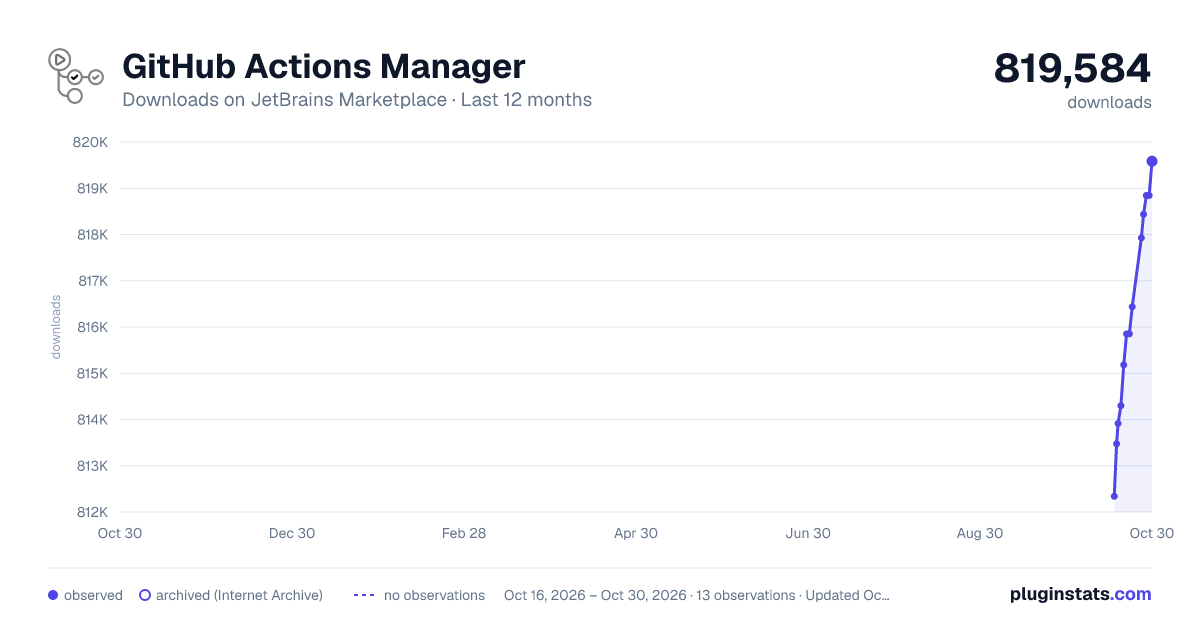
GitHub Actions Manager has 814,298 recorded downloads on JetBrains Marketplace.
It ranks #325 of 2,501 tracked JetBrains Marketplace listings by downloads.
It is rated 4.7 out of 5 from 14 ratings.
PluginStats has 4 daily observations since Oct 16, 2026; the latest is from Oct 19, 2026.
Rating: 4.71 / 5 from 14 ratings
About GitHub Actions Manager
The missing GitHub Actions UI for JetBrains IDEs. GitHub ships an official Actions extension for VS Code — JetBrains users get this plugin instead: watch workflow runs live, read step-by-step logs, dispatch workflows, approve deployments, and manage Actions secrets and variables, all without leaving the IDE.
It works with GitHub.com and GitHub Enterprise Server — if your GHES instance lives behind a VPN, this is the fastest way to follow a run or approve a deployment.
Why an IDE plugin instead of the browser or gh CLI?
• No tab-juggling: the run triggered by your push is one tool window away, filtered to your current branch. • Logs are split per step and rendered in the IDE, instead of one giant scrolling page. • A failed run is fixable on the spot — jump to the workflow file, fix, push, watch the rerun.
Viewing runs, jobs, and logs is free, forever. Advanced features (dispatch, rerun/cancel, deployment approval, artifacts, repository settings) come with a license — start a free 30-day trial on the JetBrains Marketplace, or fill this form to receive a discount code.
Free features (no license required)
• View workflow runs, jobs, and logs • See real-time and historical workflow runs directly in the IDE. • Hover over a workflow run to see a details tooltip – what triggered it, attempt, total duration, and (for the selected run) how many artifacts it produced.
• Jobs are shown as a tree, grouping matrix and reusable-workflow jobs under their parent for easy scanning. • Hover over a job to see its details tooltip – runner name and group, runner labels, attempt, branch and commit, and timing.
• Logs are organized step-by-step for easier debugging. • Search within a job's log using the IDE's find bar (⌘F / Ctrl+F) – logs render in a standard editor console.
• Track live runs as they progress or review past runs at a glance. • Filter runs by branch, actor, event, or status – individually or in combination. Includes a current-branch filter that updates automatically when you switch branches.
• New runs appear automatically (refreshes every 30s by default; configurable). • Settings & configuration • Use a custom token instead of GitHub's default authentication. • Control the auto-refresh frequency. • Choose which repositories to show or hide. • Assign a GitHub account per repository and switch assignments anytime via plugin settings.
Paid features (license required)
• View and download workflow run artifacts. • Open the pull request that triggered a run (in the IDE or browser). • Approve workflow-run deployments that require approval. • Manually trigger dispatchable workflows, with full input support (all GitHub input types).
• Rerun or cancel a workflow run – or even just a single job. • View a job's annotations (failures, warnings, and notices) in a banner above the step log, and click an annotation to jump straight to the offending file and line in the editor.
• Open the workflow file associated with a run. • Generate GitHub links to specific file lines from the IDE.
Repository settings (license required)
Manage a repository's GitHub Actions configuration from a dedicated settings dialog without opening the browser:
• Variables & secrets – list, add, edit, and delete repository and organization variables and secrets. Secret values are encrypted locally with the repository/organization public key (libsodium sealed box) before upload, and are write-only: they can be replaced but never read back. Organization-level items are shown when the repository belongs to an organization, and you can choose a new organization variable's or secret's visibility (all repositories, or private/internal only).
• Collaborators – view the repository's collaborators and add or remove them. • Actions caches – browse the repository's GitHub Actions caches (with per-branch filtering, sizes, and total storage usage) and delete stale entries.
• Environments – create and delete deployment environments. For each environment: • Edit environment variables (add, update, delete). • Review environment secrets and deployment protection rules. • Manage which branches and tags are allowed to deploy: review the deployment branch policy and add or remove branch/tag name patterns.
Workflow file editing
• Highlight outdated GitHub Actions as warnings with a quick-fix to update to the latest version. • Flag unknown actions. • Navigate directly to an action's repository (for remote actions). • Jump to the action file (for local actions).
Description from the JetBrains Marketplace listing.
- Build
- Productivity
- Remote APIs
- Tools Integration
Where GitHub Actions Manager sits in the listing
Each band is one page of 20. Downloads on a log scale. Placement is projected from downloads, so it can differ from the marketplace's own sort order. Hover a dot to see the listing.
Charts
Images: 30d · 1y · all time · 1600×900 dark
Adoption over time
7/30/90-day growth
Ranking history
Filled points are observed values; hollow points come from Internet Archive snapshots of the listing page. Dashed segments span periods with no observations — values between points are not interpolated.
Recent observations
Full history (4)Similar JetBrains Marketplace Build plugins




Data source
Cumulative download counts come from the public JetBrains Marketplace API. JetBrains reports downloads, not active installs. Ratings are the mean of public votes.
Listing: https://plugins.jetbrains.com/plugin/19347-github-actions-manager. First seen Oct 16, 2026; last successful collection Oct 19, 2026. See the methodology.