 PluginStats
Codex CLI downloads statistics
By Oleh Khomyk · JetBrains Marketplace · Code Tools
Codex CLI keeps the OpenAI Codex command-line agent one shortcut away inside your IDE. Open a dedicated Codex terminal tab, send the current editor file or selected...
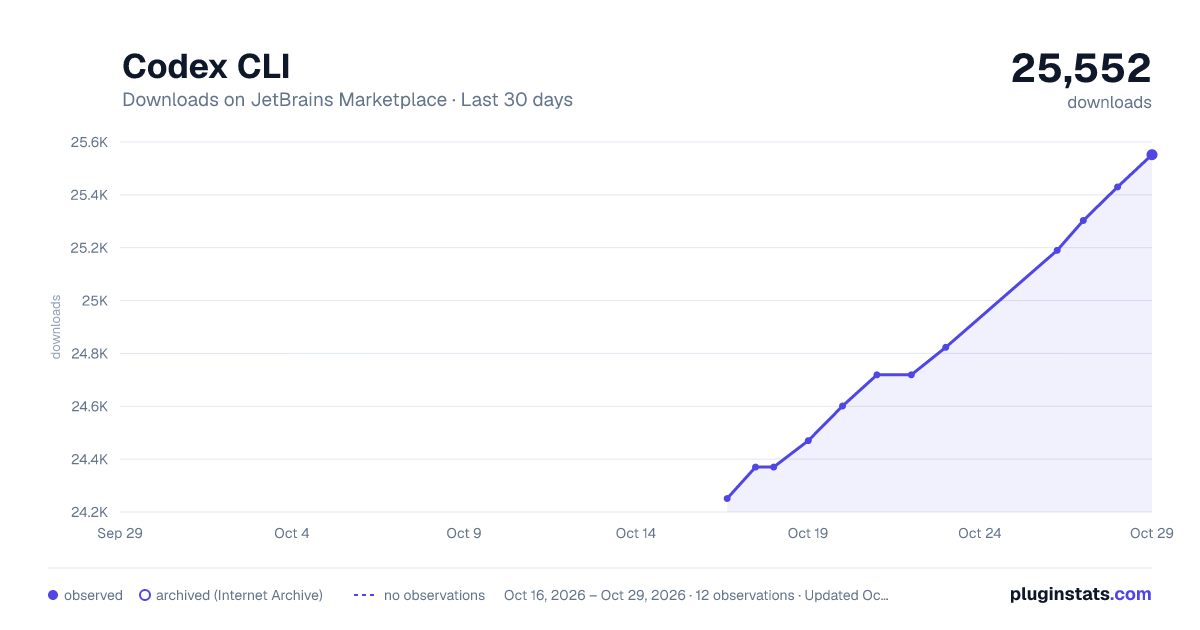
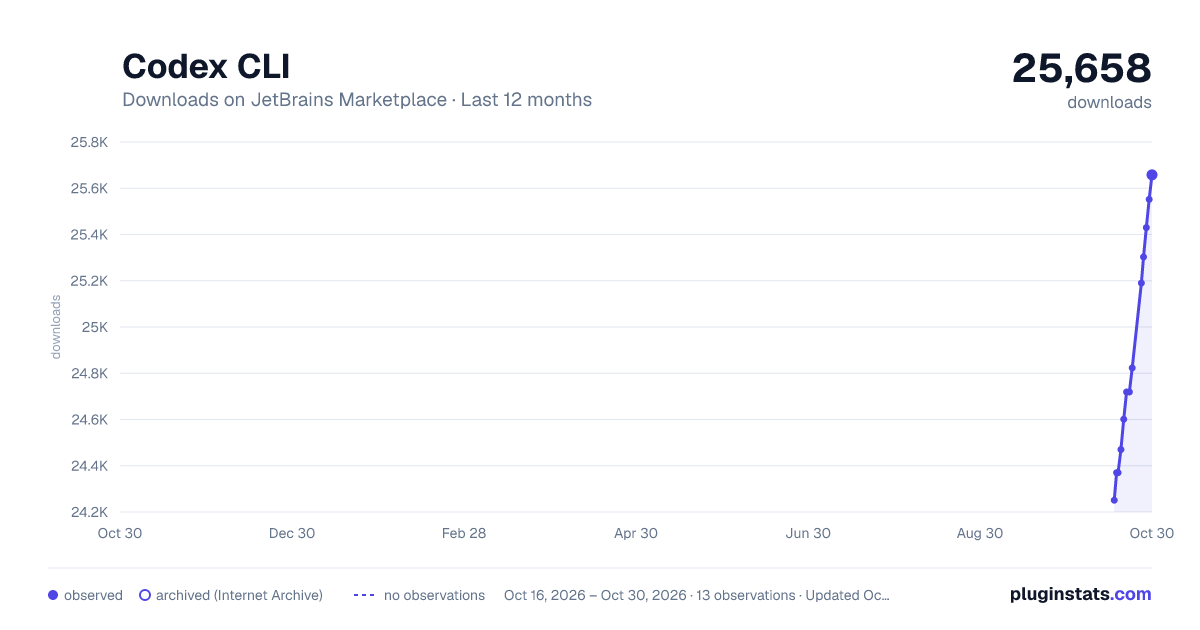
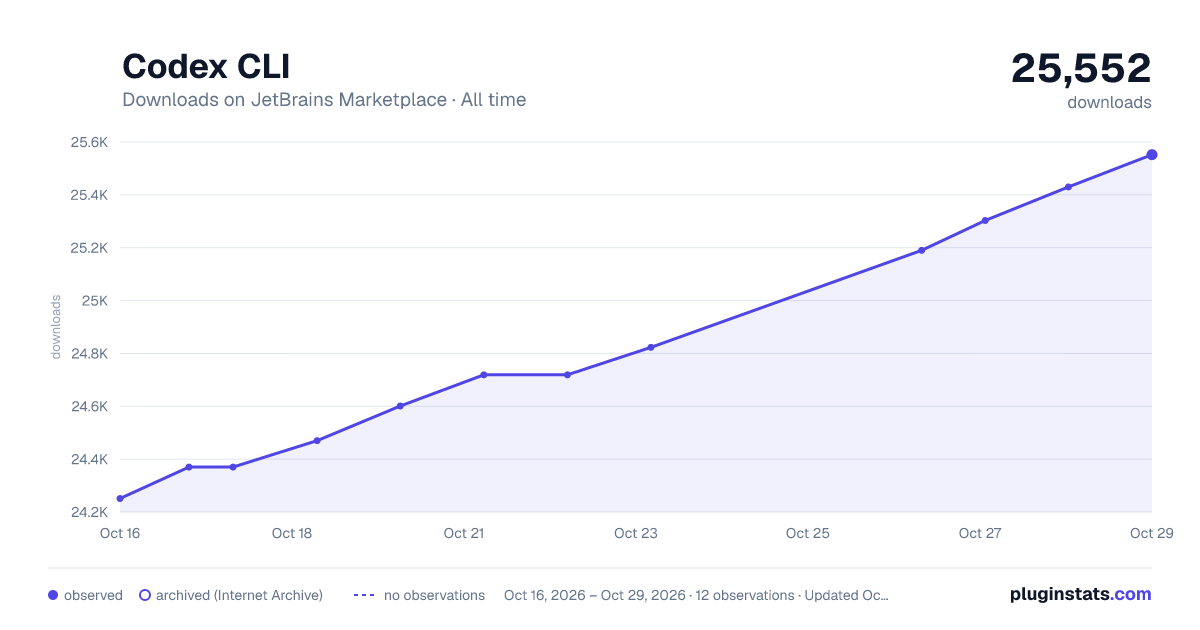
Codex CLI has 24,470 recorded downloads on JetBrains Marketplace, ranking #1960 of 2,501 tracked listings.
Rating: 4.67 / 5 from 3 ratings
About Codex CLI
Codex CLI keeps the OpenAI Codex command-line agent one shortcut away inside your IDE.
Open a dedicated Codex terminal tab, send the current editor file or selected line range as an @path reference, and keep the conversation grounded in the exact code you are looking at.
This extension is intentionally terminal-first: it launches the Codex CLI you install or configure, then focuses on fast editor-to-terminal handoff.
Features
• Dedicated Codex terminal tab: open or focus Codex from the tool window strip, Tools menu, or keyboard shortcut. • Editor file references: insert @path with no selection, or @path#L12-L34 when code is selected. • Working-directory-aware paths: references are relative to the configured Codex working directory, with absolute paths for files outside it. • Smart terminal recovery: if the Codex tab is still open but the process stopped, the launch action reruns your configured command in that same tab. • Configurable launch command: use codex, npx @openai/codex, a custom binary, or a WSL wrapper.
Usage
• Click the Codex icon in the right-hand tool window strip, or press Ctrl+Alt+Shift+C / Cmd+Alt+Shift+C. • The integrated terminal opens a dedicated Codex tab and runs the configured command automatically. • In the editor, select code if needed and press Ctrl+Alt+K / Cmd+Alt+K to insert the reference into Codex, then type your question and submit.
Configuration
Open Settings → Tools → Codex CLI to set the launch command and working directory.
Requirements
• IDE based on platform build 253 (2025.3) or later • OpenAI Codex CLI installed and available in your system PATH, or launched through npx / a custom command
Note: Codex also has an official IDE integration. This extension remains a lightweight terminal-first alternative for developers who prefer the CLI workflow.
Description from the JetBrains Marketplace listing.
- Code Tools
README badge
Show your rank in a README or on your website. The badge updates automatically.
Charts
Images: 30d · 1y · all time · 1600×900 dark
Adoption over time
7/30/90-day growth
Ranking history
Ratings over time
Listing placement
Listing placement
Filled points are observed values; hollow points come from Internet Archive snapshots of the listing page. Dashed segments span periods with no observations — values between points are not interpolated.
Each band is one page of 20. Downloads on a linear scale. Placement is projected from downloads, so it can differ from the marketplace's own sort order. Hover a dot to see the listing.
Recent observations
Full history (5)Similar JetBrains Marketplace Code Tools plugins
All 20 Codex CLI alternatives



Data source
Cumulative download counts come from the public JetBrains Marketplace API. JetBrains reports downloads, not active installs. Ratings are the mean of public votes.
Listing: https://plugins.jetbrains.com/plugin/31307-codex-cli. First seen Oct 16, 2026; last successful collection Oct 20, 2026. See the methodology.