 PluginStats
Noctule, the Swift IDE downloads statistics
By Joachim Ansorg (4 listings) · JetBrains Marketplace · Build
Cross-platform Swift language support for JetBrains IDEs 2026.1 and later. Noctule supports Swift Package Manager and Xcode projects, and debugging with LLDB. website...
Noctule, the Swift IDE has 421,458 recorded downloads on JetBrains Marketplace.
It ranks #469 of 2,500 tracked JetBrains Marketplace listings by downloads.
It is rated 4.6 out of 5 from 12 ratings.
PluginStats has 3 daily observations since Oct 16, 2026; the latest is from Oct 18, 2026.
Rating: 4.58 / 5 from 12 ratings
About Noctule, the Swift IDE
Cross-platform Swift language support for JetBrains IDEs 2026.1 and later. Noctule supports Swift Package Manager and Xcode projects, and debugging with LLDB.
website · discussions · bug tracker · newsletter
Important: Noctule is a freemium plugin. Most features are free to use, but some require a paid license.
Join the Noctule newsletter to receive updates about the plugin and its development.
Please join the discussion to shape the future of Noctule.
Platform Support
• JetBrains IDEs 2026.1 and later are supported. Noctule integrates with JetBrains plugins JSON, Git, Spellchecker, Markdown, Copyright, and IntelliLang. • Android Studio releases based on IntelliJ Platform 2026.1 and later are supported, including LSP support, which other Swift plugins don't provide. • JetBrains remote development with support for language support on the frontend and build logs of the backend shown in the frontend. • Development containers support integrates with your IDE's built-in support. • macOS, Linux and Windows are supported with Swift Package Manager and also Xcode projects on macOS.
Language Support
• Swift 6.4 language specification support • Syntax highlighting, including semantic token highlighting and customizable color schemes settings • Code folding with custom settings for default code folding • Brace matching with auto-close for {}, (), [] and for string interpolation tokens \() • Comment support for line and block comments • Native code formatter for Swift and Objective-C. • Format on Save with SwiftFormat, Swift's own swift format, and SwiftLint. • Duplicate code detection with IDEs support the feature.
Navigation and Code Insight
• Go to Declaration • Go to Implementation • Go to Class and Go to Symbol • Find Usages • Rename refactoring • Structure view supporting all Swift types and conditional compilation blocks • Quick documentation with colored rendering of embedded code blocks, retrieved from your source files • Type hierarchy with supertypes, subtypes, or both in a single hierarchy • Call hierarchy showing callees (outgoing calls) or callers (incoming calls)
Editor Support
• Code completion with context-aware suggestions • Error highlighting with quick fixes for Swift files • Diagnostics of SwiftLint and SwiftFormat are shown in the editor • Inlay hints for types and parameters • Language injection support for string and multiline string literals • File templates for common Swift declarations • ToDo item highlighting • Breadcrumb navigation support • Parameter info support for function signatures • Live Templates for common Swift elements and suitable contexts to add your own
Most of the language features rely on Apple's sourcekit-lsp and need an installed Swift toolchain.
Debugger
• Debugging for Swift, Objective-C and C code, based on lldb-dap of the Swift toolchain. It needs a Noctule license or trial. • Breakpoints and watchpoints, an LLDB console and a rich debugger integration with LLDB of the Swift toolchain.
Swift Toolchain Support
Noctule automatically detects Swift toolchains on your system:
• Installed in $PATH and common installation locations of Swift on Windows • Swiftly toolchains, including toolchains inside a Windows WSL container • Xcode toolchains • User-defined toolchains to add your own paths
Swift Package Manager Support
• Swift Package Manager projects are detected and supported as SourceKit LSP workspaces • "New Project…" wizard to quickly create such a project. • Test runner to execute tests of a Swift PM project integrating with the test runner UI. • swift run run configuration, including support for the optional "Build" step • swift build run configuration • swift test run configuration, including support for the optional "Build" step and run line markers for suites and functions. • Build Project support to build Swift PM projects for with Build Project or Build Module.
Xcode Support
Noctule integrates Xcode with the help of xcode-build-server and Apple's SourceKit LSP.
Refer to Noctule's documentation about its Xcode support to learn more about the integration.
• Xcode project support: Open the directory containing an Xcode workspace (*.xcworkspace) or project (*.xcodeproj) and Noctule will automatically set up the IDE project. • Choose scheme and destination: Available in the main toolbar and similar to Xcode. Run and debug on simulators directly from the toolbar. • Build Project support to build the selected scheme and destination with xcodebuild. • xcodebuild run configuration: Execute the build for a specific workspace/project, target, scheme and destination. • Xcode simulator run configuration: Build, deploy and debug applications on an Xcode simulator. • Xcode test run configuration: Run Xcode tests with the test runner you already know. • Simulator toolwindow: Manage Xcode simulators in a dedicated toolwindow. • Project view for Xcode workspaces and projects. • Xcode 27 project format: The new JSON project format (project.xcproj) and .xcconfig files are supported. • Support for Plist files: old-style, XML, and binary Plist files are supported. • Highlighting and navigation inside Xcode *.pbxproj project files. • Highlighting for *.xcstrings, contents.xcworkspacedata, *.entitlements, *.xcscheme, *.intentdefinition, *.storekit, *.xcstrings.
Description from the JetBrains Marketplace listing.
- Build
- Code Editing
- Code Quality
- Code Tools
- Completion
- Editor
- Formatting
- Inspection
- Navigation
- Productivity
- Programming Language
- Testing
- Tools Integration
Where Noctule, the Swift IDE sits in the listing
Each band is one page of 20. Downloads on a log scale. Placement is projected from downloads, so it can differ from the marketplace's own sort order. Hover a dot to see the listing.
Charts
Images: 30d · 1y · all time · 1600×900 dark
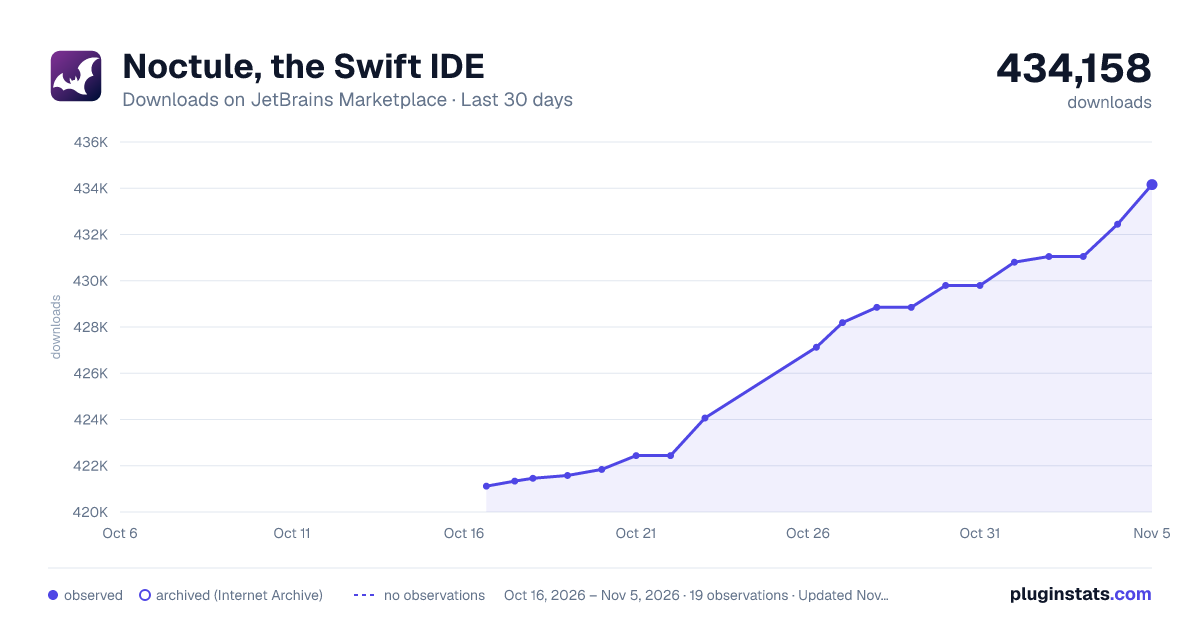
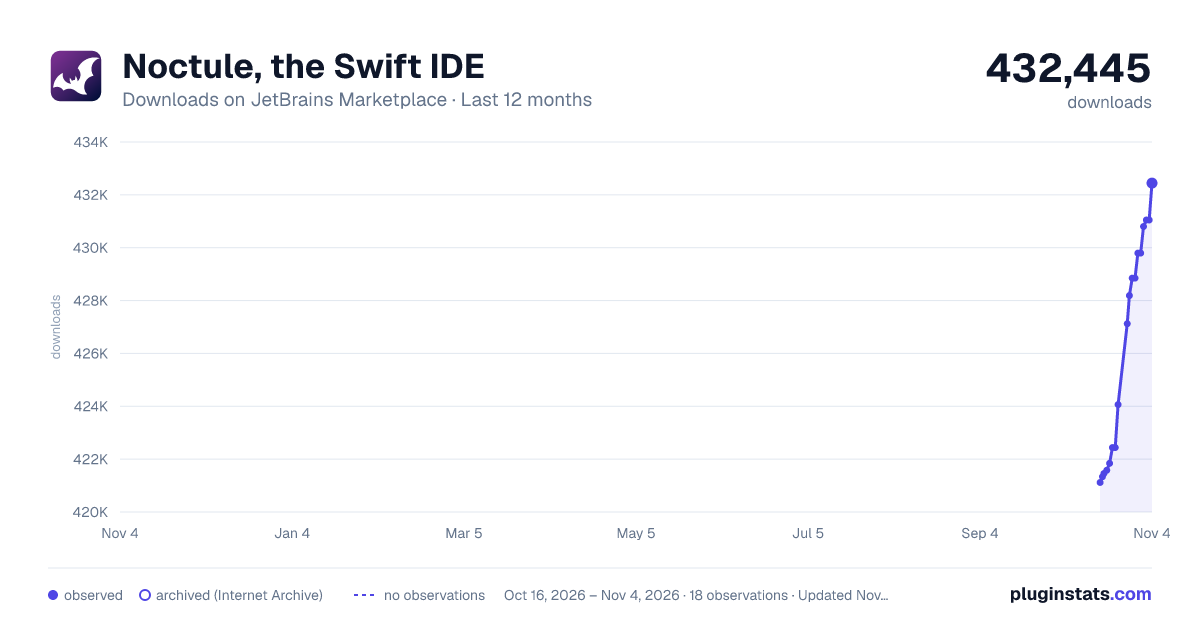
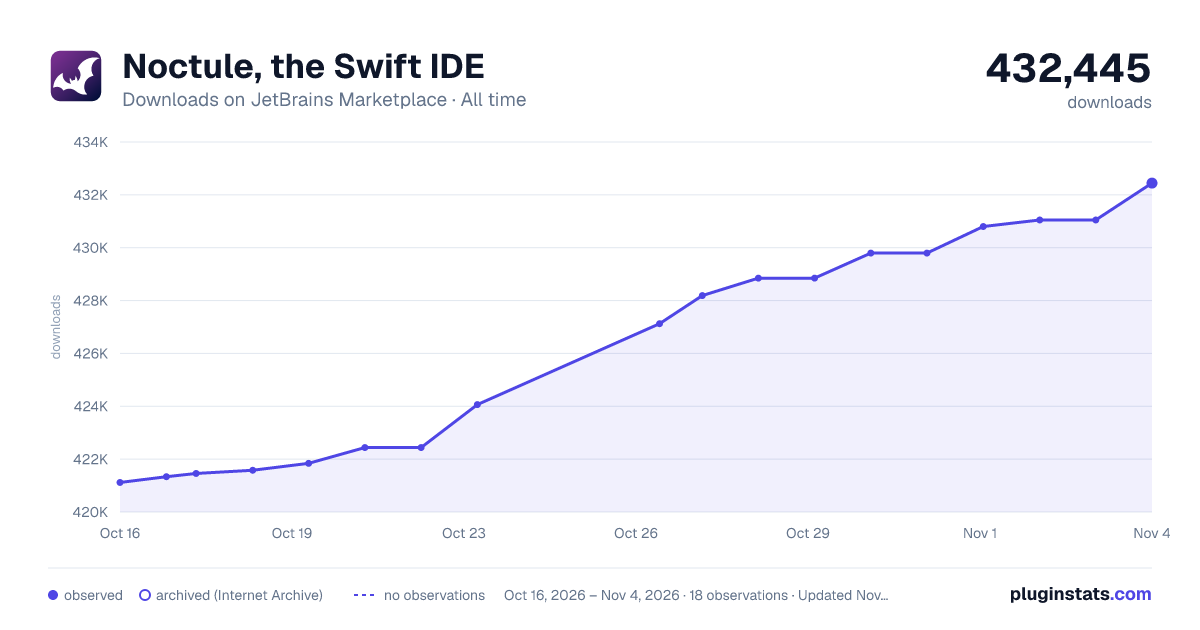
Adoption over time
7/30/90-day growth
Ranking history
Filled points are observed values; hollow points come from Internet Archive snapshots of the listing page. Dashed segments span periods with no observations — values between points are not interpolated.
Recent observations
Full history (3)Similar JetBrains Marketplace Build plugins




Data source
Cumulative download counts come from the public JetBrains Marketplace API. JetBrains reports downloads, not active installs. Ratings are the mean of public votes.
Listing: https://plugins.jetbrains.com/plugin/22150-noctule-the-swift-ide. First seen Oct 16, 2026; last successful collection Oct 18, 2026. See the methodology.