 PluginStats
Claude Code with GUI downloads statistics
By yhk1038 · JetBrains Marketplace · AI
Swttch (ex - Claude Code with GUI) The Claude Code GUI you know from Cursor and VS Code — now in JetBrains IDEs. We've been renamed — Claude Code with GUI is now...
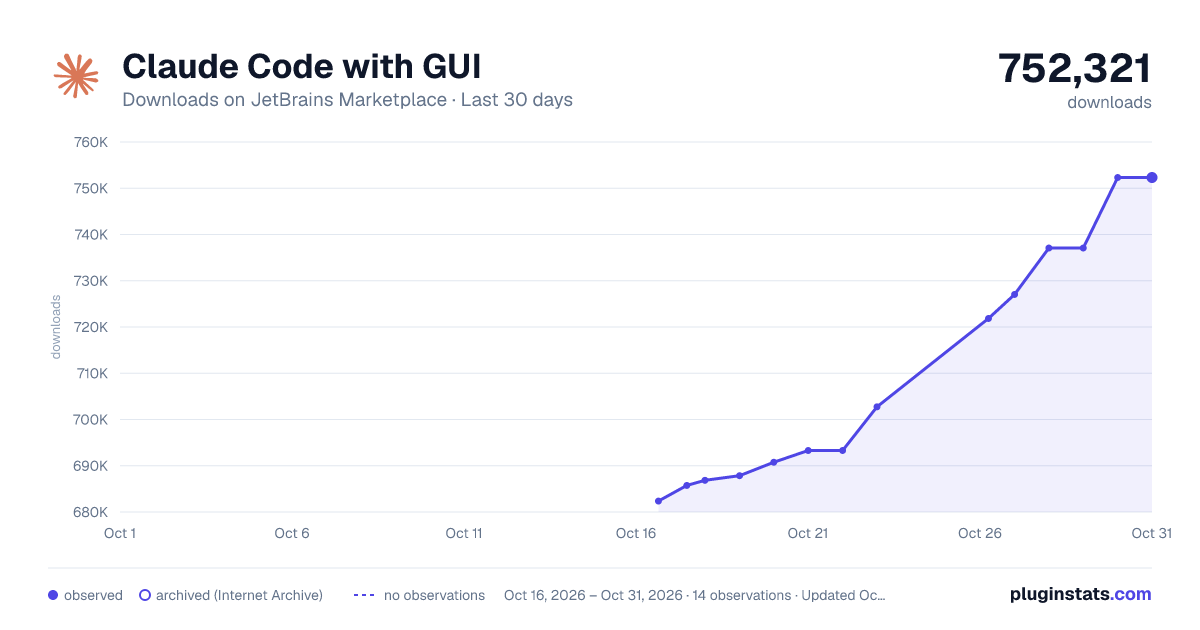
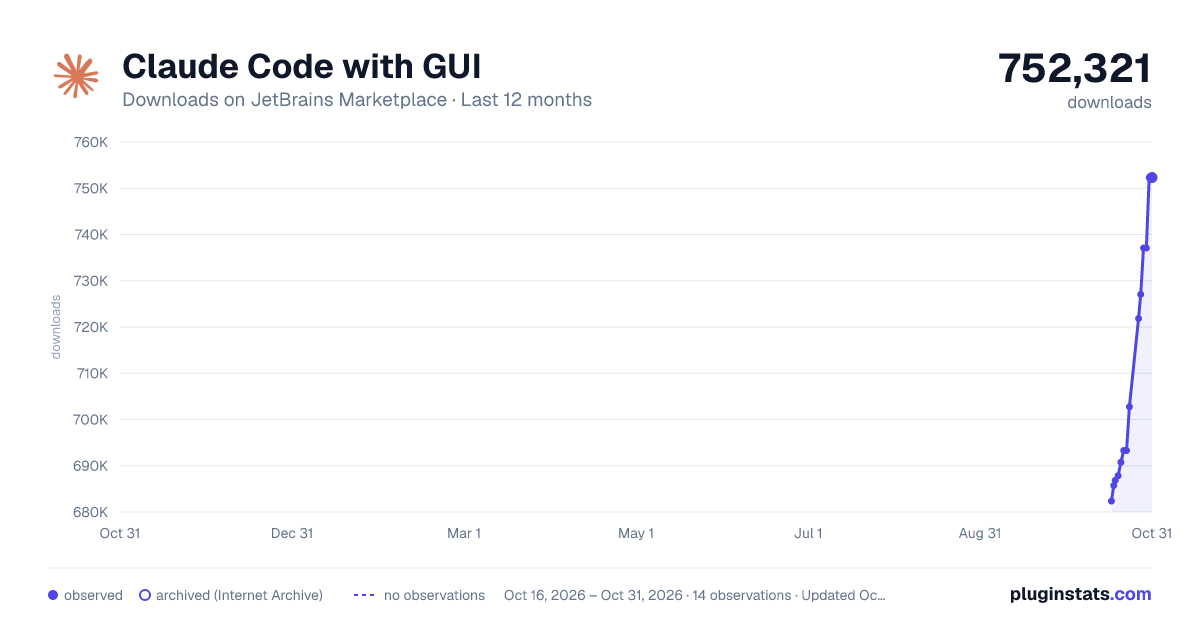
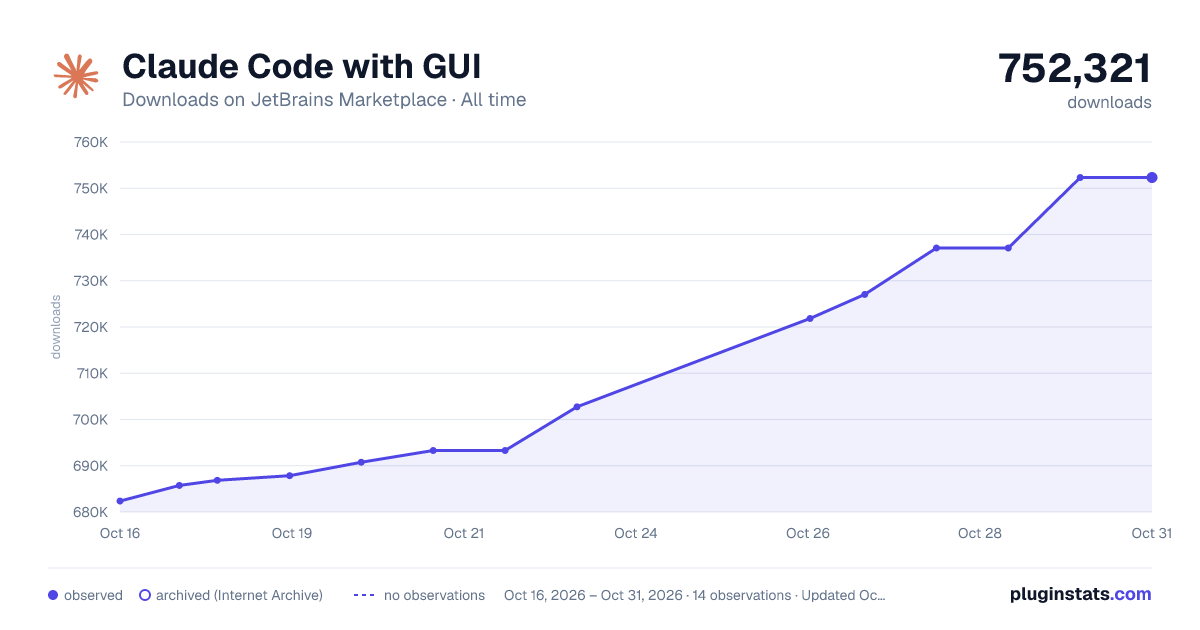
Claude Code with GUI has 686,851 recorded downloads on JetBrains Marketplace.
It ranks #354 of 2,500 tracked JetBrains Marketplace listings by downloads.
It is rated 4.2 out of 5 from 36 ratings.
PluginStats has 3 daily observations since Oct 16, 2026; the latest is from Oct 18, 2026.
Rating: 4.22 / 5 from 36 ratings
About Claude Code with GUI
Swttch (ex - Claude Code with GUI)
The Claude Code GUI you know from Cursor and VS Code — now in JetBrains IDEs.
We've been renamed — Claude Code with GUI is now Swttch. It's the same product, by the same developer. We renamed it so we can support a wider range of providers beyond Claude Code.
🌐 English | 한국어 | 日本語 | 中文 | Español | Deutsch | Français
This plugin is built with this plugin. It is developed right here — in this chat panel, running inside a JetBrains IDE.
Why this plugin
• Instantly familiar — The same screen and feel as Claude Code in Cursor and VS Code. Nothing new to learn. • Transparent and safe — Runs the Claude Code CLI directly. No proxy in between, no silent credential scanning. • Quick to improve — An open-source project that typically fixes reported bugs within a day.
Features
• Built on Anthropic's official extension — Claude Code for VS Code is the official extension built and maintained by Anthropic itself. This plugin takes that official extension as its baseline and brings the same experience to JetBrains. • Woven into your IDE — Send selected code instantly (Alt+K), review and apply changes in the IDE diff viewer, and open files and the terminal right in the editor. • Place it where you want — Put the chat in the sidebar tool window or an editor tab, and shape your own workspace. • All sessions at a glance — Browse every conversation in the left panel and open one with a single click. • Remote access from other devices — Pick up on your phone or tablet via a QR code (Cloudflare tunnel). • Windows and WSL — Supports users on PowerShell and WSL environments too. • Settings in the GUI — Manage not only plugin settings but Claude Code's own .claude and .claude.json config files through the GUI. (in development)
Requirements
• JetBrains IDE 2024.2 or newer • Claude Code CLI 1.0.0 or newer — latest version recommended, installed and authenticated • Node.js 18 or newer
Getting Started
• Verify the claude CLI is installed and authenticated (claude --version). • Install the plugin from the JetBrains Marketplace. • Open it via Tools > Open Claude Code, or press Ctrl+Shift+C. • Start coding with Claude.
Description from the JetBrains Marketplace listing.
- AI
- Code Editing
- Code Tools
- Productivity
Where Claude Code with GUI sits in the listing
Each band is one page of 20. Downloads on a log scale. Placement is projected from downloads, so it can differ from the marketplace's own sort order. Hover a dot to see the listing.
Charts
Images: 30d · 1y · all time · 1600×900 dark
Adoption over time
7/30/90-day growth
Ranking history
Filled points are observed values; hollow points come from Internet Archive snapshots of the listing page. Dashed segments span periods with no observations — values between points are not interpolated.
Recent observations
Full history (3)Similar JetBrains Marketplace AI plugins




Data source
Cumulative download counts come from the public JetBrains Marketplace API. JetBrains reports downloads, not active installs. Ratings are the mean of public votes.
Listing: https://plugins.jetbrains.com/plugin/30313-claude-code-with-gui. First seen Oct 16, 2026; last successful collection Oct 18, 2026. See the methodology.