 PluginStats
Extra Tools Pack downloads statistics
By Jonathan Lermitage (8 listings) · JetBrains Marketplace · Fun Stuff
Extra Tools Pack provides the exact same features as Extra Icons, Extra IDE Tweaks and Extra ToolWindow Colorful Icons. It's offered at a lower price than if you...
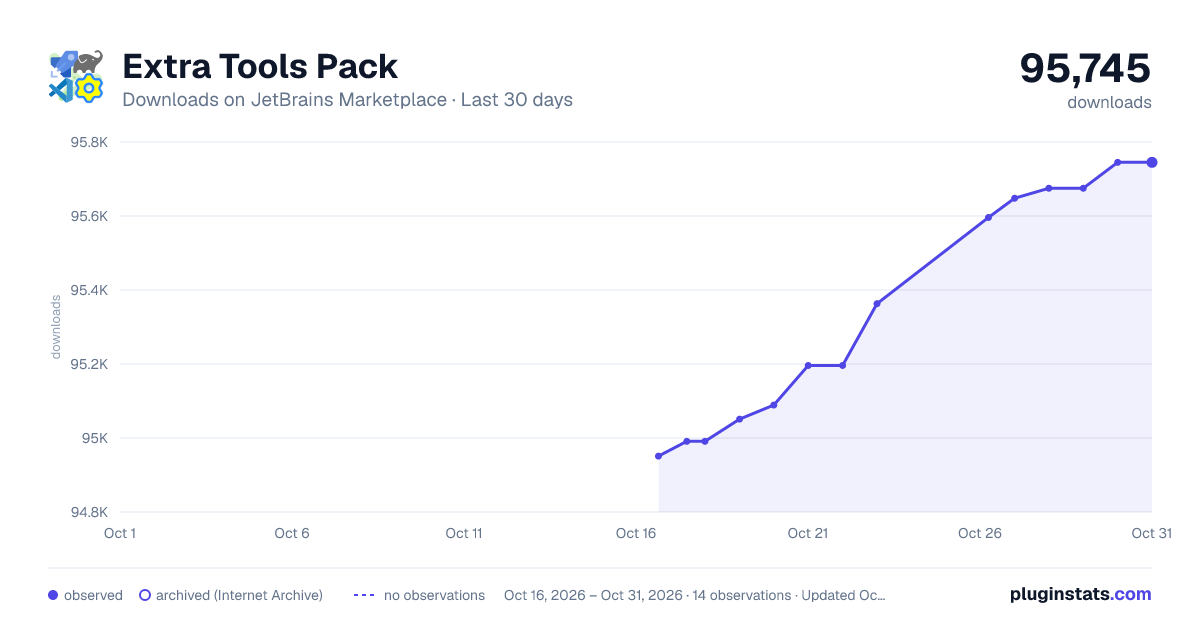
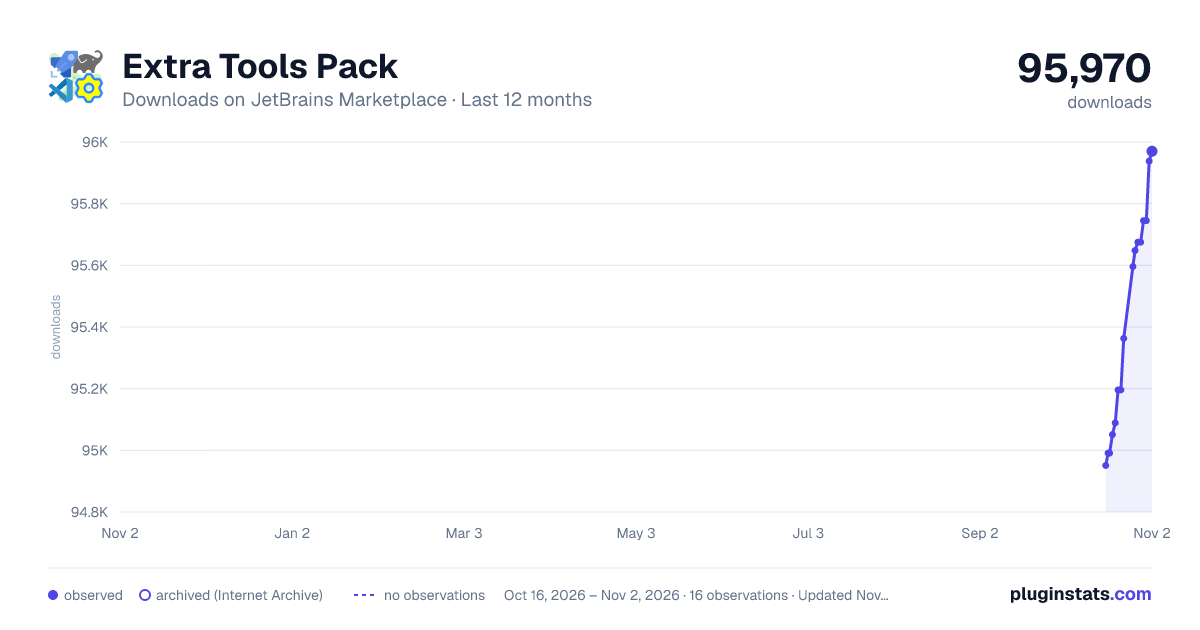
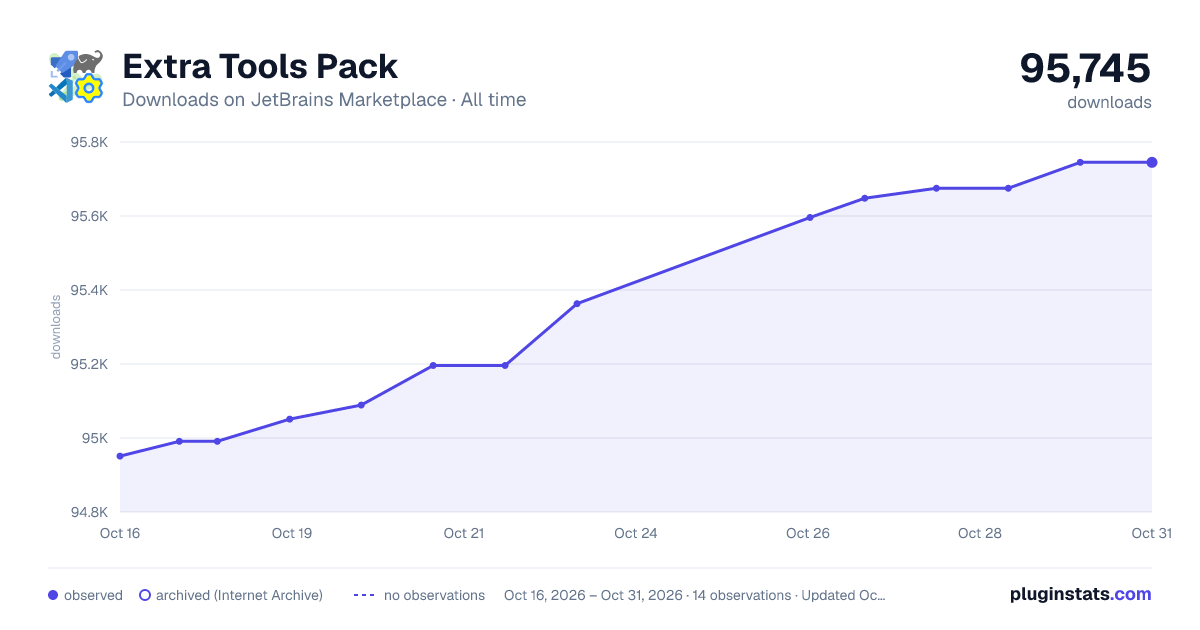
Extra Tools Pack has 94,991 recorded downloads on JetBrains Marketplace.
It ranks #944 of 2,500 tracked JetBrains Marketplace listings by downloads.
It is rated 5.0 out of 5 from 8 ratings.
PluginStats has 3 daily observations since Oct 16, 2026; the latest is from Oct 18, 2026.
Rating: 5.00 / 5 from 8 ratings
About Extra Tools Pack
Extra Tools Pack provides the exact same features as Extra Icons, Extra IDE Tweaks and Extra ToolWindow Colorful Icons. It's offered at a lower price than if you bought each plugin individually.
License types
— Extra Tools Pack offers monthly and yearly licenses.
— Extra Tools Pack Lifetime (new!) offers lifetime licenses: pay once, use it, and get updates forever.
There are two different plugins because JetBrains does not allow plugin developers to offer all the license types (monthly/yearly and lifetime) for the same plugin. Both plugins offer the exact same features. The only difference is the license.
Features from Extra Icons
Make your IDE more pleasant to use:
• Adds 500+ icons for files like Travis YML, GitLab YML, Angular files, etc. Many icons have variants, so if you are not happy with the default icon, you can choose another. • Shows an icon for Git submodule folders. • Highly configurable: see File > Settings > Appearance & Behavior > Extra Icons to select extra icons to (de)activate. This is configurable at the IDE and project level. • You can register your own icons in order to define custom icons for certain files or file patterns. • You can override almost all IDE icons, including toolbars, menus, etc. • You can import and export icons from external files. This also means you can easily share icon themes with friends. You can also download online icon packs (example: restore the old file icons when using the new UI). • For more information, please see the online documentation. • JetBrains Gateway is no longer supported (it actually has never been fully supported).
Features from Extra ToolWindow Colorful Icons
Makes tool window and control icons colorful. This feature is based on the ToolWindow Colorful Icons plugin and adds several new icons. You can also choose icons to (de)activate: see Settings > Appearance & Behavior > Extra ToolWindow Colorful Icons.
You will get the exact same features as using Extra ToolWindow Colorful Icons with a paid license.
Features from Extra IDE Tweaks
Some utilities for IDE maintenance and tweaking, plus workarounds for a few IDE issues. See Tools > Extra IDE Tweaks. Features:
• The Open Editors tool window shows opened files in all editors belonging to the opened project, as in VSCode. It can also display a list of recently opened files, as in the Recent Files action. • New experimental feature: the Updates tool window lists the dependencies updates of Gradle, Maven, and Node.js projects. It also lists the dependencies relocations of Gradle and Maven projects. • Can make folder icons more visible (with no outline style) when using the New UI. You can also use it with the regular UI. • Can change most tool windows label. Per example, rename the "Pull Requests" tool window to "PR". • Can confirm the opening of sensitive files. May be useful when streaming and/or accidentally opening a sensitive file in situations where you can leak critical information. • Can open projects located in trusted locations directly via File > Trusted Locations, just after Recent Projects. • Can register your favorite projects, organize them with optional groups, and gain fast access to your favorite projects via File > Favorite Projects, just after Recent Projects and Trusted Locations. • Can define default Excluded Folders (not per-project). There is now a global list of excluded folders. Go to Extra IDE Tweaks settings for details. • Commit Alert: this inspection allows you to define keywords that will show a confirmation dialog before committing files containing any of those keywords. Per example, define the COMMIT_ALERT keyword, modify, delete or move one or multiple files containing it, then commit. A confirmation dialog will appear asking if you still want to commit. • Activate All Tool Windows: this action activates all available tool windows in the current project. Enable it in settings, then see the "Window > Activate All Tool Windows" menu item. It's like clicking on the "..." button on the left-side toolbar, then clicking on each available tool window. • Can register any program and add it to the "Open In" list when doing a right-click on a file, a folder, or a project. Your program will be added next to the "Open In" Terminal action. That means you can open files and folders with your favorite program (like ForkLift, Total Commander, Vim...). You can register up to 2 "Open In" actions. Go to Extra IDE Tweaks settings for details.
You can also open files with Associated Application. This additional action is enabled for IDEs prior to 2024 only, as it is already implemented by 2024+ IDEs.
• Can open a folder as a Project via the "Open In" menu. • Can rename tab names to remove the parenthesis after the file names if they're located in the root project or module. Per example, renames "build.gradle.kts (my-module)" to "build.gradle.kts". For now, it works with "build.gradle", "build.gradle.kts", "build.gradle.dcl", "settings.gradle", "settings.gradle.kts" "settings.gradle.dcl" and "src/main/resources/META-INF/plugin.xml" files only. • Can purge IDE's plugin download cache. This is a workaround for known IDE limitation 🐛 IJPL-6179. • Can schedule the IDE's GC. • Can schedule the GC on local JVMs. May be useful when having multiple Gradle or Kotlin Compiler daemons consuming too much memory. You can choose to run the GC on selected JVMs: all local JVMs, or by filtering by JVM instance name with your own regexes. • Adds a Properties action to the File and Folder context menu that shows information like size, number of files, etc. • Adds a menu item under Tools in order to access the Plugins Manager faster. • Offers a workaround for known IDE issue 🐛 IDEA-341174: the Git tool window may display the wrong label "Version Control" instead of "Git".
Plugin's Chinese UI (插件的中文用户界面).
Huawei DevEco Studio support.
Check also my other plugins.
Documentation | Issues and Feature Requests
LinkedIn | Bluesky | Blog | 💙 Help Ukraine 💛
Description from the JetBrains Marketplace listing.
- Fun Stuff
- Miscellaneous
- Productivity
- User Interface
Where Extra Tools Pack sits in the listing
Each band is one page of 20. Downloads on a log scale. Placement is projected from downloads, so it can differ from the marketplace's own sort order. Hover a dot to see the listing.
Charts
Images: 30d · 1y · all time · 1600×900 dark
Adoption over time
7/30/90-day growth
Ranking history
Filled points are observed values; hollow points come from Internet Archive snapshots of the listing page. Dashed segments span periods with no observations — values between points are not interpolated.
Recent observations
Full history (3)Similar JetBrains Marketplace Fun Stuff plugins




Data source
Cumulative download counts come from the public JetBrains Marketplace API. JetBrains reports downloads, not active installs. Ratings are the mean of public votes.
Listing: https://plugins.jetbrains.com/plugin/24559-extra-tools-pack. First seen Oct 16, 2026; last successful collection Oct 18, 2026. See the methodology.