 PluginStats
GPT4_lll downloads statistics
By WMSAY · JetBrains Marketplace · Code Editing
Features Agent Chat View with Block Rendering A completely redesigned chat interface with block-based content rendering. Supports six content block types: Markdown...
GPT4_lll has 41,804 recorded downloads on JetBrains Marketplace.
It ranks #1439 of 2,500 tracked JetBrains Marketplace listings by downloads.
It is rated 3.5 out of 5 from 8 ratings.
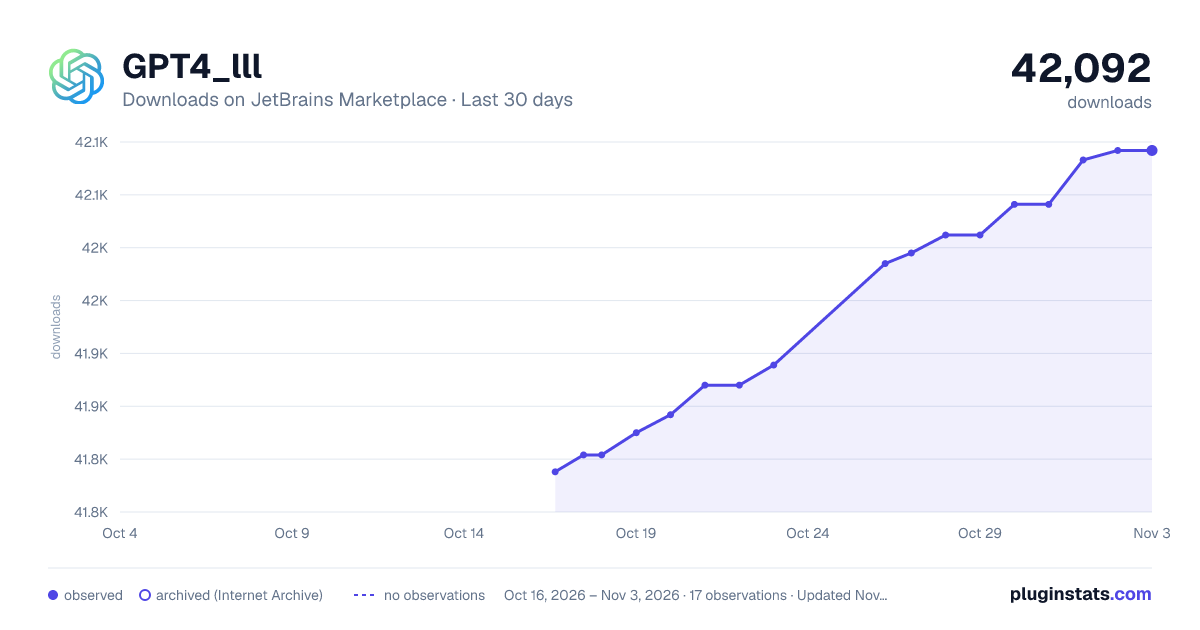
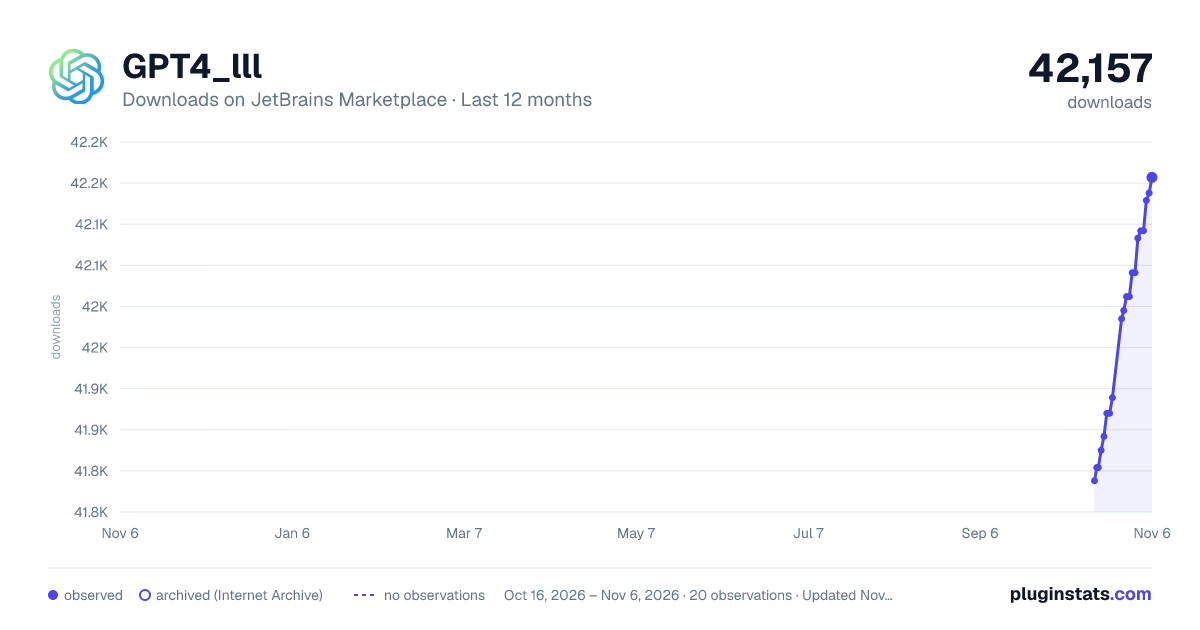
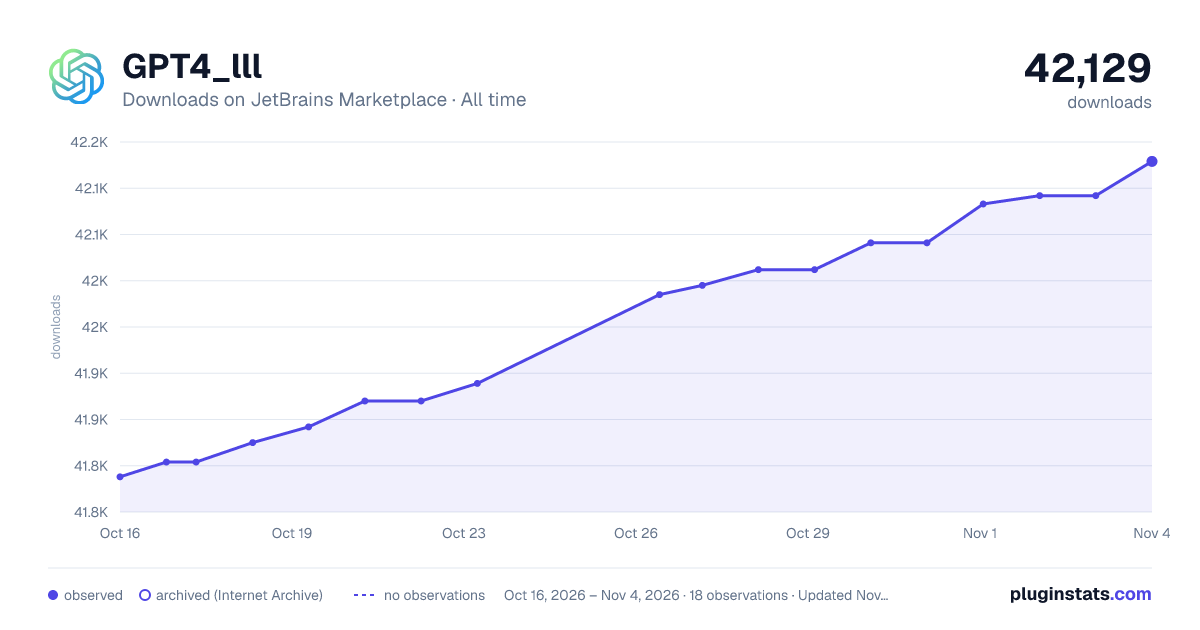
PluginStats has 3 daily observations since Oct 16, 2026; the latest is from Oct 18, 2026.
Rating: 3.50 / 5 from 8 ratings
About GPT4_lll
Features
Agent Chat View with Block Rendering
A completely redesigned chat interface with block-based content rendering. Supports six content block types: Markdown, Code, Thinking Process, Tool Call, Tool Use, and Tool Result. Provides smooth streaming display with smart auto-scrolling and per-turn bubble layout for both user and assistant messages.
Function Calling (Tool Use) Engine
Built-in Function Calling orchestrator enabling AI models to invoke tools within the IDE. Supports multi-round tool call loops (up to 20 rounds), automatic parameter validation, execution with user approval, and result feedback. Compatible with OpenAI, Anthropic and Markdown protocol formats, with built-in degradation fallback mechanism for reliability.
MCP Tool System
Model Context Protocol (MCP) tool system providing ten built-in tools for AI Agent autonomous operation:
• read_file — Read file content with optional line range • write_file — Write files with four modes: overwrite, patch (str_replace), append and insert_after_line, using atomic writes for data safety • grep — Keyword search with context lines, file size limits, directory blacklist and binary file filtering • tree — Project directory tree with configurable ignore patterns • shell_exec — Execute non-interactive local commands with 4-layer security (schema → validator → policy → runtime), structured output including stdout/stderr/exit code/risk level, configurable via .gpt4lll/shell-policy.json • open_files — Inspect currently open editor tabs and identify the active file for context-aware operations • diagnostics — Get compile, lint, and type diagnostics from the IDE's built-in code analysis engine • ask_user — Human-in-the-loop interaction: ask the user for confirmation, clarification, or choice during agent execution • invoke_skill — Dynamically load predefined skill guidance (code review, testing, refactoring, etc.) by task scenario
All tools are sandboxed to the project workspace for security.
Unified LLM Client
Centralized LLM client abstraction layer handling HTTP and SSE communication with multiple providers. Supports streaming chat, synchronous chat, and raw JSON mode for function calling. Provider-specific differences (URL, API key format, message structure, SSE parsing) are handled transparently via adapter pattern.
Conversation Memory Management
Intelligent conversation memory system with multiple strategies: sliding window (token-based truncation), summarizing (LLM auto-summarization when context exceeds threshold), adaptive (similarity-based), and composite (multi-tier). Includes real token usage tracking from API responses.
Runtime Status Indicator
Visual status feedback via animated border: idle (no border), running (animated green sweep), completed (solid green), error (red). A Stop button appears during execution for task cancellation. Status automatically resets after 3 seconds.
Free AIGC Access
The AIGC capability is now freely available to all users. Enjoy intelligent generation services at no extra cost. However, due to high demand, you may need to queue each time you use this feature.
Multi-Platform Support
The plugin supports multiple AI platforms with unified interface and seamless provider switching.
Supported List
• OpenAI (GPT-4, GPT-4o, etc.) • Grok • Tongyi Qianwen (Qwen3-Coder-Plus, Qwen3-Coder-Flash, etc.) • Baidu ERNIE Bot • DeepSeek (V3, R1) • 🔥 Xiaomi MiMo (MiMo-7B-RL, etc.) — Newly integrated! Take advantage of the Creator Incentive Program token price drop! • OpenAI-standard custom API
Code Generation Based on TODO
Introduced the ability to generate code based on TODO comments within a project. This feature enables rapid development by transforming actionable TODOs into functional code segments.
Natural Language Recognition
Improved the logic for natural language recognition, enhancing accuracy and performance. The plugin supports over 100 languages and automatically detects the user's system language to provide responses in their preferred language.
Automatic Code Type Recognition
Enhanced the code type recognition feature to automatically identify code types.
Generate Code On Demand
Implemented the capability to generate code on demand, providing code snippets when needed.
Automatic Code Comments Generation
Added a feature that allows you to auto-generate code comments using AI. By simply highlighting the code, the plugin will call on the AI model to generate comprehensive and contextually appropriate code comments.
Intelligent Comment Translation
Real-time translation for comments in external library files with streaming translation experience. Supports seamless toggling between original and translated content, with regeneration support. Significantly improves code reading and study efficiency.
History Recording Feature
Added a history recording feature to prevent data loss. Every conversation will now be recorded, allowing easy access to previous interactions.
Code Assessment
Code Assessment feature allowing team leaders to evaluate team members' code. Facilitates code reviews, improves code quality, and fosters continuous learning within the team.
Unit Test Generation
One-click unit test generation feature that automatically creates executable unit test files from selected code blocks.
SQL Statement Evaluation and Optimization
Comprehensive SQL statement evaluation and optimization feature that provides syntax correctness checks, performance optimization suggestions, security assessments, index usage recommendations, query efficiency analysis, and best practice suggestions.
AI-Powered Commit Message Generation
Automatically generates standardized commit messages based on Git changes using AI technology.
Git Work Report Generation
Generate detailed work reports by filtering Git commits by author and time range for team collaboration and project management.
Batch File Assessment…
Description from the JetBrains Marketplace listing.
- Code Editing
- Code Quality
- Code Tools
- Completion
- JEE
Where GPT4_lll sits in the listing
Each band is one page of 20. Downloads on a log scale. Placement is projected from downloads, so it can differ from the marketplace's own sort order. Hover a dot to see the listing.
Charts
Images: 30d · 1y · all time · 1600×900 dark
Adoption over time
7/30/90-day growth
Ranking history
Filled points are observed values; hollow points come from Internet Archive snapshots of the listing page. Dashed segments span periods with no observations — values between points are not interpolated.
Recent observations
Full history (3)Similar JetBrains Marketplace Code Editing plugins




Data source
Cumulative download counts come from the public JetBrains Marketplace API. JetBrains reports downloads, not active installs. Ratings are the mean of public votes.
Listing: https://plugins.jetbrains.com/plugin/21935-gpt4-lll. First seen Oct 16, 2026; last successful collection Oct 18, 2026. See the methodology.