 PluginStats
Markdown Image Kit downloads statistics
By dong4j · JetBrains Marketplace · Tools Integration
Website | GitHub | Issues | Documentation Markdown Image Kit 是一款专为 JetBrains IDE 设计的 Markdown 图片管理插件,让你在 IDE 中优雅地处理 Markdown 文档中的图片。 在 IntelliJ IDEA...
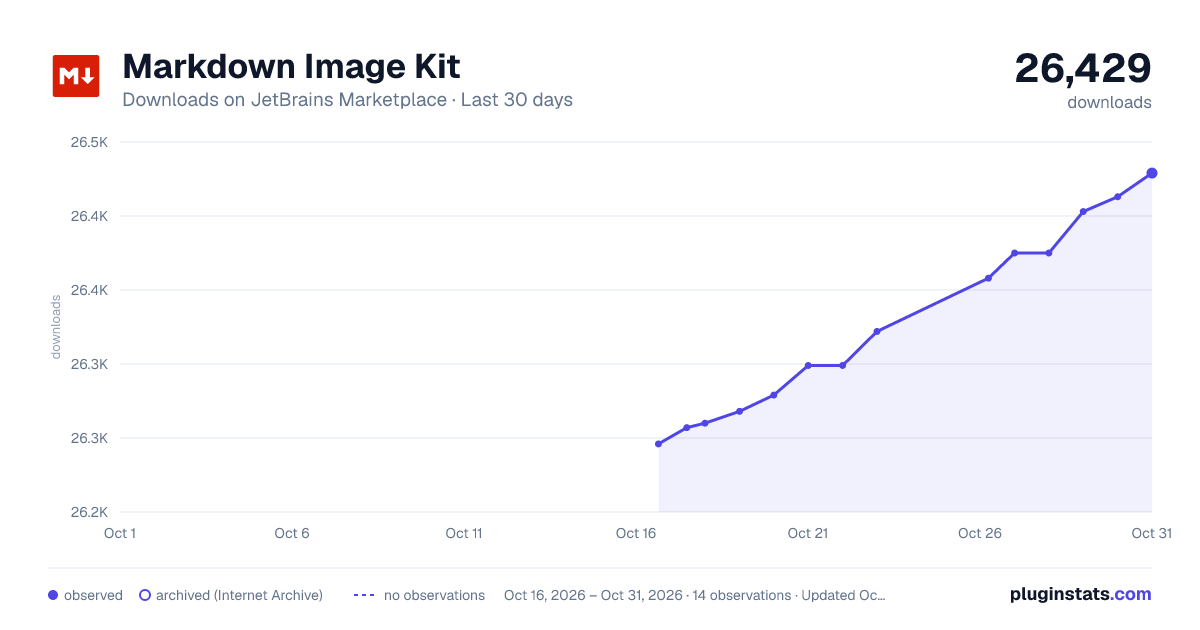
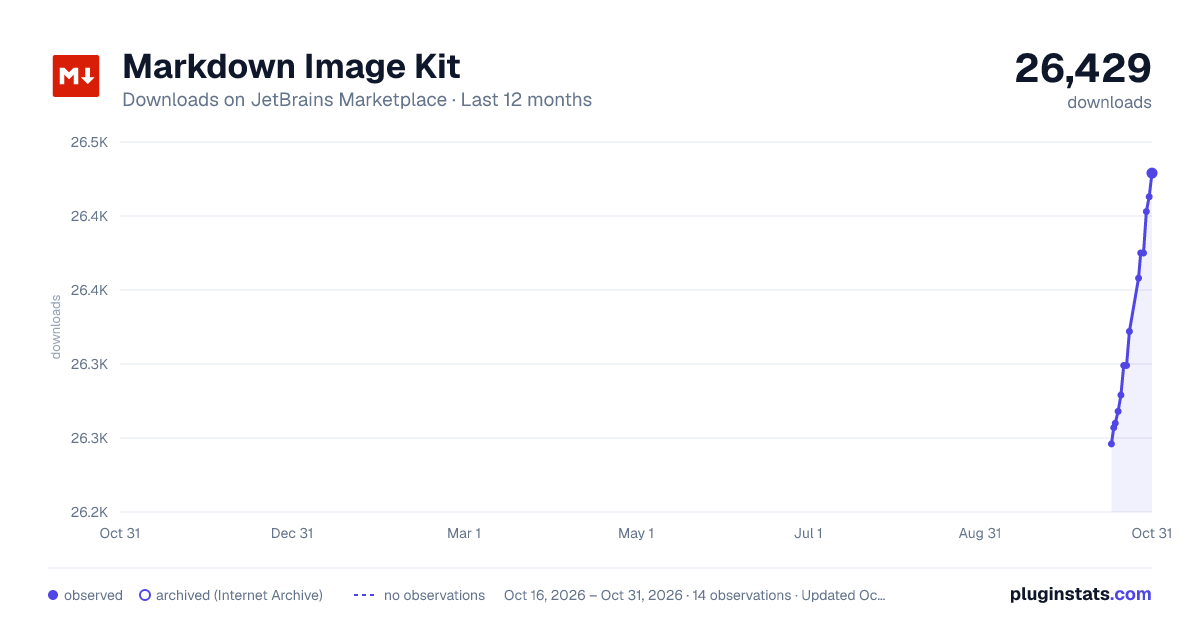
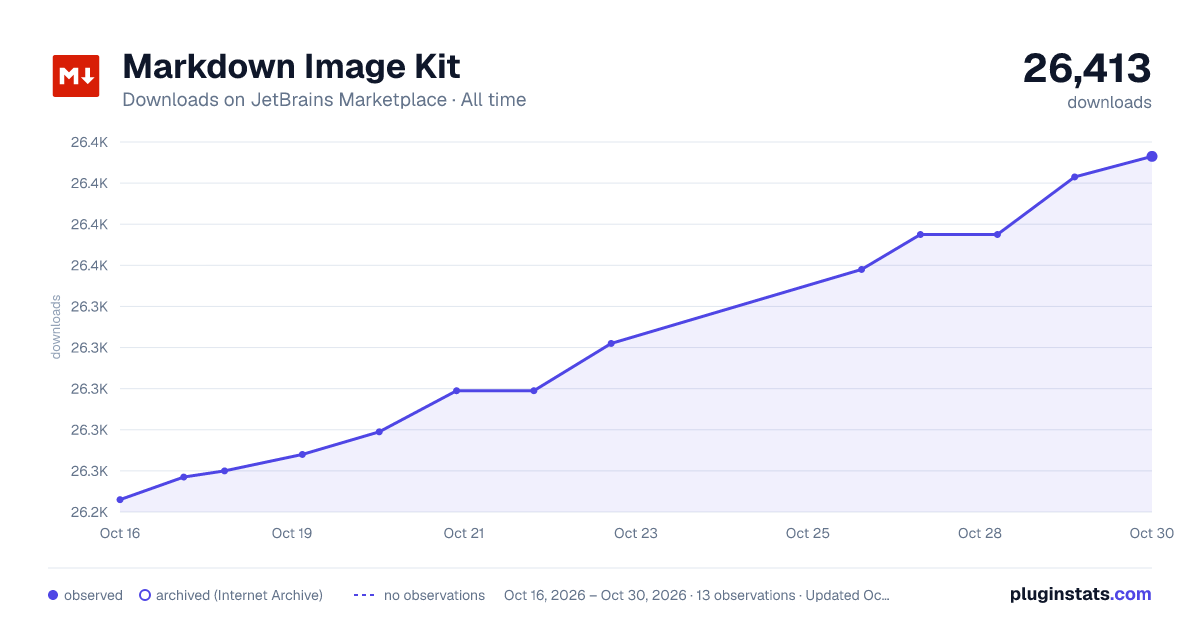
Markdown Image Kit has 26,260 recorded downloads on JetBrains Marketplace.
It ranks #1898 of 2,500 tracked JetBrains Marketplace listings by downloads.
It is rated 4.5 out of 5 from 2 ratings.
PluginStats has 3 daily observations since Oct 16, 2026; the latest is from Oct 18, 2026.
Rating: 4.50 / 5 from 2 ratings
About Markdown Image Kit
Website | GitHub | Issues | Documentation
Markdown Image Kit 是一款专为 JetBrains IDE 设计的 Markdown 图片管理插件,让你在 IDE 中优雅地处理 Markdown 文档中的图片。
在 IntelliJ IDEA 中写作技术文档时,配图往往需要借助其他工具完成。本插件将图片上传、标签替换、批量处理等功能无缝集成到 IDE 中,让技术文档配图变得简单高效。
核心特性
• 📝 Typora 完美复刻 - 复制图片后直接粘贴,自动上传到图床或保存到指定目录,支持自定义重命名模板,在 JetBrains IDE 中体验 Typora 般的图片处理体验;
• 🔄 图床迁移 - 轻松将图片从一个图床批量迁移到另一个,也支持将网络图片下载到本地,免费流量用完了?换个图床继续用; • 🔗 第三方集成 - 对接 PicList/PicGO 等成熟工具,间接支持 20+ 种图床(阿里云、腾讯云、七牛云、GitHub 等); • 📦 批量处理 - 一键上传文档中所有本地图片,批量替换标签格式,批量处理就是这么简单; • 🎨 灵活配置 - 支持图片压缩、重命名、标签自定义、本地保存等多种配置选项; • 💡 智能识别 - 自动识别本地/网络图片,避免重复上传,精准处理每一张图片; • 👁️ Code Vision 快速操作 - 通过 Code Vision 在图片标签上方显示图片尺寸和大小,快速执行删除图片+标签、使用 CleanShot X 或 Shottr 编辑图片等操作;
• 🛠️ 自定义图床 - 支持自定义图床 API,可对接任意存储服务,参考 mik-help 项目快速搭建; • 🌐 全平台支持 - 支持 IntelliJ IDEA、WebStorm、PyCharm、GoLand、PhpStorm 等所有 JetBrains IDE(2022.3+);
推荐使用方式
• PicList/PicGO(推荐) - 配置一次,支持所有图床,图床配置在 PicList 中管理,更灵活可控; • 自建图床 - 特殊需求可参考 mik-help 项目自建中转服务;
⚠️ 安全提示:如果将 IDE 的设置同步到 GitHub/Gitee,请将仓库设置为私有,否则有可能暴露密钥。
从 1.6.0 开始使用 Keychain(macOS)/KeePass(Windows) 代替 DES 加密方式,密钥存储更安全。
Markdown Image Kit is a plugin designed for JetBrains IDEs to elegantly manage images in Markdown documents. When writing technical documentation in IntelliJ IDEA, adding images often requires external tools. This plugin seamlessly integrates image uploading, tag replacement, and batch processing into the IDE, making image management simple and efficient.
Core Features
• 📝 Typora Perfect Replica - Copy an image and paste it directly. Automatically uploads to image hosting or saves to a specified directory, with custom renaming templates. Experience Typora-like image processing in JetBrains IDEs;
• 🔄 Image Host Migration - Easily migrate images from one hosting service to another in batch, or download network images to local. Free quota exhausted? Just switch to another service;
• 🔗 Third-party Integration - Integrate with mature tools like PicList/PicGO, indirectly supporting 20+ image hosting services (Aliyun, Tencent Cloud, Qiniu, GitHub, etc.);
• 📦 Batch Processing - Upload all local images in a document with one click, batch replace tag formats. Batch processing made simple;
• 🎨 Flexible Configuration - Support image compression, renaming, custom tags, local saving, and various configuration options; • 💡 Smart Recognition - Automatically identify local/network images, avoid duplicate uploads, and process each image precisely; • 👁️ Code Vision Quick Actions - Display image dimensions and file size above image tags via Code Vision, quickly perform actions like deleting images+tags, editing images with CleanShot X or Shottr;
• 🛠️ Custom Image Host - Support custom image hosting APIs, can integrate with any storage service. Refer to the mik-help project for quick setup;
• 🌐 Full Platform Support - Support all JetBrains IDEs (2022.3+) including IntelliJ IDEA, WebStorm, PyCharm, GoLand, PhpStorm, etc.;
Recommended Usage
• PicList/PicGO (Recommended) - Configure once, support all image hosting services. Manage configurations in PicList for more flexibility;
• Self-hosted - For special requirements, refer to the mik-help project to build your own proxy service;
⚠️ Security Notice: If you synchronize IDE settings to GitHub/Gitee, please set the repository to private, otherwise keys may be exposed.
Starting from version 1.6.0, Keychain (macOS)/KeePass (Windows) is used instead of DES encryption for more secure key storage.
Description from the JetBrains Marketplace listing.
- Tools Integration
Where Markdown Image Kit sits in the listing
Each band is one page of 20. Downloads on a log scale. Placement is projected from downloads, so it can differ from the marketplace's own sort order. Hover a dot to see the listing.
Charts
Images: 30d · 1y · all time · 1600×900 dark
Adoption over time
7/30/90-day growth
Ranking history
Filled points are observed values; hollow points come from Internet Archive snapshots of the listing page. Dashed segments span periods with no observations — values between points are not interpolated.
Recent observations
Full history (3)Similar JetBrains Marketplace Tools Integration plugins




Data source
Cumulative download counts come from the public JetBrains Marketplace API. JetBrains reports downloads, not active installs. Ratings are the mean of public votes.
Listing: https://plugins.jetbrains.com/plugin/12192-markdown-image-kit. First seen Oct 16, 2026; last successful collection Oct 18, 2026. See the methodology.