 PluginStats
Shifter downloads statistics
By Kay Stenschke (4 listings) · JetBrains Marketplace · Code Tools
String and code manipulations, performed on keyboard shortcut with detection of intended manipulation. The type of manipulation only has to be selected manually when...
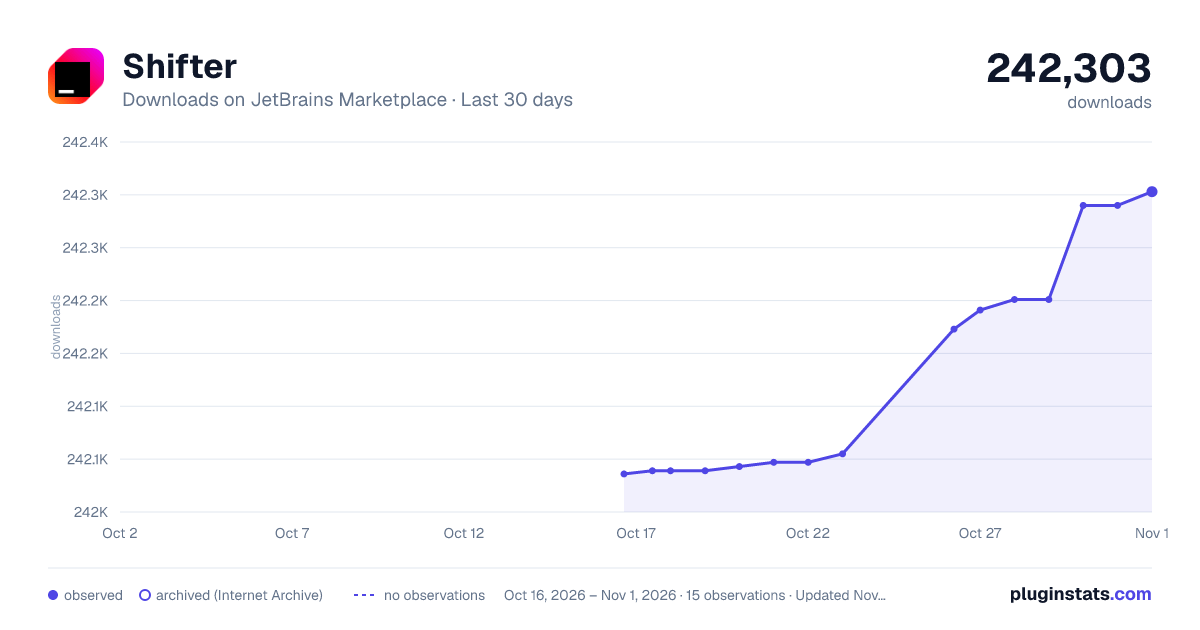
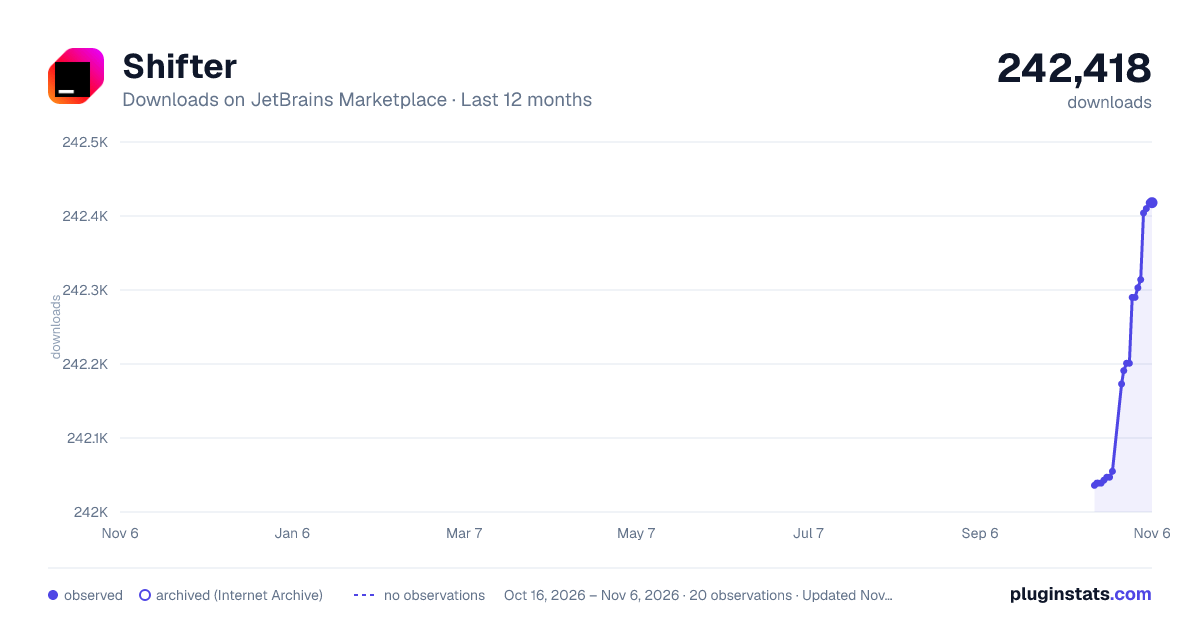
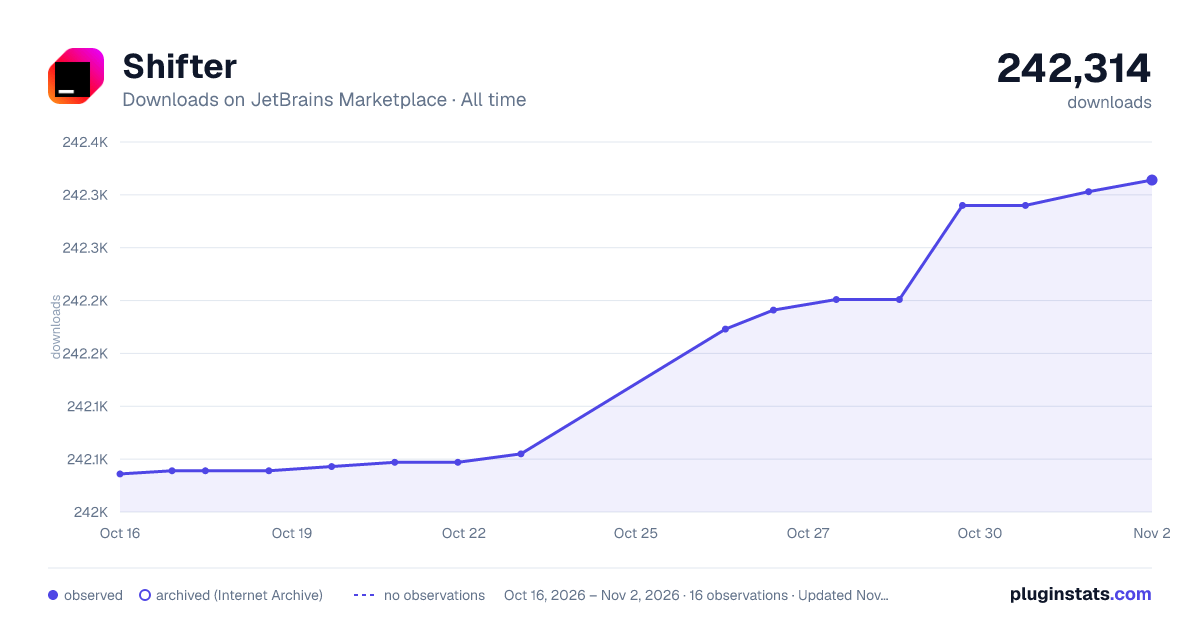
Shifter has 242,039 recorded downloads on JetBrains Marketplace.
It ranks #598 of 2,500 tracked JetBrains Marketplace listings by downloads.
It is rated 5.0 out of 5 from 21 ratings.
PluginStats has 3 daily observations since Oct 16, 2026; the latest is from Oct 18, 2026.
Rating: 5.00 / 5 from 21 ratings
About Shifter
String and code manipulations, performed on keyboard shortcut with detection of intended manipulation. The type of manipulation only has to be selected manually when multiple are possible.
Do you like it? Give it a star at GitHub. Rate it at plugins.jetbrains.com.
There's no future for Shifter without support from the community!
When evoked, Shifter detects the type of selection (or lets the user chose when ambiguous) in the current line or keyword at the caret and performs the possible string manipulation.
If there's only one shiftable word in a line, it can be shifted without the caret touching it. Lowercase/uppercase or lower case with upper first character within shifted words is maintained.
DEFAULT KEYBOARD SHORTCUTS
• Ctrl+Shift+Alt+Comma - Shift Down • Ctrl+Shift+Alt+Period - Shift Up • Ctrl+Shift+Alt+K - Shift Up More* • Ctrl+Shift+Alt+J - Shift Down More*
Shift more: repeats shifting a value multiple times. The amount of repetitions can be configured in the plugin configuration (default: 10).
Mac Users: On Macs, the keyboard shortcuts are Comma or Period key together with Shift+Alt+Cmd
SHIFTING TYPES
Sorting
• Shifting a multi-line selection sorts the lines alphabetically ascending/descending. • Shifting a single-line selection, that is a comma- or pipe-separated list, sorts the items ascending/descending. • Shifting a single-line selection, that is XML attribute-value pairs, sorts them alphabetically. • Shifting a single-line selection, that is a tupel, flips the items' order (delimiters: ":", "|", ", ", " - ", " + ", " < ", " > ", " <= ", " >= ", " == ", " != ", " === ", " !== ", " || ") • Shifting a selection that is a camelCased (w/ lower or upper lead character) word pair, flips the order of the words. • Shifting a selected AND && or OR || logical conjunction with two operands, swaps the operands' order • Shifting a selected (from questionmark on) ternary expression, swaps "than" and "else" statements • Shifting a selected PHP concatenation from two strings / variables, toggles the concatenated items' order • Shifting a selection from a CSS file, sorts all attributes inside their selectors (alphabetically, vendor-attributes and vendor-styles at the end) • Shifting selected attribute-style lines inside a CSS (or LESS or SASS) file, sorts them (alphabetically, vendor-attributes and vendor-styles at the end)
Numeric Shifting
• Numeric values - Incrementing/decrementing numbers • Strings ending with numbers - increments/decrements the postfix • Numeric block selection: opens dialog to chose: 1. in/decrement each or: 2. replace by enumeration • UNIX (and millisecond based) timestamps - Increments/decrements by one day, shows a balloon info with the shifted date in human-readable format • CSS hex RGB colors - Shifts color value lighter/darker • CSS length values - Shifts numeric length values up/down by 1 (units: em, in, px, pt, cm, rem, vw, vh, vmin, vmax) • Increment/decrement roman numerals
String Manipulations
• Shifting a selection within a single line: detects and swaps characters: single quote vs. double quote OR slash vs. backslash • Shifting a selected (or the caret touching a) camel-cased string, converts it into a minus- or underscore-separated path (and vice versa) • Strings wrapped in single/double quotes and backticks - Shifts to alphabetically next/previous quoted string found in current document • Parenthesis: Strings surrounded by round, square or curly brackets: toggles surrounding "(" and ")" to "[" and "]" to "{" and "}" • Logical operators: toggles between (selected) "&&" and "||" • HTML en/decoding of selected special characters • Single characters and string consisting from any amount of the same character can be shifted to the previous/next ASCII value • Escaped single or double quotes can be unescaped when shifting a selection
Code- and DOC Comments
• Selection which is a block comment or multiple line-comments (e.g. PHP, JavaScript, C syntax) - toggle among comment type (//... vs. /*...*/). Merges multi-line comments into 1 line. • Selected line of code ending with a trailing //-comment - Moves the comment into a new line before the code • Selected HTML comment inside a PHP / PHTML file: converts it into a PHP block comment (and vice versa) • PHPDoc: Shifting a selected PHP doc comment block that contains @param comments w/ variable name but no data type, guesses and inserts data types • PHPDoc: Shifting while the caret is inside an @param annotation that contains no data type, inserts a data type (guessed from the variable name) • JsDOC: Shifting w/ the caret touching a data type that is not wrapped in curly brackets, inside an "@param", "@returns" or "@type" annotation: adds the missing curly brackets • Selected JsDoc block: Convert "@return" into "@returns", add missing curly brackets around data types in "@param", "@returns" and "@type" lines, correct invalid data types into existing data types (bool => boolean, int(eger) => number), reduce empty JsDoc lines
PHP, JavaScript and TypeScript shifting
• PHP variables - Shifts to alphabetically next/previous variable found in current document ("shift more" shifts until first variable with a different first letter) • Selected PHP array - Shifts among long and shorthand syntax (PHP >= 5.4) • Selection which is a Sizzle-Selector - Converts the selector into a corresponding JavaScript variable declaration • Selection of multiple JavaScript var declarations in succession - are joined into multiple comma-separated declarations • Selected deprecated jQuery observer methods are modernized, e.g. ".click(" becomes ".on('click', ": Event types: blur, change, click, dblclick, error, focus, keypress, keydown, keyup, load, mouseenter, mouseleave, resize, submit, scroll, unload • Selected JavaScript string concatenation in TypeScript file - Converts to TypeScript string interpolation
Dictionaric Keyword Shifting…
Description from the JetBrains Marketplace listing.
- Code Tools
Where Shifter sits in the listing
Each band is one page of 20. Downloads on a log scale. Placement is projected from downloads, so it can differ from the marketplace's own sort order. Hover a dot to see the listing.
Charts
Images: 30d · 1y · all time · 1600×900 dark
Adoption over time
7/30/90-day growth
Ranking history
Filled points are observed values; hollow points come from Internet Archive snapshots of the listing page. Dashed segments span periods with no observations — values between points are not interpolated.
Recent observations
Full history (3)Similar JetBrains Marketplace Code Tools plugins




Data source
Cumulative download counts come from the public JetBrains Marketplace API. JetBrains reports downloads, not active installs. Ratings are the mean of public votes.
Listing: https://plugins.jetbrains.com/plugin/6149-shifter. First seen Oct 16, 2026; last successful collection Oct 18, 2026. See the methodology.