 PluginStats
aerospike pulls statistics
Docker Hub · Databases & storage
Aerospike – the reliable, high performance, distributed database optimized for flash and RAM.
aerospike has 20,233,495 recorded pulls on Docker Hub.
It ranks #107 of 1,263 tracked Docker Hub listings by pulls.
PluginStats has 3 daily observations since Oct 16, 2026; the latest is from Oct 18, 2026.
About aerospike
Quick reference
• Maintained by: Aerospike, Inc. • Where to get help: the Docker Community Slack, Server Fault, Unix & Linux, or Stack Overflow
Supported tags and respective Dockerfile links
• ee-8.2.0.0, ee-8.2.0.0_1 • ce-8.2.0.0, ce-8.2.0.0_1
Quick reference (cont.)
• Where to file issues: the Aerospike Forums or GitHub • Supported architectures: (more info) amd64, arm64v8 • Published image artifact details: repo-info repo's repos/aerospike/ directory (history) (image metadata, transfer size, etc) • Image updates: official-images repo's library/aerospike label official-images repo's library/aerospike file (history) • Source of this description: docs repo's aerospike/ directory (history)
Aerospike Database Docker Images
What is Aerospike?
Aerospike is a distributed NoSQL database purposefully designed for high performance web scale applications. Aerospike supports key-value and document data models, and has multiple data types including List, Map, HyperLogLog, GeoJSON, and Blob. Aerospike's patented hybrid memory architecture delivers predictable high performance at scale and high data density per node.
Getting Started
Aerospike Enterprise Edition requires a feature key file to start and to ungate certain features in the database, such as compression. Enterprise customers can use their production or development keys.
Anyone can sign up to get an evaluation feature key file for a full-featured, single-node Aerospike Enterprise Edition.
Aerospike Community Edition supports the same developer APIs as Aerospike Enterprise Edition, and differs in ease of operation and enterprise features. See the product matrix for more.
Running an Aerospike EE node with a feature key file in a mapped directory
Above, *DIR* is a directory on your machine where you drop your feature key file. Make sure Docker Desktop has file sharing permission to bind mount it into Docker containers.
Running a node with a feature key file in an environment variable
Running an Aerospike CE node
Advanced Configuration
The Aerospike Docker image has a default configuration file template that can be populated with individual configuration parameters, as we did before with FEATURE_KEY_FILE. Alternatively, it can be replaced with a custom configuration file.
The following sections describe both advanced options.
Injecting configuration parameters
You can inject parameters into the configuration template using container-side environment variables with the -e flag.
For example, to set the default namespace name to *demo*:
Injecting configuration parameters into the configuration template isn't compatible with using a custom configuration file. You can use one or the other.
List of template variables
• FEATURE_KEY_FILE - the feature_key_file is only required for the EE image. Default: /etc/aerospike/features.conf • SERVICE_THREADS - the service_threads. Default: Number of vCPUs • LOGFILE - the file param of the logging context. Default: /dev/null, do not log to file, log to stdout • SERVICE_ADDRESS - the bind address of the networking.service subcontext. Default: any • SERVICE_PORT - the port of the networking.service subcontext. Default: 3000 • HB_ADDRESS - the networking.heartbeat address for cross cluster mesh. Default: any • HB_PORT - the port for networking.heartbeat communications. Default: 3002 • FABRIC_ADDRESS - the address of the networking.fabric subcontext. Default: any • FABRIC_PORT - the port of the networking.fabric subcontext. Default: 3001
The single preconfigured namespace is in-memory with filesystem persistence
• NAMESPACE - the name of the namespace. Default: test • REPL_FACTOR - the namespace replication-factor. Default: 2 • MEM_GB - the namespace memory-size. Default: 1, the unit is always G (GB) • DEFAULT_TTL - the namespace default-ttl. Default: 30d • STORAGE_GB - the namespace persistence file size. Default: 4, the unit is always G (GB) • NSUP_PERIOD - the namespace nsup-period. Default: 120 , nsup-period in seconds
Using a custom configuration file
You can override the use of the configuration file template by providing your own aerospike.conf, as described in Configuring Aerospike Database.
You should first -v map a local directory, which Docker will bind mount. Next, drop your aerospike.conf file into this directory. Finally, use the --config-file option to tell Aerospike where in the container the configuration file is (the default path is /etc/aerospike/aerospike.conf). Remember that the feature key file is required, so use feature-key-file in your config file to point to a mounted path (such as /opt/aerospike/etc/feature.conf).
For example:
Persistent Data Directory
With Docker, the files within the container are not persisted past the life of the container. To persist data, you will want to mount a directory from the host to the container's /opt/aerospike/data using the -v option:
For example:
The example above uses the configuration template, where the single defined namespace is in-memory with file-based persistence. Just mounting the predefined /opt/aerospike/data directory enables the data to be persisted on the host.
Alternatively, a custom configuration file is used with the parameter file set to be a file in the mounted /opt/aerospike/data, such as in the following config snippet:
namespace test { # : storage-engine device { file /opt/aerospike/data/test.dat filesize 4G data-in-memory true } }
In this example we also mount the data directory in a similar way, using a custom configuration file.
Block Storage
Docker provides an ability to expose a host's block devices to a running container. The --device option can be used to map a host block device within a container.
Update the storage-engine device section of the namespace in the custom aerospike configuration file.
namespace test { # : storage-engine device { device /dev/xvdc write-block-size 128k } }
Now to map a host drive /dev/sdc to /dev/xvdc on a container
Persistent Lua Cache…
Description from the Docker Hub listing.
Where aerospike sits in the listing
Each band is one page of 20. Pulls on a log scale. Placement is projected from pulls, so it can differ from the marketplace's own sort order. Hover a dot to see the listing.


Charts
Images: 30d · 1y · all time · 1600×900 dark
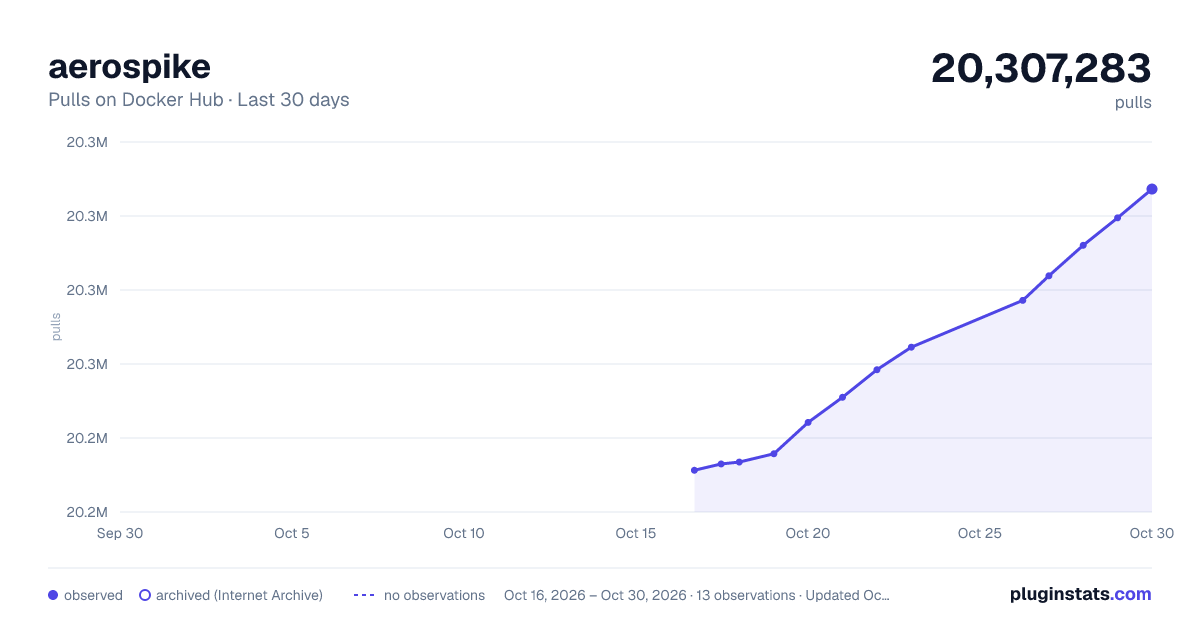
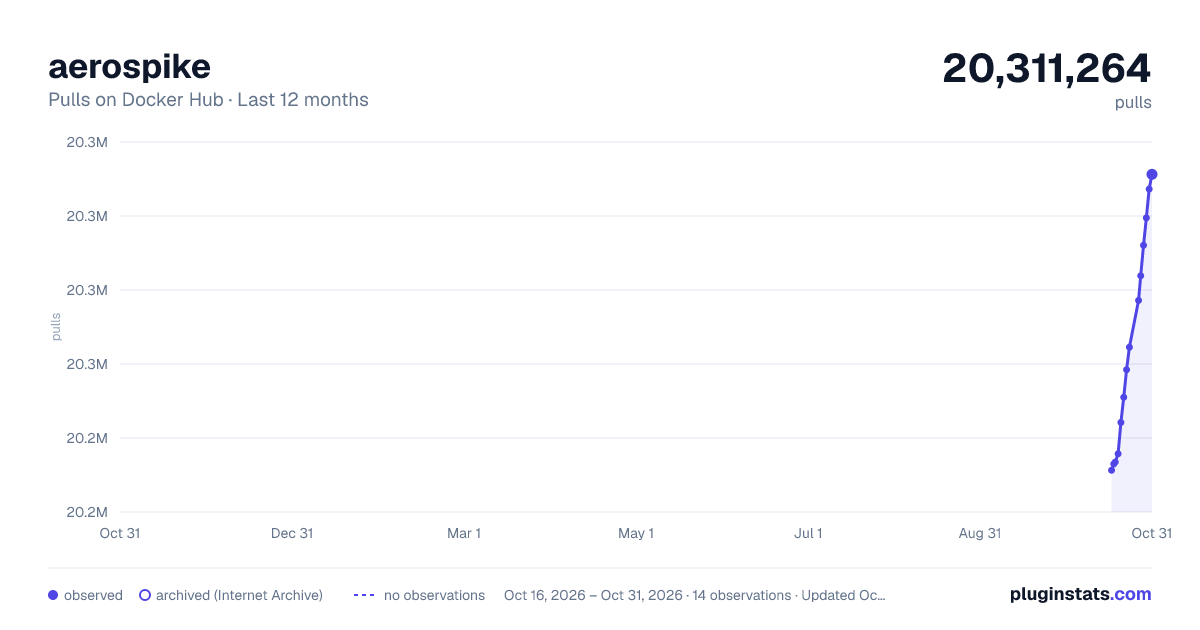
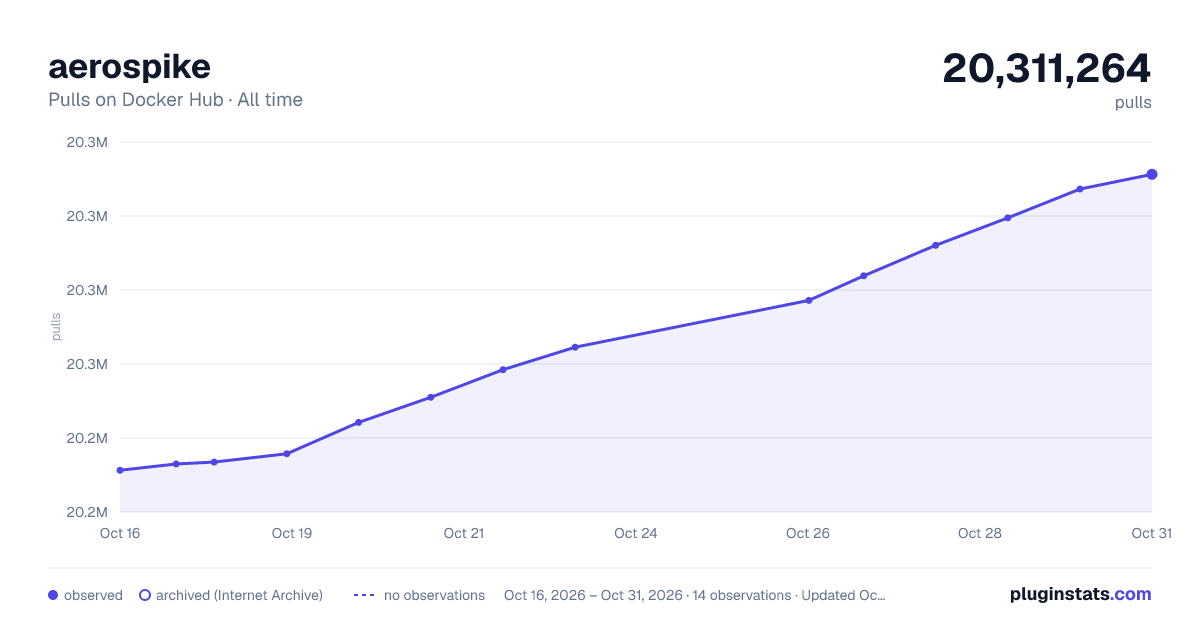

Adoption over time


7/30/90-day growth


Filled points are observed values; hollow points come from Internet Archive snapshots of the listing page. Dashed segments span periods with no observations — values between points are not interpolated.
Recent observations
Full history (3)Similar Docker Hub Databases & storage plugins
Data source
Cumulative pull counts and stars come from the public Docker Hub API. Pulls count image downloads (including automated CI pulls), not installs or users.
Listing: https://hub.docker.com/_/aerospike. First seen Oct 16, 2026; last successful collection Oct 18, 2026. See the methodology.