 PluginStats
hitch pulls statistics
Hitch is a libev-based high performance SSL/TLS proxy by Varnish Software.
hitch has 567,431 recorded pulls on Docker Hub.
It ranks #295 of 1,263 tracked Docker Hub listings by pulls.
PluginStats has 3 daily observations since Oct 16, 2026; the latest is from Oct 18, 2026.
About hitch
Quick reference
• Maintained by: the Hitch Docker Community • Where to get help: the Docker Community Slack, Server Fault, Unix & Linux, or Stack Overflow
Supported tags and respective Dockerfile links
• 1, 1.8, 1.8.0, 1.8.0-1, latest
Quick reference (cont.)
• Where to file issues: https://github.com/varnish/docker-hitch/issues • Supported architectures: (more info) amd64, arm32v7, arm64v8, i386 • Published image artifact details: repo-info repo's repos/hitch/ directory (history) (image metadata, transfer size, etc) • Image updates: official-images repo's library/hitch label official-images repo's library/hitch file (history) • Source of this description: docs repo's hitch/ directory (history)
What is Hitch?
Hitch is a *libev-based* high performance *SSL/TLS proxy* by Varnish Software. It is specifically built to terminate TLS connections at high scale and forwards unencrypted HTTP traffic to Varnish or any other HTTP backend.
How to use this image
Running a Hitch Docker container can be done by using the following command:
This container will expose port 443, which is required for HTTPS traffic.
Configuration file and extra options
Without any argument, the container will run hitch --config=/etc/hitch/hitch.conf. You can mount your own configuration file to replace the default one:
You can also change the path of the configuration file by setting the HITCH_CONFIG_FILE environment variable.
Note that extra arguments can be added to the command line. If the first argument starts with a -, the arguments are added to the default command line, otherwise they are treated as a command.
Our assumption is that your backend, Varnish or other, supports both *HTTP/2* and the *PROXY* protocol.
Connecting to the backend
By default Hitch will connect to the backend using localhost:8843 using the PROXY protocol. If your backend server *PROXY*, the two will be able to talk together and backend will be able to expose the true client IP.
But you'll probably run your backend service in a separate container. In that case, you'll want to change the backend settings. You can either do that by replacing the backend configuration setting in your mounted configuration file, or by adding a *command-line option*.
Here's how you set the backend via a *command-line option*, assuming your backend is available through backend.example.com on port 8443:
Setting the certificate
The Hitch Docker image comes with a self-signed certificate that is stored in /etc/hitch/certs/default.
This certificate is automatically created during *Hitch* package install, and is a self-signed certificate using 2048-bit RSA-encrypted cipher. It is set up for the localhost hostname, with an expiration date 30 years in the future.
This certificate is only suited for testing. Using a bind mount, you can override the value of the certificate and use your own certificate, which is advisable.
Here's an example:
You can also override the pem-file configuration setting in your mounted configuration file.
If you prefer setting the certificate location on the command line, you can add the location as part of the --backend option.
Here's how you do this:
License
View license information for the software contained in this image.
As with all Docker images, these likely also contain other software which may be under other licenses (such as Bash, etc from the base distribution, along with any direct or indirect dependencies of the primary software being contained).
Some additional license information which was able to be auto-detected might be found in the repo-info repository's hitch/ directory.
As for any pre-built image usage, it is the image user's responsibility to ensure that any use of this image complies with any relevant licenses for all software contained within.
Description from the Docker Hub listing.
Where hitch sits in the listing
Each band is one page of 20. Pulls on a log scale. Placement is projected from pulls, so it can differ from the marketplace's own sort order. Hover a dot to see the listing.


Charts
Images: 30d · 1y · all time · 1600×900 dark

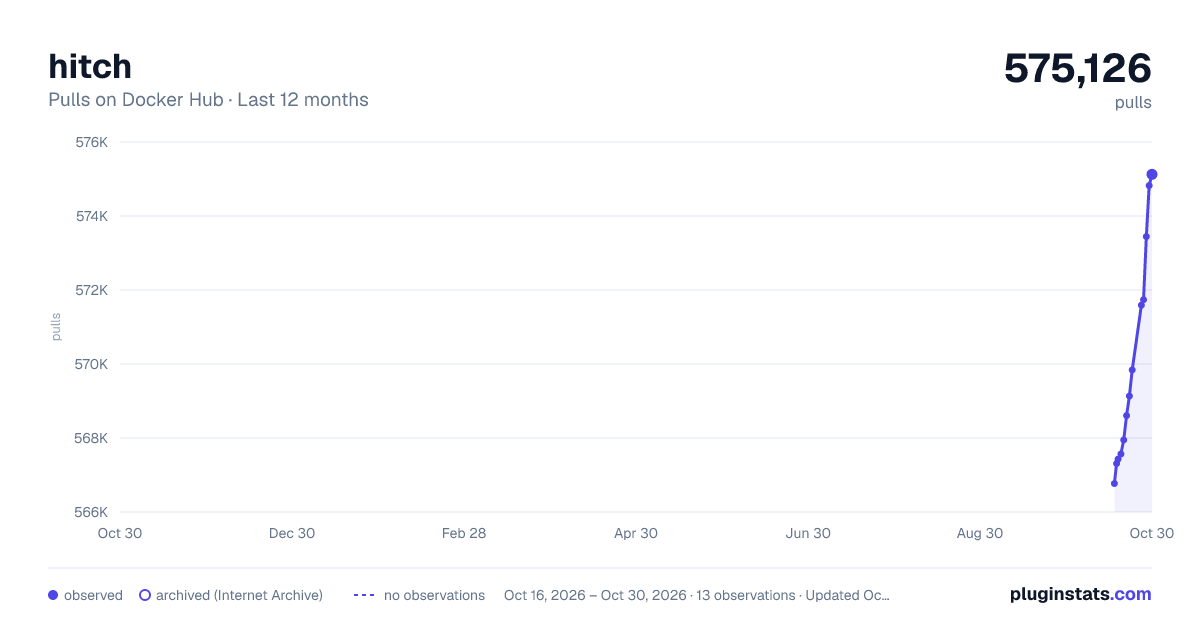
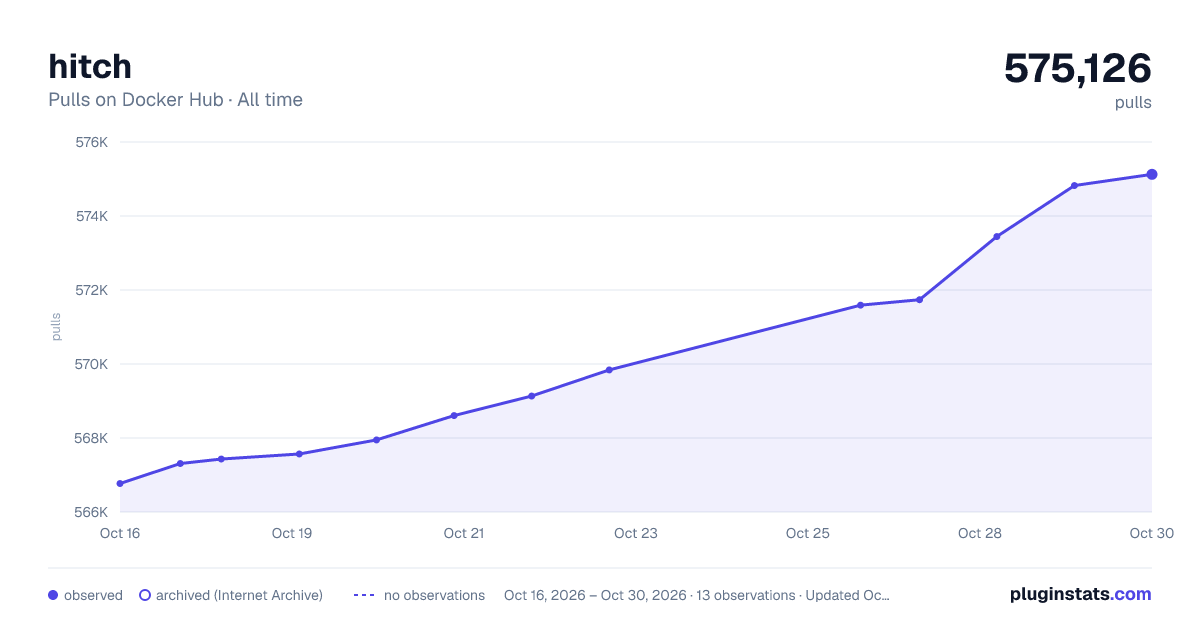

Adoption over time


7/30/90-day growth


Filled points are observed values; hollow points come from Internet Archive snapshots of the listing page. Dashed segments span periods with no observations — values between points are not interpolated.
Recent observations
Full history (3)Similar Docker Hub Web servers plugins
Data source
Cumulative pull counts and stars come from the public Docker Hub API. Pulls count image downloads (including automated CI pulls), not installs or users.
Listing: https://hub.docker.com/_/hitch. First seen Oct 16, 2026; last successful collection Oct 18, 2026. See the methodology.