 PluginStats
mcp/opik pulls statistics
By mcp (100 listings) · Docker Hub · Machine learning & AI
Model Context Protocol (MCP) server for Opik, the open-source LLM observability and evaluation pl...
mcp/opik has 16,994 recorded pulls on Docker Hub.
It ranks #733 of 1,263 tracked Docker Hub listings by pulls.
PluginStats has 3 daily observations since Oct 16, 2026; the latest is from Oct 18, 2026.
About mcp/opik
Opik MCP Server
Model Context Protocol (MCP) implementation for Opik enabling seamless IDE integration and unified access to prompts, projects, traces, and metrics. .
What is an MCP Server?
MCP Info
Attribute|Details| |-|-| Docker Image|mcp/opik Author|comet-ml Repository|https://github.com/comet-ml/opik-mcp
Image Building Info
Attribute|Details| |-|-| Dockerfile|https://github.com/comet-ml/opik-mcp/blob/ea3b4862c5d904fd51cacf61a28abf4791864d1e/Dockerfile Commit|ea3b4862c5d904fd51cacf61a28abf4791864d1e Docker Image built by|Docker Inc. Docker Scout Health Score| Verify Signature|COSIGN_REPOSITORY=mcp/signatures cosign verify mcp/opik --key https://raw.githubusercontent.com/docker/keyring/refs/heads/main/public/mcp/latest.pub Licence|Apache License 2.0
Available Tools (13)
Tools provided by this Server|Short Description -|- add-trace-feedback|Add feedback scores to a trace for quality evaluation and monitoring.| create-project|Create a new project| create-prompt|Create a new prompt| get-prompt-version|Retrieve a specific version of a prompt| get-prompts|Get a list of prompts with optional filtering| get-trace-by-id|Get detailed information about a specific trace including input, output, metadata, and timing information| get-trace-stats|Get aggregated statistics for traces including counts, costs, token usage, and performance metrics over time| get-trace-threads|Get trace threads (conversation groupings) to view related traces that belong to the same conversation or session| list-projects|Get a list of projects with optional filtering| list-traces|Get a list of traces from a project.| opik-integration-docs|Provides detailed documentation on how to integrate Opik with your LLM application| save-prompt-version|Save a new version of a prompt| search-traces|Advanced search for traces with complex filtering and query capabilities|
Tools Details
Tool: add-trace-feedback
Add feedback scores to a trace for quality evaluation and monitoring. Useful for rating trace quality, relevance, or custom metrics Parameters|Type|Description -|-|- scores|array|Array of feedback scores to add. Each score should have a name and value between 0-1 traceId|string|ID of the trace to add feedback to workspaceName|string *optional*|Workspace name to use instead of the default
Tool: create-project
Create a new project Parameters|Type|Description -|-|- name|string|Name of the project description|string *optional*|Description of the project workspaceName|string *optional*|Workspace name to use instead of the default
Tool: create-prompt
Create a new prompt Parameters|Type|Description -|-|- name|string|Name of the prompt description|string *optional*|Description of the prompt tags|array *optional*|List of tags for the prompt
Tool: get-prompt-version
Retrieve a specific version of a prompt Parameters|Type|Description -|-|- name|string|Name of the prompt commit|string *optional*|Specific commit/version to retrieve
Tool: get-prompts
Get a list of prompts with optional filtering Parameters|Type|Description -|-|- name|string *optional*|Filter by prompt name page|number *optional*|Page number for pagination size|number *optional*|Number of items per page
Tool: get-trace-by-id
Get detailed information about a specific trace including input, output, metadata, and timing information Parameters|Type|Description -|-|- traceId|string|ID of the trace to fetch (UUID format, e.g. "123e4567-e89b-12d3-a456-426614174000") workspaceName|string *optional*|Workspace name to use instead of the default workspace
Tool: get-trace-stats
Get aggregated statistics for traces including counts, costs, token usage, and performance metrics over time Parameters|Type|Description -|-|- endDate|string *optional*|End date in ISO format (YYYY-MM-DD). Example: "2024-01-31" projectId|string *optional*|Project ID to filter traces. If not provided, will use the first available project projectName|string *optional*|Project name to filter traces (alternative to projectId) startDate|string *optional*|Start date in ISO format (YYYY-MM-DD). Example: "2024-01-01" workspaceName|string *optional*|Workspace name to use instead of the default workspace
Tool: get-trace-threads
Get trace threads (conversation groupings) to view related traces that belong to the same conversation or session Parameters|Type|Description -|-|- page|number *optional*|Page number for pagination projectId|string *optional*|Project ID to filter threads projectName|string *optional*|Project name to filter threads size|number *optional*|Number of threads per page threadId|string *optional*|Specific thread ID to retrieve (useful for getting all traces in a conversation) workspaceName|string *optional*|Workspace name to use instead of the default
Tool: list-projects
Get a list of projects with optional filtering Parameters|Type|Description -|-|- page|number *optional*|Page number for pagination size|number *optional*|Number of items per page workspaceName|string *optional*|Workspace name to use instead of the default
Tool: list-traces
Get a list of traces from a project. Use this for basic trace retrieval and overview Parameters|Type|Description -|-|- page|number *optional*|Page number for pagination (starts at 1) projectId|string *optional*|Project ID to filter traces. If not provided, will use the first available project projectName|string *optional*|Project name to filter traces (alternative to projectId). Example: "My AI Assistant" size|number *optional*|Number of traces per page (1-100, default 10) workspaceName|string *optional*|Workspace name to use instead of the default workspace
Tool: opik-integration-docs
Provides detailed documentation on how to integrate Opik with your LLM application
Tool: save-prompt-version…
Description from the Docker Hub listing.
Where mcp/opik sits in the listing
Each band is one page of 20. Pulls on a log scale. Placement is projected from pulls, so it can differ from the marketplace's own sort order. Hover a dot to see the listing.


Charts
Images: 30d · 1y · all time · 1600×900 dark
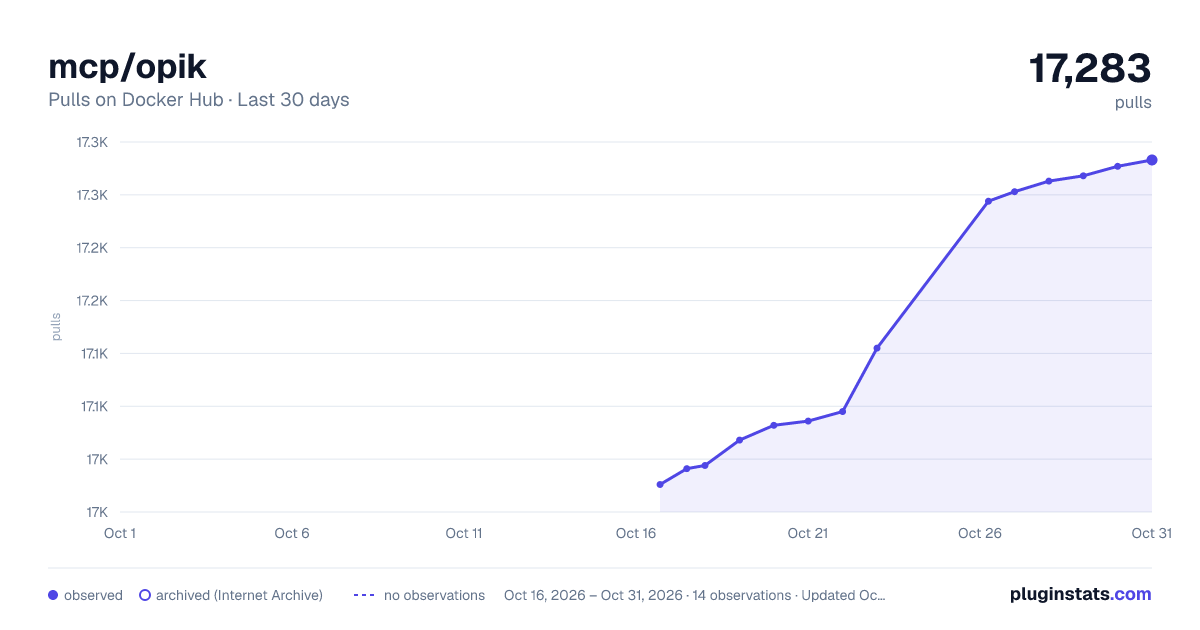
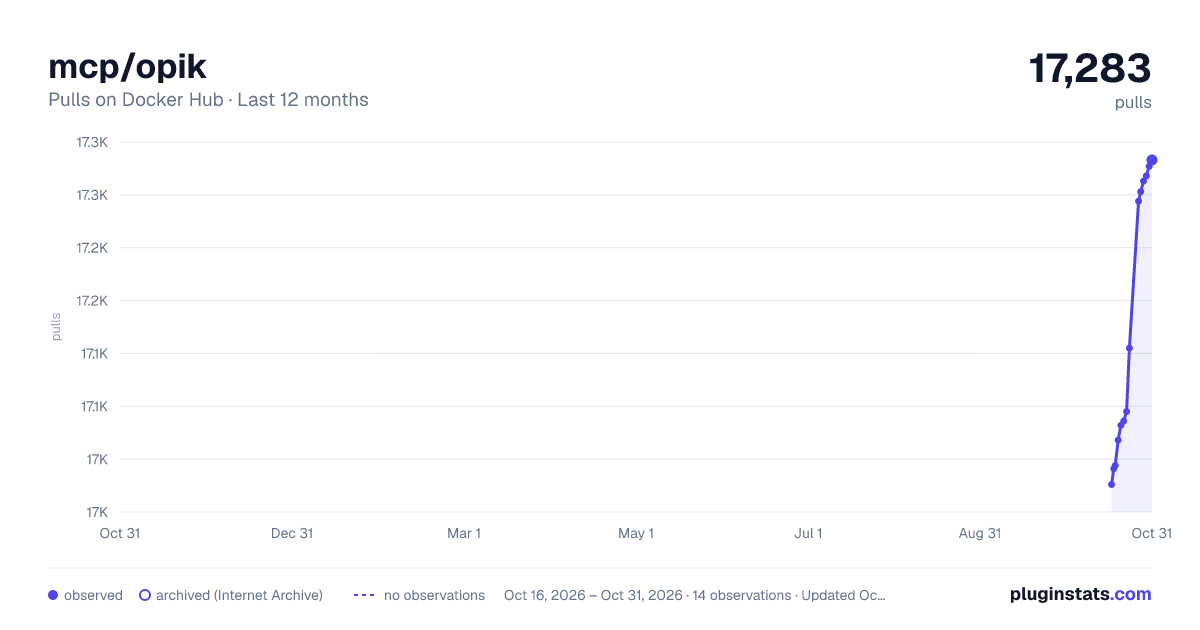
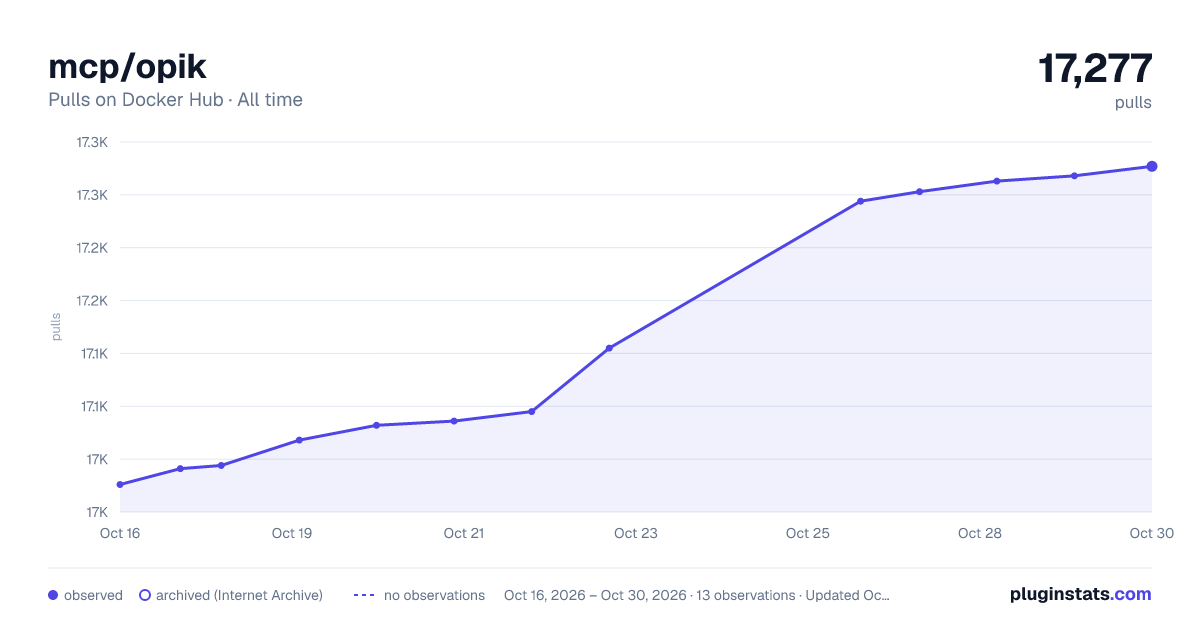

Adoption over time


7/30/90-day growth


Filled points are observed values; hollow points come from Internet Archive snapshots of the listing page. Dashed segments span periods with no observations — values between points are not interpolated.
Recent observations
Full history (3)Similar Docker Hub Machine learning & AI plugins
Data source
Cumulative pull counts and stars come from the public Docker Hub API. Pulls count image downloads (including automated CI pulls), not installs or users.
Listing: https://hub.docker.com/r/mcp/opik. First seen Oct 16, 2026; last successful collection Oct 18, 2026. See the methodology.