 PluginStats
atlassian/confluence-server pulls statistics
By atlassian (66 listings) · Docker Hub
Official Confluence Server image – create, organise and discuss work with your team.
atlassian/confluence-server has 74,067,177 recorded pulls on Docker Hub, ranking #49 of 1,265 tracked listings.
About atlassian/confluence-server

Confluence Server is where you create, organise and discuss work with your team. Capture the knowledge that's too often lost in email inboxes and shared network drives in Confluence - where it's easy to find, use, and update. Give every team, project, or department its own space to create the things they need, whether it's meeting notes, product requirements, file lists, or project plans, you can get more done in Confluence.
Learn more about Confluence Server: https://www.atlassian.com/software/confluence
You can find the repository for this Dockerfile at https://hub.docker.com/r/atlassian/confluence-server
Contents
[TOC]
Overview
This Docker container makes it easy to get an instance of Confluence up and running.
NOTE: This Docker image is published as both atlassian/confluence and
atlassian/confluence-server. These are the same image, but the -server
version is deprecated and only kept for backwards-compatibility; for new
installations it is recommended to use the shorter name.
** Use docker version >= 20.10.10 **
Quick Start
For the directory in the environmental variable CONFLUENCE_HOME that is used
to store Confluence data (amongst other things) we recommend mounting a host
directory as a [data volume][1]:
Additionally, if running Confluence in Data Center mode it is required that a
shared filesystem is mounted. The mountpoint (inside the container) can be
configured with CONFLUENCE_SHARED_HOME.
Start Atlassian Confluence Server:
docker run -v /data/your-confluence-home:/var/atlassian/application-data/confluence --name="confluence" -d -p 8090:8090 -p 8091:8091 atlassian/confluence
Success. Confluence is now available on http://localhost:8090*
Please ensure your container has the necessary resources allocated to it. We recommend 2GiB of memory allocated to accommodate the application server. See [Supported Platforms][3] for further information.
* Note: If you are using docker-machine on Mac OS X, please use open http://$(docker-machine ip default):8090 instead.
Configuring Confluence
This Docker image is intended to be configured from its environment; the provided information is used to generate the application configuration files from templates. This allows containers to be repeatably created and destroyed on-the-fly, as required in advanced cluster configurations. Most aspects of the deployment can be configured in this manner; the necessary environment variables are documented below. However, if your particular deployment scenario is not covered by these settings, it is possible to override the provided templates with your own; see the section Advanced Configuration below.
Memory / Heap Size
If you need to override Confluence Server's default memory allocation, you can control the minimum heap (Xms) and maximum heap (Xmx) via the below environment variables.
-
JVM_MINIMUM_MEMORY(default: 1024m)The minimum heap size of the JVM
-
JVM_MAXIMUM_MEMORY(default: 1024m)The maximum heap size of the JVM
-
JVM_RESERVED_CODE_CACHE_SIZE(default: 256m)The reserved code cache size of the JVM
Tomcat and Reverse Proxy Settings
If Confluence is run behind a reverse proxy server (e.g. a load-balancer or nginx server), then you need to specify extra options to make Confluence aware of the setup. They can be controlled via the below environment variables.
-
ATL_PROXY_NAME(default: NONE)The reverse proxy's fully qualified hostname.
CATALINA_CONNECTOR_PROXYNAMEis also supported for backwards compatability. -
ATL_PROXY_PORT(default: NONE)The reverse proxy's port number via which Confluence is accessed.
CATALINA_CONNECTOR_PROXYPORTis also supported for backwards compatability. -
ATL_TOMCAT_PORT(default: 8090)The port for Tomcat/Confluence to listen on. Depending on your container deployment method this port may need to be [exposed and published][docker-expose].
-
ATL_TOMCAT_SCHEME(default: http)The protocol via which Confluence is accessed.
CATALINA_CONNECTOR_SCHEMEis also supported for backwards compatability. -
ATL_TOMCAT_SECURE(default: false)Set 'true' if
ATL_TOMCAT_SCHEMEis 'https'.CATALINA_CONNECTOR_SECUREis also supported for backwards compatability. -
ATL_TOMCAT_CONTEXTPATH(default: NONE)The context path the application is served over.
CATALINA_CONTEXT_PATHis also supported for backwards compatability. -
ATL_TOMCAT_ACCESS_LOG(default: false [version < 7.11.0] and true [version >=7.11.0])Whether to enable Tomcat access logging; set to
trueto enable. NOTE: These logs are written to the Container internal volume by default (under/opt/atlassian/confluence/logs/); these are rotated but not removed, and will grow indefinitely. If you enable this functionality it is recommended that you map the directory to a volume and perform log ingestion/cleanup with external tools.
The following Tomcat/Catalina options are also supported. For more information, see https://tomcat.apache.org/tomcat-7.0-doc/config/index.html
ATL_TOMCAT_MGMT_PORT(default: 8000)ATL_TOMCAT_MAXTHREADS(default: 48)ATL_TOMCAT_MINSPARETHREADS(default: 10)ATL_TOMCAT_CONNECTIONTIMEOUT(default: 20000)ATL_TOMCAT_ENABLELOOKUPS(default: false)ATL_TOMCAT_PROTOCOL(default: org.apache.coyote.http11.Http11NioProtocol)ATL_TOMCAT_REDIRECTPORT(default: 8443)ATL_TOMCAT_ACCEPTCOUNT(default: 10)ATL_TOMCAT_DEBUG(default: 0)ATL_TOMCAT_URIENCODING(default: UTF-8)ATL_TOMCAT_MAXHTTPHEADERSIZE(default: 8192)
Access Log Settings
You can set the maximum number of days for access logs to be retained before being deleted. The default value of -1 means never delete old files.…
Description from the Docker Hub listing.
README badge
Show your rank in a README or on your website. The badge updates automatically.
Charts
Images: 30d · 1y · all time · 1600×900 dark
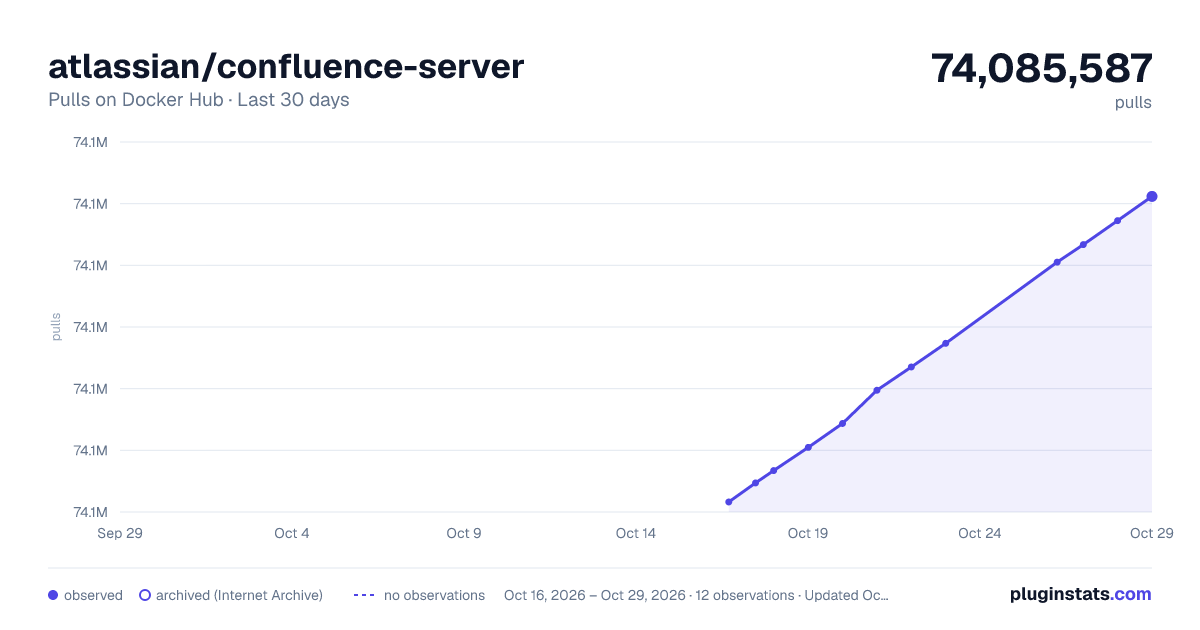

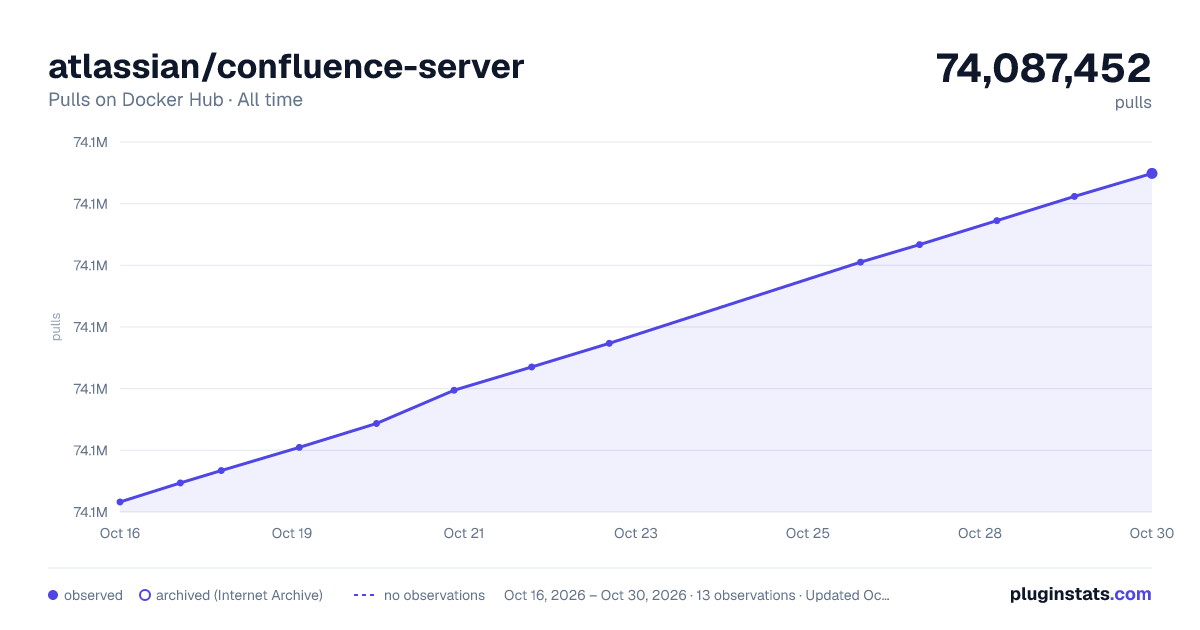

Adoption over time
7/30/90-day growth
Ranking history
Listing placement
Filled points are observed values; hollow points come from Internet Archive snapshots of the listing page. Dashed segments span periods with no observations — values between points are not interpolated.
Each band is one page of 20. Pulls on a linear scale. Placement is projected from pulls, so it can differ from the marketplace's own sort order. Hover a dot to see the listing.
Recent observations
Full history (5)Similar Docker Hub plugins
All 20 atlassian/confluence-server alternativesData source
Cumulative pull counts and stars come from the public Docker Hub API. Pulls count image downloads (including automated CI pulls), not installs or users.
Listing: https://hub.docker.com/r/atlassian/confluence-server. First seen Oct 16, 2026; last successful collection Oct 20, 2026. See the methodology.