 PluginStats
jenkins/jenkinsfile-runner pulls statistics
By jenkins (33 listings) · Docker Hub
Jenkinsfile Runner packages
jenkins/jenkinsfile-runner has 57,096 recorded pulls on Docker Hub.
It ranks #492 of 1,263 tracked Docker Hub listings by pulls.
PluginStats has 3 daily observations since Oct 16, 2026; the latest is from Oct 18, 2026.
About jenkins/jenkinsfile-runner
= Jenkinsfile Runner (Incubating project) :toc: :toc-placement: preamble :toclevels: 3
https://github.com/jenkinsci/jenkinsfile-runner/releases/latest[image:https://img.shields.io/github/v/release/jenkinsci/jenkinsfile-runner?include_prereleases&label=changelog[GitHub release (latest by date including pre-releases)]] https://hub.docker.com/r/jenkins/jenkinsfile-runner[image:https://img.shields.io/docker/pulls/jenkins/jenkinsfile-runner?label=docker%20pulls%20%28vanilla%29[Docker Pulls]] https://github.com/jenkinsci/jenkinsfile-runner/graphs/contributors[image:https://img.shields.io/github/contributors/jenkinsci/jenkinsfile-runner[GitHub contributors]] https://gitter.im/jenkinsci/jenkinsfile-runner[image:https://badges.gitter.im/jenkinsci/jenkinsfile-runner.svg[Gitter]]
Jenkinsfile Runner packages Jenkins pipeline execution engine as a command line tool or as a Docker image.
== Use-cases
Target use cases include but not limited to:
• Using Jenkins in a Function-as-a-Service context. • Assist editing and testing Jenkins Pipeline definitions and libraries locally. • Integration testing of Pipelines.
== Quick Demo
The demo below demonstrates running of a simple Pipeline with Jenkinsfile Runner. It is based on the _Vanilla_ distribution which includes the minimum required set of plugins for running pipelines.
image:./demo/cwp/recording.gif[Jenkinsfile Runner Demo]
See link:./demo/cwp/[this directory] for the source codes of the demo. There are more demos available in the project.
== Usage in command-line
Jenkinsfile Runner can be run in the command line or in Docker. To run it in the command line follow these steps:
. Download the Jenkinsfile Runner ZIP archive available in https://github.com/jenkinsci/jenkinsfile-runner/releases[GitHub Releases]. ** There is also a standalone JAR option available there, but this is a preview-only feature (see https://github.com/jenkinsci/jenkinsfile-runner/issues/350[issue #350]). ** Latest unreleased versions can be also built from source code. See the link:./CONTRIBUTING.adoc[contributing guidelines] if you want to build Jenkinsfile Runner on your own. . Prepare the execution environment . Run the Pipeline
=== Preparation
Jenkinsfile Runner bundle includes the Jenkins core and a minimum set of plugins. More plugins can be installed on-demand. If it is not needed, just skip this step.
To add plugins, create a directory and assemble all the plugins that you’d like to use with the build. There are two ways to do it:
• Use the https://github.com/jenkinsci/plugin-installation-manager-tool[Plugin Installation Manager Tool] to install plugins into a new plugin directory. • Run the Jenkins setup wizard and install the desired set of plugins. After that, the plugins can be retrieved from JENKINS_HOME/plugins.
=== Execution
Say you have your Git repository checked out at ~/foo that contains Jenkinsfile and your source code. You can now run Jenkinsfile Runner like this:
.... jenkinsfile-runner -w -p -f ....
Sample Jenkinsfile:
[source,groovy]
pipeline { agent any stages { stage('Print hello') { steps { echo 'Hello world!' } } } }
Output:
.... $ ./app/target/appassembler/bin/jenkinsfile-runner -w /tmp/jenkins -p /tmp/jenkins_home/plugins -f ~/foo/ -a "param1=Hello¶m2=value2" Started Resume disabled by user, switching to high-performance, low-durability mode. [Pipeline] node [Pipeline] { [Pipeline] // stage [Pipeline] stage [Pipeline] { (Print hello) [Pipeline] echo Hello world! [Pipeline] } [Pipeline] // stage [Pipeline] } [Pipeline] // node [Pipeline] End of Pipeline Finished: SUCCESS ....
The exit code reflects the result of the build. The demo directory includes a few simple examples of Jenkinsfiles you can try out.
=== Command Line Interface (CLI)
The Jenkinsfile Runner CLI provides multiple advanced options and commands. The The CLI is powered by https://picocli.info/[picocli] and https://github.com/kohsuke/args4j[args4j]. To execute a command:
.... jenkinsfile-runner ....
Supported commands:
• run - Runs the Jenkinsfile. This command also runs by default if no subcommands specified. • lint - Lints the Jenkinsfile without actually running it. Only applicable to Declarative Pipeline. • cli - Runs interactive https://www.jenkins.io/doc/book/managing/cli/[Jenkins CLI] from where you can access all standard Jenkins commands provided by the Jenkins core and installed plugins: list-plugins, groovy, groovysh, etc. • generate-completion - Generate bash/zsh completion script for Jenkinsfile Runner. • version - Shows the Jenkinsfile Runner version. • help - Displays help information about the specified command.
All commands provide additional CLI arguments which can be accessed through help methods.
==== Jenkins Instance Arguments
Some CLI commands, including run require a startup of the Jenkins controller instance within Jenkinsfile Runner.
Common arguments:
• -w (--jenkins-war) FILE - Path to exploded Jenkins WAR directory. Depending on packaging, it may contain the entire WAR file or just resources to be loaded by the WAR file, for example Groovy hooks or extra libraries. • -jv (--jenkins-version) VAL : Jenkins version to use if the WAR file is not specified. Defaults to latest LTS. • -p (--plugins) FILE - Plugins required for the run. Should point to either a plugins.txt file or to a /plugins installation directory Defaults to plugins.txt.
Advanced arguments:…
Description from the Docker Hub listing.
Where jenkins/jenkinsfile-runner sits in the listing
Each band is one page of 20. Pulls on a log scale. Placement is projected from pulls, so it can differ from the marketplace's own sort order. Hover a dot to see the listing.


Charts
Images: 30d · 1y · all time · 1600×900 dark
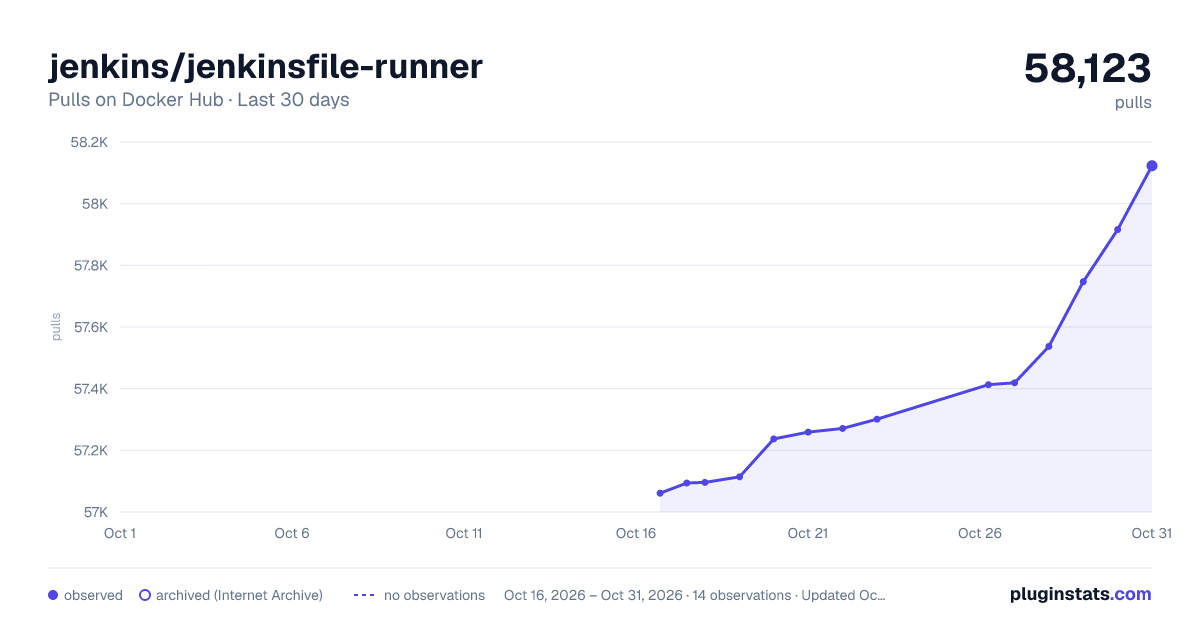
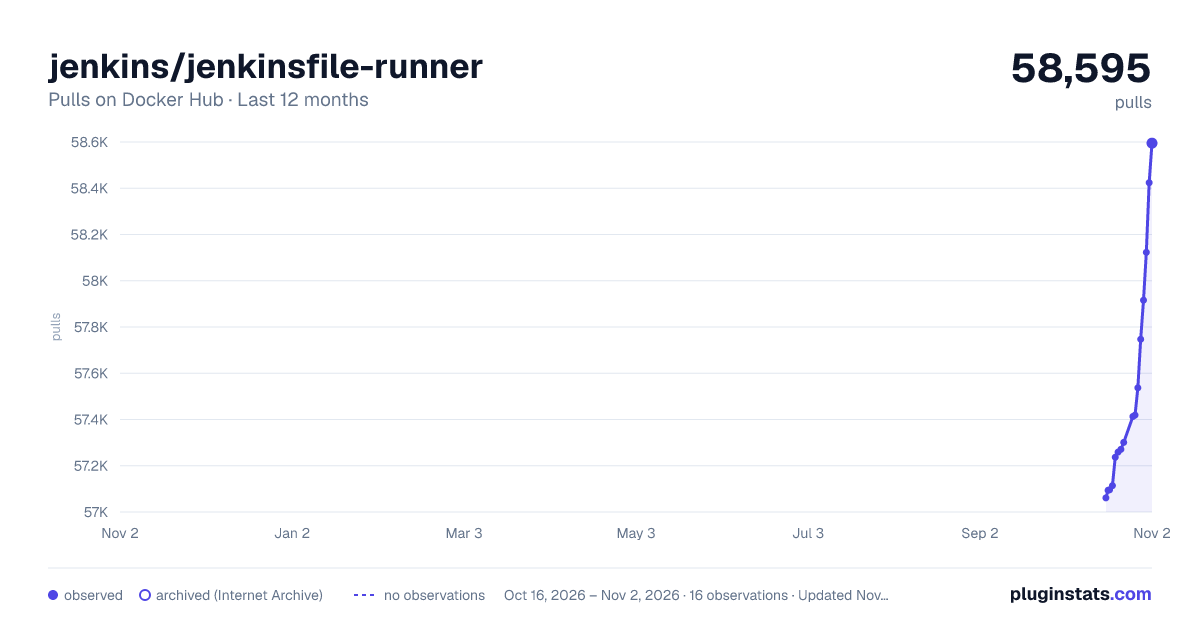
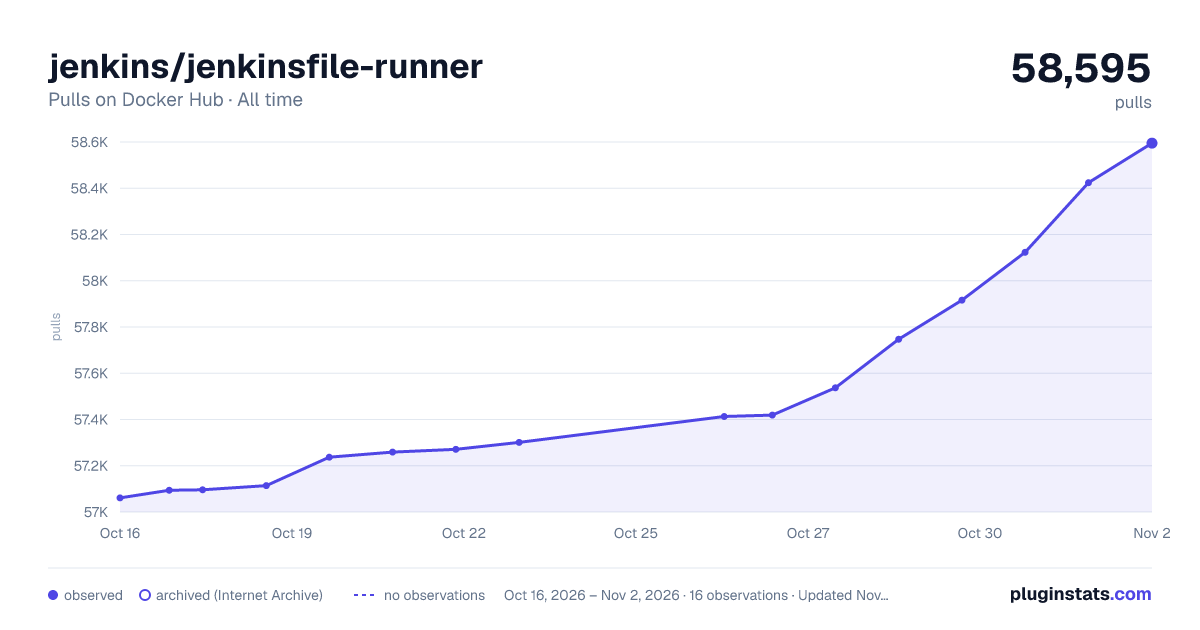

Adoption over time


7/30/90-day growth


Filled points are observed values; hollow points come from Internet Archive snapshots of the listing page. Dashed segments span periods with no observations — values between points are not interpolated.
Recent observations
Full history (3)Similar Docker Hub plugins
Data source
Cumulative pull counts and stars come from the public Docker Hub API. Pulls count image downloads (including automated CI pulls), not installs or users.
Listing: https://hub.docker.com/r/jenkins/jenkinsfile-runner. First seen Oct 16, 2026; last successful collection Oct 18, 2026. See the methodology.