 PluginStats
mcp/box pulls statistics
By mcp (100 listings) · Docker Hub · Machine learning & AI
An MCP server capable of interacting with the Box API
mcp/box has 18,564 recorded pulls on Docker Hub.
It ranks #703 of 1,263 tracked Docker Hub listings by pulls.
PluginStats has 3 daily observations since Oct 16, 2026; the latest is from Oct 18, 2026.
About mcp/box
Box MCP Server
An MCP server capable of interacting with the Box API.
What is an MCP Server?
MCP Info
Attribute|Details| |-|-| Docker Image|mcp/box Author|dgageot Repository|https://github.com/dgageot/mcp-server-box
Image Building Info
Attribute|Details| |-|-| Dockerfile|https://github.com/dgageot/mcp-server-box/blob/ec5b6680117610028d4320c9463b66309d95452d/Dockerfile Commit|ec5b6680117610028d4320c9463b66309d95452d Docker Image built by|Docker Inc. Docker Scout Health Score| Verify Signature|COSIGN_REPOSITORY=mcp/signatures cosign verify mcp/box --key https://raw.githubusercontent.com/docker/keyring/refs/heads/main/public/mcp/latest.pub Licence|
Available Tools (12)
Tools provided by this Server|Short Description -|- box_ai_extract_data|" Extract data from a single file in Box using AI.| box_ask_ai_tool|Ask box ai about a file in Box.| box_ask_ai_tool_multi_file|Use Box AI to analyze and respond to a prompt based on the content of multiple files.| box_authorize_app_tool|Authorize the Box application.| box_download_file_tool|Download a file from Box and return its content as a string.| box_list_folder_content_by_folder_id|List the content of a folder in Box by its ID.| box_manage_folder_tool|Manage Box folders - create, delete, or update.| box_read_tool|Read the text content of a file in Box.| box_search_folder_by_name|Locate a folder in Box by its name.| box_search_tool|Search for files in Box with the given query.| box_upload_file_tool|Upload content as a file to Box.| box_who_am_i|Get the current user's information.|
Tools Details
Tool: box_ai_extract_data
" Extract data from a single file in Box using AI. Parameters|Type|Description -|-|- fields|string| file_id|string|
Tool: box_ask_ai_tool
Ask box ai about a file in Box. Parameters|Type|Description -|-|- file_id|string| prompt|string|
Tool: box_ask_ai_tool_multi_file
Use Box AI to analyze and respond to a prompt based on the content of multiple files.
This tool allows users to query Box AI with a specific prompt, leveraging the content of multiple files stored in Box. The AI processes the files and generates a response based on the provided prompt. Parameters|Type|Description -|-|- file_ids|array| prompt|string|
Tool: box_authorize_app_tool
Authorize the Box application. Start the Box app authorization process
return: str: Message
Tool: box_download_file_tool
Download a file from Box and return its content as a string. Supports text files (returns content directly) and images (returns base64-encoded). Other file types will return an error message. Optionally saves the file locally. Parameters|Type|Description -|-|- file_id|string| save_file|boolean *optional*| save_path|string *optional*|
Tool: box_list_folder_content_by_folder_id
List the content of a folder in Box by its ID. Parameters|Type|Description -|-|- folder_id|string| is_recursive|string|
Tool: box_manage_folder_tool
Manage Box folders - create, delete, or update. Parameters|Type|Description -|-|- action|string| description|string *optional*| folder_id|string *optional*| name|string *optional*| parent_id|string *optional*| recursive|boolean *optional*|
Tool: box_read_tool
Read the text content of a file in Box. Parameters|Type|Description -|-|- file_id|string|
Tool: box_search_folder_by_name
Locate a folder in Box by its name. Parameters|Type|Description -|-|- folder_name|string|
Tool: box_search_tool
Search for files in Box with the given query. Parameters|Type|Description -|-|- query|string| ancestor_folder_ids|string *optional*| file_extensions|string *optional*| where_to_look_for_query|string *optional*|
Tool: box_upload_file_tool
Upload content as a file to Box. Parameters|Type|Description -|-|- content|string| file_name|string| folder_id|string *optional*|
Tool: box_who_am_i
Get the current user's information. This is also useful to check the connection status.
return: str: The current user's information.
Use this MCP Server
Why is it safer to run MCP Servers with Docker?
Description from the Docker Hub listing.
Where mcp/box sits in the listing
Each band is one page of 20. Pulls on a log scale. Placement is projected from pulls, so it can differ from the marketplace's own sort order. Hover a dot to see the listing.


Charts
Images: 30d · 1y · all time · 1600×900 dark
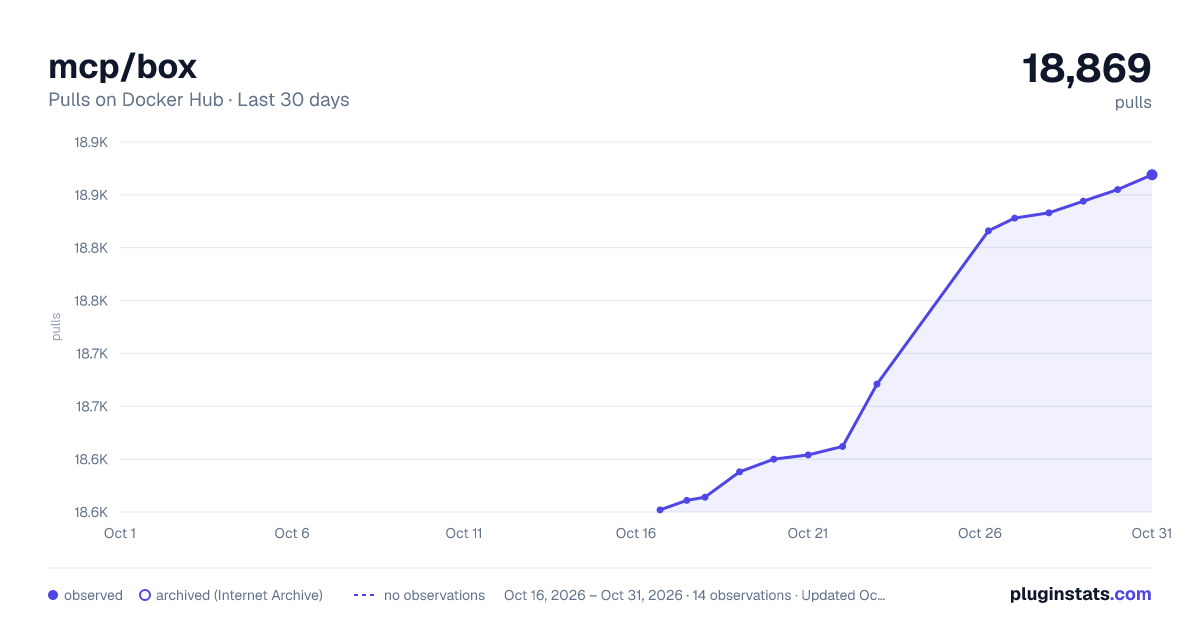
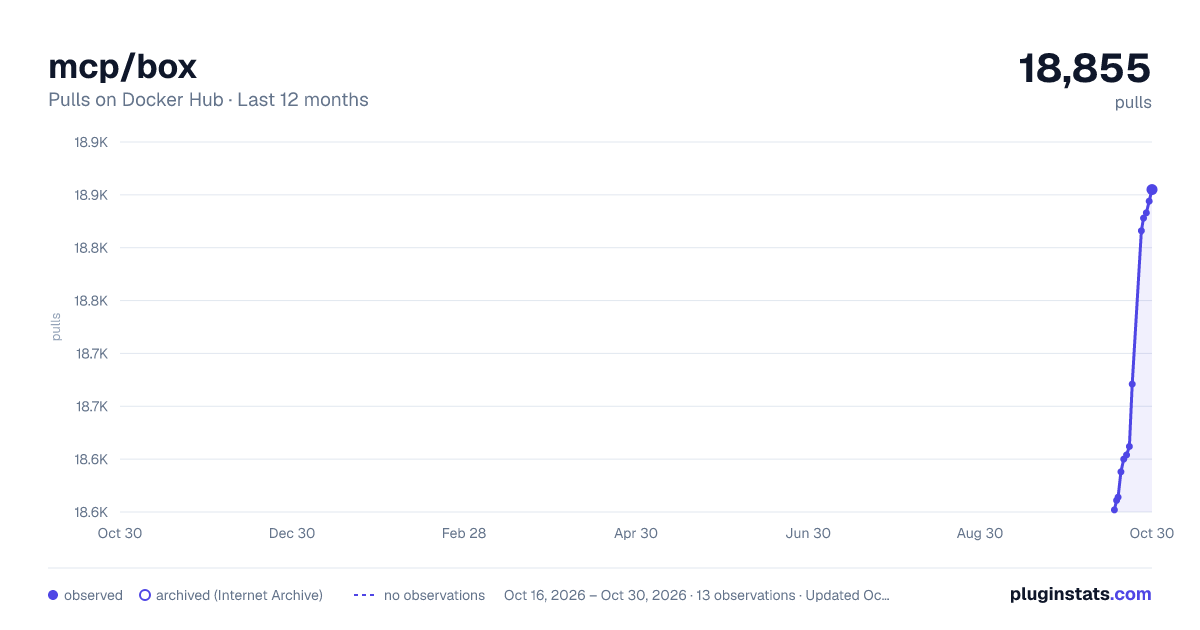
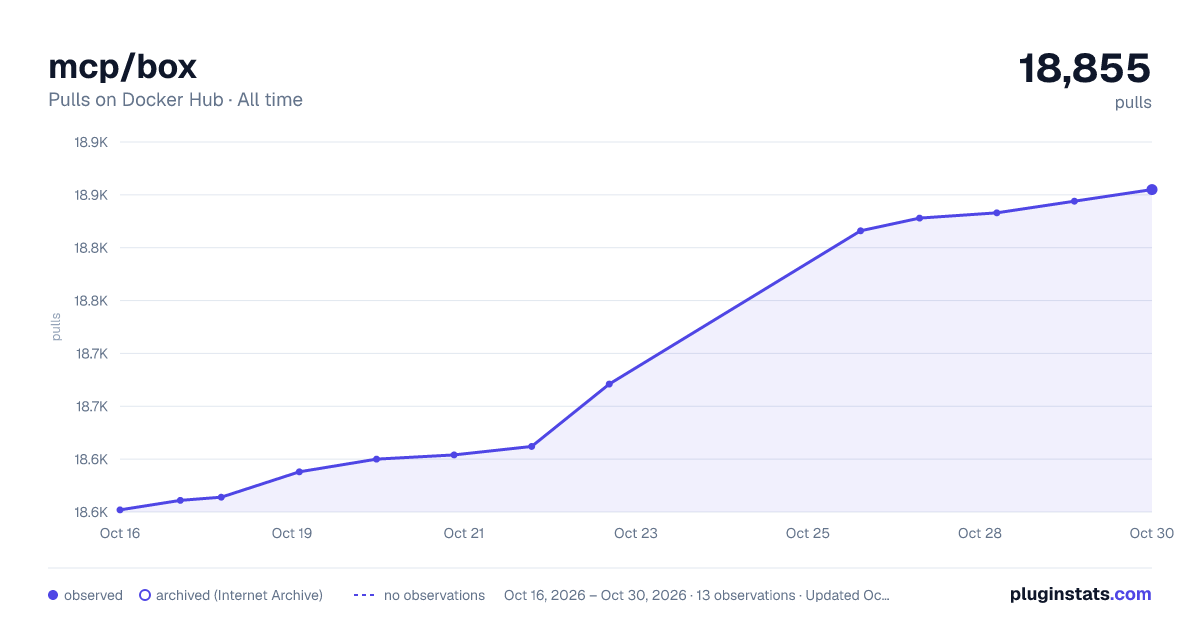

Adoption over time


7/30/90-day growth


Filled points are observed values; hollow points come from Internet Archive snapshots of the listing page. Dashed segments span periods with no observations — values between points are not interpolated.
Recent observations
Full history (3)Similar Docker Hub Machine learning & AI plugins
Data source
Cumulative pull counts and stars come from the public Docker Hub API. Pulls count image downloads (including automated CI pulls), not installs or users.
Listing: https://hub.docker.com/r/mcp/box. First seen Oct 16, 2026; last successful collection Oct 18, 2026. See the methodology.