 PluginStats
bitnami/mcp-mongodb pulls statistics
By bitnami (100 listings) · Docker Hub · Databases & storage
Bitnami Secure Image for mcp-mongodb
bitnami/mcp-mongodb has 19,111 recorded pulls on Docker Hub, ranking #694 of 1,265 tracked listings.
About bitnami/mcp-mongodb
Bitnami Secure Image for MongoDB® MCP Server
Model Context Protocol server that connects MCP-compatible clients to MongoDB® databases and Atlas clusters for querying, management, and tooling
Overview of MongoDB® MCP Server Trademarks: This software listing is packaged by Bitnami. The respective trademarks mentioned in the offering are owned by the respective companies, and use of them does not imply any affiliation or endorsement.
<a id="tl-dr"></a> TL;DR
docker run --name mcp-mongodb REGISTRY_NAME/bitnami/mcp-mongodb:latest
Note: You need to substitute the
REGISTRY_NAMEplaceholder with a reference to your container registry.
<a id="supported-tags-and-respective-dockerfile"></a> Supported tags and respective Dockerfile links
Learn more about the Bitnami tagging policy and the difference between rolling tags and immutable tags in our documentation page.
<a id="get-this-image"></a> Get this image
The Bitnami MongoDB® MCP Server Docker image is only available to Bitnami Secure Images customers.
<a id="why-use-a-non-root"></a> Why use a non-root container?
Non-root container images add an extra layer of security and are generally recommended for production environments. However, because they run as a non-root user, privileged tasks are typically off-limits. Learn more about non-root containers in our docs.
<a id="configuration"></a> Configuration
The following section describes how to run commands
<a id="running-commands"></a> Running commands
To run commands inside this container, you can use docker run, for example to execute command --help you can follow the example below:
docker run --rm --name mcp-mongodb REGISTRY_NAME/bitnami/mcp-mongodb:latest -- --help
Check the official MongoDB® MCP Server documentation for more information.
<a id="fips-configuration-in-bitnami-secure"></a> FIPS configuration in Bitnami Secure Images
The Bitnami MongoDB® MCP Server Docker image from the Bitnami Secure Images catalog includes extra features and settings to configure the container with FIPS capabilities. You can configure the next environment variables:
OPENSSL_FIPS: whether OpenSSL runs in FIPS mode or not.yes(default),no.
<a id="license"></a> License
Copyright © 2026 Broadcom. The term "Broadcom" refers to Broadcom Inc. and/or its subsidiaries.
Licensed under the Apache License, Version 2.0 (the "License"); you may not use this file except in compliance with the License. You may obtain a copy of the License at
http://www.apache.org/licenses/LICENSE-2.0
Unless required by applicable law or agreed to in writing, software distributed under the License is distributed on an "AS IS" BASIS, WITHOUT WARRANTIES OR CONDITIONS OF ANY KIND, either express or implied. See the License for the specific language governing permissions and limitations under the License.
Description from the Docker Hub listing.
README badge
Show your rank in a README or on your website. The badge updates automatically.
Charts
Images: 30d · 1y · all time · 1600×900 dark
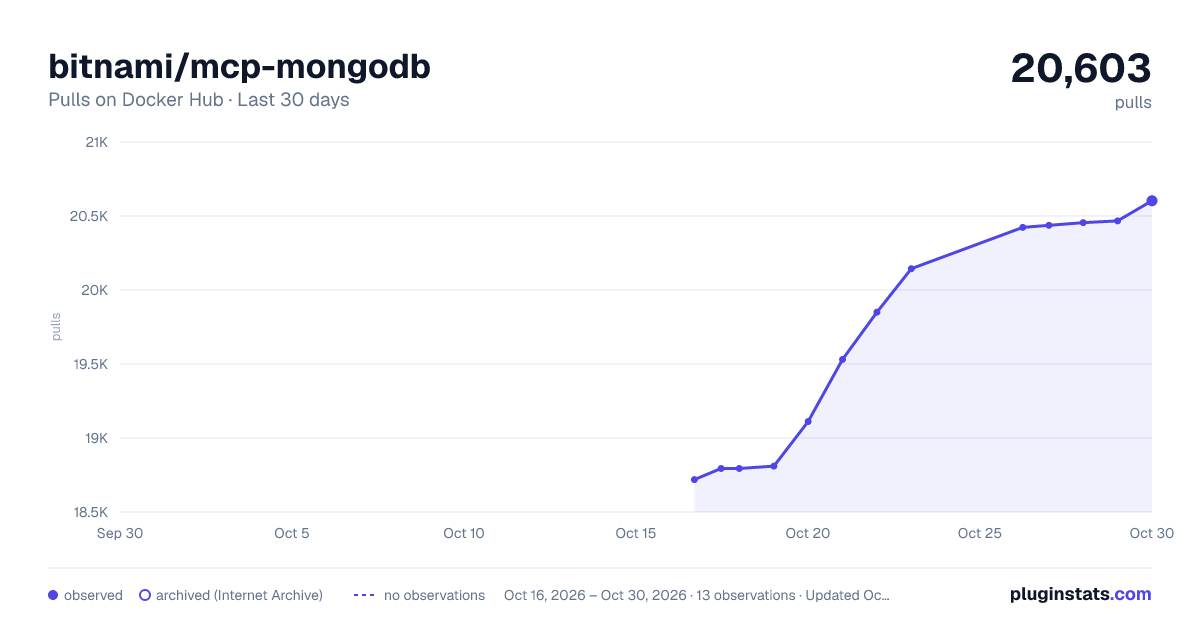
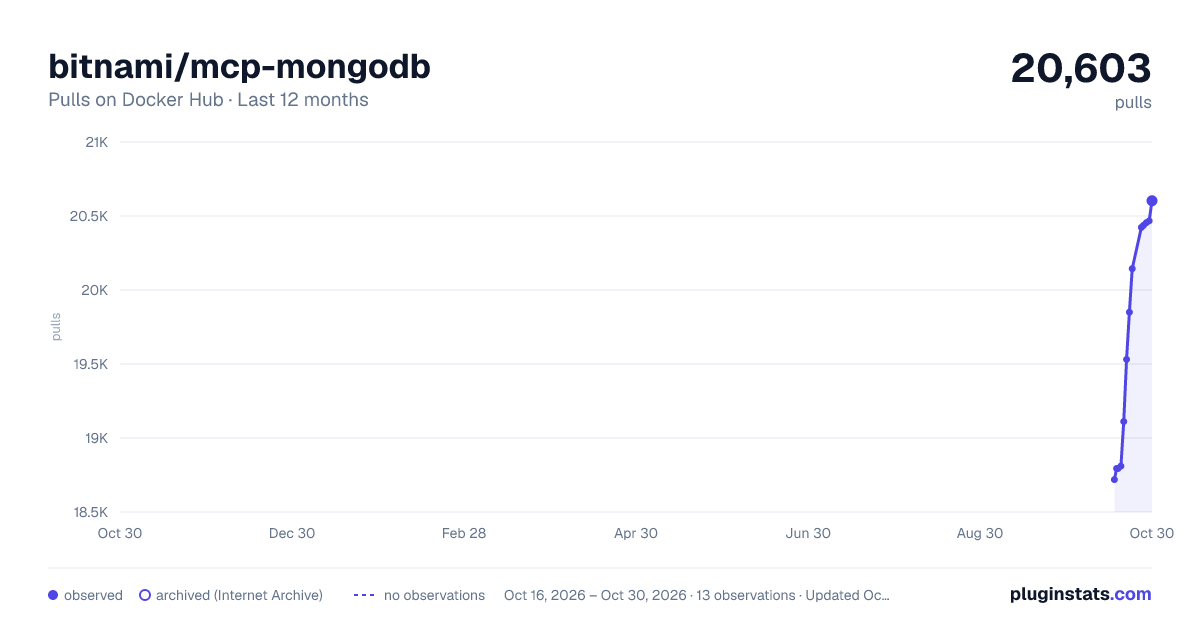
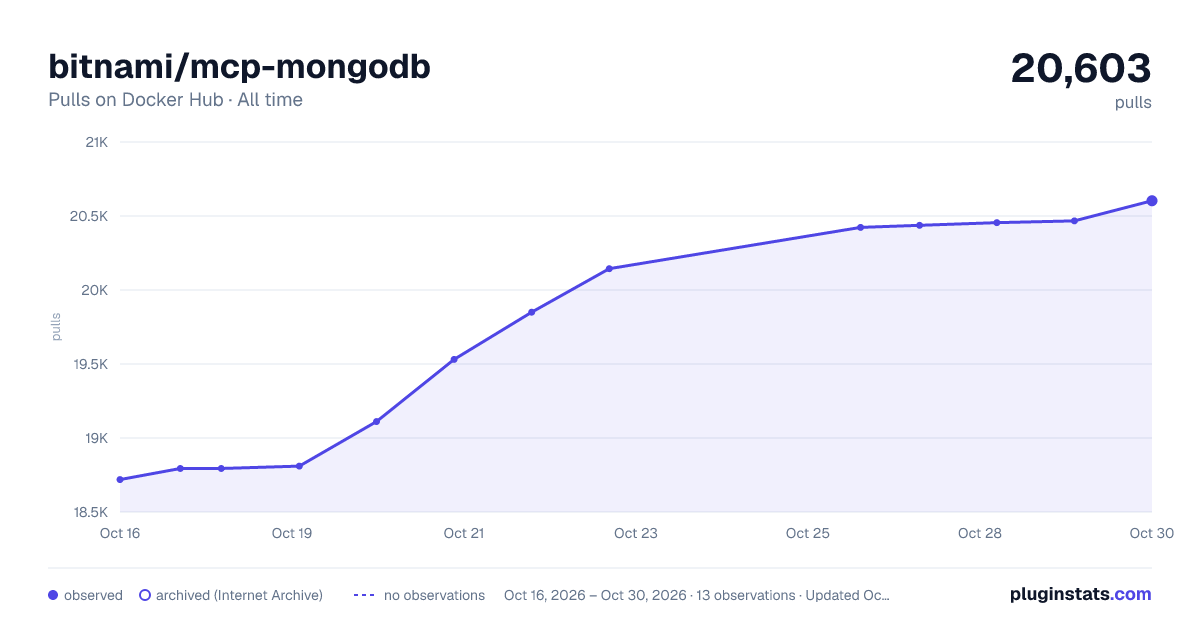

Adoption over time
7/30/90-day growth
Ranking history
Listing placement
Listing placement
Listing placement
Filled points are observed values; hollow points come from Internet Archive snapshots of the listing page. Dashed segments span periods with no observations — values between points are not interpolated.
Each band is one page of 20. Pulls on a linear scale. Placement is projected from pulls, so it can differ from the marketplace's own sort order. Hover a dot to see the listing.
Recent observations
Full history (5)Similar Docker Hub Databases & storage plugins
All 20 bitnami/mcp-mongodb alternativesData source
Cumulative pull counts and stars come from the public Docker Hub API. Pulls count image downloads (including automated CI pulls), not installs or users.
Listing: https://hub.docker.com/r/bitnami/mcp-mongodb. First seen Oct 16, 2026; last successful collection Oct 20, 2026. See the methodology.