 PluginStats
localstack/snowflake-next pulls statistics
By localstack (61 listings) · Docker Hub
Preview of the next-generation LocalStack for Snowflake — a local Snowflake emulator.
localstack/snowflake-next has 36,131 recorded pulls on Docker Hub.
It ranks #578 of 1,263 tracked Docker Hub listings by pulls.
PluginStats has 3 daily observations since Oct 16, 2026; the latest is from Oct 18, 2026.
About localstack/snowflake-next
Overview • Installation • Quickstart • Configuration • Tags • Support • License • 📖 Docs • ☑️ Feature coverage
Overview
localstack/snowflake-next is a preview of the next generation of LocalStack for Snowflake — a Snowflake-compatible emulator that runs on your machine or in CI, so software and data teams can develop and test data pipelines without spending Snowflake Cloud credits.
It is a ground-up reimplementation of localstack/snowflake with the same goal: existing Snowflake clients connect unmodified. The image speaks the Snowflake driver protocol, so the Python connector, JDBC, .NET, Node.js, Go, SnowSQL, the Snowflake CLI, dbt, and SQLAlchemy all point at it by changing the host only.
☑️ Feature coverage — what the emulator supports today.
Supported today:
• Query operations on warehouses, databases, schemas, tables, and views • Semi-structured and structured data — VARIANT, OBJECT, ARRAY, and structured types • Stages, PUT/GET, and COPY INTO — internal stages plus external stages on Amazon S3 • UDFs and stored procedures in SQL, JavaScript, Python, and Java, including user-defined aggregates • Streaming ingest with Snowpipe and Snowpipe Streaming • Iceberg tables — managed, dynamic, and externally managed • Time Travel, UNDROP, dynamic tables, materialized views, streams, and tasks • Governance — RBAC, masking policies, row access policies, and tags • Geospatial types (GEOGRAPHY, GEOMETRY) • … and more!
The feature coverage catalog lists every function (with signatures), SQL command, query feature and data type as supported, partial or not supported — every one Snowflake's SQL reference documents, so the gaps are visible alongside the coverage. It is generated from the emulator itself for every :latest build, and is also available as JSON for tooling and agents.
Being a preview, coverage is still expanding and behavior may change between releases — the LocalStack for Snowflake docs describe the current generally-available emulator, localstack/snowflake, which remains the image to use for established workflows. Most of it applies here too; where the two differ, this preview is the one still moving.
Installation
The image is public — no registry login needed:
NOTE: the emulator requires a valid LocalStack auth token whose license carries the Snowflake preview entitlement, passed as the LOCALSTACK_AUTH_TOKEN environment variable (lstk passes it for you). It checks the license at startup and exits without serving if the token is missing or not entitled. Find your token at app.localstack.cloud, see the auth token guide for details, and talk to us to get access to the preview.
Start the emulator — lstk (recommended)
lstk 1.3.0+ is the recommended way to start the emulator: one command pulls the image, passes your auth token, and starts the container:
--image is not saved to the lstk config, so pass it on each lstk start. Add --persist to keep data across restarts; lstk status, lstk logs --follow, and lstk stop manage the container.
Start the emulator — docker
Publish both ports. The container serves TLS and plain HTTP on each: 4566 is LocalStack's usual port, and 443 is what lets clients connect with the connector defaults and the browser reach the worksheet at https://snowflake.localhost.localstack.cloud/.
To serve different ports, set GATEWAY_LISTEN — a comma-separated list, one listener per entry — and publish them the same way:
Mapping a host port onto a *different* container port needs nothing else: result downloads and stage transfers follow the address each client connected on.
Start the emulator — docker-compose
Create a docker-compose.yml file with the specified content:
Then start it with:
The container bundles everything it needs and initializes its data directory on first boot. State is ephemeral by default — like every other LocalStack emulator, a restart comes up clean. Set PERSISTENCE=1 *and* mount /var/lib/localstack — as in the compose file above, or with a named volume (-v snowflake-next-data:/var/lib/localstack) — to keep your databases across restarts. Mounting the volume without PERSISTENCE=1 does not persist anything.
Everything the emulator writes into a bind-mounted volume belongs to the user that owns the mounted directory — the container adopts that uid instead of writing as its own — so removing the directory afterwards never needs sudo.
Web interface
Once the container is up, open https://snowflake.localhost.localstack.cloud/ for the built-in web interface: browse databases, schemas, and tables, run queries in a SQL worksheet, and review query history. On a different port, use the URL the startup log prints. For Docker compose host-port remapping, set LOCALSTACK_HOST=: to correct that worksheet hint; lstk already sets it. Only the port is used, with the effective Snowflake hostname and TLS scheme, and the constructed URL always includes the port (even :443). An effective SNOWFLAKE_API_ENDPOINT wins verbatim; absent a usable LOCALSTACK_HOST port, the hint uses the first bound port. GET /_localstack/health reports the running version.
Quickstart
After starting the emulator, use the Snowflake Python connector to run a query against it:
The Python and .NET connectors both require a non-empty account. account=test reaches account TEST, while *.sf.sql init scripts seed account SNOWFLAKE by default. To have your init scripts seed the account these snippets use, start the emulator with SNOWFLAKE_INIT_ACCOUNT=TEST, or connect with account=snowflake instead.
.NET 10 (Snowflake.Data 4.x)
Use HTTPS, the default and recommended scheme. For an image published on host port 4566, this is Island's known-working connection string:
As with the Python snippet, init scripts seed this account=test connection only when the emulator runs with SNOWFLAKE_INIT_ACCOUNT=TEST.…
Description from the Docker Hub listing.
Where localstack/snowflake-next sits in the listing
Each band is one page of 20. Pulls on a log scale. Placement is projected from pulls, so it can differ from the marketplace's own sort order. Hover a dot to see the listing.


Charts
Images: 30d · 1y · all time · 1600×900 dark
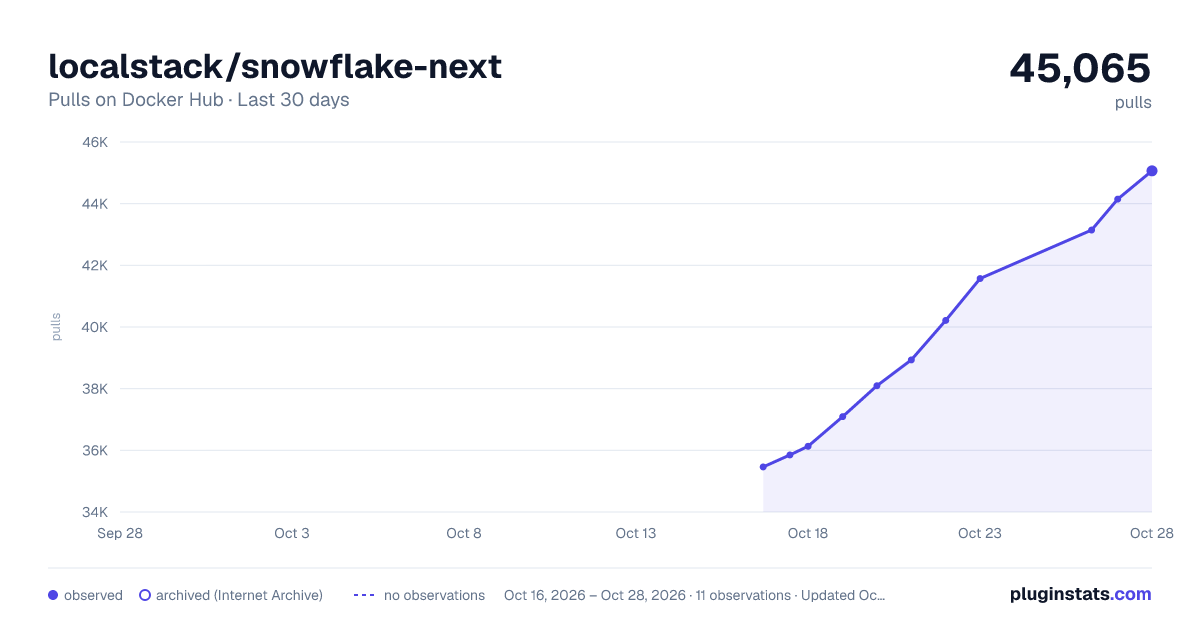
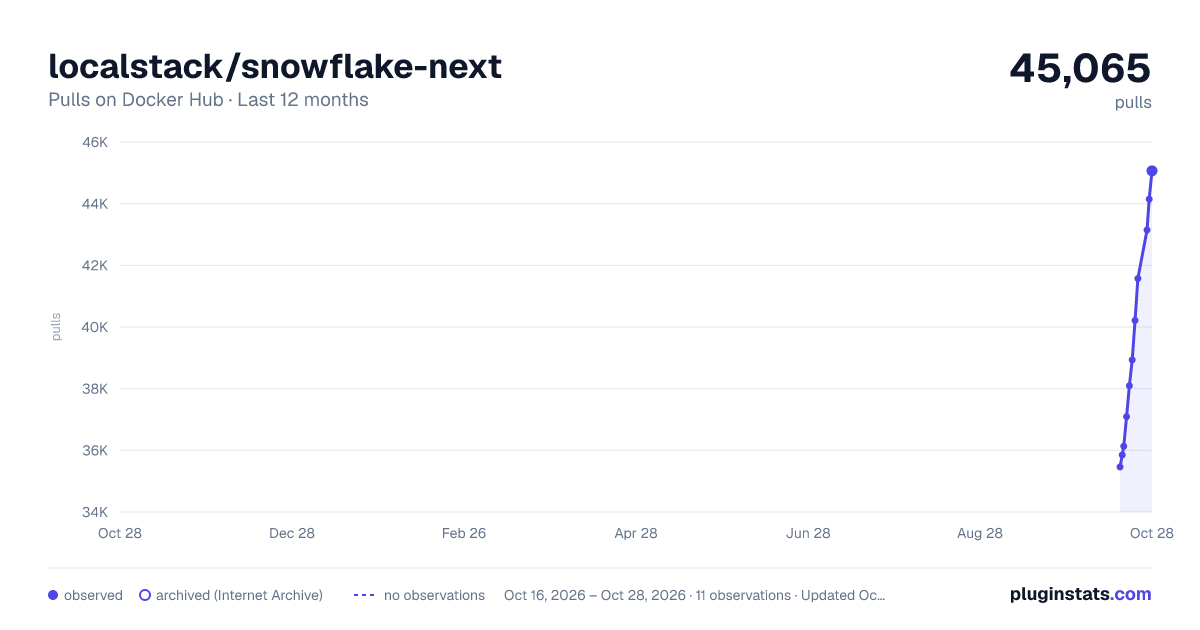
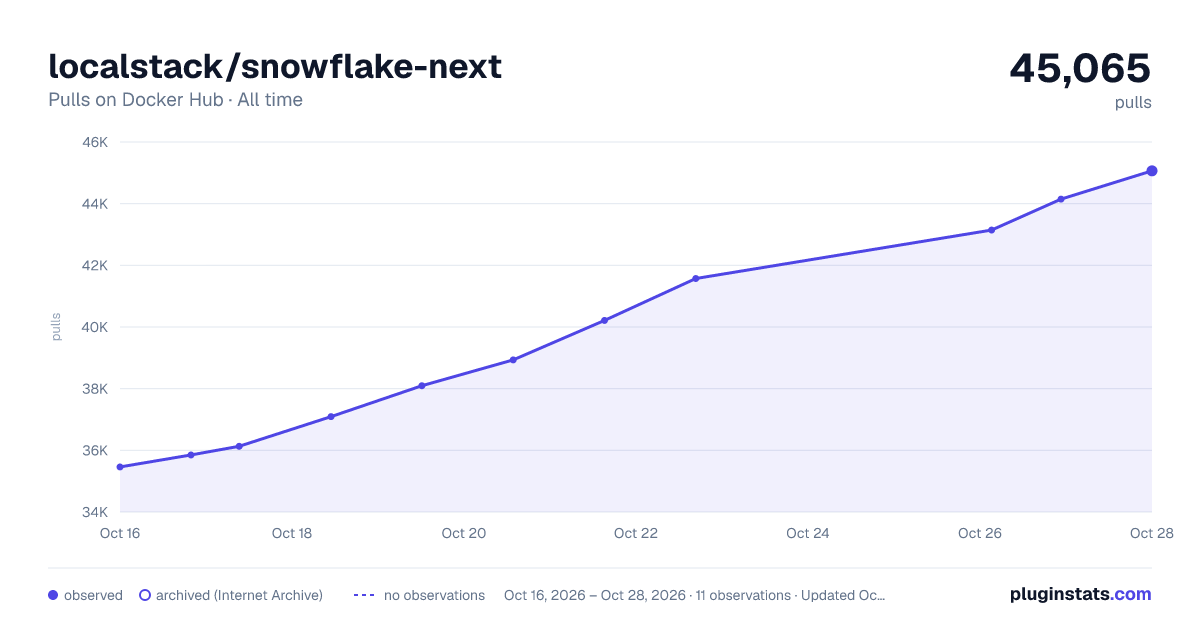

Adoption over time


7/30/90-day growth


Filled points are observed values; hollow points come from Internet Archive snapshots of the listing page. Dashed segments span periods with no observations — values between points are not interpolated.
Recent observations
Full history (3)Similar Docker Hub plugins
Data source
Cumulative pull counts and stars come from the public Docker Hub API. Pulls count image downloads (including automated CI pulls), not installs or users.
Listing: https://hub.docker.com/r/localstack/snowflake-next. First seen Oct 16, 2026; last successful collection Oct 18, 2026. See the methodology.