 PluginStats
espocrm pulls statistics
Docker Hub · Content management system
EspoCRM is a highly customizable open source CRM software.
espocrm has 89,955 recorded pulls on Docker Hub.
It ranks #414 of 1,263 tracked Docker Hub listings by pulls.
PluginStats has 3 daily observations since Oct 16, 2026; the latest is from Oct 18, 2026.
About espocrm
Quick reference
• Maintained by: EspoCRM • Where to get help: GitHub Issues, EspoCRM Documentation, EspoCRM Community
Supported tags and respective Dockerfile links
• apache, apache-trixie, 10.0.10-apache, 10.0.10-apache-trixie, 10.0-apache, 10.0-apache-trixie, 10-apache, 10-apache-trixie, latest, 10.0.10, 10.0, 10 • fpm, fpm-trixie, 10.0.10-fpm, 10.0.10-fpm-trixie, 10.0-fpm, 10.0-fpm-trixie, 10-fpm, 10-fpm-trixie • fpm-alpine, fpm-alpine3.23, 10.0.10-fpm-alpine, 10.0.10-fpm-alpine3.23, 10.0-fpm-alpine, 10.0-fpm-alpine3.23, 10-fpm-alpine, 10-fpm-alpine3.23
Quick reference (cont.)
• Where to file issues: https://github.com/espocrm/espocrm-docker/issues • Supported architectures: (more info) amd64, arm32v5, arm32v6, arm32v7, arm64v8, i386 • Published image artifact details: repo-info repo's repos/espocrm/ directory (history) (image metadata, transfer size, etc) • Image updates: official-images repo's library/espocrm label official-images repo's library/espocrm file (history) • Source of this description: docs repo's espocrm/ directory (history)
What is EspoCRM?
EspoCRM is a highly customizable open source CRM software that allows users to see, enter and evaluate all your company relationships regardless of the type. People, companies, projects or opportunities - all in an easy and intuitive interface.
How to use this image
The basic pattern for starting an espocrm instance is:
Quick start
Then, access it via http://localhost:8080 or http://YOUR_IP_ADDRESS:8080 with credentials admin and your_admin_password.
Custom site URL
To set a custom IP address or domain, pass the ESPOCRM_SITE_URL environment variable when running the container.
Then, access it via http://192.168.0.100:8080 with credentials admin and your_admin_password.
... via docker compose
Example compose.yaml for espocrm:
Run docker compose up, wait for it to initialize completely, and visit http://localhost:8080 or http://YOUR_IP_ADDRESS:8080 (as appropriate).
Traefik
You can read the instructions for installing EspoCRM in conjunction with Traefik in the Docker Compose environment here.
Caddy
You can read the instructions for installing EspoCRM in conjunction with Caddy in the Docker Compose environment here.
Upgrading
Keeping your EspoCRM installation updated ensures you have the latest features, security patches, and bug fixes. The upgrade process differs depending on whether you're using Docker Run or Docker Compose.
Docker Run
To upgrade EspoCRM when using Docker Run:
1\. Pull the latest images:
2\. Stop all running containers:
3\. Remove the old containers:
4\. Run the containers again with the same configuration as your original deployment (using the quick start or step by step commands from the Docker Run section).
Docker Compose
To upgrade EspoCRM when using Docker Compose:
1\. Navigate to your EspoCRM container directory.
2\. Run the command:
Within a few minutes the container will be upgraded to the latest version.
Docker Secrets
To securely pass sensitive information, append _FILE to any supported environment variable. When this suffix is used, the variable's value is read from a file inside the container instead of being specified directly. This can be used with Docker secrets stored in /run/secrets/ files. For example:
Environment variables
These environment variables are used only for the initial installation. If you need to define configuration options at container startup, see Config Environments.
ESPOCRM_DATABASE_PLATFORM
Database platform. The possible values: Mysql or Postgresql. The default value is Mysql.
ESPOCRM_DATABASE_HOST
Database host name for EspoCRM. The default value is espocrm-db.
ESPOCRM_DATABASE_PORT
Database port for EspoCRM. The default value is empty.
ESPOCRM_DATABASE_NAME
Database name for EspoCRM. The default value is espocrm.
ESPOCRM_DATABASE_USER
Database user for EspoCRM. The default value is espocrm.
ESPOCRM_DATABASE_PASSWORD
Database password for EspoCRM. The default value is password.
ESPOCRM_ADMIN_USERNAME
User name for an administrator of EspoCRM. The default value is admin.
ESPOCRM_ADMIN_PASSWORD
User password for an administrator of EspoCRM. The default value is password.
ESPOCRM_SITE_URL
The URL of EspoCRM. This option is very important for normal operating of EspoCRM. Examples: http://192.168.0.100:8080, http://my-crm.local.
Other optional options
The list of possible values and their default values can be found in EspoCRM Administrator panel > Settings.
• ESPOCRM_LANGUAGE • ESPOCRM_DATE_FORMAT • ESPOCRM_TIME_FORMAT • ESPOCRM_TIME_ZONE • ESPOCRM_WEEK_START • ESPOCRM_DEFAULT_CURRENCY • ESPOCRM_THOUSAND_SEPARATOR • ESPOCRM_DECIMAL_MARK
Config Environments
These environment variables are used to define EspoCRM configuration parameters on every container startup. The parameters that can be changed are defined in data/config.php or data/config-internal.php.
Naming
Config environment variables should be converted from camel case. For example:
The exportDisabled config option should be converted to ESPOCRM_CONFIG_EXPORT_DISABLED.
Logger
There are additional options to change the logger:
• ESPOCRM_CONFIG_LOGGER__LEVEL: "DEBUG" • ESPOCRM_CONFIG_LOGGER__MAX_FILE_NUMBER: 30 • ESPOCRM_CONFIG_LOGGER__PATH: "data/logs/espo.log"
Allowed types:
String
Integer
Boolean
Null
Image Variants
The espocrm images come in many flavors, each designed for a specific use case.
espocrm:
This is the defacto image. If you are unsure about what your needs are, you probably want to use this one. It is designed to be used both as a throw away container (mount your source code and start the container to start your app), as well as the base to build other images off of.…
Description from the Docker Hub listing.
Where espocrm sits in the listing
Each band is one page of 20. Pulls on a log scale. Placement is projected from pulls, so it can differ from the marketplace's own sort order. Hover a dot to see the listing.


Charts
Images: 30d · 1y · all time · 1600×900 dark
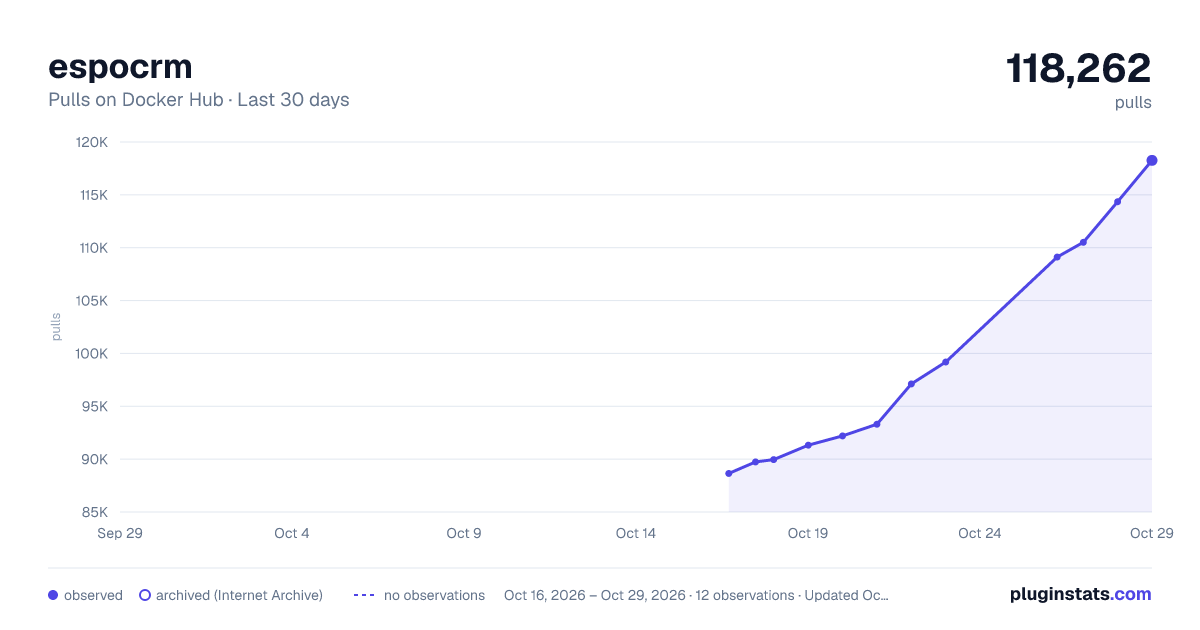
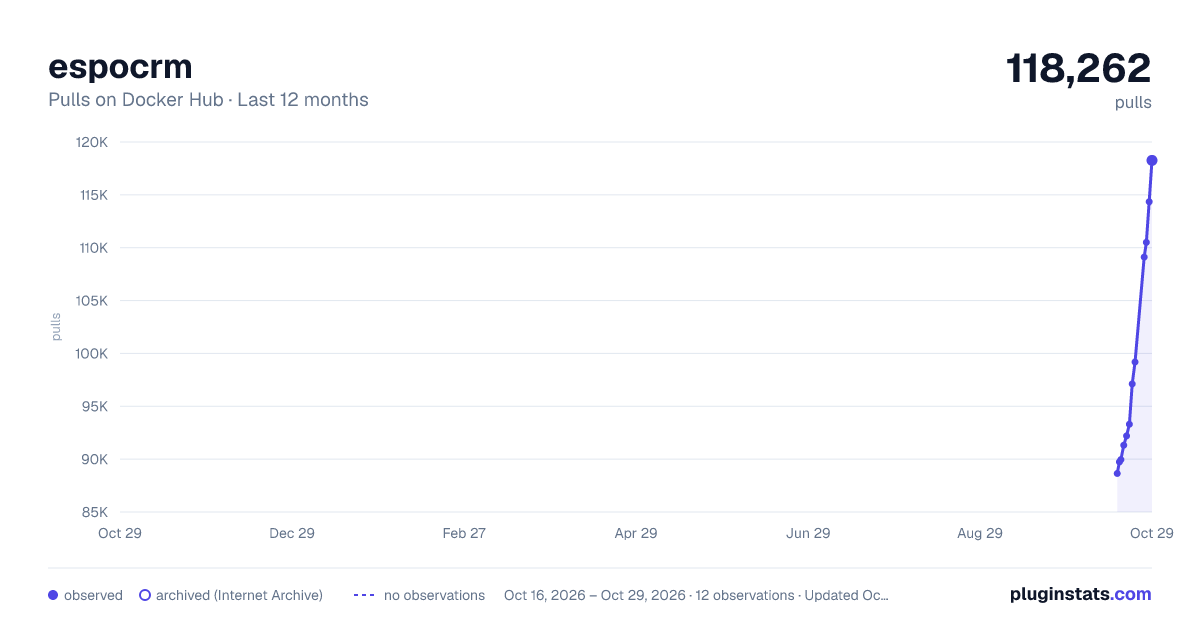
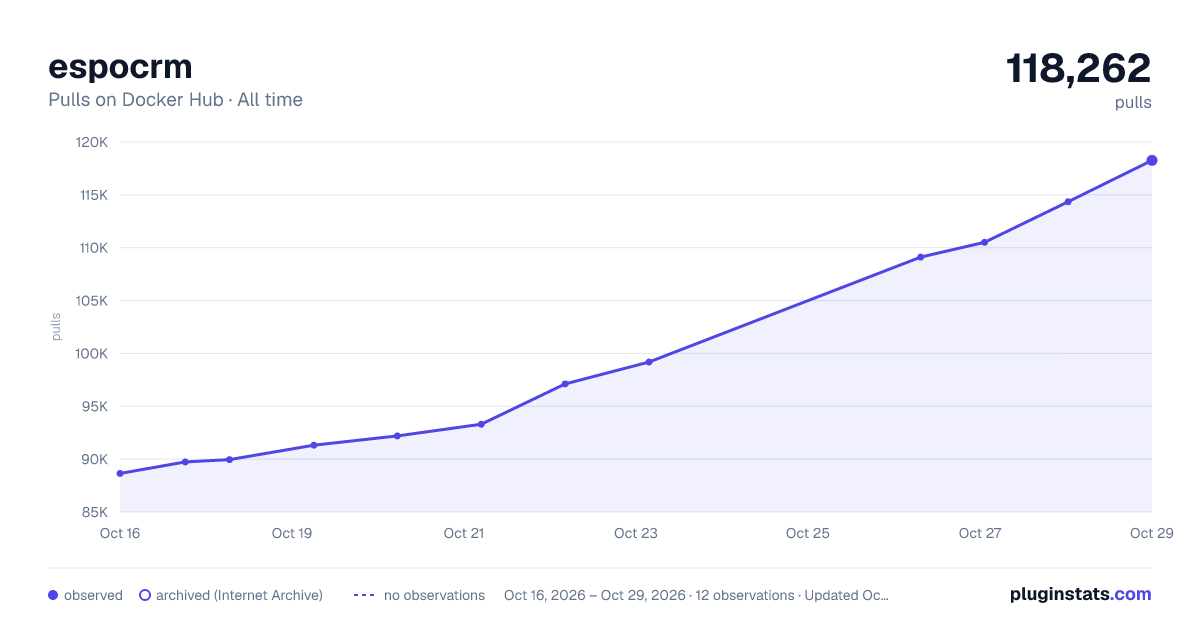

Adoption over time


7/30/90-day growth


Filled points are observed values; hollow points come from Internet Archive snapshots of the listing page. Dashed segments span periods with no observations — values between points are not interpolated.
Recent observations
Full history (3)Similar Docker Hub Content management system plugins
Data source
Cumulative pull counts and stars come from the public Docker Hub API. Pulls count image downloads (including automated CI pulls), not installs or users.
Listing: https://hub.docker.com/_/espocrm. First seen Oct 16, 2026; last successful collection Oct 18, 2026. See the methodology.