 PluginStats
storm pulls statistics
Apache Storm is a free and open source distributed realtime computation system.
storm has 9,345,606 recorded pulls on Docker Hub.
It ranks #138 of 1,263 tracked Docker Hub listings by pulls.
PluginStats has 4 daily observations since Oct 16, 2026; the latest is from Oct 19, 2026.
About storm
Quick reference
• Maintained by: Apache Storm • Where to get help: Apache Storm™ community
Supported tags and respective Dockerfile links
• 3.1.0-jre25, 3.1-jre25, 3.1.0, 3.1, latest • 3.1.0-lite-jre25, 3.1-lite-jre25, 3.1.0-lite, 3.1-lite
Quick reference (cont.)
• Where to file issues: https://issues.apache.org/jira/browse/STORM • Supported architectures: (more info) amd64, arm64v8 • Published image artifact details: repo-info repo's repos/storm/ directory (history) (image metadata, transfer size, etc) • Image updates: official-images repo's library/storm label official-images repo's library/storm file (history) • Source of this description: docs repo's storm/ directory (history)
What is Apache Storm?
Apache Storm is a free and open source distributed realtime computation system. Apache Storm makes it easy to reliably process unbounded streams of data, doing for realtime processing what Hadoop did for batch processing. Apache Storm is simple, can be used with any programming language, and is a lot of fun to use!
Apache Storm has many use cases: realtime analytics, online machine learning, continuous computation, distributed RPC, ETL, and more. Apache Storm is fast: a benchmark clocked it at over a million tuples processed per second per node. It is scalable, fault-tolerant, guarantees your data will be processed, and is easy to set up and operate.
Apache Storm integrates with the queueing and database technologies you already use. An Apache Storm topology consumes streams of data and processes those streams in arbitrarily complex ways, repartitioning the streams between each stage of the computation however needed.
wikipedia.org/wiki/Storm_(event_processor))
How to use this image
Running topologies in local mode
Assuming you have topology.jar in the current directory.
Setting up a minimal Storm cluster
1. Apache Zookeeper is a must for running a Storm cluster. Start it first. Since the Zookeeper "fails fast" it's better to always restart it.
2. The Nimbus daemon has to be connected with the Zookeeper. It's also a "fail fast" system.
3. Finally start a single Supervisor node. It will talk to the Nimbus and Zookeeper.
4. Now you can submit a topology to our cluster.
5. Optionally, you can start the Storm UI.
... via docker compose
Example compose.yaml for storm:
Run docker compose up and wait for it to initialize completely. The Nimbus will be available at http://localhost:6627 or http://host-ip:6627 (as appropriate).
Configuration
This image uses default configuration of the Apache Storm. There are two main ways to change it.
1. Using command line arguments.
2. Assuming you have storm.yaml in the current directory you can mount it as a volume.
Logging
This image uses default logging configuration. All logs go to the /logs directory by default.
Data persistence
No data are persisted by default. For convenience there are /data and /logs directories in the image owned by storm user. Use them accordingly to persist data and logs using volumes.
*Please be noticed that using paths other than those predefined is likely to cause permission denied errors. It's because for security reasons the Storm is running under the non-root storm user.*
License
Apache Storm, Storm, Apache, the Apache feather logo, and the Apache Storm project logo are trademarks of The Apache Software Foundation.
Licensed under the Apache License, Version 2.0.
See license information.
As with all Docker images, these likely also contain other software which may be under other licenses (such as Bash, etc from the base distribution, along with any direct or indirect dependencies of the primary software being contained).
Some additional license information which was able to be auto-detected might be found in the repo-info repository's storm/ directory.
As for any pre-built image usage, it is the image user's responsibility to ensure that any use of this image complies with any relevant licenses for all software contained within.
Description from the Docker Hub listing.
Charts
Images: 30d · 1y · all time · 1600×900 dark
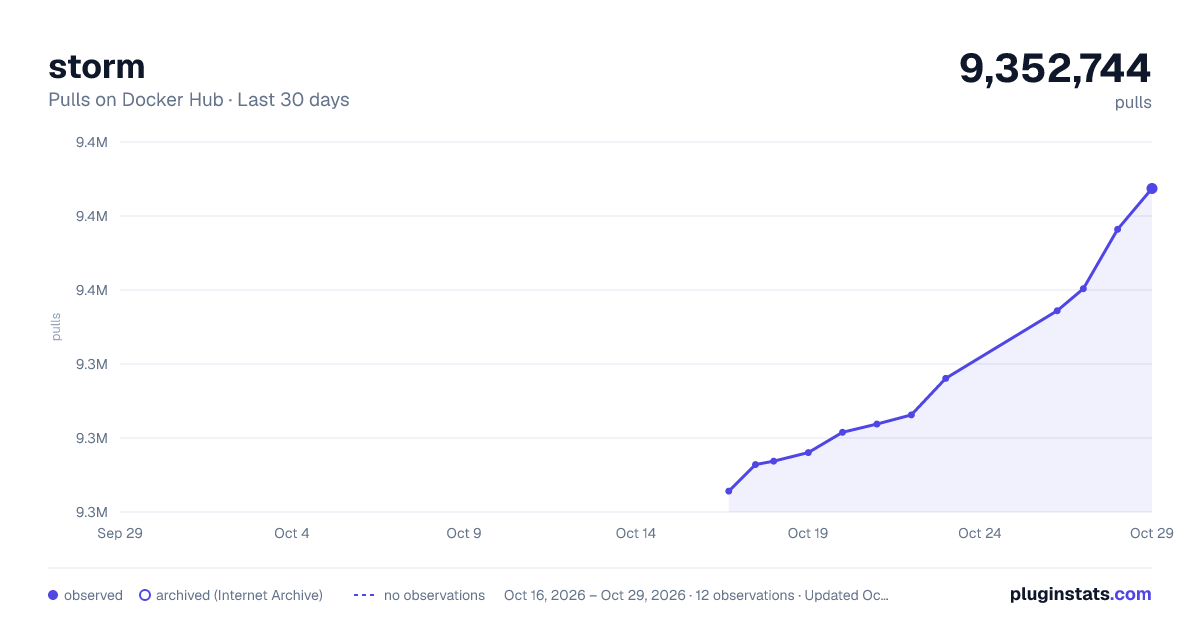
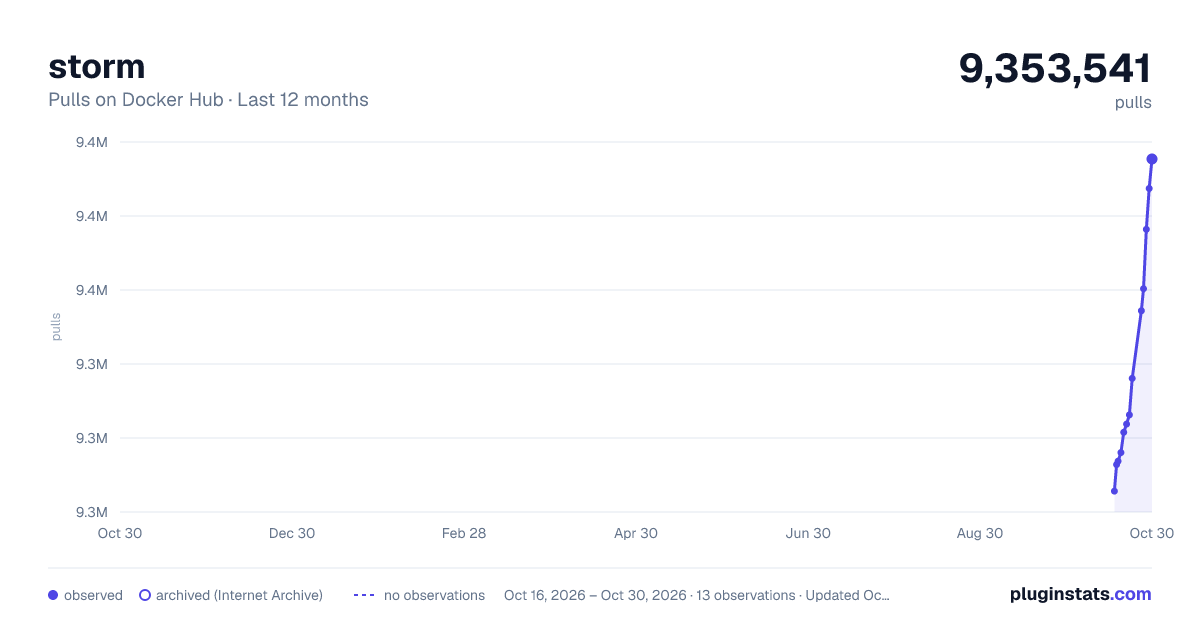
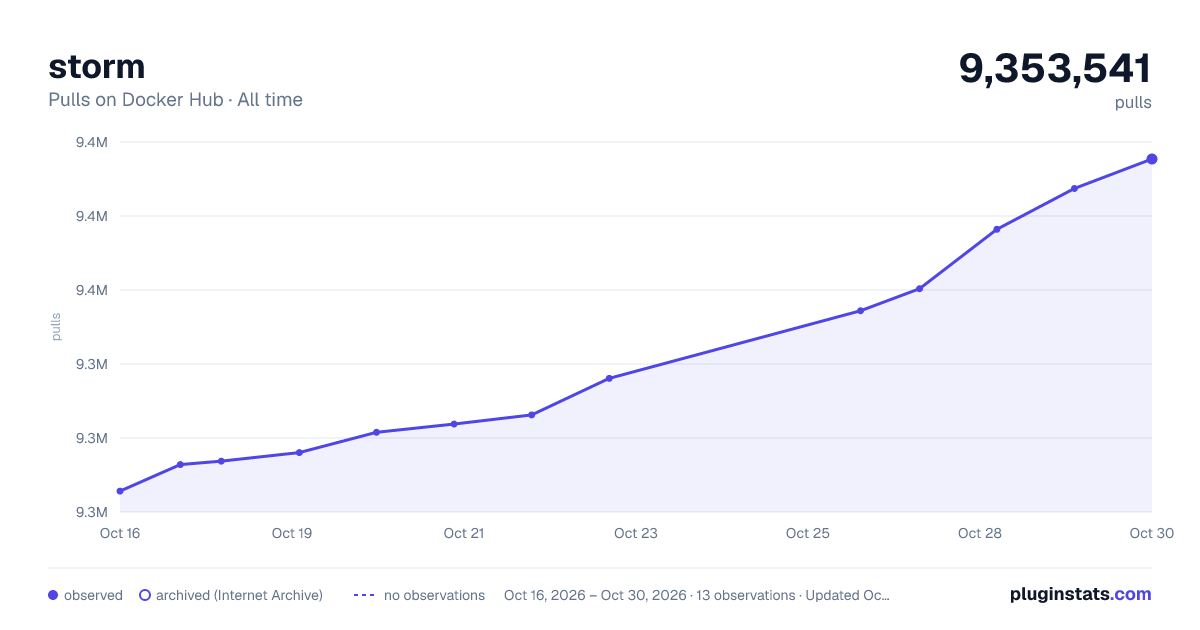

Adoption over time


7/30/90-day growth


Listing placement


Filled points are observed values; hollow points come from Internet Archive snapshots of the listing page. Dashed segments span periods with no observations — values between points are not interpolated.
Each band is one page of 20. Pulls on a log scale. Placement is projected from pulls, so it can differ from the marketplace's own sort order. Hover a dot to see the listing.
Recent observations
Full history (4)Similar Docker Hub Data science plugins
All 20 storm alternativesData source
Cumulative pull counts and stars come from the public Docker Hub API. Pulls count image downloads (including automated CI pulls), not installs or users.
Listing: https://hub.docker.com/_/storm. First seen Oct 16, 2026; last successful collection Oct 19, 2026. See the methodology.