 PluginStats
clickhouse pulls statistics
Docker Hub · Databases & storage
ClickHouse is the fastest and most resource efficient OSS database for real-time apps and analytics.
clickhouse has 7,000,995 recorded pulls on Docker Hub.
It ranks #155 of 1,263 tracked Docker Hub listings by pulls.
PluginStats has 3 daily observations since Oct 16, 2026; the latest is from Oct 18, 2026.
About clickhouse
Quick reference
• Maintained by: ClickHouse Inc. • Where to get help: the Docker Community Slack, Server Fault, Unix & Linux, or Stack Overflow
Supported tags and respective Dockerfile links
• latest, jammy, 26.9, 26.9-jammy, 26.9.19, 26.9.19-jammy, 26.9.19.9, 26.9.19.9-jammy • lts, lts-jammy, 26.8, 26.8-jammy, 26.8.28, 26.8.28-jammy, 26.8.28.14, 26.8.28.14-jammy • 26.7, 26.7-jammy, 26.7.31, 26.7.31-jammy, 26.7.31.12, 26.7.31.12-jammy • 26.3, 26.3-jammy, 26.3.52, 26.3.52-jammy, 26.3.52.9, 26.3.52.9-jammy
Quick reference (cont.)
• Where to file issues: https://github.com/ClickHouse/ClickHouse/issues • Supported architectures: (more info) amd64, arm64v8 • Published image artifact details: repo-info repo's repos/clickhouse/ directory (history) (image metadata, transfer size, etc) • Image updates: official-images repo's library/clickhouse label official-images repo's library/clickhouse file (history) • Source of this description: docs repo's clickhouse/ directory (history)
ClickHouse Server Docker Image
What is ClickHouse?
ClickHouse is an open-source column-oriented DBMS (columnar database management system) for online analytical processing (OLAP) that allows users to generate analytical reports using SQL queries in real-time.
ClickHouse works 100-1000x faster than traditional database management systems, and processes hundreds of millions to over a billion rows and tens of gigabytes of data per server per second. With a widespread user base around the globe, the technology has received praise for its reliability, ease of use, and fault tolerance.
For more information and documentation see https://clickhouse.com/.
Versions
• The latest tag points to the latest release of the latest stable branch. • Branch tags like 22.2 point to the latest release of the corresponding branch. • Full version tags like 22.2.3 and 22.2.3.5 point to the corresponding release.
Compatibility
• The amd64 image requires support for the x86-64-v3 microarchitecture level (AVX2, BMI1, BMI2, F16C, FMA, LZCNT, MOVBE, XSAVE). Virtually all x86 CPUs after 2015 support x86-64-v3. • The arm64 image requires support for the ARMv8.2-A architecture and additionally the Load-Acquire RCpc register. The register is optional in version ARMv8.2-A and mandatory in ARMv8.3-A. Supported in Graviton >=2, Azure and GCP instances. Examples for unsupported devices are Raspberry Pi 4 (ARMv8.0-A) and Jetson AGX Xavier/Orin (ARMv8.2-A). • Since the ClickHouse 24.11 Ubuntu images started using ubuntu:22.04 as their base image. It requires docker version >= 20.10.10 containing patch. As a workaround you could use docker run --security-opt seccomp=unconfined instead, however that has security implications.
How to use this image
start server instance
By default, ClickHouse will be accessible only via the Docker network. See the networking section below.
By default, the server instance runs as the default user without a password.
connect to it from a native client
More information about the ClickHouse client.
connect to it using curl
More information about the ClickHouse HTTP Interface.
stopping / removing the container
networking
⚠️ Note: the predefined user default does not have the network access unless the password is set, see "How to create default database and user on starting" and "Managing default user" below
You can expose your ClickHouse running in docker by mapping a particular port from inside the container using host ports:
22.6.3.35
Or by allowing the container to use host ports directly using --network=host (also allows achieving better network performance):
22.6.3.35
⚠️ Note: the user default in the example above is available only for the localhost requests
Volumes
Typically you may want to mount the following folders inside your container to achieve persistency:
• /var/lib/clickhouse/ - main folder where ClickHouse stores the data • /var/log/clickhouse-server/ - logs
You may also want to mount:
• /etc/clickhouse-server/config.d/*.xml - files with server configuration adjustments • /etc/clickhouse-server/users.d/*.xml - files with user settings adjustments • /docker-entrypoint-initdb.d/ - folder with database initialization scripts (see below).
Linux capabilities
ClickHouse has some advanced functionality, which requires enabling several Linux capabilities.
They are optional and can be enabled using the following docker command-line arguments:
Read more in knowledge base.
Configuration
The container exposes port 8123 for the HTTP interface and port 9000 for the native client.
ClickHouse configuration is represented with a file "config.xml" (documentation)
Start server instance with custom configuration
Start server as custom user
When you use the image with local directories mounted, you probably want to specify the user to maintain the proper file ownership. Use the --user argument and mount /var/lib/clickhouse and /var/log/clickhouse-server inside the container. Otherwise, the image will complain and not start.
Start server from root (useful in case of enabled user namespace)
How to create default database and user on starting
Sometimes you may want to create a user (user named default is used by default) and database on a container start. You can do it using environment variables CLICKHOUSE_DB, CLICKHOUSE_USER, CLICKHOUSE_DEFAULT_ACCESS_MANAGEMENT and CLICKHOUSE_PASSWORD:
Managing default user
The user default has disabled network access by default in the case none of CLICKHOUSE_USER, CLICKHOUSE_PASSWORD, or CLICKHOUSE_DEFAULT_ACCESS_MANAGEMENT are set.
There's a way to make default user insecurely available by setting environment variable CLICKHOUSE_SKIP_USER_SETUP to 1:
How to extend this image…
Description from the Docker Hub listing.
Where clickhouse sits in the listing
Each band is one page of 20. Pulls on a log scale. Placement is projected from pulls, so it can differ from the marketplace's own sort order. Hover a dot to see the listing.


Charts
Images: 30d · 1y · all time · 1600×900 dark
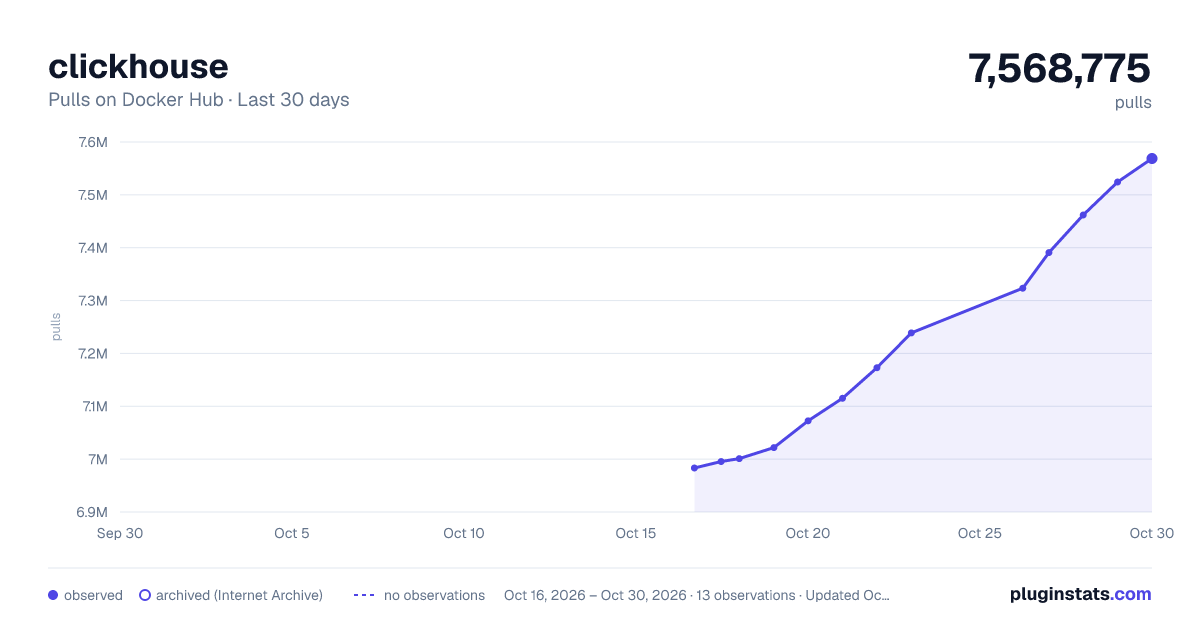
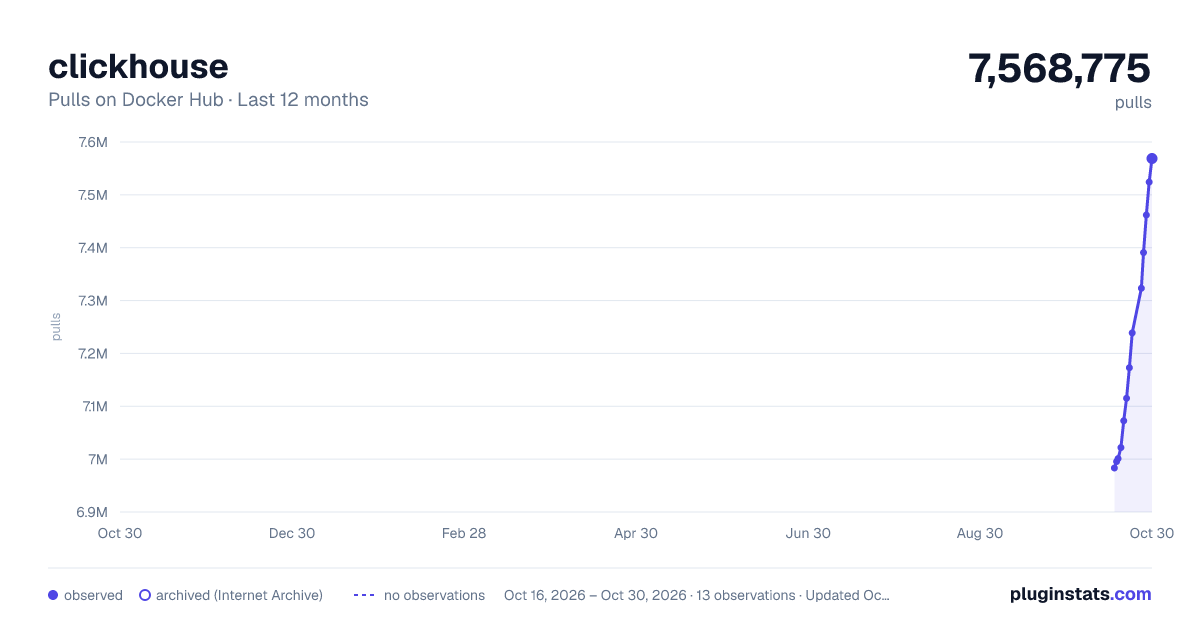
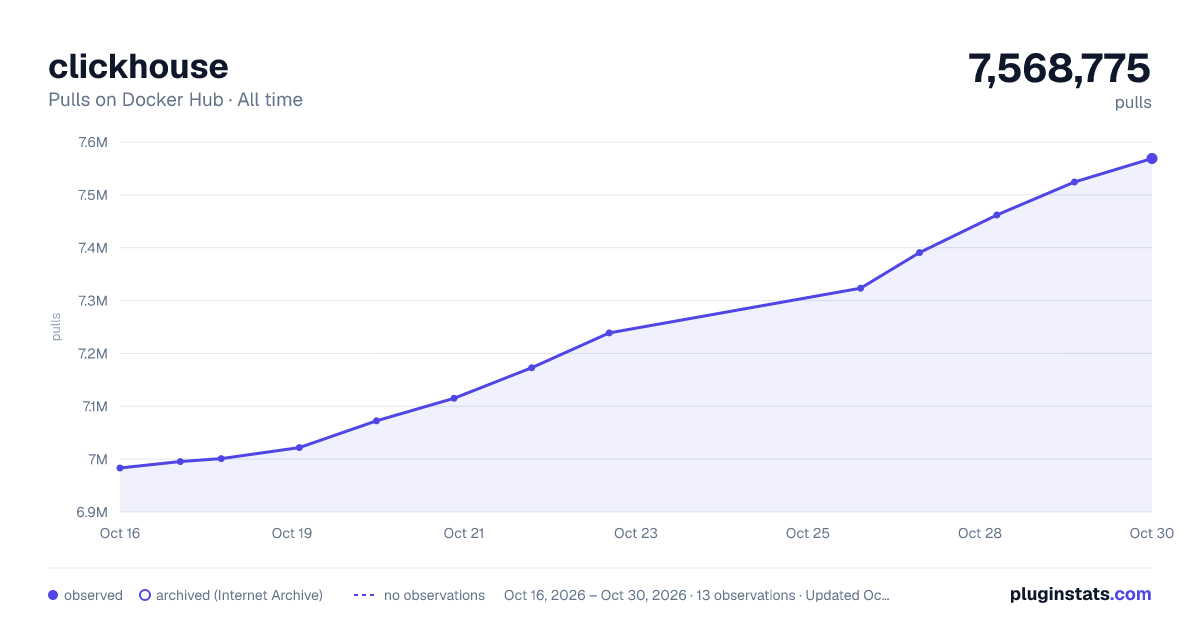

Adoption over time


7/30/90-day growth


Filled points are observed values; hollow points come from Internet Archive snapshots of the listing page. Dashed segments span periods with no observations — values between points are not interpolated.
Recent observations
Full history (3)Similar Docker Hub Databases & storage plugins
Data source
Cumulative pull counts and stars come from the public Docker Hub API. Pulls count image downloads (including automated CI pulls), not installs or users.
Listing: https://hub.docker.com/_/clickhouse. First seen Oct 16, 2026; last successful collection Oct 18, 2026. See the methodology.