 PluginStats
mcp/redshift-mcp-server pulls statistics
By mcp (100 listings) · Docker Hub · Machine learning & AI
Data warehouse operations and queries.
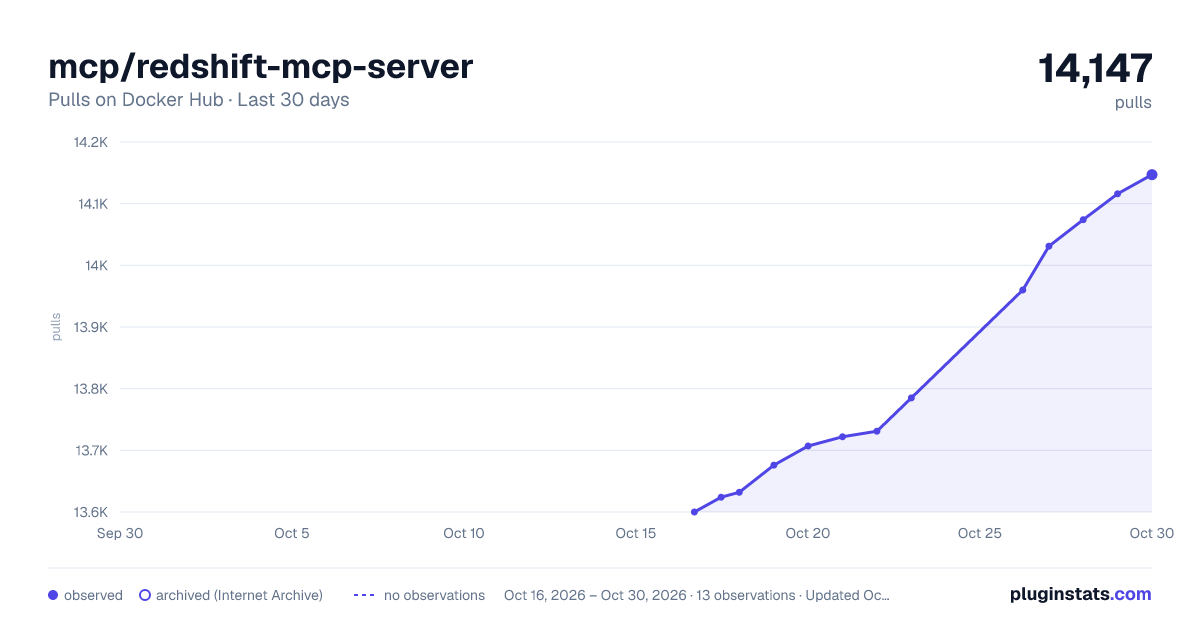
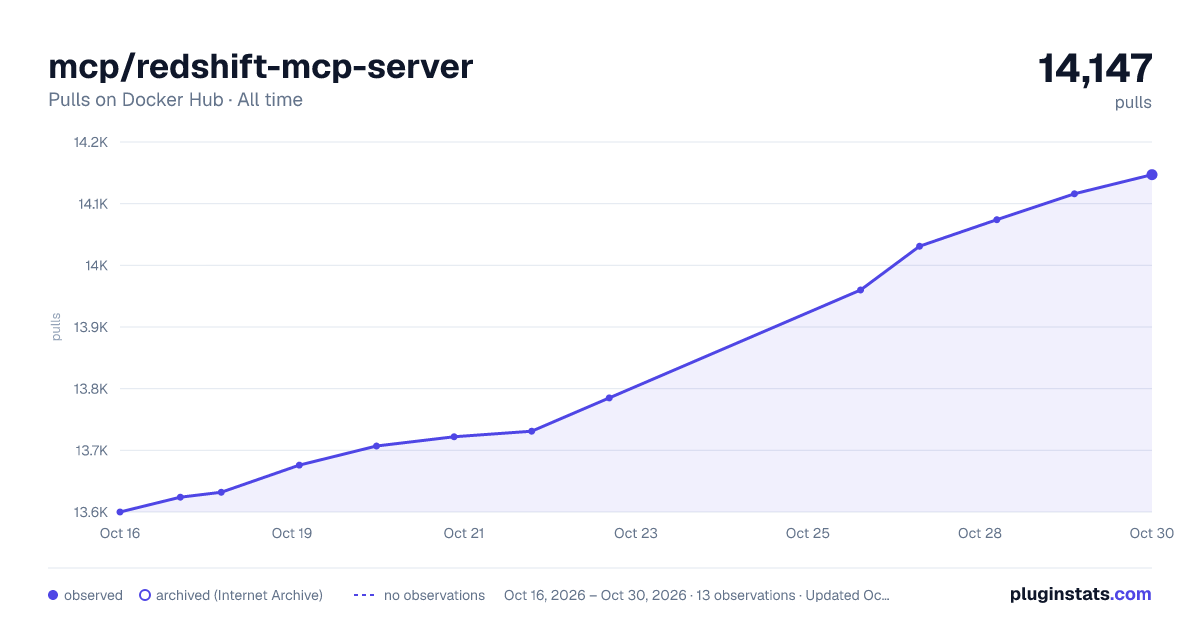
mcp/redshift-mcp-server has 13,707 recorded pulls on Docker Hub, ranking #822 of 1,265 tracked listings.
About mcp/redshift-mcp-server
Amazon Redshift MCP Server
Data warehouse operations and queries.
MCP Info
| Attribute | Details |
|---|---|
| Docker Image | mcp/redshift-mcp-server |
| Author | awslabs |
| Repository | https://github.com/awslabs/mcp |
Image Building Info
| Attribute | Details |
|---|---|
| Dockerfile | https://github.com/awslabs/mcp/blob/636aca8e109b5559006044f035bb89c16e9e5410/src/redshift-mcp-server/Dockerfile |
| Commit | 636aca8e109b5559006044f035bb89c16e9e5410 |
| Docker Image built by | Docker Inc. |
| Docker Scout Health Score | |
| Verify Signature | COSIGN_REPOSITORY=mcp/signatures cosign verify mcp/redshift-mcp-server --key https://raw.githubusercontent.com/docker/keyring/refs/heads/main/public/mcp/latest.pub |
| Licence | Apache License 2.0 |
Available Tools (6)
| Tools provided by this Server | Short Description |
|---|---|
execute_query | Execute a SQL query against a Redshift cluster or serverless workgroup. |
list_clusters | List all available Amazon Redshift clusters and serverless workgroups. |
list_columns | List all columns in a specified table within a Redshift schema. |
list_databases | List all databases in a specified Amazon Redshift cluster. |
list_schemas | List all schemas in a specified database within a Redshift cluster. |
list_tables | List all tables in a specified schema within a Redshift database. |
Tools Details
Tool: execute_query
Execute a SQL query against a Redshift cluster or serverless workgroup.
This tool uses the Redshift Data API to execute SQL queries and return results. It supports both provisioned clusters and serverless workgroups, and handles various data types in the result set.
Usage Requirements
- Ensure your AWS credentials are properly configured (via AWS_PROFILE or default credentials).
- The cluster must be available and accessible.
- Required IAM permissions: redshift-data:ExecuteStatement, redshift-data:DescribeStatement, redshift-data:GetStatementResult.
- The user must have appropriate permissions to execute queries in the specified database.
Parameters
- cluster_identifier: The unique identifier of the Redshift cluster to query. IMPORTANT: Use a valid cluster identifier from the list_clusters tool.
- database_name: The database name to execute the query against. IMPORTANT: Use a valid database name from the list_databases tool.
- sql: The SQL statement to execute. Should be a single SQL statement.
Response Structure
Returns a QueryResult object with the following structure:
- columns: List of column names in the result set.
- rows: List of rows, where each row is a list of values.
- row_count: Number of rows returned.
- execution_time_ms: Query execution time in milliseconds.
- query_id: Unique identifier for the query execution.
Usage Tips
- First use list_clusters to get valid cluster identifiers.
- Then use list_databases to get valid database names for the cluster.
- Ensure the cluster status is 'available' before executing queries.
- Use LIMIT clauses for exploratory queries to avoid large result sets.
- Consider using the metadata discovery tools to understand table structures before querying.
Data Type Handling
The tool automatically handles various Redshift data types:
- String values (VARCHAR, CHAR, TEXT).
- Numeric values (INTEGER, BIGINT, DECIMAL, FLOAT).
- Boolean values.
- NULL values.
- Date and timestamp values (returned as strings).
Security Considerations
- Avoid dynamic SQL construction with user input.
- Consider database object permissions.
- Queries run in read-only mode and must be a single statement; writes and
multi-statement submissions are rejected.
Parameters|Type|Description
-|-|-
cluster_identifier|string|The cluster identifier to execute the query on. Must be a valid cluster identifier from the list_clusters tool.database_name|string|The database name to execute the query against. Must be a valid database name from the list_databases tool.sql|string|The SQL statement to execute. Should be a single SQL statement.
Tool: list_clusters
List all available Amazon Redshift clusters and serverless workgroups.
This tool discovers and returns information about all Redshift clusters and serverless workgroups in your AWS account, including their current status, connection details, and configuration.
Usage Requirements
- Ensure your AWS credentials are properly configured (via AWS_PROFILE or default credentials).
- Required IAM permissions: redshift:DescribeClusters, redshift-serverless:ListWorkgroups, redshift-serverless:GetWorkgroup.
Response Structure
Returns a list of RedshiftCluster objects with the following structure:
- identifier: Unique identifier for the cluster/workgroup.
- type: Type of cluster (provisioned or serverless).
- status: Current status of the cluster.
- database_name: Default database name.
- endpoint: Connection endpoint information.
- port: Connection port.
- vpc_id: VPC ID where the cluster resides.
- node_type: Node type (for provisioned clusters).
- number_of_nodes: Number of nodes (for provisioned clusters).
- creation_time: When the cluster was created.
- master_username: Master username for the cluster.
- publicly_accessible: Whether the cluster is publicly accessible.
- encrypted: Whether the cluster is encrypted.
- tags: Tags associated with the cluster.
Usage Tips…
Description from the Docker Hub listing.
README badge
Show your rank in a README or on your website. The badge updates automatically.
Charts
Images: 30d · 1y · all time · 1600×900 dark


Adoption over time
7/30/90-day growth
Ranking history
Listing placement
Listing placement
Filled points are observed values; hollow points come from Internet Archive snapshots of the listing page. Dashed segments span periods with no observations — values between points are not interpolated.
Each band is one page of 20. Pulls on a linear scale. Placement is projected from pulls, so it can differ from the marketplace's own sort order. Hover a dot to see the listing.
Recent observations
Full history (5)Similar Docker Hub Machine learning & AI plugins
All 20 mcp/redshift-mcp-server alternativesData source
Cumulative pull counts and stars come from the public Docker Hub API. Pulls count image downloads (including automated CI pulls), not installs or users.
Listing: https://hub.docker.com/r/mcp/redshift-mcp-server. First seen Oct 16, 2026; last successful collection Oct 20, 2026. See the methodology.