 PluginStats
yourls pulls statistics
Docker Hub · Content management system
YOURLS is a set of PHP scripts that will allow you to run Your Own URL Shortener.
yourls has 23,672,663 recorded pulls on Docker Hub.
It ranks #94 of 1,263 tracked Docker Hub listings by pulls.
PluginStats has 4 daily observations since Oct 16, 2026; the latest is from Oct 19, 2026.
About yourls
Quick reference
• Maintained by: YOURLS • Where to get help: the Docker Community Slack, Server Fault, Unix & Linux, or Stack Overflow
Supported tags and respective Dockerfile links
• 1.10.6-apache, 1.10-apache, 1-apache, apache, 1.10.6, 1.10, 1, latest • 1.10.6-fpm, 1.10-fpm, 1-fpm, fpm • 1.10.6-fpm-alpine, 1.10-fpm-alpine, 1-fpm-alpine, fpm-alpine
Quick reference (cont.)
• Where to file issues: https://github.com/YOURLS/containers/issues • Supported architectures: (more info) amd64, arm32v5, arm32v6, arm32v7, arm64v8, i386, ppc64le, riscv64, s390x • Published image artifact details: repo-info repo's repos/yourls/ directory (history) (image metadata, transfer size, etc) • Image updates: official-images repo's library/yourls label official-images repo's library/yourls file (history) • Source of this description: docs repo's yourls/ directory (history)
What is YOURLS?
YOURLS is a set of PHP scripts that will allow you to run Your Own URL Shortener. You'll have full control over your data, detailed stats, analytics, plugins, and more. It's free.
github.com/YOURLS/YOURLS
How to use this image
Start a yourls server instance
The YOURLS instance accepts a number of environment variables for configuration, see *Environment Variables* section below.
If you'd like to use an external database instead of a mysql container, specify the hostname and port with YOURLS_DB_HOST along with the password in YOURLS_DB_PASS and the username in YOURLS_DB_USER (if it is something other than root):
Connect to the YOURLS administration interface
If you'd like to be able to access the instance from the host without the container's IP, standard port mappings can be used:
Then, access it via http://localhost:8080/admin/ or http://:8080/admin/ in a browser.
Note: On first instantiation, reaching the root folder will generate an error. Access the YOURLS administration interface via the path /admin/.
Environment Variables
When you start the yourls image, you can adjust the configuration of the YOURLS instance by passing one or more environment variables on the docker run command-line. The YOURLS instance accepts a number of environment variables for configuration. A few notable/important examples for using this Docker image include the following.
YOURLS_SITE
Required. YOURLS instance URL, no trailing slash, lowercase.
Example: YOURLS_SITE="https://example.com"
YOURLS_USER
Required. YOURLS instance username.
Example: YOURLS_USER="example_username"
YOURLS_PASS
Required. YOURLS instance password.
Example: YOURLS_PASS="example_password"
YOURLS_DB_HOST, YOURLS_DB_USER, YOURLS_DB_PASS
Optional if linked mysql container.
Host, user (defaults to root) and password for the database.
YOURLS_DB_NAME
Optional. Database name, defaults to yourls. The database must have been created before installing YOURLS.
YOURLS_DB_PREFIX
Optional. Database tables prefix, defaults to yourls_. Only set this when you need to override the default table prefix.
Docker Secrets
As an alternative to passing sensitive information via environment variables, _FILE may be appended to the previously listed environment variables, causing the initialization script to load the values for those variables from files present in the container. In particular, this can be used to load passwords from Docker secrets stored in /run/secrets/ files. For example:
Currently, this is supported for YOURLS_DB_HOST, YOURLS_DB_USER, YOURLS_DB_PASS, YOURLS_DB_NAME, YOURLS_DB_PREFIX, YOURLS_SITE, YOURLS_USER, and YOURLS_PASS.
... via docker compose
Example compose.yaml for yourls:
Run docker compose up, wait for it to initialize completely, and visit http://localhost:8080/admin/, or http://:8080/admin/ (as appropriate).
Adding additional libraries / extensions
This image does not provide any additional PHP extensions or other libraries, even if they are required by popular plugins. There are an infinite number of possible plugins, and they potentially require any extension PHP supports. Including every PHP extension that exists would dramatically increase the image size.
If you need additional PHP extensions, you'll need to create your own image FROM this one. The documentation of the php image explains how to compile additional extensions.
Include persistent user-content
Mount the volume containing your plugins, pages or languages to the proper directory; and then apply them through the "admin" UI. Ensure read/write/execute permissions are in place for the user:
• Plugins go in a subdirectory in /var/www/html/user/plugins/ • Pages go in a subdirectory in /var/www/html/user/pages/ • Languages go in a subdirectory in /var/www/html/user/languages/
If you wish to provide additional content in an image for deploying in multiple installations, place it in the same directories under /usr/src/yourls/ instead (which gets copied to /var/www/html/ on the container's initial startup).
Image Variants
The yourls images come in many flavors, each designed for a specific use case.
yourls:
This is the defacto image. If you are unsure about what your needs are, you probably want to use this one. It is designed to be used both as a throw away container (mount your source code and start the container to start your app), as well as the base to build other images off of.
yourls:-fpm
This variant contains PHP's FastCGI Process Manager (FPM), which is the recommended FastCGI implementation for PHP.
In order to use this image variant, some kind of reverse proxy (such as NGINX, Apache, or other tool which speaks the FastCGI protocol) will be required.
WARNING: the FastCGI protocol is inherently trusting, and thus *extremely* insecure to expose outside of a private container network -- unless you know *exactly* what you are doing (and are willing to accept the extreme risk), do not use Docker's --publish (-p) flag with this image variant.
FPM configuration
This variant has a few FPM configuration files, each providing a small set of directives.…
Description from the Docker Hub listing.
Where yourls sits in the listing
Each band is one page of 20. Pulls on a log scale. Placement is projected from pulls, so it can differ from the marketplace's own sort order. Hover a dot to see the listing.


Charts
Images: 30d · 1y · all time · 1600×900 dark
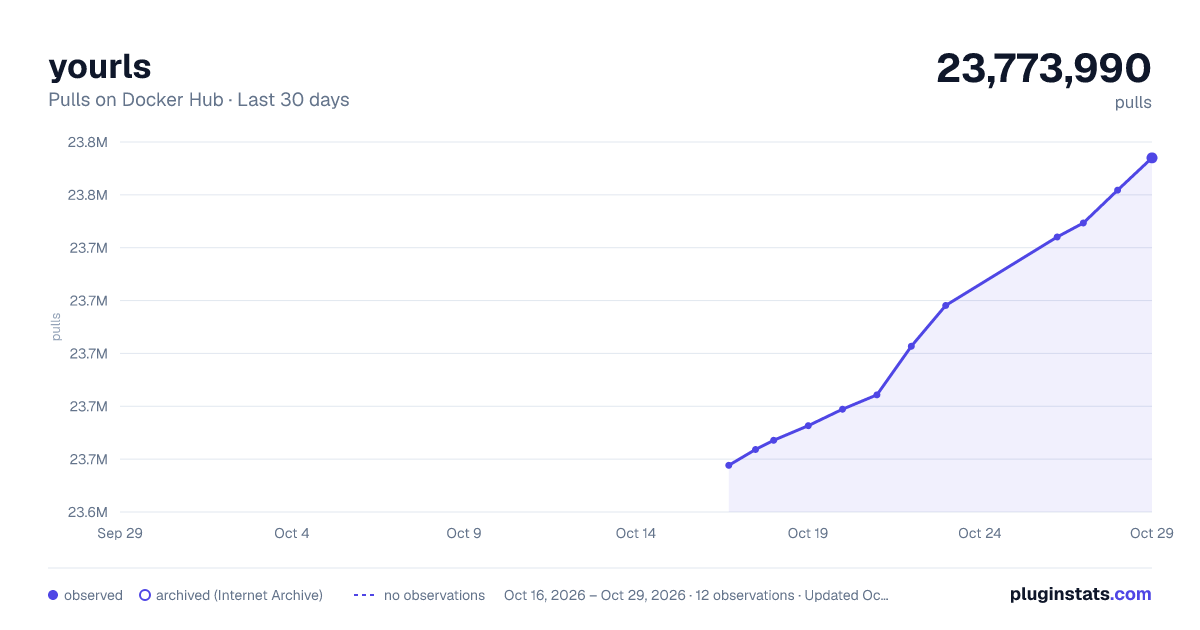
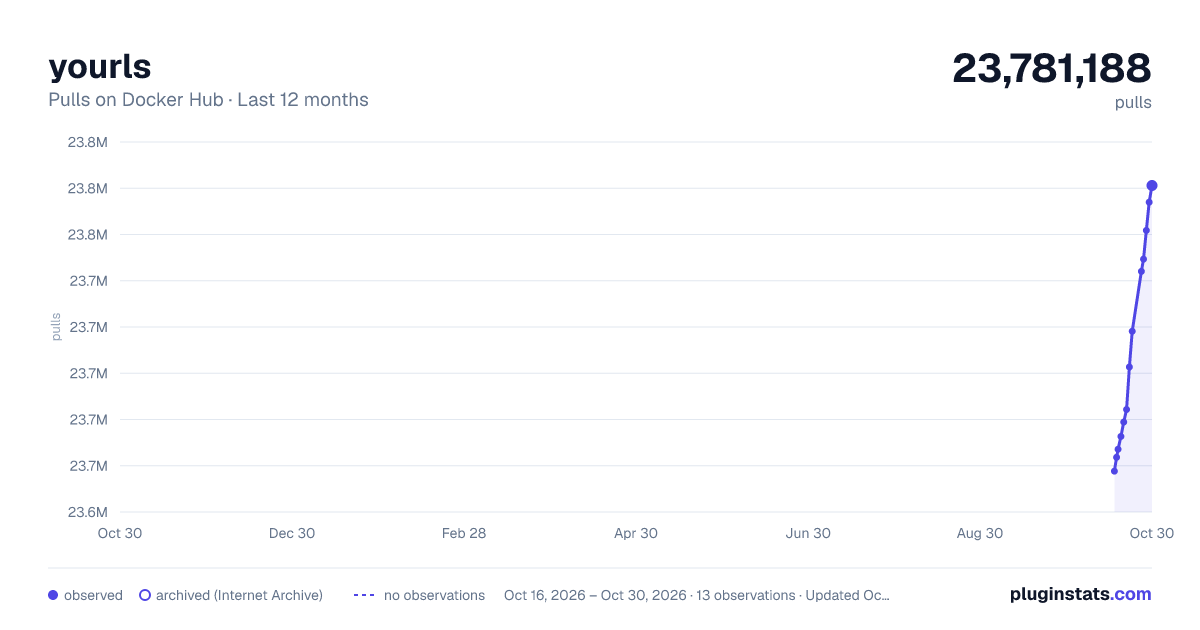
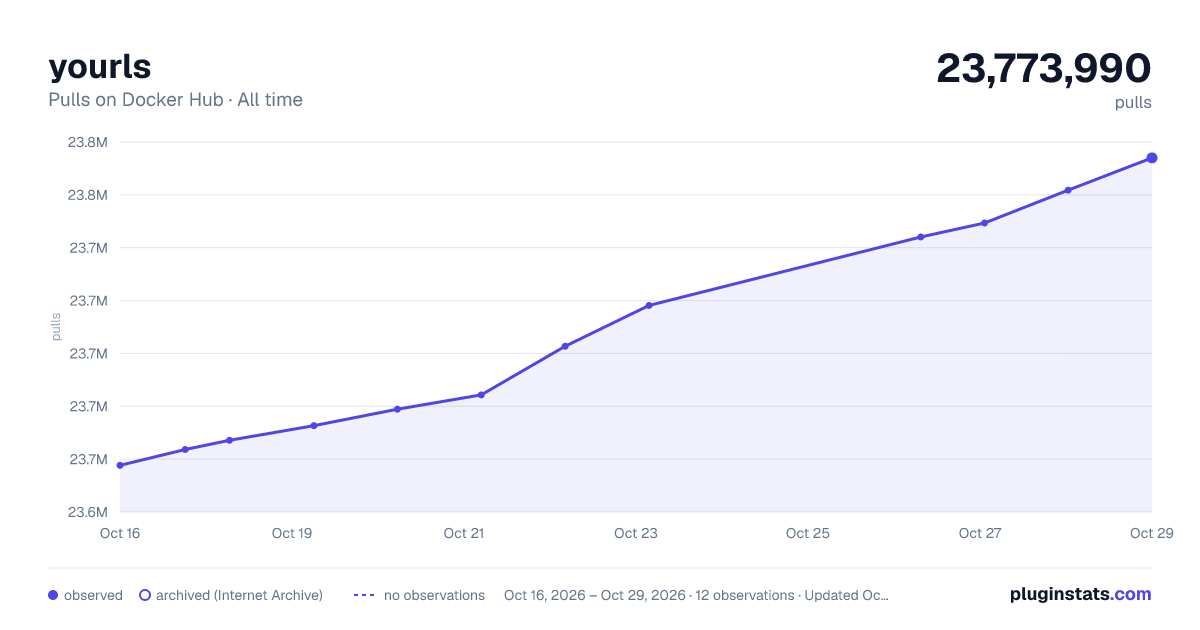

Adoption over time


7/30/90-day growth


Filled points are observed values; hollow points come from Internet Archive snapshots of the listing page. Dashed segments span periods with no observations — values between points are not interpolated.
Recent observations
Full history (4)Similar Docker Hub Content management system plugins
Data source
Cumulative pull counts and stars come from the public Docker Hub API. Pulls count image downloads (including automated CI pulls), not installs or users.
Listing: https://hub.docker.com/_/yourls. First seen Oct 16, 2026; last successful collection Oct 19, 2026. See the methodology.