 PluginStats
mcp/ccapi-mcp-server pulls statistics
By mcp (100 listings) · Docker Hub · Machine learning & AI
Direct resource management with security scanning.
mcp/ccapi-mcp-server has 14,698 recorded pulls on Docker Hub.
It ranks #785 of 1,263 tracked Docker Hub listings by pulls.
PluginStats has 4 daily observations since Oct 16, 2026; the latest is from Oct 19, 2026.
About mcp/ccapi-mcp-server
AWS Cloud Control API MCP Server
Direct resource management with security scanning.
What is an MCP Server?
MCP Info
Attribute|Details| |-|-| Docker Image|mcp/ccapi-mcp-server Author|awslabs Repository|https://github.com/awslabs/mcp
Image Building Info
Attribute|Details| |-|-| Dockerfile|https://github.com/awslabs/mcp/blob/636aca8e109b5559006044f035bb89c16e9e5410/src/ccapi-mcp-server/Dockerfile Commit|636aca8e109b5559006044f035bb89c16e9e5410 Docker Image built by|Docker Inc. Docker Scout Health Score| Verify Signature|COSIGN_REPOSITORY=mcp/signatures cosign verify mcp/ccapi-mcp-server --key https://raw.githubusercontent.com/docker/keyring/refs/heads/main/public/mcp/latest.pub Licence|Apache License 2.0
Available Tools (14)
Tools provided by this Server|Short Description -|- check_environment_variables|Check if required environment variables are set correctly.| create_resource|Create an AWS resource.| create_template|Create a CloudFormation template from existing resources using the IaC Generator API.| delete_resource|Delete an AWS resource.| explain|MANDATORY: Explain any data in clear, human-readable format.| generate_infrastructure_code|Generate infrastructure code before resource creation or update.| get_aws_account_info|Get information about the current AWS account being used.| get_aws_session_info|Get information about the current AWS session.| get_resource|Get details of a specific AWS resource.| get_resource_request_status|Get the status of a long running operation with the request token.| get_resource_schema_information|Get schema information for an AWS resource.| list_resources|List AWS resources of a specified type.| run_checkov|Run Checkov security and compliance scanner on server-stored CloudFormation template.| update_resource|Update an AWS resource.|
Tools Details
Tool: check_environment_variables
Check if required environment variables are set correctly.
Tool: create_resource
Create an AWS resource.
This tool automatically adds default identification tags to all resources for support and troubleshooting purposes.
IMPORTANT: Always check the response for 'security_warning' field and display any warnings to the user. Parameters|Type|Description -|-|- credentials_token|string|Credentials token from get_aws_session_info() to ensure AWS credentials are valid explained_token|string|Explained token from explain() - properties will be retrieved from this token resource_type|string|The AWS resource type (e.g., "AWS::S3::Bucket", "AWS::RDS::DBInstance") region|string *optional*|The AWS region that the operation should be performed in security_scan_token|string *optional*|Security scan token from approve_security_findings() to ensure security checks were performed (only required when SECURITY_SCANNING=enabled) skip_security_check|boolean *optional*|Skip security checks (only when SECURITY_SCANNING=disabled)
Tool: create_template
Create a CloudFormation template from existing resources using the IaC Generator API.
This tool allows you to generate CloudFormation templates from existing AWS resources that are not already managed by CloudFormation. The template generation process is asynchronous, so you can check the status of the process and retrieve the template once it's complete. You can pass up to 500 resources at a time.
IMPORTANT FOR LLMs: This tool only generates CloudFormation templates. If users request other IaC formats (Terraform, CDK, etc.), follow this workflow: 1. Use create_template() to generate CloudFormation template from existing resources 2. Convert the CloudFormation to the requested format using your native capabilities 3. For Terraform specifically: Create both resource definitions AND import blocks so users can import existing resources into Terraform state ⚠️ ALWAYS USE TERRAFORM IMPORT BLOCKS (NOT TERRAFORM IMPORT COMMANDS) ⚠️ 4. Provide both the original CloudFormation and converted IaC to the user
Example workflow for "create Terraform import for these resources": 1. create_template() → get CloudFormation template 2. Convert to Terraform resource blocks 3. Generate corresponding Terraform import blocks (NOT terraform import commands) Example: import { to = aws_s3_bucket.example, id = "my-bucket" } 4. Provide complete Terraform configuration with import blocks
Examples: 1. Start template generation for an S3 bucket: create_template( template_name="my-template", resources=[{"ResourceType": "AWS::S3::Bucket", "ResourceIdentifier": {"BucketName": "my-bucket"}}], deletion_policy="RETAIN", update_replace_policy="RETAIN" )
2. Check status of template generation: create_template(template_id="arn:aws:cloudformation:us-east-1:123456789012:generatedtemplate/abcdef12-3456-7890-abcd-ef1234567890")
3. Retrieve generated template: create_template( template_id="arn:aws:cloudformation:us-east-1:123456789012:generatedtemplate/abcdef12-3456-7890-abcd-ef1234567890", output_format="YAML" ) Parameters|Type|Description -|-|- deletion_policy|string *optional*|Default DeletionPolicy for resources in the template (RETAIN, DELETE, or SNAPSHOT) output_format|string *optional*|Output format for the template (JSON or YAML) region|string *optional*|The AWS region that the operation should be performed in resources|string *optional*|List of resources to include in the template, each with 'ResourceType' and 'ResourceIdentifier' template_id|string *optional*|ID of an existing template generation process to check status or retrieve template template_name|string *optional*|Name for the generated template update_replace_policy|string *optional*|Default UpdateReplacePolicy for resources in the template (RETAIN, DELETE, or SNAPSHOT)
Tool: delete_resource…
Description from the Docker Hub listing.
Where mcp/ccapi-mcp-server sits in the listing
Each band is one page of 20. Pulls on a log scale. Placement is projected from pulls, so it can differ from the marketplace's own sort order. Hover a dot to see the listing.


Charts
Images: 30d · 1y · all time · 1600×900 dark
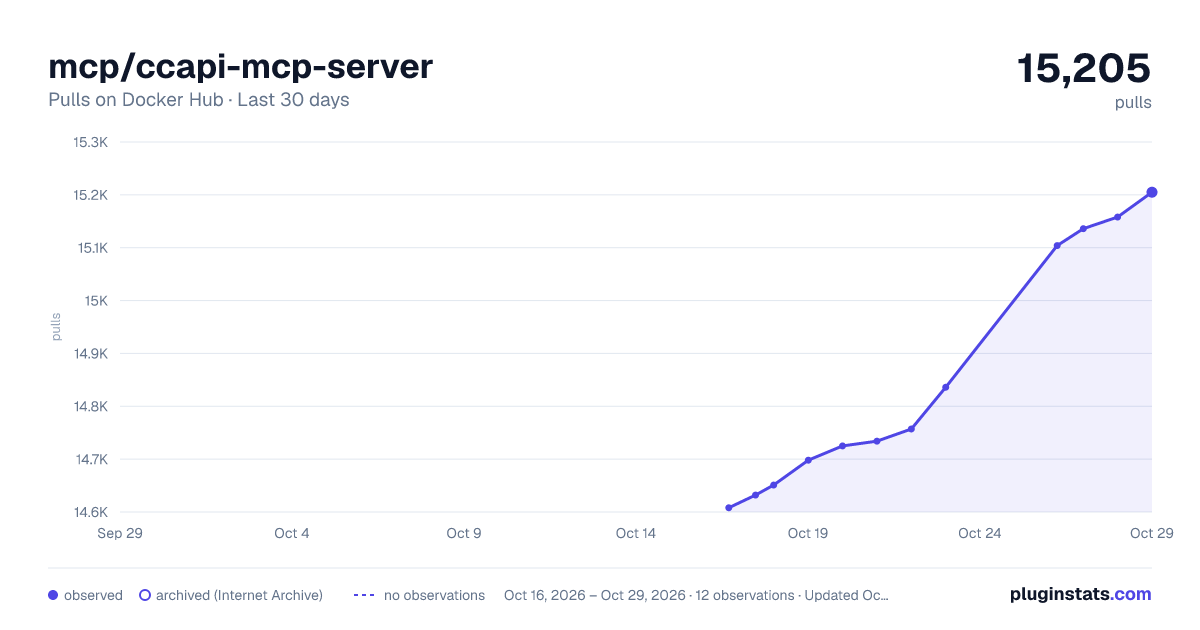
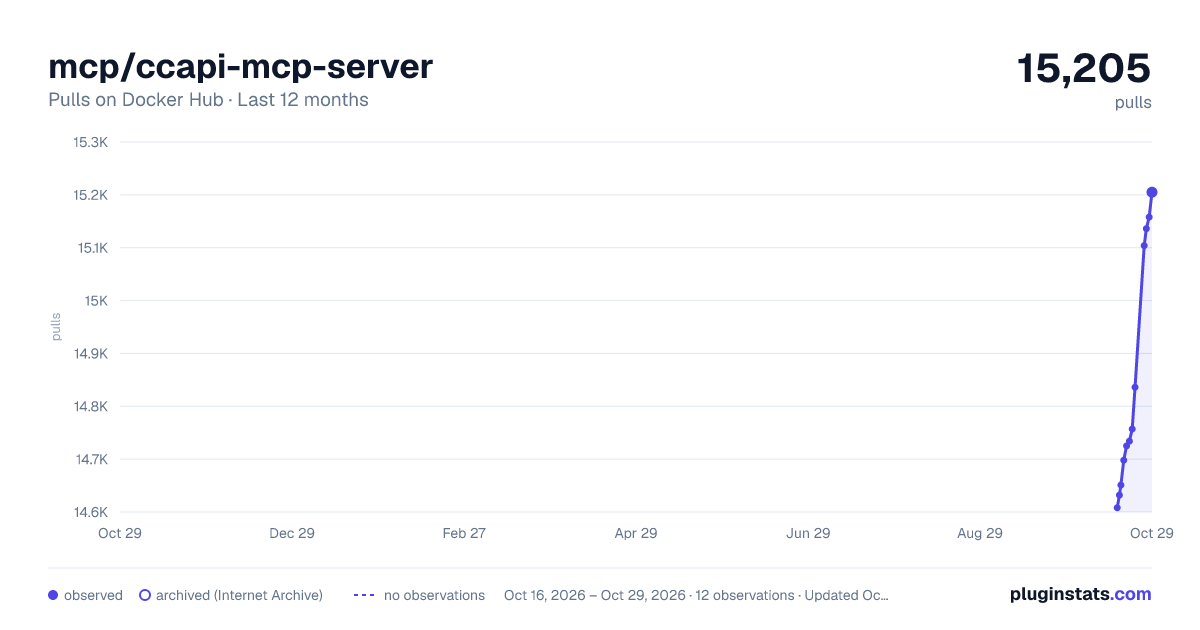
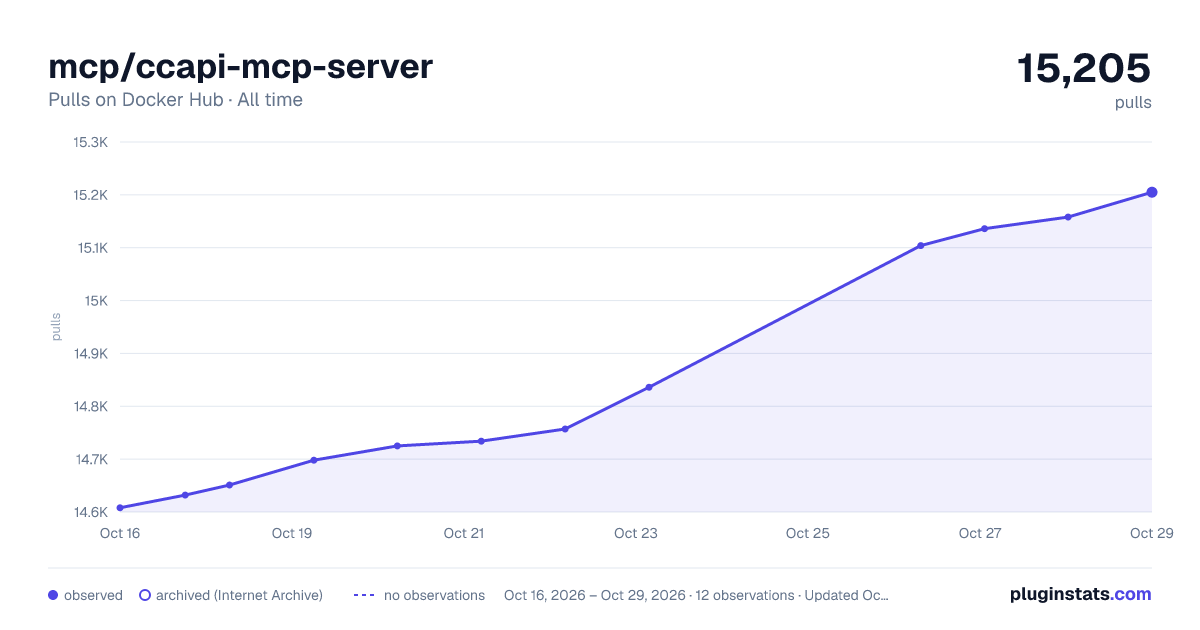

Adoption over time


7/30/90-day growth


Filled points are observed values; hollow points come from Internet Archive snapshots of the listing page. Dashed segments span periods with no observations — values between points are not interpolated.
Recent observations
Full history (4)Similar Docker Hub Machine learning & AI plugins
Data source
Cumulative pull counts and stars come from the public Docker Hub API. Pulls count image downloads (including automated CI pulls), not installs or users.
Listing: https://hub.docker.com/r/mcp/ccapi-mcp-server. First seen Oct 16, 2026; last successful collection Oct 19, 2026. See the methodology.