 PluginStats
mcp/shopify pulls statistics
By mcp (100 listings) · Docker Hub · Machine learning & AI
Shopify.dev MCP server
mcp/shopify has 12,486 recorded pulls on Docker Hub.
It ranks #853 of 1,263 tracked Docker Hub listings by pulls.
PluginStats has 3 daily observations since Oct 16, 2026; the latest is from Oct 18, 2026.
About mcp/shopify
Shopify MCP Server
Shopify.dev MCP server.
What is an MCP Server?
Characteristics
Attribute|Details| |-|-| Docker Image|mcp/shopify Author|Shopify Repository|https://github.com/Shopify/dev-mcp Dockerfile|https://github.com/Shopify/dev-mcp/blob/refs/pull/7/merge/Dockerfile Docker Image built by|Docker Inc. Docker Scout Health Score| Verify Signature|COSIGN_REPOSITORY=mcp/signatures cosign verify mcp/shopify --key https://raw.githubusercontent.com/docker/keyring/refs/heads/main/public/mcp/latest.pub Licence|ISC License
Available Tools (5)
Tools provided by this Server|Short Description -|- fetch_full_docs|Use this tool to retrieve a list of full documentation pages from shopify.dev.| introspect_graphql_schema|This tool introspects and returns the portion of the Shopify Admin API GraphQL schema relevant to the user prompt.| learn_shopify_api|🚨 MANDATORY FIRST STEP: This tool MUST be called before any other Shopify tools.| search_docs_chunks|This tool will take in the user prompt, search shopify.dev, and return relevant documentation and code examples that will help answer the user's question.| validate_graphql_codeblocks|This tool validates GraphQL code blocks against the Shopify GraphQL schema to ensure they don't contain hallucinated fields or operations.|
Tools Details
Tool: fetch_full_docs
Use this tool to retrieve a list of full documentation pages from shopify.dev. Parameters|Type|Description -|-|- conversationId|string|🔗 REQUIRED: conversationId from learn_shopify_api tool. Call learn_shopify_api first if you don't have this. paths|array|The paths to the full documentation pages to read, i.e. ["/docs/api/app-home", "/docs/api/functions"]. Paths should be relative to the root of the developer documentation site.
Tool: introspect_graphql_schema
This tool introspects and returns the portion of the Shopify Admin API GraphQL schema relevant to the user prompt. Only use this for the Shopify Admin API, and not any other APIs like the Shopify Storefront API or the Shopify Functions API. Parameters|Type|Description -|-|- conversationId|string|🔗 REQUIRED: conversationId from learn_shopify_api tool. Call learn_shopify_api first if you don't have this. query|string|Search term to filter schema elements by name. Only pass simple terms like 'product', 'discountProduct', etc. api|string *optional*|The API to introspect. Valid options are: • 'admin': The Admin API is the primary API for managing your Shopify store. It allows you to create and manage products, orders, customers, and more. Default is 'admin'. filter|array *optional*|Filter results to show specific sections. Valid values are 'types', 'queries', 'mutations', or 'all' (default) version|string *optional*|The version of the API to introspect. MUST be one of '2024-10' or '2025-01' or '2025-04' or '2025-07' or 'unstable'. Default is '2025-07'.
Tool: learn_shopify_api
🚨 MANDATORY FIRST STEP: This tool MUST be called before any other Shopify tools.
⚠️ ALL OTHER SHOPIFY TOOLS WILL FAIL without a conversationId from this tool. This tool generates a conversationId that is REQUIRED for all subsequent tool calls. After calling this tool, you MUST extract the conversationId from the response and pass it to every other Shopify tool call.
🔄 MULTIPLE API SUPPORT: You MUST call this tool multiple times in the same conversation when you need to learn about different Shopify APIs. THIS IS NOT OPTIONAL. Just pass the existing conversationId to maintain conversation continuity while loading the new API context.
For example, a user might ask a question about the Admin API, then switch to the Functions API, then ask a question about polaris UI components. In this case I would expect you to call learn_shopify_api three times with the following arguments:
• learn_shopify_api(api: "admin") -> conversationId: "123" • learn_shopify_api(api: "functions", conversationId: "123") • learn_shopify_api(api: "polaris", conversationId: "123")
This is because the conversationId is used to maintain conversation continuity while loading the new API context.
🚨 Valid arguments for api are: • admin: The Admin GraphQL API lets you build apps and integrations that extend and enhance the Shopify admin. • functions: Shopify Functions allow developers to customize the backend logic that powers parts of Shopify. Here are all the available APIs: Discount, Cart and Checkout Validation, Cart Transform, Pickup Point Delivery Option Generator, Delivery Customization, Fulfillment Constraints, Local Pickup Delivery Option Generator, Order Routing Location Rule, Payment Customization • hydrogen: Shopify Hydrogen store feature implementation guides. Here are all the available feature guides: Bundles, Subscriptions, Combined Listings, Markets. Always use this tool first when implementing one of these features in a Hydrogen store. Keywords: hydrogen, localization, markets, subscriptions, selling plans, combined listings, bundles. • storefront-web-components: How to create storefronts using Storefront Web Components. Storefront Web Components let you bring Shopify-powered commerce capabilities to any website. Shopify Storefront Web Components are a set of web components that enable developers to build customizable storefronts using only HTML and Shopify's APIs. Keywords: web components, html, shopify-store, shopify-context, shopify-list-context, shopify-data, shopify-media, shopify-money, shopify-cart, shopify-variant-selector
🔄 WORKFLOW: 1. Call learn_shopify_api first with the initial API 2. Extract the conversationId from the response 3. Pass that same conversationId to ALL other Shopify tools 4. If you need to know more about a different API at any point in the conversation, call learn_shopify_api again with the new API and the same conversationId…
Description from the Docker Hub listing.
Where mcp/shopify sits in the listing
Each band is one page of 20. Pulls on a log scale. Placement is projected from pulls, so it can differ from the marketplace's own sort order. Hover a dot to see the listing.


Charts
Images: 30d · 1y · all time · 1600×900 dark

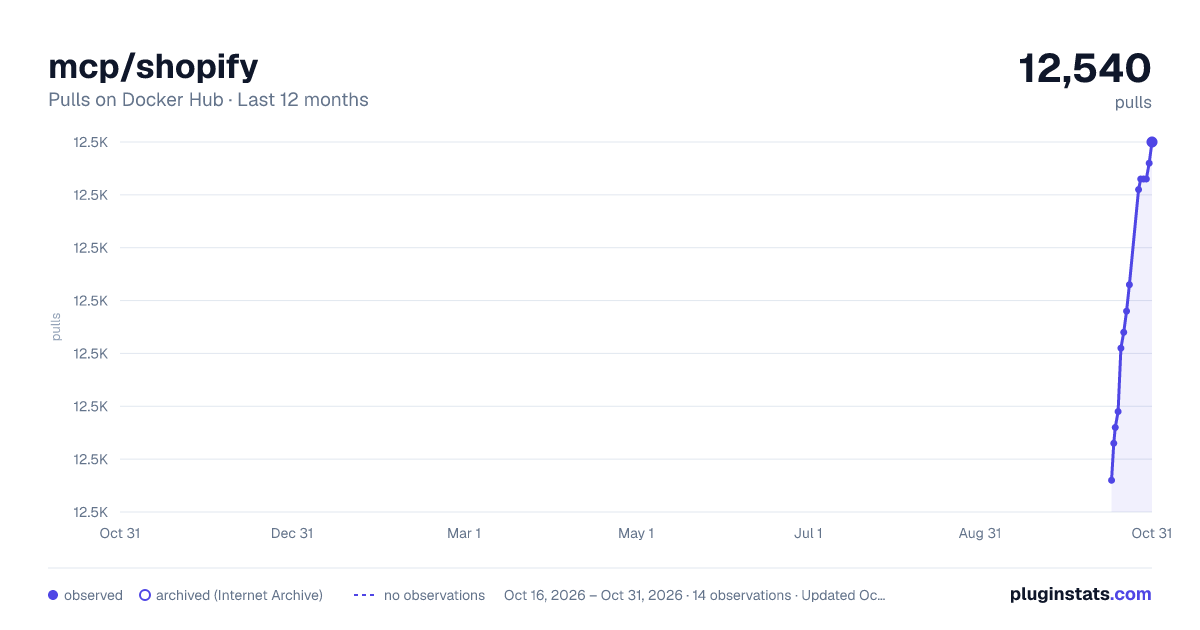
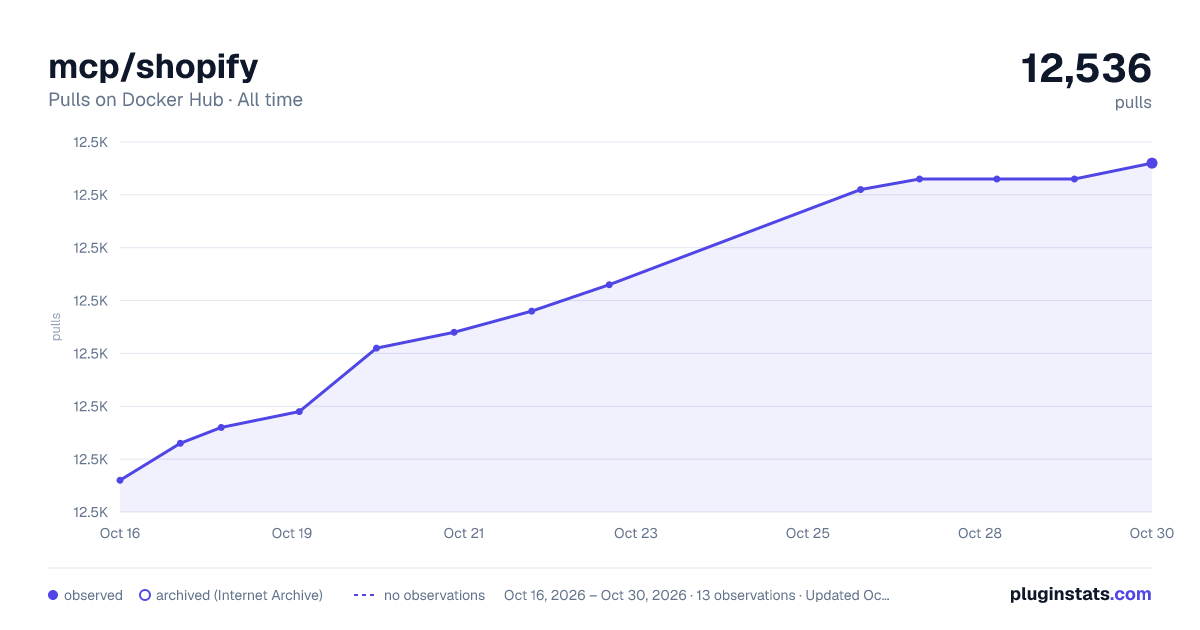

Adoption over time


7/30/90-day growth


Filled points are observed values; hollow points come from Internet Archive snapshots of the listing page. Dashed segments span periods with no observations — values between points are not interpolated.
Recent observations
Full history (3)Similar Docker Hub Machine learning & AI plugins
Data source
Cumulative pull counts and stars come from the public Docker Hub API. Pulls count image downloads (including automated CI pulls), not installs or users.
Listing: https://hub.docker.com/r/mcp/shopify. First seen Oct 16, 2026; last successful collection Oct 18, 2026. See the methodology.