 PluginStats
odoo pulls statistics
Docker Hub · Content management system
Odoo (formerly known as OpenERP) is a suite of open-source business apps.
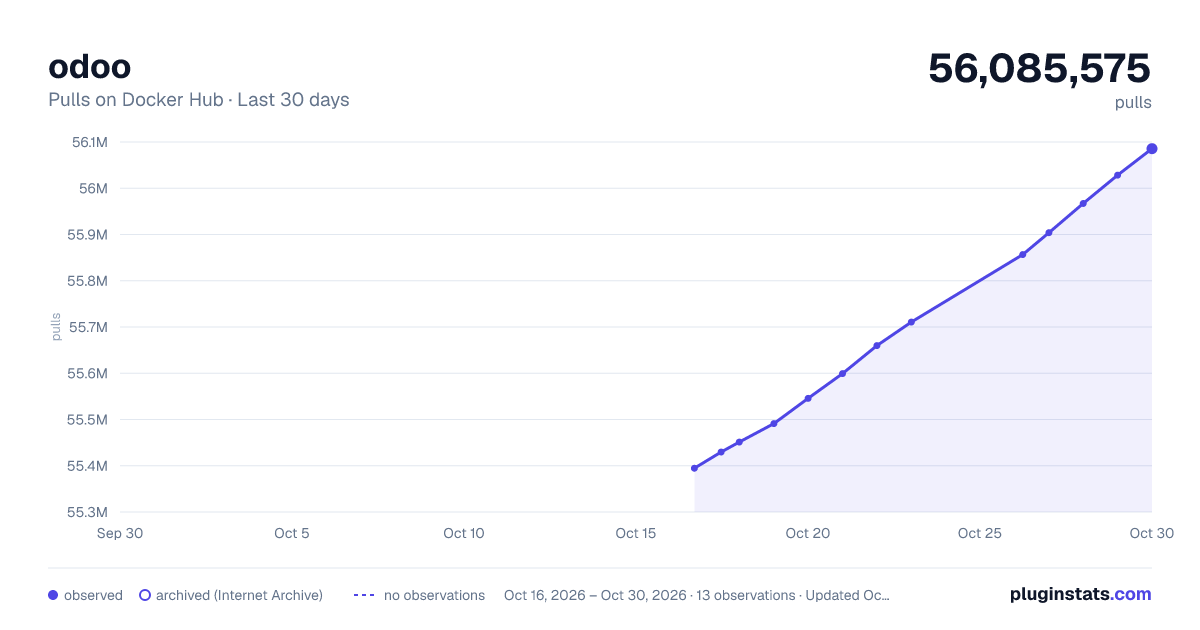
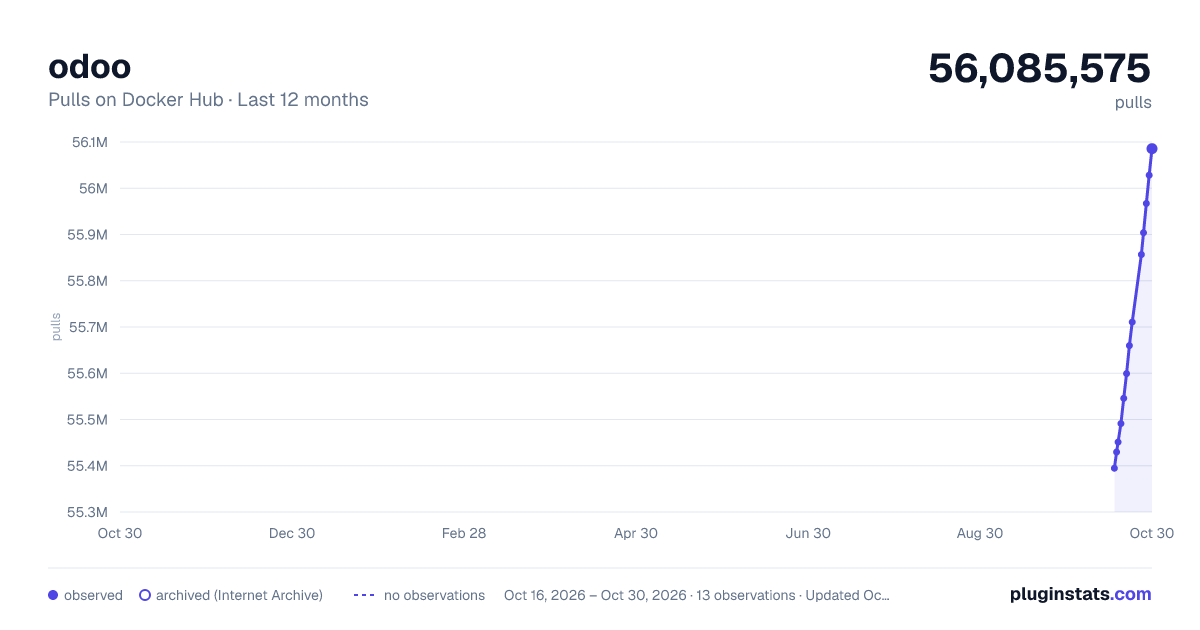
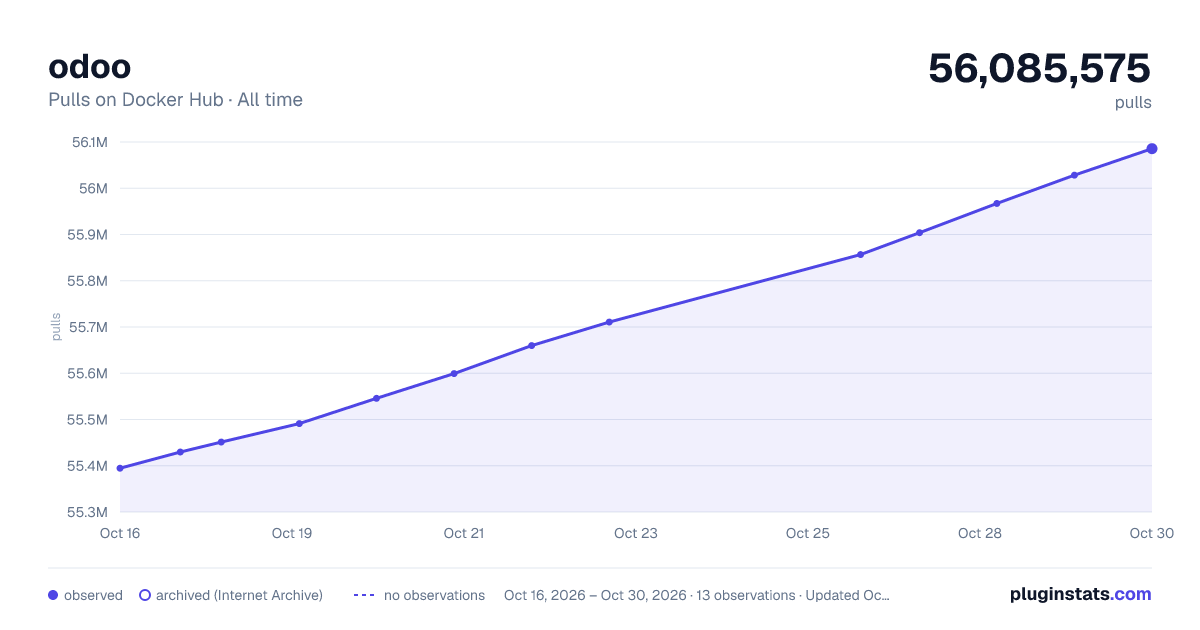
odoo has 55,451,171 recorded pulls on Docker Hub.
It ranks #57 of 1,263 tracked Docker Hub listings by pulls.
PluginStats has 3 daily observations since Oct 16, 2026; the latest is from Oct 18, 2026.
About odoo
Quick reference
• Maintained by: Odoo • Where to get help: the Docker Community Slack, Server Fault, Unix & Linux, or Stack Overflow
Supported tags and respective Dockerfile links
• 20.0-20261015, 20.0, 20, latest • 19.0-20261015, 19.0, 19 • 18.0-20261015, 18.0, 18
Quick reference (cont.)
• Where to file issues: https://github.com/odoo/docker/issues • Supported architectures: (more info) amd64, arm64v8, ppc64le • Published image artifact details: repo-info repo's repos/odoo/ directory (history) (image metadata, transfer size, etc) • Image updates: official-images repo's library/odoo label official-images repo's library/odoo file (history) • Source of this description: docs repo's odoo/ directory (history)
What is Odoo?
Odoo, formerly known as OpenERP, is a suite of open-source business apps written in Python and released under the LGPL license. This suite of applications covers all business needs, from Website/Ecommerce down to manufacturing, inventory and accounting, all seamlessly integrated. It is the first time ever a software editor managed to reach such a functional coverage. Odoo is the most installed business software in the world. Odoo is used by 2.000.000 users worldwide ranging from very small companies (1 user) to very large ones (300 000 users).
www.odoo.com
How to use this image
This image requires a running PostgreSQL server.
Start a PostgreSQL server
Start an Odoo instance
The alias of the container running Postgres must be db for Odoo to be able to connect to the Postgres server.
Stop and restart an Odoo instance
Use named volumes to preserve data
When the Odoo container is created like described above, the odoo filestore is created inside the container. If the container is removed, the filestore is lost. The preferred way to prevent that is by using a Docker named volume.
With the above command, the volume named odoo-data will persist even if the container is removed and can be re-used by issuing the same command.
The path /var/lib/odoo used as the mount point of the volume must match the odoo data_dir in the config file or as CLI parameters.
Note that the same principle applies to the Postgresql container and a named volume can be used to preserve the database when the container is removed. So the database container could be started like this (before the odoo container):
Stop and restart a PostgreSQL server
When a PostgreSQL server is restarted, the Odoo instances linked to that server must be restarted as well because the server address has changed and the link is thus broken.
Restarting a PostgreSQL server does not affect the created databases.
Run Odoo with a custom configuration
The default configuration file for the server (located at /etc/odoo/odoo.conf) can be overriden at startup using volumes. Suppose you have a custom configuration at /path/to/config/odoo.conf, then
Please use this configuration template to write your custom configuration as we already set some arguments for running Odoo inside a Docker container.
You can also directly specify Odoo arguments inline. Those arguments must be given after the keyword -- in the command-line, as follows
Mount custom addons
You can mount your own Odoo addons within the Odoo container, at /mnt/extra-addons
Note: Altough there is no official Odoo Enterprise Docker image, the Enterprise modules can be mounted by using the above mentionned method.
Run multiple Odoo instances
Note: For plain use of mails and reports functionalities, when the host and container ports differ (e.g. 8070 and 8069), one has to set, in Odoo, Settings->Parameters->System Parameters (requires technical features), web.base.url to the container port (e.g. 127.0.0.1:8069).
Environment Variables
Tweak these environment variables to easily connect to a postgres server:
• HOST: The address of the postgres server. If you used a postgres container, set to the name of the container. Defaults to db. • PORT: The port the postgres server is listening to. Defaults to 5432. • USER: The postgres role with which Odoo will connect. If you used a postgres container, set to the same value as POSTGRES_USER. Defaults to odoo. • PASSWORD: The password of the postgres role with which Odoo will connect. If you used a postgres container, set to the same value as POSTGRES_PASSWORD. Defaults to odoo.
Docker Compose examples
The simplest compose.yaml file would be:
If the default postgres credentials does not suit you, tweak the environment variables:
Here's a last example showing you how to
• mount custom addons located in ./addons • use a custom configuration file located in .config/odoo.conf • use named volumes for the Odoo and postgres data dir • use a secrets file named odoo_pg_pass that contains the postgreql password shared by both services
To start your Odoo instance, go in the directory of the compose.yaml file you created from the previous examples and type:
How to upgrade this image
Odoo images are updated on a regular basis to make them use recent releases (a new release of each version of Odoo is built every night). Please be aware that what follows is about upgrading from an old release to the latest one provided of the same major version, as upgrading from a major version to another is a much more complex process requiring elaborated migration scripts (see Odoo Upgrade page or this community project which aims to write those scripts).
Suppose you created a database from an Odoo instance named old-odoo, and you want to access this database from a new Odoo instance named new-odoo, e.g. because you've just downloaded a newer Odoo image.
By default, Odoo 16.0+ uses a filestore (located at /var/lib/odoo/filestore/) for attachments. You should restore this filestore in your new Odoo instance by running
License
View license information for the software contained in this image.…
Description from the Docker Hub listing.
Where odoo sits in the listing
Each band is one page of 20. Pulls on a log scale. Placement is projected from pulls, so it can differ from the marketplace's own sort order. Hover a dot to see the listing.


Charts
Images: 30d · 1y · all time · 1600×900 dark

Adoption over time


7/30/90-day growth


Filled points are observed values; hollow points come from Internet Archive snapshots of the listing page. Dashed segments span periods with no observations — values between points are not interpolated.
Recent observations
Full history (3)Similar Docker Hub Content management system plugins
Data source
Cumulative pull counts and stars come from the public Docker Hub API. Pulls count image downloads (including automated CI pulls), not installs or users.
Listing: https://hub.docker.com/_/odoo. First seen Oct 16, 2026; last successful collection Oct 18, 2026. See the methodology.