 PluginStats
classroom.cloud Student users statistics
By NetSupport Ltd · Chrome Web Store · Workflow & Planning
classroom.cloud delivers a set of stress-free, simple yet effective cloud-based teaching, online safety/safeguarding and technician…
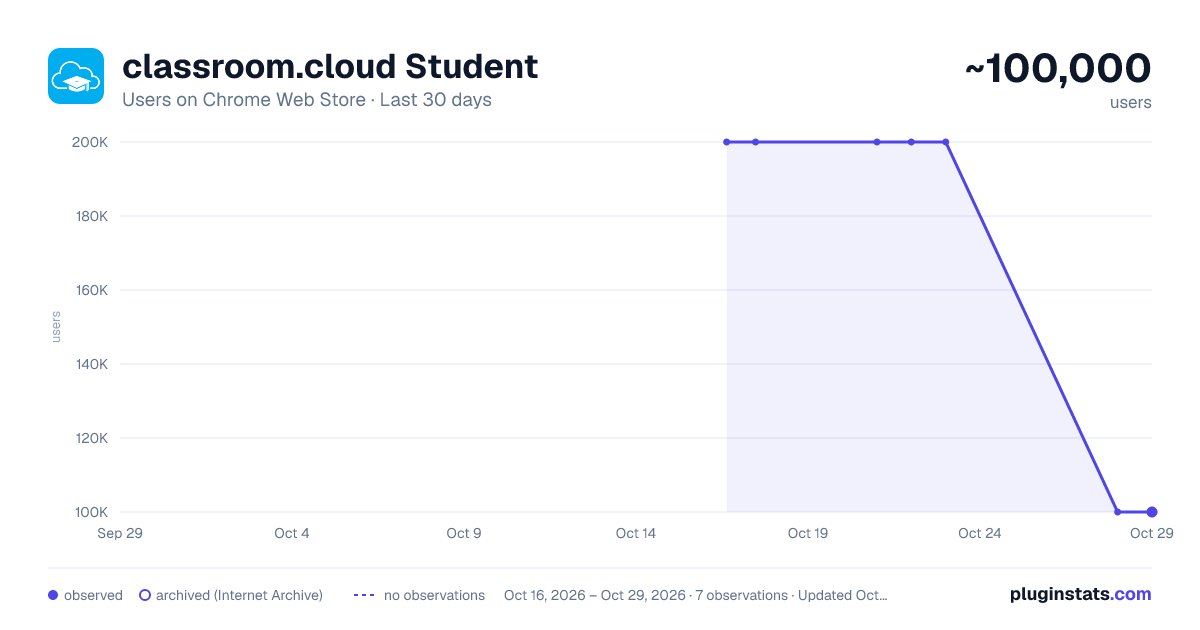
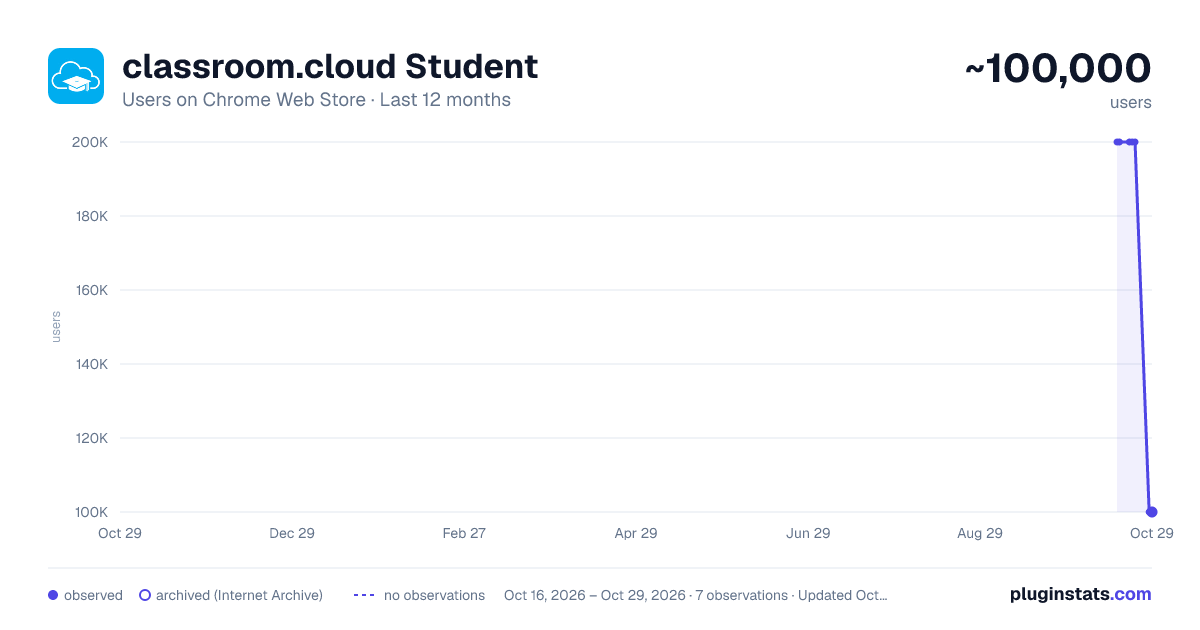
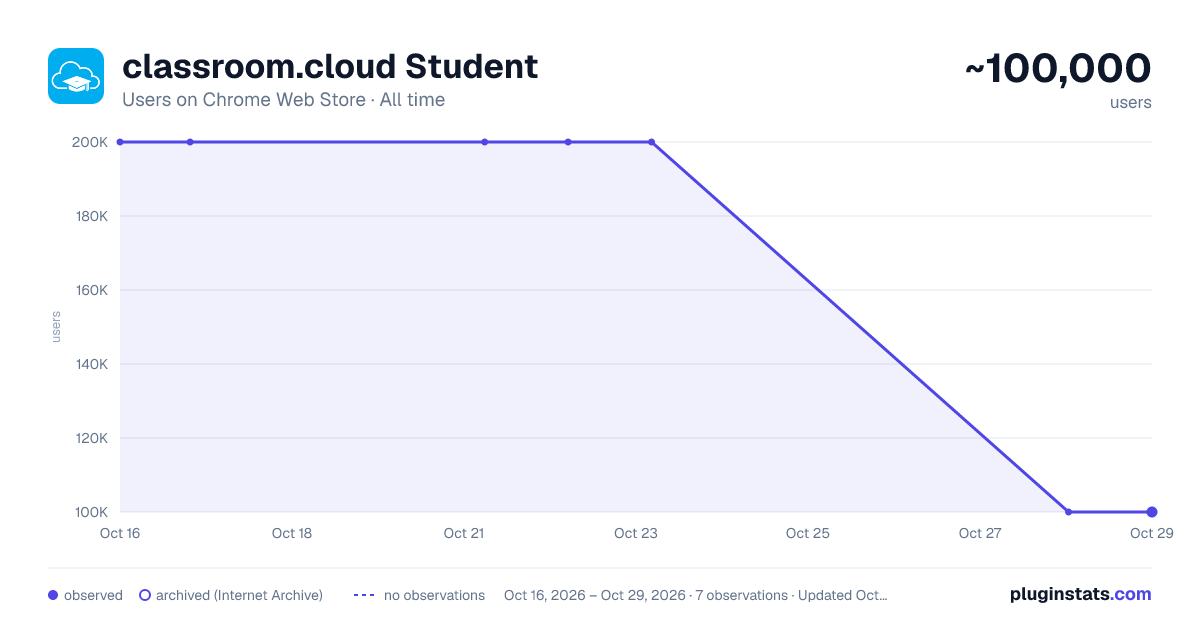
classroom.cloud Student has approximately 200,000 recorded users on Chrome Web Store.
It ranks #67 of 1,556 tracked Chrome Web Store listings by users.
It is rated 1.2 out of 5 from 220 ratings.
PluginStats has 2 daily observations since Oct 16, 2026; the latest is from Oct 17, 2026.
Rating: 1.20 / 5 from 220 ratings
About classroom.cloud Student
classroom.cloud delivers a set of stress-free, simple yet effective cloud-based teaching, online safety/safeguarding and technician…
classroom.cloud delivers a set of stress-free, simple yet effective cloud-based teaching, online safety/safeguarding and technician tools that help deliver engaging and meaningful learning experiences for students in a safe online environment – no matter the location of you and your students!
Perfect for schools and districts, the Student extension can be easily deployed by the IT team to the schools' managed Google accounts enabling you to connect instantly and securely to the students' Chrome OS devices from the classroom.cloud Administrator and Teacher portals.
If you are yet to create your classroom.cloud account, please visit classroom.cloud\signup to get started.
KEY FEATURES
CLASSROOM MANAGEMENT:
Choice of flexible connection methods - connect to a pre-defined group of student devices or on the fly using a Class Code.
Easily monitor students’ screens via crystal-clear thumbnails.
Open a watch window to zoom in and take a closer look at activity on a single student device. You can view the open Browser and prompt students to share their full desktop. (The latter can be disabled if you prefer to remain with the browser capture only.)
Ask students to register with their names at the start of a class.
Present students with the lesson objectives and their expected learning outcomes.
Broadcast the teachers screen and audio to connected student devices to help show/talk them through explanations and lesson activities.
The teacher can mute the audio playing in the active browser window on student devices.
Lock students’ screens in a single click to gain attention.
Get a feel for students’ understanding of the topic you’ve just taught them by sending out a quick survey for students to respond to.
Chat, send a message, and support your students via prioritised help requests – all without their peers knowing.
Acknowledge examples of good work or effort by assigning rewards to students during the lesson.
The teacher can randomly select students to answer a question during a Q&A session.
Choose the websites they can and can't see or block all website access. See details of the website that students are currently viewing to check they are focused on the task at hand.
Save yourself a heap of time and maximize lesson time by launching a website on the student devices.
SAFEGUARDING (ONLINE SAFETY):
Keyword and phrase monitoring: The Safeguarding/Online Safety tools help you protect students from being exposed to inappropriate online content. It alerts staff when students type or search for any terms that match with those in the classroom.cloud keyword database (multiple languages supported) – providing safeguarding and internet safety indicators for self-harm, bullying, sexual and criminal exploitation, and much more.
Staff can also manage the pre-populated list in the classroom.cloud web portal and add any additional ones they feel are appropriate.
For focused monitoring of specific year groups or students considered vulnerable, you can create groups of student devices and apply specific settings to them.
Dedicated safeguarding/online safety user roles can be assigned to the required staff members and is given to classroom.cloud Administrators by default.
Reporting Concerns: Using the Safeguarding/Online Safety button on their device, students can report concerns in confidence to a trusted member of staff via the Report a Concern option.
The component also offers students who do feel vulnerable instant access to a list of relevant online resources should they want to seek external help with a particular problem or concern.
Please note: The Safeguarding (Online Safety) tools are free to use during your evaluation period and are an optional extra when you purchase classroom.cloud.
TECH TOOLS
classroom.cloud also provides school IT teams with a range of tools to deliver pro-active support and to help monitor activity across the network.
View Student Desktops The 'Watch' feature is available to classroom.cloud Administrators and Technicians, allowing them to view activity at a selected device.
Send Message Send an instant notification to connected desktops.
Inventory The Inventory tool lets you retrieve a real-time view of the hardware and software installed on each school device.
Audit Log The Audit Log provides a central record of actions taken and system changes made by classroom.cloud users.
Activity Monitor The Activity component provides a single chronological view of user login sessions, application usage, and internet usage for all available classroom.cloud devices.
Acceptable Use Policy Distribution classroom.cloud Administrators can create custom Acceptable Use Policies and assign them to specific user groups. When the user signs into a Chromebook, any policies requiring their acknowledgement will appear.
A dedicated user role for school techs can be assigned to appropriate staff members but access is automatically given to classroom.cloud Administrators.
A step-by-step guide to managing and deploying the classroom.cloud Student extension using the Google Admin Console is available on our website.
The classroom.cloud Privacy Policy can be viewed at: classroom.cloud/privacy-policy/
Latest updates and fixes in version 3.10.0.0:
- Performance and operability enhancements
Description from the Chrome Web Store listing.
Where classroom.cloud Student sits in the listing
Each band is one page of 20. Users on a log scale. Placement is projected from users, so it can differ from the marketplace's own sort order. Hover a dot to see the listing.
Charts
Images: 30d · 1y · all time · 1600×900 dark
Adoption over time
7/30/90-day growth
Ranking history
Filled points are observed values; hollow points come from Internet Archive snapshots of the listing page. Dashed segments span periods with no observations — values between points are not interpolated.
Recent observations
Full history (2)Similar Chrome Web Store Workflow & Planning plugins




Data source
User counts are read from public Chrome Web Store listing pages. Google displays rounded user counts (and caps the display at 10,000,000+), so small changes may not be visible. Rating counts above 1,000 are rounded (e.g. 1.6K).
Listing: https://chromewebstore.google.com/detail/classroomcloud-student/mpkdoimpgkhjcicmhmlmgboelebflpla. First seen Oct 16, 2026; last successful collection Oct 17, 2026. See the methodology.