 PluginStats
AccessCheck — Website Accessibility Checker, WCAG & ADA Audit users statistics
By aaleksandr.ross · Chrome Web Store · Tools
Run a WCAG and ADA accessibility audit. Check color contrast, alt text, headings, ARIA and 50+ website issues.
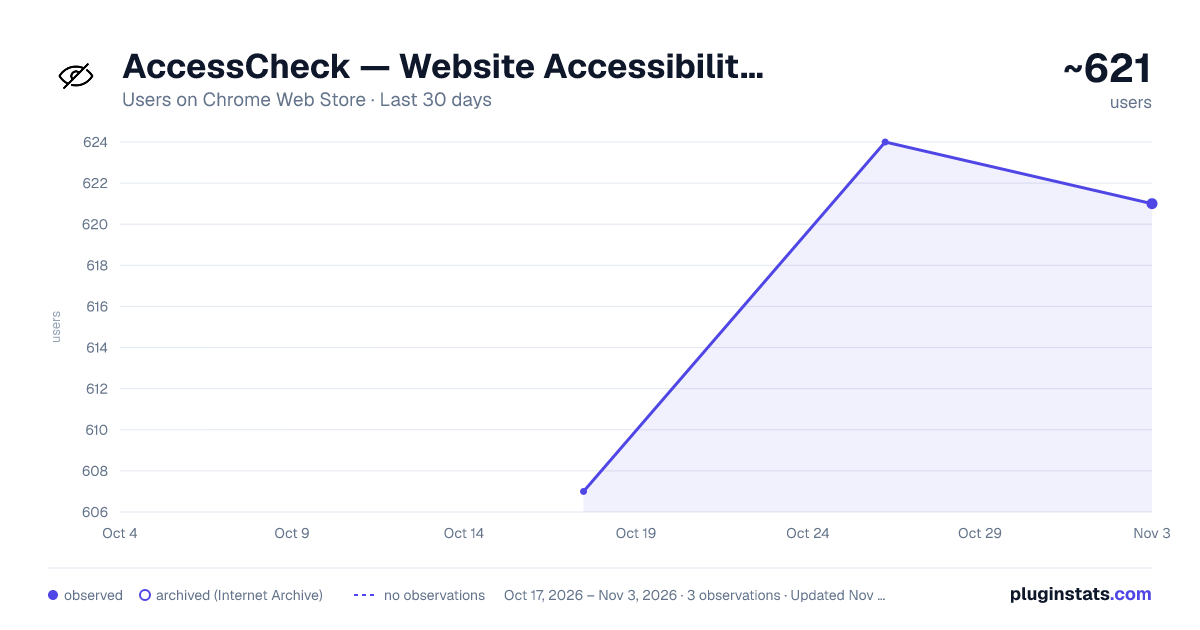
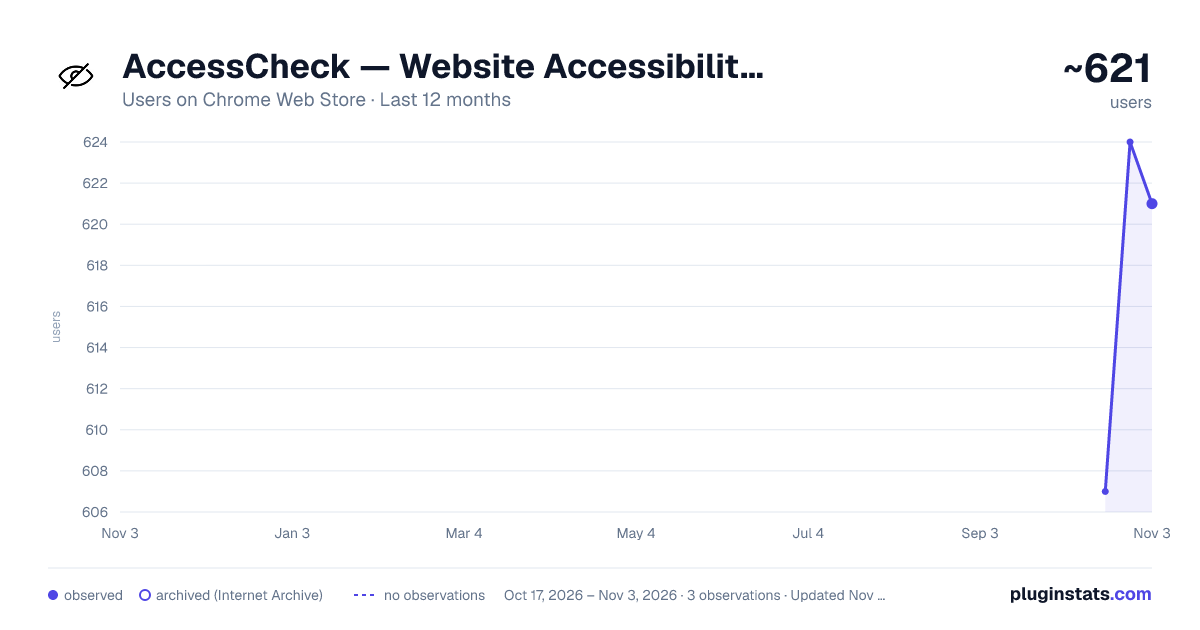
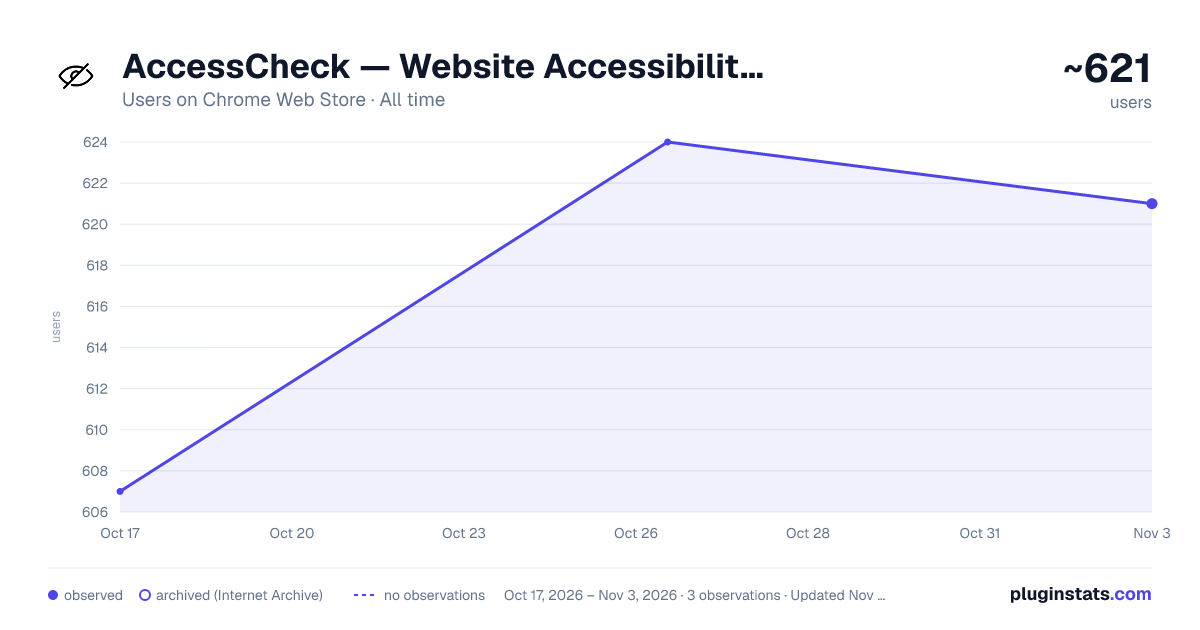
AccessCheck — Website Accessibility Checker, WCAG & ADA Audit has approximately 607 recorded users on Chrome Web Store.
It ranks #935 of 2,033 tracked Chrome Web Store listings by users.
It is rated 5.0 out of 5 from 2 ratings.
PluginStats has 1 daily observations since Oct 17, 2026; the latest is from Oct 17, 2026.
Rating: 5.00 / 5 from 2 ratings
About AccessCheck — Website Accessibility Checker, WCAG & ADA Audit
Run a WCAG and ADA accessibility audit. Check color contrast, alt text, headings, ARIA and 50+ website issues.
AccessCheck — Website Accessibility Checker, WCAG & ADA Audit
Run a one-click WCAG and ADA accessibility audit on any web page. This accessibility checker tests color contrast, alt text, heading structure, ARIA labels, keyboard navigation and 50+ other website accessibility issues — and explains every single one in plain English, not technical WCAG codes.
WHAT ACCESSCHECK SCANS
- Color contrast ratio for text, buttons, links, and UI elements - Missing, empty, or redundant alt text on images and icons - Heading structure and hierarchy (H1 through H6 order) - Form labels, input associations, and required field indicators - ARIA labels, roles, states, and properties - Keyboard navigation, tab order, and focus indicators - Link text clarity, descriptiveness, and "click here" anti-patterns - Language attributes and document structure - Skip navigation links and bypass blocks - Table headers, captions, and data cell associations - Interactive element focus order and visibility - Landmark regions, page structure, and HTML5 sectioning - Iframe titles, button names, and link names - Color-only information cues and meaningful contrast - And 40+ additional WCAG 2.1 and WCAG 2.2 success criteria
WHO IS ACCESSCHECK FOR
- Small business owners ensuring their site meets ADA website compliance requirements - Marketers and content creators checking accessibility before publishing - E-commerce store owners protecting against ADA lawsuits and demand letters - Web designers validating color contrast and readability for new designs - Bloggers making their content accessible to readers using assistive technology - Agency teams running quick website accessibility audits for clients - QA engineers needing a fast accessibility testing tool inside the browser - Educators, nonprofits, and government teams meeting Section 508 requirements - Anyone who wants to understand website accessibility without reading WCAG documentation
HOW IT WORKS
1. Click the AccessCheck icon on any web page 2. View results in the side panel — organized by category (Images, Forms, Navigation, Color, Structure) 3. Read plain-English descriptions of each accessibility violation (no technical WCAG jargon) 4. Follow step-by-step fix instructions with optional code snippets 5. Track your accessibility score over time with built-in scan history 6. Export a professional accessibility report as PDF for stakeholders (Pro)
WHY CHOOSE ACCESSCHECK
Plain English: Every issue is explained in language anyone can understand — not just developers. This accessibility checker translates technical WCAG codes into human-readable descriptions, so non-developers can fix problems without learning a11y jargon.
Instant Results: One-click accessibility audit directly in your browser. No waiting, no external servers, no command line.
No Server, No Signup, No Tracking: 100% client-side scanning. Your page data never leaves your browser. This website accessibility checker works entirely offline and respects your privacy.
Visual Highlights: See exactly where accessibility issues appear on the page with colored overlays — no more guessing which element triggered the violation.
Letter Grade: Get an A-to-F accessibility score at a glance to understand your overall WCAG compliance level.
Scan History: Track how your website accessibility improves over time with historical score tracking and trend sparklines.
PDF Reports: Export professional accessibility audit reports for clients, stakeholders, and legal records (Pro).
Batch Scanning: Audit multiple pages or an entire sitemap in one run to check your whole website for accessibility violations (Pro).
Developer Mode: Optionally show WCAG success criteria codes alongside plain-English explanations for accessibility specialists and developers.
STANDARDS SUPPORTED
- WCAG 2.0, WCAG 2.1, and WCAG 2.2 (Level A, AA, and AAA) - ADA (Americans with Disabilities Act) Title III compliance indicators - Section 508 of the Rehabilitation Act - EN 301 549 and the European Accessibility Act (EAA 2025) - AODA (Accessibility for Ontarians with Disabilities Act)
FULL LIST OF ACCESSIBILITY CHECKS
Color contrast ratio checker for text and backgrounds Alt text checker for images, icons, and decorative graphics Heading structure and hierarchy validator Form label and input association checker ARIA attribute validation and screen reader compatibility test Keyboard navigation and focus order testing Link text quality and descriptiveness analysis Skip navigation and landmark region detection Table structure and header association review Language attribute and document structure audit Interactive element accessibility evaluation Focus indicator visibility checker Button, link, and iframe name validator Duplicate ID and unique landmark detector
PRIVACY & PERFORMANCE
AccessCheck runs 100% in your browser. No page data is sent to external servers, no browsing activity is tracked, and no account is needed. This accessibility scanner is lightweight and performs the full website accessibility audit in seconds without slowing down your browser. Powered by the open-source axe-core engine trusted by accessibility teams worldwide.
Description from the Chrome Web Store listing.
Where AccessCheck — Website Accessibility Checker, WCAG & ADA Audit sits in the listing
Each band is one page of 20. Users on a log scale. Placement is projected from users, so it can differ from the marketplace's own sort order. Hover a dot to see the listing.
Charts
Images: 30d · 1y · all time · 1600×900 dark
Adoption over time
7/30/90-day growth
Ranking history
Filled points are observed values; hollow points come from Internet Archive snapshots of the listing page. Dashed segments span periods with no observations — values between points are not interpolated.
Recent observations
Full history (1)Similar Chrome Web Store Tools plugins




Data source
User counts are read from public Chrome Web Store listing pages. Google displays rounded user counts (and caps the display at 10,000,000+), so small changes may not be visible. Rating counts above 1,000 are rounded (e.g. 1.6K).
Listing: https://chromewebstore.google.com/detail/accesscheck-—-website-acc/mbghbhlimdapjmeplbffopfagdikdacm. First seen Oct 17, 2026; last successful collection Oct 17, 2026. See the methodology.