 PluginStats
Calendar Clarity users statistics
Color-code Google Calendar with unlimited colors that sync to your phone, group your labels, dim the noise, and focus with a timer.
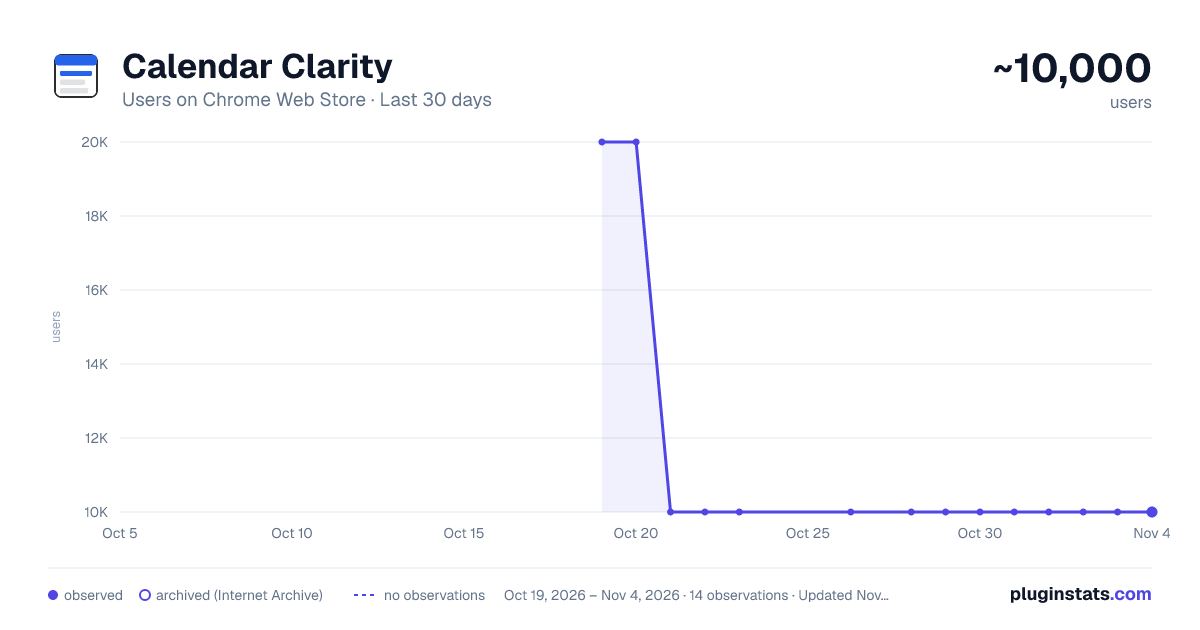
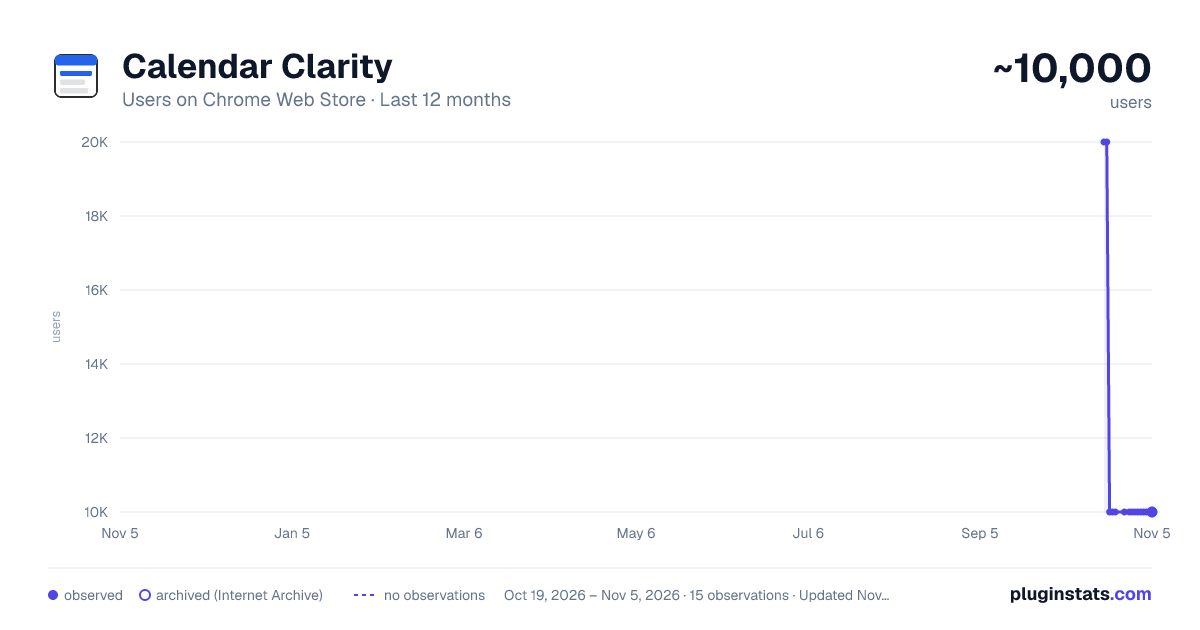
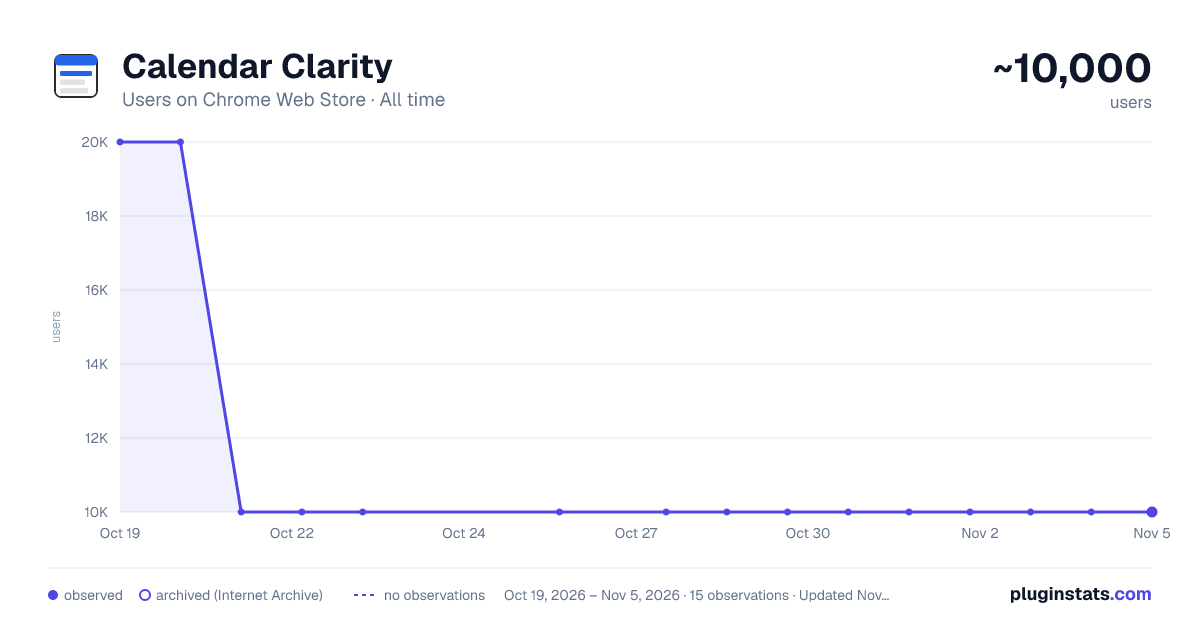
Calendar Clarity has approximately 20,000 recorded users on Chrome Web Store, ranking #224 of 2,495 tracked listings.
Rating: 4.10 / 5 from 59 ratings
About Calendar Clarity
Color-code Google Calendar with unlimited colors that sync to your phone, group your labels, dim the noise, and focus with a timer.
Calm a cluttered Google Calendar. Give every color a name and a purpose, dim the events that don't matter, reshape your week without dragging events around, and drop into a focus session — all without leaving Google Calendar. Your colors live as native Google labels, so they follow you to the Google Calendar app on your phone.
KEY FEATURES
🎨 Colors That Sync to Your Phone: Color-code your week with named, grouped categories. Because your colors are saved as native Google labels, they show up in the Google Calendar mobile app and on every device — not just your browser. To add a color, open an event in Google Calendar, click its color, and choose “Edit labels” — create any color there (pick one, use the eyedropper, or paste a hex code), then name and group it here so it's always one click away in the event menu.
🗂️ Group & Order Your Colors: Organize your labels into meaningful groups — Work, Personal, Health, whatever fits your life — so the right color is always at hand. Reorder your groups, and reorder the colors inside each group, so the colors you reach for most sit first — in the popup and in the right-click color menu on your calendar. Prefer more room to work? Open the same editor as a full page in its own tab.
✨ Clean Color Blocks: Give an event a color of its own and Google draws a strip of the calendar's color down its left edge. Calendar Clarity hides that strip, so a colored event reads as one solid block. It's a setting in the Colors tab you can switch off whenever you like, and it changes nothing about your saved colors.
📚 Built for Several Calendars: Personal, work, family — Calendar Clarity keeps the colors from each of your calendars, tells you which calendar each one came from, and lets you narrow the list to one calendar at a time.
🃏 Details on Hover (optional): Hover an event to see its category name and who's attending — at a glance, without opening it.
🗓️ Event Actions — your own one-click shortcuts (optional): Set up a change once — how far to postpone, how much to extend by, where a copy lands — and from then on it's a right-click away, with your settings remembered. No dragging, no re-typing, no dialog to fill in each time.
Some of these Google Calendar can't do at all: Split breaks a long block into focused sessions that tile the original time exactly, Spread distributes a backlog across the open time in your week, and Extend can push out the meetings that get in the way. Postpone, Reschedule and Duplicate are the everyday ones, just faster.
Event Actions make real changes to your Google Calendar and run only when you trigger them. The first time you use one, you'll sign in with Google to grant calendar access — requests go straight from your browser to Google.
🌫️ Event Visibility: Dim the events that don't matter — declined meetings, all-day clutter, low-priority blocks — so the day you actually care about stands out at a glance.
✅ Check Things Off (optional): Turn your events into things you can tick. Hover any event, click the circle that appears, and it's marked done with a check and a strikethrough — in Day, Week and Month view alike. It stays your own private note: nothing is sent to Google, and no one else ever sees it. Off until you switch it on under Visibility.
🧘 Focus Sessions: Start a focus timer from any event, then settle in with a guided breathing pacer (Box, Coherent, Calm, and 4·7·8), a guided meditation that scales to your session, and calming ambient soundscapes (Rain, Ocean, Café, Pink noise, Brown noise) — or bring your own Spotify playlist. Includes focus-mode dimming, gentle completion chimes, optional break suggestions, and session history.
⚠️🚨 GOOD TO KNOW 🚨⚠️
📱 Colors sync through Google: Calendar Clarity runs in Chrome on your computer, but because your colors become native Google labels, they appear in the Google Calendar apps on your phone and tablet automatically.
🎨 How to add a color: Colors are created in Google Calendar's own “Labels” dialog. Open any event, click its color, and choose “Edit labels” — pick a color, use the eyedropper, or paste a hex code, then Save. Your color then shows up in Calendar Clarity, where you name it and sort it into a group. Because it's a real Google label, it syncs to your phone automatically.
🖍️ About the line on colored events: When an event's color is different from its calendar's color, Google draws a thin strip of the calendar color down the event's left edge. That's Google's own rendering, not something the extension adds. Calendar Clarity hides it by default; turn it off in the Colors tab to put it back. This changes only how your calendar looks in this browser — your colors are real Google labels and are never altered.
📚 Labels belong to a calendar, not to you: That's Google's own rule — a label created on your work calendar exists only there, which is why the same name can appear under two different calendars. Calendar Clarity shows you which is which. To pick up a calendar's colors, open the color menu on one of its events once.
🔐 Event Actions use your Google Calendar (optional): These features are off until you turn them on. The first time you use one, you sign in with Google to grant calendar access, and it asks only for what it needs — permission to act on your events. Those requests go directly from your browser to Google and never pass through our servers. You can revoke access anytime at myaccount.google.com/permissions.
🛠️ Works alongside Google Calendar's layout: This extension works with Google Calendar's current design. If Google changes something and a feature looks off, reach out at ali@humanquest.net or visit https://humanquest.net and we'll fix it fast.
🖌️ Changes apply to existing events: An event needs to be saved before colors can be applied to it.…
Description from the Chrome Web Store listing.
README badge
Show your rank in a README or on your website. The badge updates automatically.
Charts
Images: 30d · 1y · all time · 1600×900 dark
Adoption over time
7/30/90-day growth
Ranking history
Ratings over time
Listing placement
Listing placement
Filled points are observed values; hollow points come from Internet Archive snapshots of the listing page. Dashed segments span periods with no observations — values between points are not interpolated.
Each band is one page of 20. Users on a linear scale. Placement is projected from users, so it can differ from the marketplace's own sort order. Hover a dot to see the listing.
Recent observations
Full history (2)Similar Chrome Web Store Tools plugins
All 20 Calendar Clarity alternatives



Data source
Covers every Chrome Web Store extension with at least 100 users, found through the store's public sitemap. User counts are read from public listing pages. The 10% most-used extensions are refreshed daily, the next 40% weekly and the next 40% monthly; the least-used 10% are not refreshed. Google displays rounded user counts (and caps the display at 10,000,000+), so small changes may not be visible. Rating counts above 1,000 are rounded (e.g. 1.6K).
Listing: https://chromewebstore.google.com/detail/calendar-clarity/fadonemflmjiddpmnpehmiemedpjdgml. First seen Oct 19, 2026; last successful collection Oct 20, 2026. See the methodology.