 PluginStats
@beardcoder/prettier-plugin-fluid weekly downloads statistics
By beardcoder · npm · Prettier plugins
Prettier plugin for TYPO3 Fluid templates that plays nicely with other HTML plugins
@beardcoder/prettier-plugin-fluid has 32 recorded weekly downloads on npm, a change of -34.7% over the past 7 days, ranking #1860 of 2,322 tracked listings.
About @beardcoder/prettier-plugin-fluid
@beardcoder/prettier-plugin-fluid


Prettier plugin for TYPO3 Fluid templates.
- Plays nicely with other plugins. The HTML structure is formatted by
Prettier's own
htmlparser, so plugins that hook into it keep working, such as attribute sorting and Tailwind class sorting. - Never touches your Fluid code. Shorthand syntax like
{item.title -> f:format.crop(maxCharacters: 20)}is kept byte-for-byte, including arbitrarily nested inline syntax and escaped quotes:{f:if(condition: '{a}', then: '{f:translate(key: \'x\')}')}. - Understands ViewHelpers. Structural tags (
f:if,f:for,f:section, …) are laid out as blocks. Inline ones (f:link.*,f:translate, …) behave like<a>. Custom ViewHelpers are configurable. - Formats inline assets. The content of
<f:asset.css>and<f:asset.script>is formatted as CSS and JavaScript, just like<style>and<script>. - Safe by design. Some parts are kept verbatim:
<f:comment>content (its lines only move with the comment's indentation), CDATA sections, conditional wrappers like<f:if …><div></f:if>, and<script>/<style>/<f:asset.*>blocks that contain Fluid code. If formatting would ever drop Fluid code, the plugin fails instead of writing the file. - Helpful errors. When a template is invalid HTML, the error points at the line and column in your template.
Installation
bun add -d prettier @beardcoder/prettier-plugin-fluid
# or
npm install --save-dev prettier @beardcoder/prettier-plugin-fluid
Requires Prettier 3 and Node.js 20 or later, or Bun.
Fluid templates are usually plain .html files, so assign the fluid parser
to them in your Prettier config (.prettierrc.json):
{
  "plugins": ["@beardcoder/prettier-plugin-fluid"],
  "overrides": [
    {
      "files": [
        "**/Resources/Private/**/{Templates,Layouts,Partials,Components,PageView}/**/*.html",
        "**/ContentBlocks/**/templates/**/*.html"
      ],
      "options": { "parser": "fluid" }
    }
  ]
}
These are the same locations the
Fluid extension for VS Code
treats as Fluid templates. Files ending in .fluid or .fluid.html are
detected automatically (.fluid.html from Prettier 3.6 on; older versions
treat it as .html, so assign the parser via overrides there).
bunx prettier --write "**/Resources/Private/**/*.html"
Only HTML templates are supported. Plain-text templates (e.g. *.fluid.txt
for text emails) are not formatted: an HTML formatter would change their line
breaks.
VS Code
Install the Prettier extension
and the Fluid extension.
The Fluid extension marks HTML templates with the language html-fluid, which
this plugin registers for. Prettier then formats them on save:
{
  "[html-fluid]": {
    "editor.defaultFormatter": "esbenp.prettier-vscode",
    "editor.formatOnSave": true
  }
}
Sorting attributes
Use
prettier-plugin-organize-attributes.
It sorts attributes on HTML tags and on ViewHelper tags. This order suits
Fluid templates: the attributes that identify a ViewHelper call come first,
then everything else alphabetically.
{
  "plugins": [
    "@beardcoder/prettier-plugin-fluid",
    "prettier-plugin-organize-attributes"
  ],
  "attributeGroups": [
    "^data-namespace-typo3-fluid$",
    "^xmlns$",
    "^partial$",
    "^section$",
    "^name$",
    "^type$",
    "^each$",
    "^as$",
    "^key$",
    "^tagName$",
    "^src$",
    "$DEFAULT"
  ],
  "attributeSort": "ASC",
  "attributeIgnoreCase": true
}
organize-attributes matches namespaced attributes by their local name only:
xmlns:ce is sorted as ce, so it would end up before
data-namespace-typo3-fluid. That is why data-namespace-typo3-fluid needs a
group of its own at the start. A ^xmlns group only matches a plain xmlns
attribute.
Tailwind CSS
Add
prettier-plugin-tailwindcss
as the last plugin. It chains organize-attributes internally:
{
  "plugins": [
    "@beardcoder/prettier-plugin-fluid",
    "prettier-plugin-organize-attributes",
    "prettier-plugin-tailwindcss"
  ]
}
Tailwind treats Fluid expressions inside class as unknown classes and
moves them to the front.
Options…
Description from the npm listing.
- fluid
- fluid-templates
- formatter
- prettier
- prettier-plugin
- typo3
README badge
Show your rank in a README or on your website. The badge updates automatically.
Charts
Images: 30d · 1y · all time · 1600×900 dark
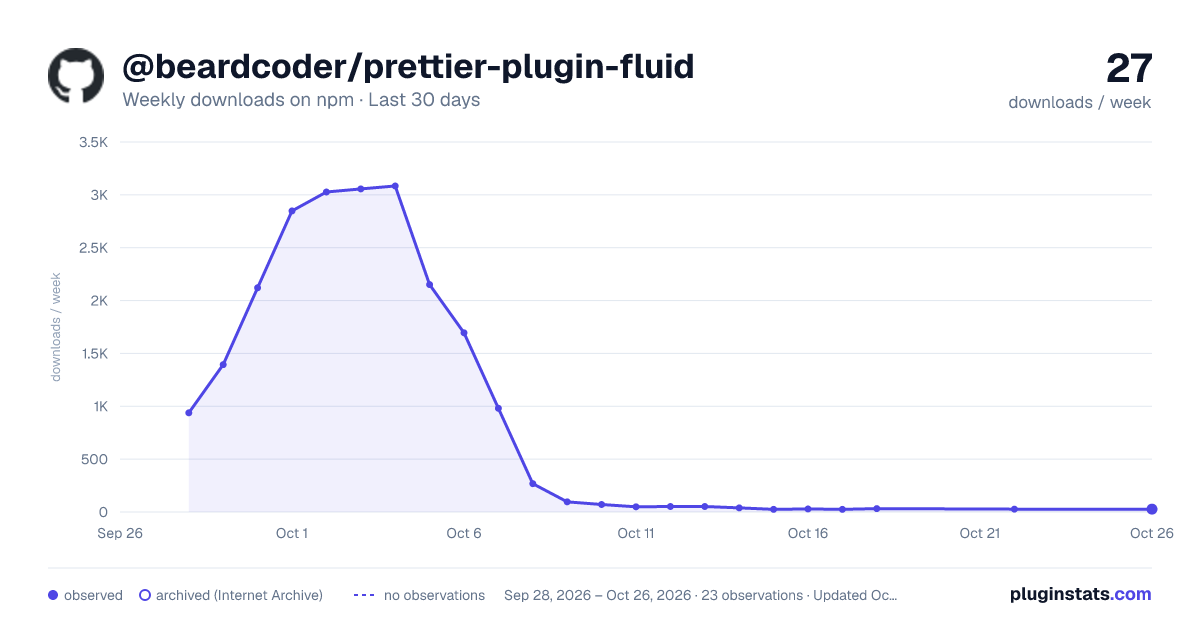
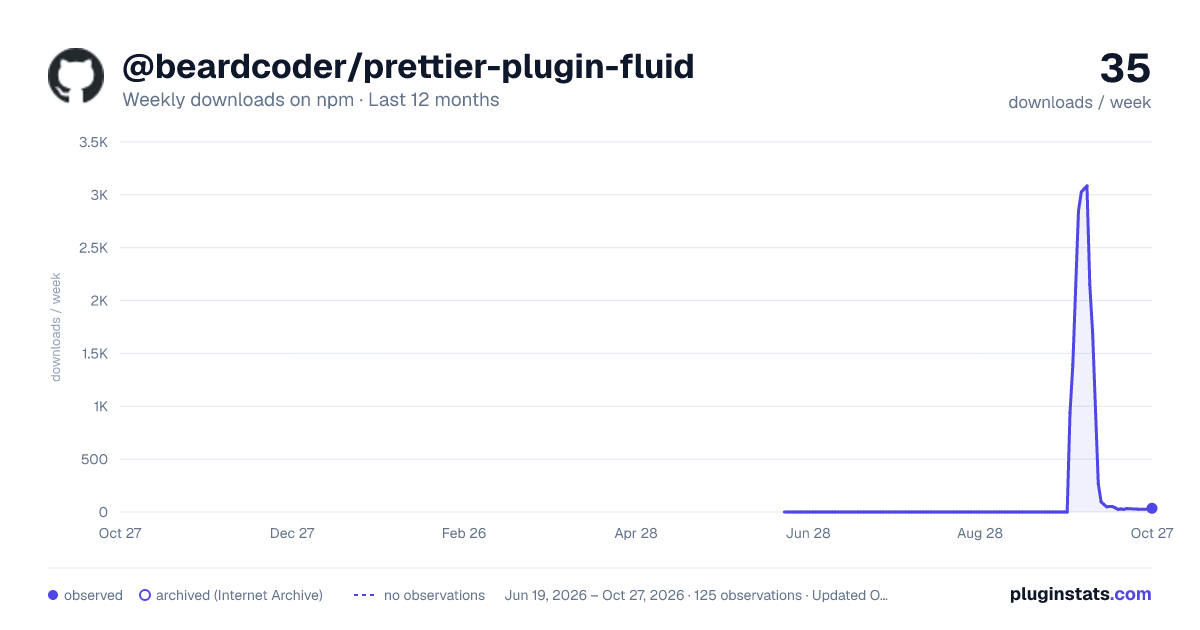
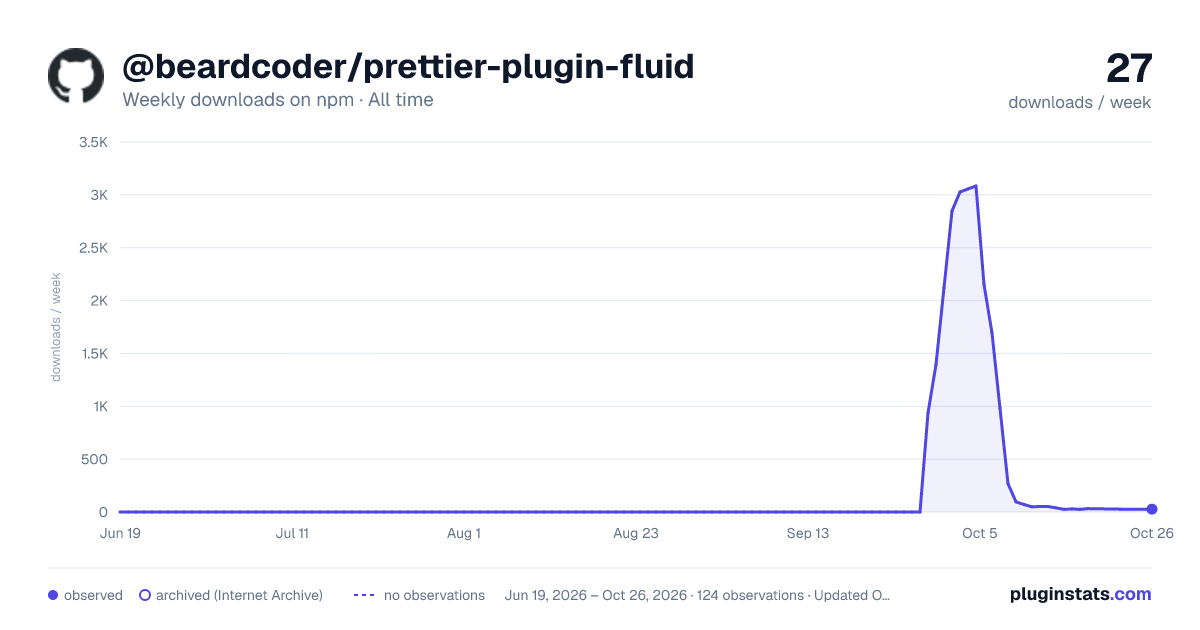

Adoption over time
7/30/90-day growth
Ranking history
Listing placement
Listing placement
Filled points are observed values; hollow points come from Internet Archive snapshots of the listing page. Dashed segments span periods with no observations — values between points are not interpolated.
Each band is one page of 20. Weekly downloads on a linear scale. Placement is projected from weekly downloads, so it can differ from the marketplace's own sort order. Hover a dot to see the listing.
Recent observations
Full history (122)Similar npm Prettier plugins plugins
All 20 @beardcoder/prettier-plugin-fluid alternatives- 32 weekly downloads-49.2%
- 30 weekly downloads-3.2%
- 30 weekly downloads+11.1%
- 27 weekly downloads-47.1%
Data source
Weekly downloads (trailing 7 complete days) come from the official npm downloads API. Downloads include CI and mirrors and are not equivalent to installs or users. npm publishes no ratings.
Listing: https://www.npmjs.com/package/@beardcoder/prettier-plugin-fluid. First seen Oct 16, 2026; last successful collection Oct 20, 2026. See the methodology.