 PluginStats
vite-plugin-sass-dts weekly downloads statistics
By activeguild · npm · Vite plugins
A plugin that automatically creates a type file when using the css module type-safely.
vite-plugin-sass-dts has 25,560 recorded weekly downloads on npm, a decrease of 44.0% over the past 30 days.
It ranks #695 of 2,251 tracked npm listings by weekly downloads.
Over 90 days, weekly downloads changed by -25.5%.
PluginStats has 543 daily observations since Apr 23, 2025; the latest is from Oct 17, 2026.
About vite-plugin-sass-dts
vite-plugin-sass-dts ⚡ Welcome 😀
vite-plugin-sass-dts
A plugin that automatically creates a type file when using the CSS module type-safely.
Demo
Install
For version 1.3.27 or later, please use the latest sass-embedded package; we have confirmed that it does not work with the sass package.
This plugin requires Vite 7 or later (vite: ^7 || ^8). Sass files are compiled with the modern Sass API (modern / modern-compiler) by default. The legacy Sass API (api: 'legacy') is no longer supported since Vite 7.
Options
| Parameter | Type | Description |
| enabledMode | string[] | Create d.ts files for css modules of file extension css, sass, scss included in the project at build time.
Valid enumerations 'development' and 'production'. By default it is enabled only for development. We recommend that you turn off the flag once you have created the d.ts file, as it will take a long time to build. (default [development]) | | global.generate | boolean | Outputs the common style set in additionalData of preprocessorOptions as a global type definition file. | | global.outputFilePath | string | Specify the file that outputs the global common style with an absolute path.Relative paths will be supported. | | typeName.replacement | string \| (fileName: string) => string | Type name can be changed to any value. (default is the classname key as a string. e.g. theClassName: 'theClassName';) | | exportName.replacement | string \| (fileName: string) => string | Export name can be changed to any value. (default is 'classNames'. e.g. declare const classNames: { ... };) | | outputDir | string | An absolute path to the output directory. If undefined, declaration files will be generated in the source directories. | | sourceDir | string | An absolute path to your source code directory. The plugin will replace this path with outputDir option when writing declaration files. | | esmExport | boolean | Specify dts export type. If enabled, going to use ESM style export export default .... Otherwise export = .... | | prettierFilePath | string | Specify the path to the prettier configuration file. | | formatter | 'prettier' \| 'biome' | Specify the formatter used for the generated d.ts files. When set to biome, install @biomejs/js-api and @biomejs/wasm-nodejs as devDependencies. (default: prettier) | | useNamedExport | boolean | Output also in named export.(default: false) | | legacyFileFormat | boolean | Use legacy file naming format. If true, generates *.scss.d.ts (legacy). If false, generates *.d.scss.ts (TypeScript 5 compatible). (default: false) |
Add it to vite.config.ts
Format with Biome
The generated d.ts files are formatted with prettier by default. To format them with Biome instead, set the formatter option and install the Biome JavaScript API packages.
Usage
You can create a dts file by saving the scss file during development. You can check the usage example when the following options are set. Prepare the vite.config.ts file with the following options and start it in development mode.
[vite.config.ts]
Then save the following file ...
[src/assets/styles/_index.scss]
[src/App.module.scss]
Saving the scss file creates a d.ts file in the outputDir hierarchy.
Note: if outputDir is not set, declaration files are output to the same directory as the source files.
TypeScript 5 Compatibility: By default, declaration files are generated in the format *.d.scss.ts (e.g., App.module.d.scss.ts) which is compatible with TypeScript 5's module resolution. To use the legacy format *.scss.d.ts, set legacyFileFormat: true in the plugin options.
[dist/App.module.d.scss.ts]
The optional global type definition is output to the output path of the common style specified in the options.
[src/style.d.ts]
Principles of conduct
Please see the principles of conduct when building a site.
License
This library is licensed under the MIT license.
Description from the npm listing.
- vite
- vite-plugin
- css
- scss
- classnames
- clsx
- typescript
- generics
- cssmodules
Where vite-plugin-sass-dts sits in the listing
Each band is one page of 20. Weekly downloads on a log scale. Placement is projected from weekly downloads, so it can differ from the marketplace's own sort order. Hover a dot to see the listing.


Charts
Images: 30d · 1y · all time · 1600×900 dark
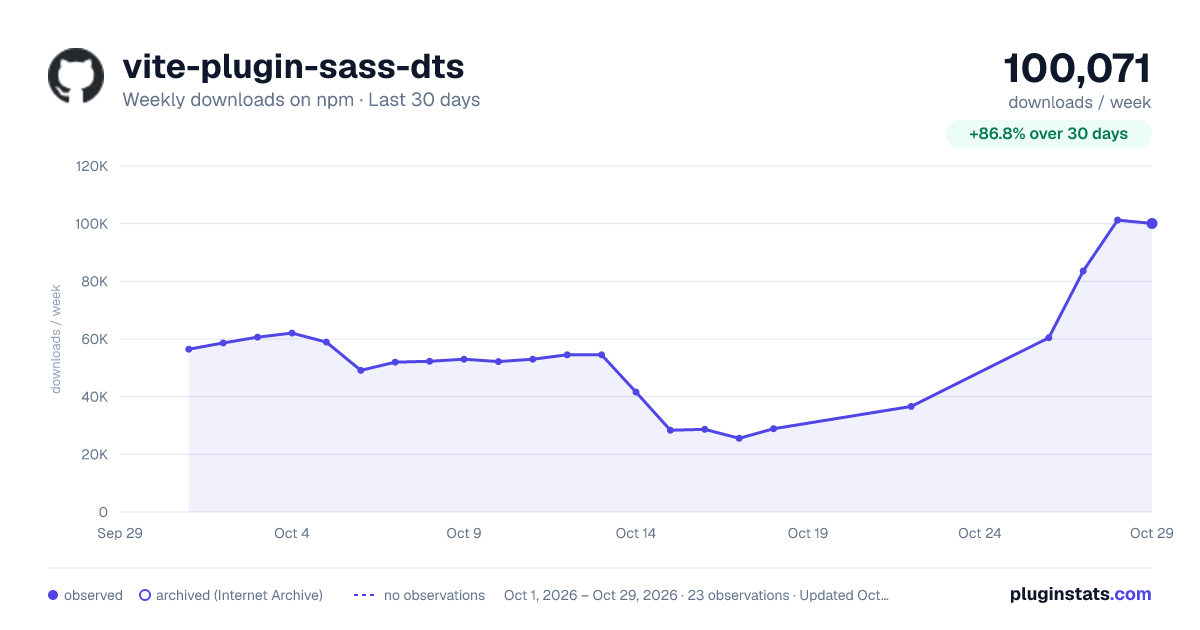
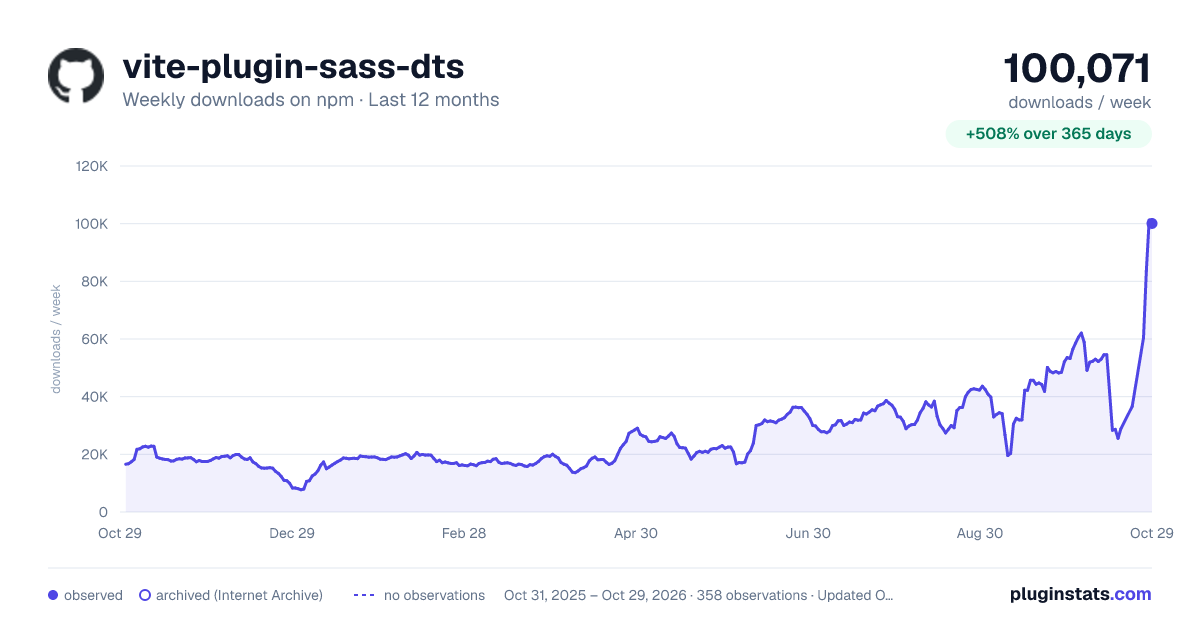
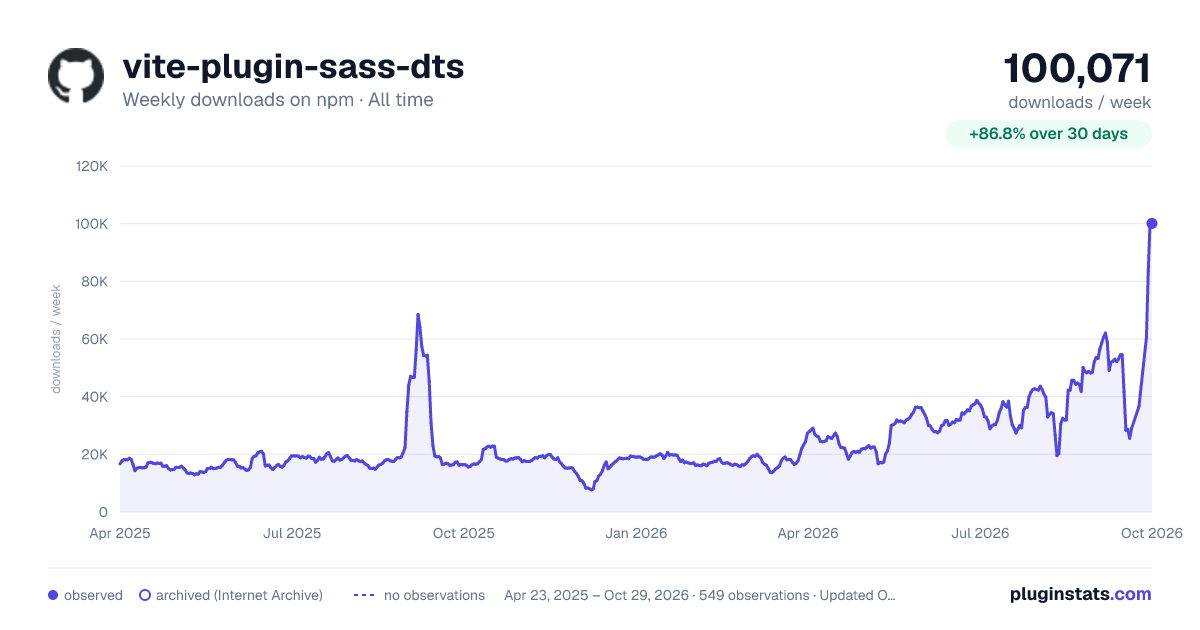

Adoption over time


7/30/90-day growth


Filled points are observed values; hollow points come from Internet Archive snapshots of the listing page. Dashed segments span periods with no observations — values between points are not interpolated.
Recent observations
Full history (543)Similar npm Vite plugins plugins
Data source
Weekly downloads (trailing 7 complete days) come from the official npm downloads API. Downloads include CI and mirrors and are not equivalent to installs or users. npm publishes no ratings.
Listing: https://www.npmjs.com/package/vite-plugin-sass-dts. First seen Oct 16, 2026; last successful collection Oct 18, 2026. See the methodology.