 PluginStats
@mcp-use/inspector weekly downloads statistics
By mcp-use (3 listings) · npm · MCP servers
MCP Inspector - A tool for inspecting and debugging MCP servers
@mcp-use/inspector has 21,587 recorded weekly downloads on npm, a decrease of 36.0% over the past 30 days.
It ranks #729 of 2,251 tracked npm listings by weekly downloads.
Over 90 days, weekly downloads changed by -58.1%.
PluginStats has 121 daily observations since Jun 19, 2026; the latest is from Oct 17, 2026.
About @mcp-use/inspector
MCP Inspector
🔍 MCP Inspector by mcp-use is an open-source, interactive developer tool for testing and debugging MCP servers with support for MCP-UI and OpenAI Apps SDK widgets. It provides a beautiful, intuitive interface for testing tools, exploring resources, managing prompts, and monitoring server connections - all from your browser.
🚀 Try it:
• Online: inspector.mcp-use.com • Locally: Run npx @mcp-use/inspector • Repository: github.com/mcp-use/mcp-use
🎥 Demo
📖 Documentation
For detailed usage instructions and guides, visit mcp-use.com/docs/inspector
📦 Related Packages
| Package | Description | Version |
| mcp-use | MCP framework and CLI | | | create-mcp-use-app | Create MCP apps | |
✨ Key Features
| Feature | Description |
| 🚀 Dev Auto-Mount | Project-pinned Inspector available at /mcp/inspector in mcp-use dev | | 🔌 Multi-Connection | Connect to and manage multiple MCP servers simultaneously | | 🎯 Interactive Testing | Test tools with live execution and real-time results | | 📊 Real-time Status | Monitor connection states, errors, and server health | | 🔐 OAuth Support | Built-in OAuth flow handling with popup authentication | | 💾 Persistent Sessions | Connections saved to localStorage and auto-reconnect | | 🎨 Beautiful UI | Modern, responsive interface built with React and Tailwind | | 🔍 Tool Explorer | Browse and execute all available tools with schema validation | | 📁 Resource Browser | View and copy resource URIs with syntax highlighting | | 🧩 Skills Explorer | Browse, verify, and preview Skills over MCP files | | 💬 Prompt Manager | Test and manage prompts with argument templates | | 🌐 Universal Support | Works with Streamable HTTP server connections | | 🎨 Widget Support | Full support for MCP-UI and OpenAI Apps SDK widgets | | 🔑 BYOK Chat | Bring Your Own Key chat interface for testing conversational flows | | 📚 Skill-aware Chat | Test progressive skill loading with removable per-chat context | | 💾 Saved Tool Calls | Save and replay tool executions for repeated testing | | ⌨️ Quick Actions | Cmd + K keyboard shortcuts for rapid navigation | | 🐳 Docker Ready | Self-host with a single Docker container for production use |
🚀 Quick Start
Access the Inspector
There are three ways to use the MCP Inspector:
1. Online Version (Recommended for Testing)
Visit inspector.mcp-use.com - no installation required!
2. Run Locally
Opens the inspector in your browser at http://localhost:8080
3. Auto-mounted by mcp-use dev
mcp-use includes the prebuilt Inspector package. The development CLI mounts it at /mcp/inspector without a separate project dependency:
Run mcp-use dev; the inspector is available at http://localhost:3000/mcp/inspector.
The UI assets, proxy, and OAuth backend all come from the installed package; no CDN is used. Production server.listen() and mcp-use start do not mount the Inspector.
📖 Usage Guide
Embedding the React client
Applications that import components from @mcp-use/inspector/client must also load the Inspector theme contract from their global Tailwind stylesheet:
The stylesheet supplies the surface, shadow, hover, and active tokens used by portaled dialogs, dropdowns, selects, and other Inspector UI primitives. The standalone Inspector bundles these styles automatically.
Dashboard
The main dashboard is your central hub for managing MCP server connections:
• Connected Servers Panel (left): View all your connected servers • Connect Panel (right): Add new server connections with transport, URL, auth, and headers configuration • Quick Actions: Access settings and clear sessions from the top bar
Adding an MCP Server
To connect to an MCP server:
1. Open Connect Panel: Click the Connect panel on the right side of the dashboard 2. Configure Transport: The Inspector supports Streamable HTTP only. 3. Enter Server URL: Input the MCP server endpoint (e.g., https://mcp.linear.app/mcp) 4. Configure Authentication (if needed): Add OAuth credentials or API headers 5. Click Connect: Establish the connection
Example URLs:
• Linear: https://mcp.linear.app/mcp • Local: http://localhost:3000/mcp
OAuth Authentication
For servers requiring OAuth (like Linear):
1. After clicking Connect, you'll see the authorization page 2. Click "Approve" to grant access 3. The inspector handles the redirect automatically 4. Server appears in Connected Servers list with a green indicator
Privacy Note: All authentication tokens and credentials are stored securely in your browser's local storage. Nothing is sent to our servers - everything stays on your device.
Connected Servers
Once connected, each server shows:
• Connection status indicator (green = connected) • Server name and URL • Available tools count • Action buttons: Inspect, Disconnect, Remove
Click "Inspect" to open the detailed server view.
🔍 Server Detail View
After clicking "Inspect" on a connected server, you'll see four main tabs:
Tools Tab
The Tools tab displays all available tools from the MCP server.
Features:
• Browse all available tools with their names and descriptions • Select a tool to view its detailed schema • Click "Execute" to test the tool • Enter JSON parameters in the input panel • View real-time results with syntax highlighting • Support for MCP-UI and OpenAI Apps SDK widgets
Example: When connected to Linear MCP server, you'll see 23+ tools for managing issues, projects, and teams.
Resources Tab
Browse available resources from the MCP server:
• View resource descriptions and metadata • Copy resource URIs for use in your applications • Check MIME types and resource properties • Preview resource content
Note: Some servers (like Linear) may not expose resources, in which case you'll see "No resources available".
Prompts Tab
Test and manage pre-configured prompts:…
Description from the npm listing.
- mcp
- inspector
- debug
- tools
Where @mcp-use/inspector sits in the listing
Each band is one page of 20. Weekly downloads on a log scale. Placement is projected from weekly downloads, so it can differ from the marketplace's own sort order. Hover a dot to see the listing.


Charts
Images: 30d · 1y · all time · 1600×900 dark
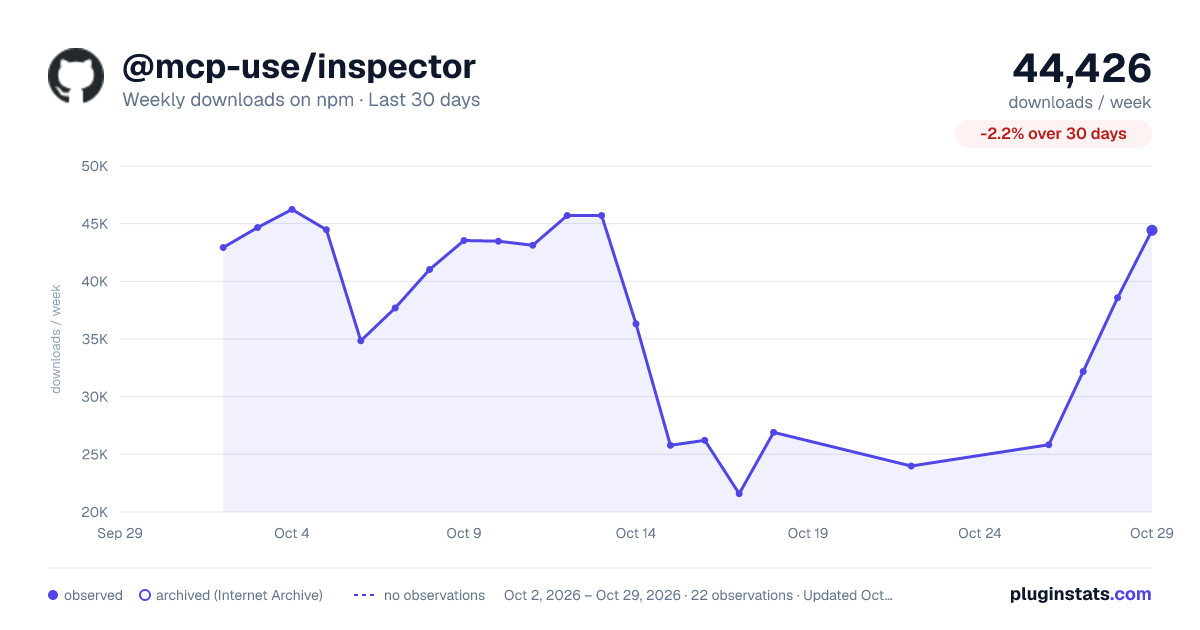
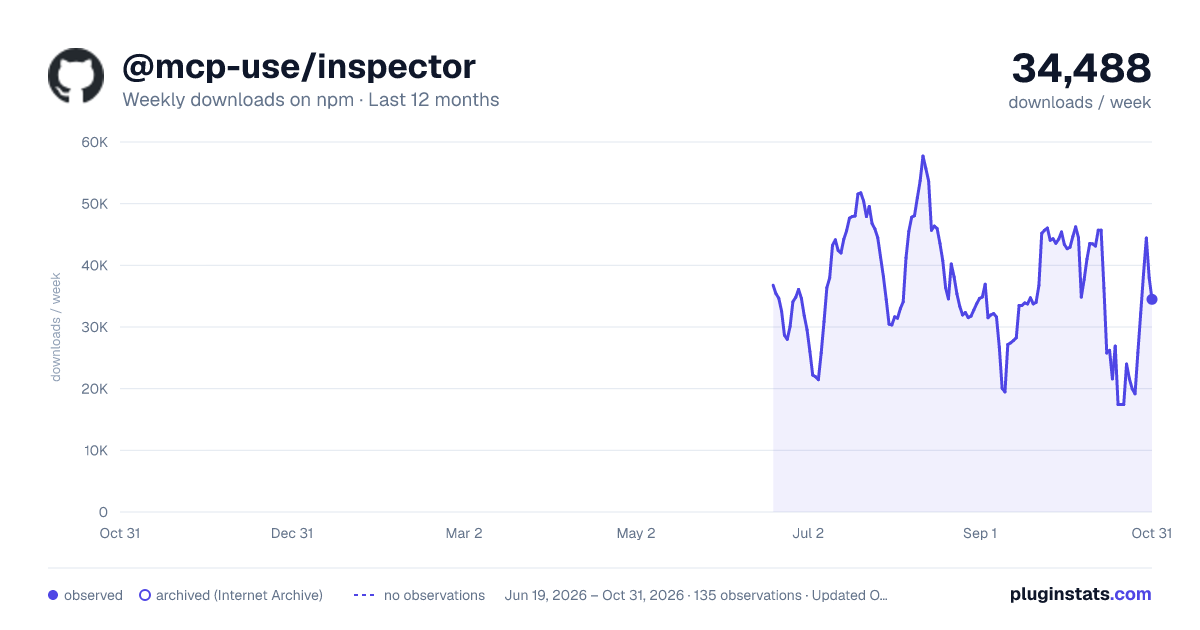
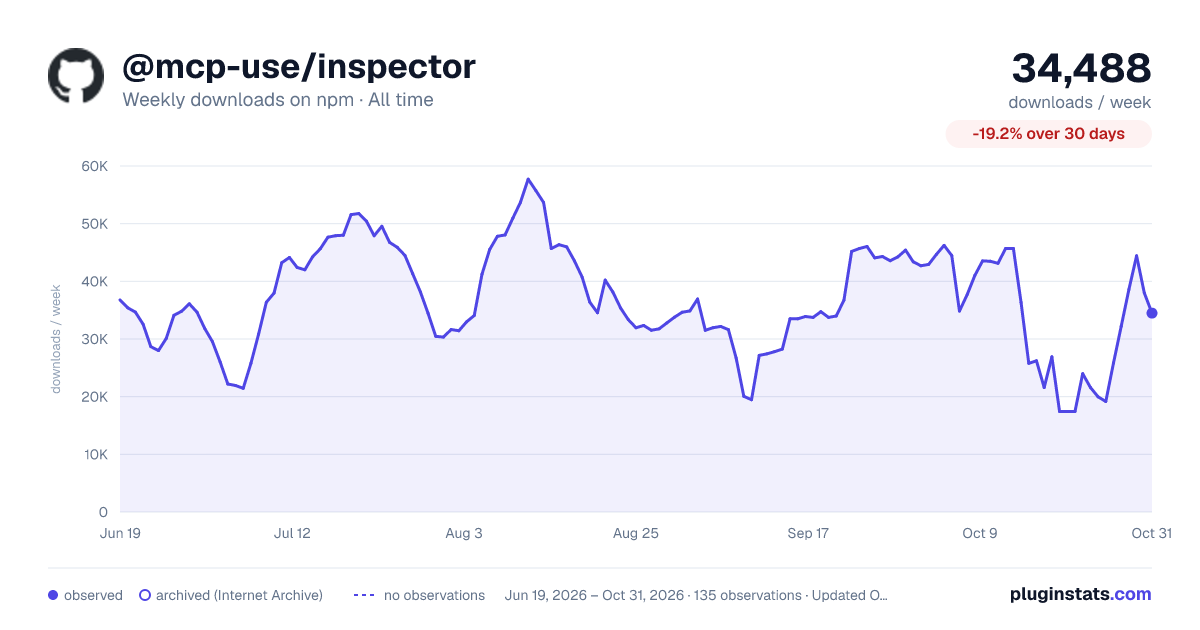

Adoption over time


7/30/90-day growth


Filled points are observed values; hollow points come from Internet Archive snapshots of the listing page. Dashed segments span periods with no observations — values between points are not interpolated.
Recent observations
Full history (121)Similar npm MCP servers plugins
Data source
Weekly downloads (trailing 7 complete days) come from the official npm downloads API. Downloads include CI and mirrors and are not equivalent to installs or users. npm publishes no ratings.
Listing: https://www.npmjs.com/package/@mcp-use/inspector. First seen Oct 16, 2026; last successful collection Oct 18, 2026. See the methodology.