 PluginStats
@next-ai-drawio/mcp-server weekly downloads statistics
By next-ai-drawio · npm · Claude Code
draw.io MCP server for Claude Code, Cursor, Codex and VS Code: the AI draws on a live browser canvas you can also edit by hand, with versions and undo
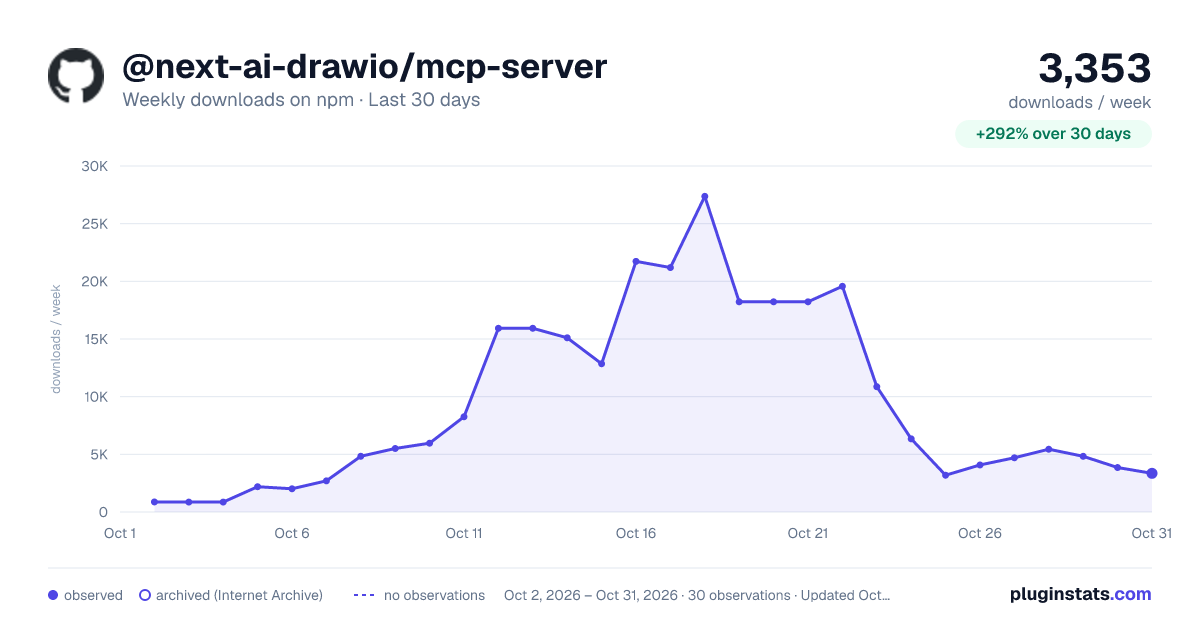
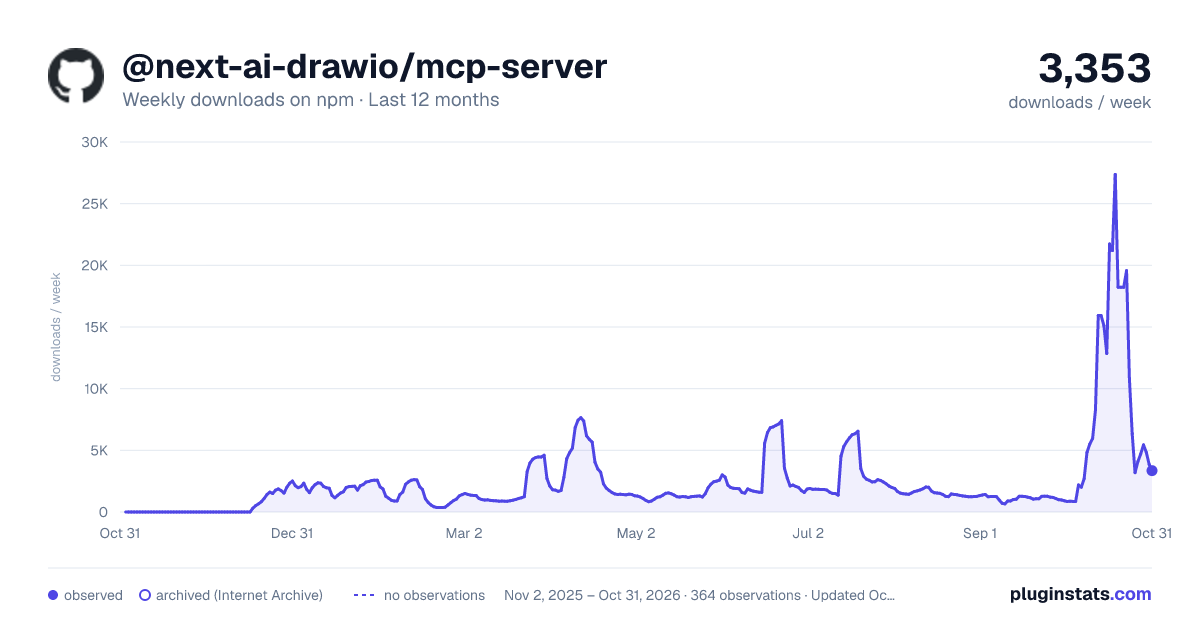
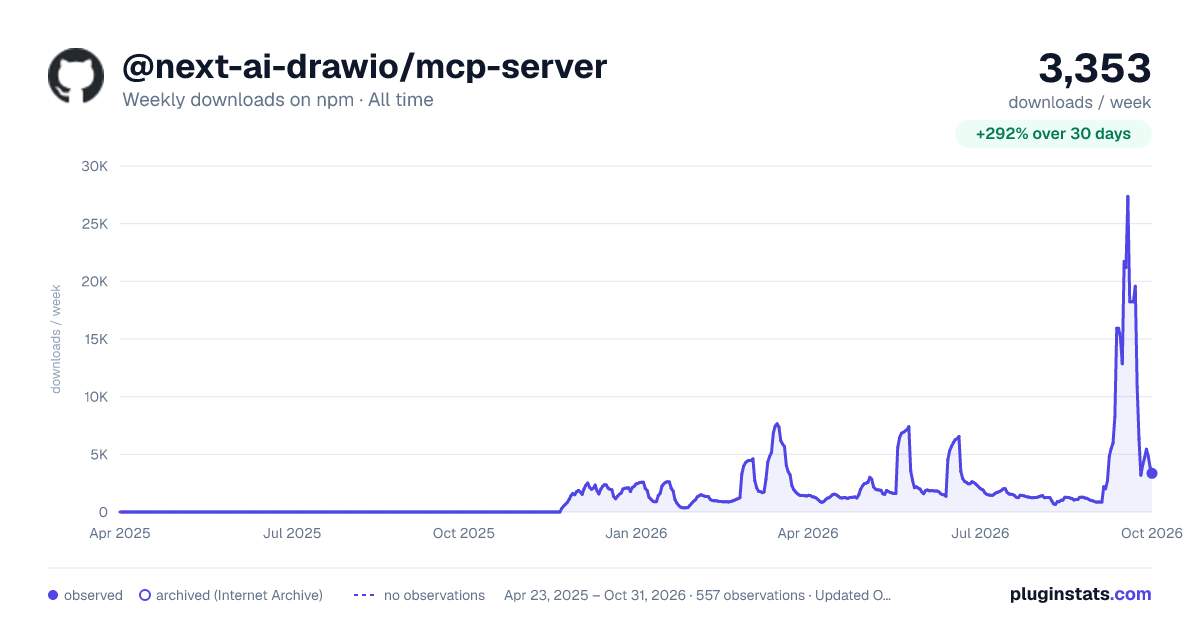
@next-ai-drawio/mcp-server has 21,195 recorded weekly downloads on npm, an increase of 1660% over the past 30 days.
It ranks #739 of 2,251 tracked npm listings by weekly downloads.
Over 90 days, weekly downloads changed by +224%.
PluginStats has 543 daily observations since Apr 23, 2025; the latest is from Oct 17, 2026.
About @next-ai-drawio/mcp-server
Next AI Draw.io MCP Server
An MCP server that lets Claude Code, Cursor, VS Code and other AI agents draw draw.io diagrams from your project's files, with a live preview in your browser. The preview is the canvas of the Next AI Draw.io web app: the AI's changes are outlined, Ctrl+Z takes them back, and you can edit by hand at any time.
https://github.com/user-attachments/assets/6f53a67b-ab21-4113-9fee-7fb32f9de678
Install
In VS Code or Cursor, one click adds it:
Let your AI agent install it
Paste this into Claude Code, Codex, Cursor, VS Code, Cline or any agent that can edit files and run commands:
Install by hand
Claude Code
--scope user makes the tools available in every project. Without it, they exist only in the folder where you ran the command.
Or install it as a plugin from the Claude Code community marketplace (Claude Code 2.1.275 or later):
Codex CLI
Codex asks before each drawio tool that changes the diagram, and codex exec without full access fails with "MCP tool call requires approval". To let the drawio tools run without asking, add one line to the server's section in ~/.codex/config.toml:
To approve only some tools, use [mcp_servers.drawio.tools.] with approval_mode = "approve" instead.
VS Code (.vscode/mcp.json)
Cursor, Claude Desktop, Cline and most other clients (~/.cursor/mcp.json, claude_desktop_config.json, cline_mcp_settings.json)
Restart the client, then ask, for example, "Read this repo and draw its architecture". The preview opens in your browser and the diagram appears as it is drawn.
Features
• Draws from your project: the agent reads your code and documents with its own tools. Existing .drawio and .drawio.svg files open with load_diagram. • The web app's canvas: the AI's changes are outlined for a few seconds (never in exports) and one Ctrl+Z takes them back. Select shapes and say "these" (get_selection). Your hand edits are read before the AI edits again. • Real icons: the web app's drawing rules and shape libraries (AWS, Azure, GCP, Kubernetes, Cisco and more), so the AI uses real icon names. • Self-check: the AI can look at a screenshot of the rendered diagram and fix overlaps (screenshot: true, or screenshot_diagram). • Versions: the last 20 versions as cards next to the canvas; restore or compare one, or ask the AI to undo (restore_version). • Pages and export: multi-page diagrams; save as .drawio, .png, .svg or .drawio.svg. Images get a 20 px margin, and PNGs a white background (transparent: true for none). • Offline: the draw.io editor ships inside the package.
Choosing a draw.io MCP server
Several MCP servers draw draw.io diagrams. As of October 2026 they differ like this:
| Server | How you see and change the diagram | A good fit when |
| This server, @next-ai-drawio/mcp-server | A live draw.io canvas in your browser. The AI reads it back, including your hand edits and selection; its changes are outlined, Ctrl+Z takes them back, and earlier versions can be restored | You and the AI take turns on the same diagram | | draw.io's official @drawio/mcp | Opens each diagram from XML, CSV or Mermaid in the draw.io editor in a new tab; no tool reads it back | You want the diagram in the full draw.io editor and edit it yourself from there | | draw.io's hosted MCP app, https://mcp.draw.io/mcp | Shows the diagram inside the chat in Claude.ai, ChatGPT, VS Code or Cursor, with nothing to install; the diagram is sent to draw.io's server | You work in a chat app and want to see the diagram in the conversation | | draw.io's plugin for Claude Code, Codex CLI and Copilot CLI | A skill that writes .drawio files; PNG, SVG and PDF export needs draw.io Desktop | You want diagram files in your repository without an MCP server | | lgazo/drawio-mcp-server | A draw.io editor on localhost, or your own draw.io through a browser extension; tools create, read, update and delete single shapes, layers and pages | You want fine-grained tools, several documents at once, or Mermaid import |
Saved diagrams
Every change is saved to ~/.next-ai-drawio/.drawio with its last 20 versions; the newest 50 diagrams are kept. To continue one in a later conversation, ask the AI for it: it finds it with list_saved_diagrams and reopens it with start_session.
Your own drawing rules
Write them in ~/.next-ai-drawio/instructions.md, for example "Always use a minimal style". They are added to the drawing guide on every call, so edits apply without a restart. The first 5000 characters are used.
Tools
| Tool | What it does |
| start_session | Open the preview and return the drawing guide; session_id continues a saved diagram | | create_new_diagram | Draw a new diagram from mxCell XML | | edit_diagram | Add, update or delete cells by id, all or nothing | | get_diagram | The current XML, including your edits in the browser | | get_selection | The shapes you selected in the preview | | screenshot_diagram | A PNG of a page, for the AI to check | | load_diagram, export_diagram | Open a .drawio or .drawio.svg file; save .drawio, .png, .svg or .drawio.svg | | restore_version | Go back to an earlier version; a redo stays possible | | list_saved_diagrams | Diagrams saved by earlier sessions, newest first | | get_drawing_guide, get_shape_library | The drawing rules again; the icon styles of a library such as aws4 | | list_pages, add_page, rename_page, delete_page | Pages (tabs) |
Configuration
Environment variables, set in the client's env for the server:
| Variable | Default | What it does |…
Description from the npm listing.
- mcp
- mcp-server
- drawio
- draw.io
- diagrams.net
- diagram
- architecture-diagram
- flowchart
- ai
- claude
- claude-code
- cursor
- codex
- model-context-protocol
Where @next-ai-drawio/mcp-server sits in the listing
Each band is one page of 20. Weekly downloads on a log scale. Placement is projected from weekly downloads, so it can differ from the marketplace's own sort order. Hover a dot to see the listing.


Charts
Images: 30d · 1y · all time · 1600×900 dark

Adoption over time


7/30/90-day growth


Filled points are observed values; hollow points come from Internet Archive snapshots of the listing page. Dashed segments span periods with no observations — values between points are not interpolated.
Recent observations
Full history (543)Similar npm Claude Code plugins
Data source
Weekly downloads (trailing 7 complete days) come from the official npm downloads API. Downloads include CI and mirrors and are not equivalent to installs or users. npm publishes no ratings.
Listing: https://www.npmjs.com/package/@next-ai-drawio/mcp-server. First seen Oct 16, 2026; last successful collection Oct 18, 2026. See the methodology.