 PluginStats
mcp-framework weekly downloads statistics
By QuantGeekDev · npm · MCP servers
Framework for building Model Context Protocol (MCP) servers in Typescript
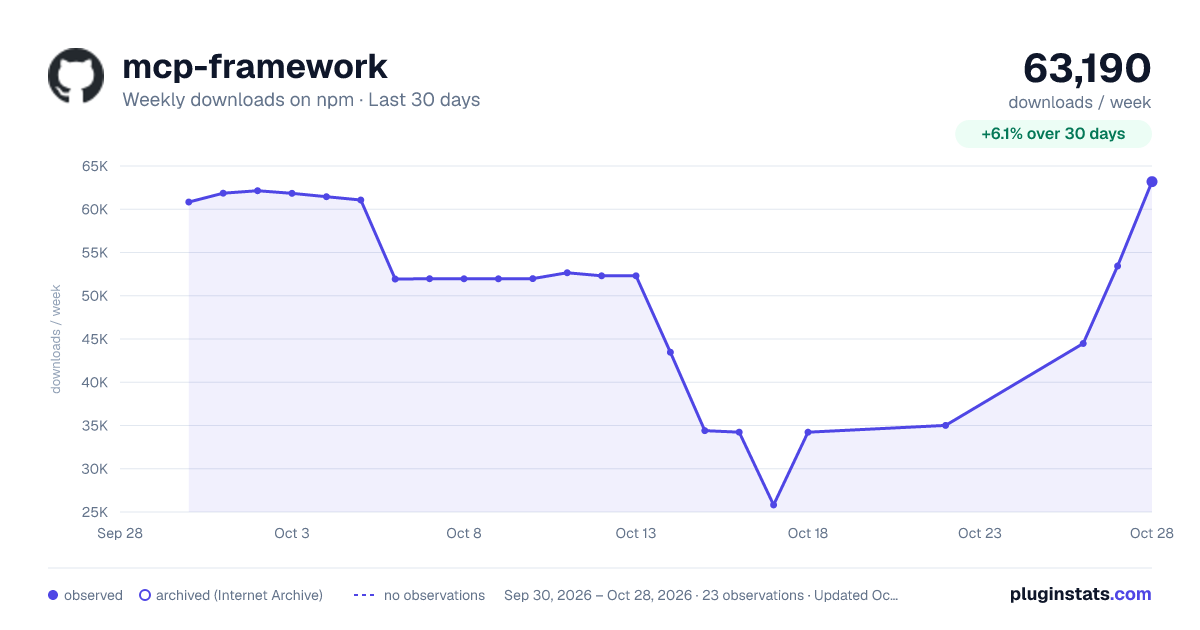
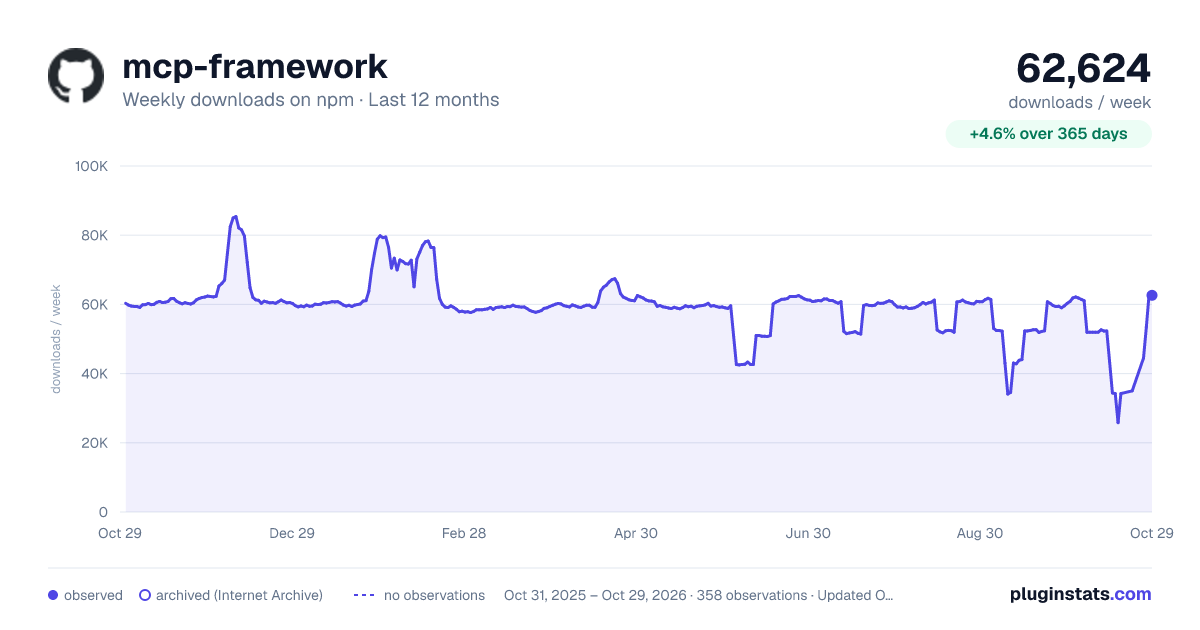
mcp-framework has 25,816 recorded weekly downloads on npm, a decrease of 51.0% over the past 30 days.
It ranks #692 of 2,251 tracked npm listings by weekly downloads.
Over 90 days, weekly downloads changed by -56.7%.
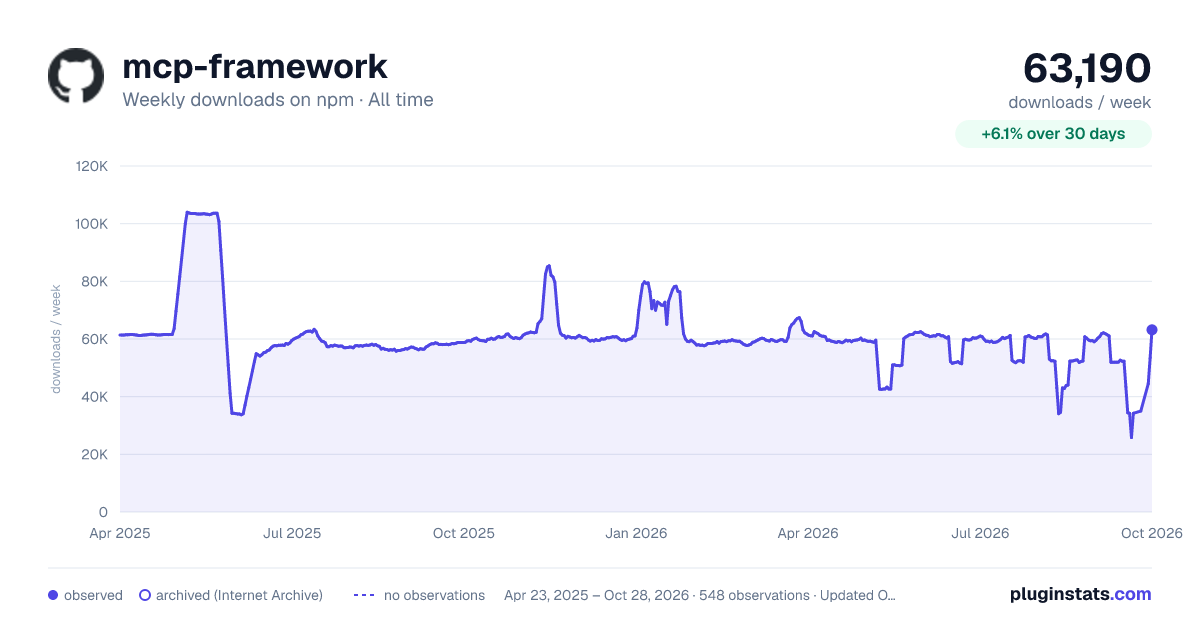
PluginStats has 543 daily observations since Apr 23, 2025; the latest is from Oct 17, 2026.
About mcp-framework
MCP Framework
MCP-Framework is the most productive TypeScript framework for building Model Context Protocol (MCP) servers. It provides architecture out of the box, with automatic directory-based discovery for tools, resources, and prompts. Use powerful MCP abstractions to define tools, resources, or prompts in an elegant, class-based way. The CLI gets you started in seconds.
Why mcp-framework?
• 50% less boilerplate than the official SDK • CLI scaffolding: mcp create my-server gets you started in seconds • Class-based tools with Zod validation and auto-generated descriptions • Built-in authentication (JWT, API Key, OAuth 2.1) • TypeScript-first with full type inference • Used by developers at Vercel, Next.js, LocalStack, and BaseHub
mcp-framework vs Alternatives
| Feature | mcp-framework | Official SDK | FastMCP |
| CLI Scaffolding | ✅ | ❌ | ❌ | | Class-based Tools | ✅ | ❌ | ❌ | | Built-in Auth | ✅ | ❌ | ❌ | | Zod Validation | ✅ | Manual | ❌ | | TypeScript | ✅ | ✅ | ✅ | | Description Validation | ✅ | ❌ | ❌ |
Trusted by developers at Vercel, Next.js, LocalStack, and BaseHub.
Features
• 🛠️ Automatic discovery and loading of tools, resources, and prompts • Multiple transport support (stdio, SSE, HTTP Stream) • TypeScript-first development with full type safety • Built on the official MCP SDK • Easy-to-use base classes for tools, prompts, and resources • Out of the box authentication for SSE endpoints (OAuth 2.1, JWT, API Key)
Projects Built with MCP Framework
The following projects and services are built using MCP Framework:
• ### tip.md A crypto tipping service that enables AI assistants to help users send cryptocurrency tips to content creators directly from their chat interface. The MCP service allows for: • Checking wallet types for users • Preparing cryptocurrency tips for users/agents to complete Setup instructions for various clients (Cursor, Sage, Claude Desktop) are available in their MCP Server documentation.
Support our work
Read the full docs here
Creating a repository with mcp-framework
Using the CLI (Recommended)
CLI Usage
The framework provides a powerful CLI for managing your MCP server projects:
Project Creation
Options:
--http: Use HTTP transport instead of default stdio
--port : Specify HTTP port (default: 8080)
--cors: Enable CORS with wildcard (*) access
Adding a Tool
Building and Validation
The framework provides comprehensive validation to ensure your tools are properly documented and functional:
Validating Tools
This command checks that all tools using Zod schemas have descriptions for every field. The validation runs automatically during build, but you can also run it standalone:
• ✅ During build: npm run build automatically validates tools • ✅ Standalone: mcp validate for manual validation • ✅ Development: Use defineSchema() helper for immediate feedback • ✅ Runtime: Server validates tools on startup
Example validation error:
Integrating validation into CI/CD:
Adding a Prompt
Adding a Resource
Development Workflow
1. Create your project:
2. Add tools:
3. Define your tool schemas with automatic validation:
4. Build with automatic validation:
5. Optional: Run standalone validation:
6. Test your server:
7. Add to MCP Client (see Claude Desktop example below)
Pro Tips: • Use defineSchema() during development for immediate feedback • Build process automatically catches missing descriptions • Server startup validates all tools before accepting connections • Use TypeScript's autocomplete with MCPInput for better DX
Using with Claude Desktop
Local Development
Add this configuration to your Claude Desktop config file:
MacOS: ~/Library/Application Support/Claude/claude_desktop_config.json Windows: %APPDATA%/Claude/claude_desktop_config.json
After Publishing
Add this configuration to your Claude Desktop config file:
MacOS: ~/Library/Application Support/Claude/claude_desktop_config.json Windows: %APPDATA%/Claude/claude_desktop_config.json
Building and Testing
1. Make changes to your tools 2. Run npm run build to compile 3. The server will automatically load your tools on startup
Environment Variables
The framework supports the following environment variables for configuration:
| Variable | Description | Default |
| MCP_ENABLE_FILE_LOGGING | Enable logging to files (true/false) | false | | MCP_LOG_DIRECTORY | Directory where log files will be stored | logs | | MCP_DEBUG_CONSOLE | Display debug level messages in console (true/false) | false |
Example usage:
Quick Start
Defining Tools
MCP Framework uses Zod schemas for defining tool inputs, providing type safety, validation, and automatic documentation:
Key Benefits: • ✅ Single source of truth - Define types and validation in one place • ✅ Automatic type inference - TypeScript types are inferred from your schema • ✅ Rich validation - Leverage Zod's powerful validation features • ✅ Required descriptions - Framework enforces documentation • ✅ Better IDE support - Full autocomplete and type checking • ✅ Cleaner code - No duplicate type definitions
Advanced Zod Schema Features
The framework supports all Zod features:
Automatic Type Inference
The MCPInput type automatically infers the correct input type from your schema, eliminating the need for manual type definitions:
No more duplicate interfaces or generic type parameters needed!
Schema Validation & Descriptions
All schema fields must have descriptions. This ensures your tools are well-documented and provides better user experience in MCP clients.
The framework validates descriptions at multiple levels:
1. Build-time Validation (Recommended)
2. Development-time Validation
Use the defineSchema helper for immediate feedback:
3. Standalone Validation
4. Runtime Validation
The server automatically validates tools on startup.
To skip validation (not recommended):
Setting up the Server
Transport Configuration
stdio Transport (Default)…
Description from the npm listing.
- mcp
- claude
- anthropic
- ai
- framework
- tools
- modelcontextprotocol
- model
- context
- protocol
Where mcp-framework sits in the listing
Each band is one page of 20. Weekly downloads on a log scale. Placement is projected from weekly downloads, so it can differ from the marketplace's own sort order. Hover a dot to see the listing.


Charts
Images: 30d · 1y · all time · 1600×900 dark

Adoption over time


7/30/90-day growth


Filled points are observed values; hollow points come from Internet Archive snapshots of the listing page. Dashed segments span periods with no observations — values between points are not interpolated.
Recent observations
Full history (543)Similar npm MCP servers plugins
Data source
Weekly downloads (trailing 7 complete days) come from the official npm downloads API. Downloads include CI and mirrors and are not equivalent to installs or users. npm publishes no ratings.
Listing: https://www.npmjs.com/package/mcp-framework. First seen Oct 16, 2026; last successful collection Oct 18, 2026. See the methodology.