 PluginStats
cline weekly downloads statistics
By cline (2 listings) · npm · MCP servers
Autonomous coding agent CLI - capable of creating/editing files, running commands, using the browser, and more
cline has 31,419 recorded weekly downloads on npm, a decrease of 65.6% over the past 30 days.
It ranks #656 of 2,251 tracked npm listings by weekly downloads.
Over 90 days, weekly downloads changed by -89.1%.
PluginStats has 543 daily observations since Apr 23, 2025; the latest is from Oct 17, 2026.
About cline
Cline CLI
NPM VS Code Extension Discord r/cline Feature Requests Docs
Run Cline in your terminal. Interactive chat for paired sessions, or fully headless for CI/CD and scripting. The CLI shares its agent core with the Cline VS Code extension, JetBrains plugin, and SDK, so plan/act modes, MCP servers, checkpoints, rules, skills, and provider configuration all behave the same across surfaces.
Install
For nightly builds:
Platform binaries are published for macOS, Linux, and Windows on arm64 and x64. The cline package resolves the correct binary for your platform via optional dependencies, so no Node, Bun, or Zig runtime is required at install time.
Quick start
Run interactively:
Run a single prompt:
Pipe input:
See cline --help for the full flag reference.
Use any provider
Cline supports the same providers as the VS Code extension. You can sign in to Cline directly, use your ChatGPT Subscription through openai-codex, or bring an API key from Anthropic, OpenAI, Google Gemini, OpenRouter, AWS Bedrock, GCP Vertex, Cerebras, Groq, and any OpenAI-compatible endpoint.
cline auth without a provider opens the interactive auth setup TUI with the same options as the old CLI flow (Sign in with Cline, Sign in with ChatGPT Subscription, Sign in with OCA, or use your own API key).
OAuth-supported providers (cline, openai-codex, oca) do not auto-launch a browser on normal startup. Authenticate explicitly first with cline auth . For non-interactive runs, if an OAuth provider is selected and no saved credentials are available, cline fails fast with an authentication message instead of launching a hidden browser flow.
Modes
Cline CLI runs in a few different shapes depending on what you need:
• Interactive TUI: cline or cline -i opens a full terminal UI with plan/act toggle, slash commands, file mentions, and live tool approvals • One-shot: cline "your prompt" runs a single turn and exits • JSON: cline --json "..." streams NDJSON events for piping into other tools • Yolo: cline --yolo "..." skips approval prompts and exits when the turn finishes • Zen: cline --zen "..." fires the task to the background hub daemon and exits immediately (see below)
Headless mode for CI/CD
Run Cline with zero interaction for scripting and automation. Pipe input, get JSON output, chain commands, integrate into CI/CD pipelines.
Features
• Streaming TUI built on OpenTUI with markdown rendering, syntax-highlighted diffs, scrollable chat, and mouse support • Plan/Act mode toggle for switching between planning and execution • Native MCP support for connecting custom tools • Checkpoints with /undo to rewind workspace state • Sub-agent spawning and agent teams for parallel work • OAuth login for Cline, ChatGPT Subscription (openai-codex), and OCA • Configurable thinking budgets per run • Cron and event-driven schedules for recurring agent work • Chat connectors for Telegram, Google Chat, and WhatsApp
Usage
MCP servers
Manage MCP servers with the interactive wizard:
Open the add-server wizard with the name, transport, and command or URL already filled in with cline mcp install (cline mcp add also works). Stdio servers use everything after -- as the command and arguments:
Remote HTTP and SSE servers take a name, transport, and URL. The wizard still asks for auth details before saving:
Because this command opens the wizard, it requires a TTY.
Connectors
Bridge a chat surface into RPC-backed Cline sessions. Each conversation thread maps to a session with full context. Supported platforms: Telegram, Slack, Google Chat, WhatsApp, and Linear.
In chat surfaces, connector slash commands include /help, /start, /new, /clear, /whereami, /tools, /yolo, /cwd , /schedule, /abort, and /exit. Run cline connect --help to see the full flag list for any adapter.
Schedules
Schedule agents on cron-like intervals or external events.
If --provider and --model are omitted, schedules use the last configured provider and model. If only --provider is given, the schedule uses that provider's saved model.
Schedules can route results back to chat surfaces with --delivery-adapter, --delivery-bot, and --delivery-thread.
Options
| Flag | Description |
| -s, --system | Override the system prompt | | -P, --provider | Provider id (default: cline) | | -m, --model | Model id (default: anthropic/claude-sonnet-4.6) | | -k, --key | API key for this run, also saved as the provider's key | | -p, --plan | Run in plan mode (default is act mode) | | -i, --tui | Interactive TUI multi-turn mode | | -t, --timeout | Optional run timeout in seconds | | -c, --cwd | Working directory for tools | | --config | Configuration directory (used for CLI home resolution) | | --hooks-dir | Additional hooks directory hint for runtime hook injection | | --acp | ACP (Agent Client Protocol) mode | | --thinking [none\|low\|medium\|high\|xhigh] | Model thinking level when supported. Defaults to medium when the flag is provided without a level. Without the flag, the CLI uses the level you last chose with /model, or the provider default. | | --compaction | Context compaction mode. Defaults to agentic; use basic for local truncation or off to disable. | | --retries | Maximum consecutive mistakes (retries) before halting (default: 3) | | --json | Output NDJSON instead of styled text | | --data-dir | Use isolated local state at instead of ~/.cline/data (enables sandbox mode automatically) | | --auto-approve [true\|false] | Set tool auto-approval for all tools | | --kanban | Run the external kanban app | | -y, --yolo | Skip tool approval prompts, enable submit_and_exit, and disable spawn/team tools by default | | -z, --zen | Dispatch the task to the background hub and exit the CLI immediately | | --team-name | Override the runtime team state name | | -h, --help | Show help and exit | | -v, --verbose | Show verbose runtime diagnostics | | -V, --version | Show version and exit |…
Description from the npm listing.
- cline
- claude
- dev
- mcp
- openrouter
- coding
- agent
- autonomous
- chatgpt
- sonnet
- ai
- llama
- cli
Where cline sits in the listing
Each band is one page of 20. Weekly downloads on a log scale. Placement is projected from weekly downloads, so it can differ from the marketplace's own sort order. Hover a dot to see the listing.


Charts
Images: 30d · 1y · all time · 1600×900 dark
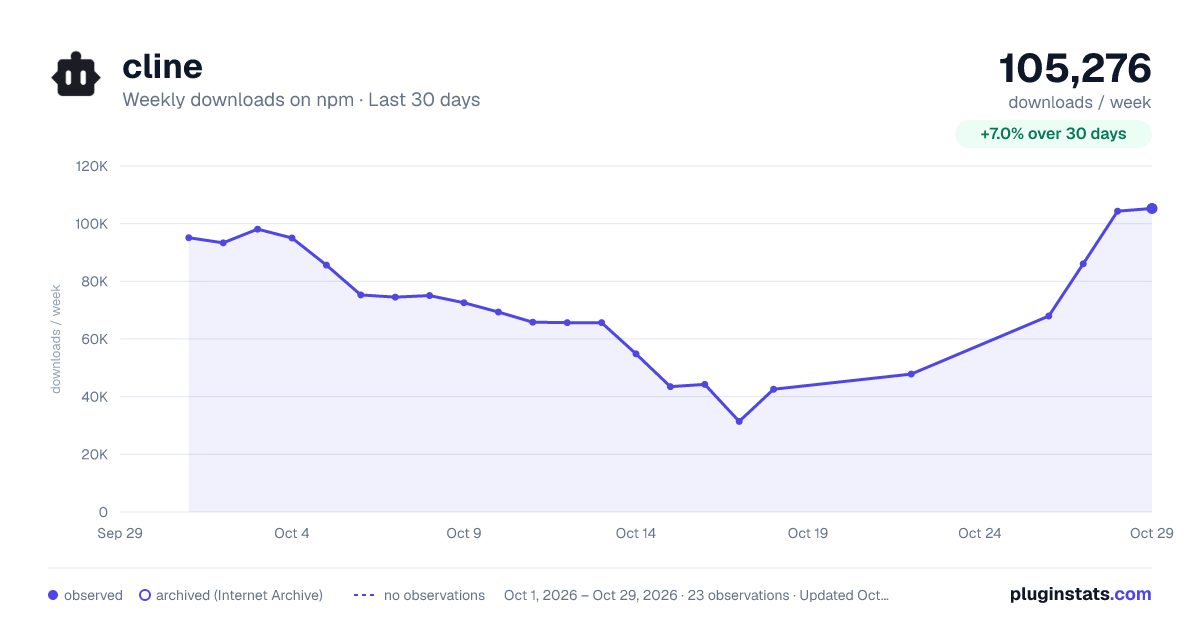
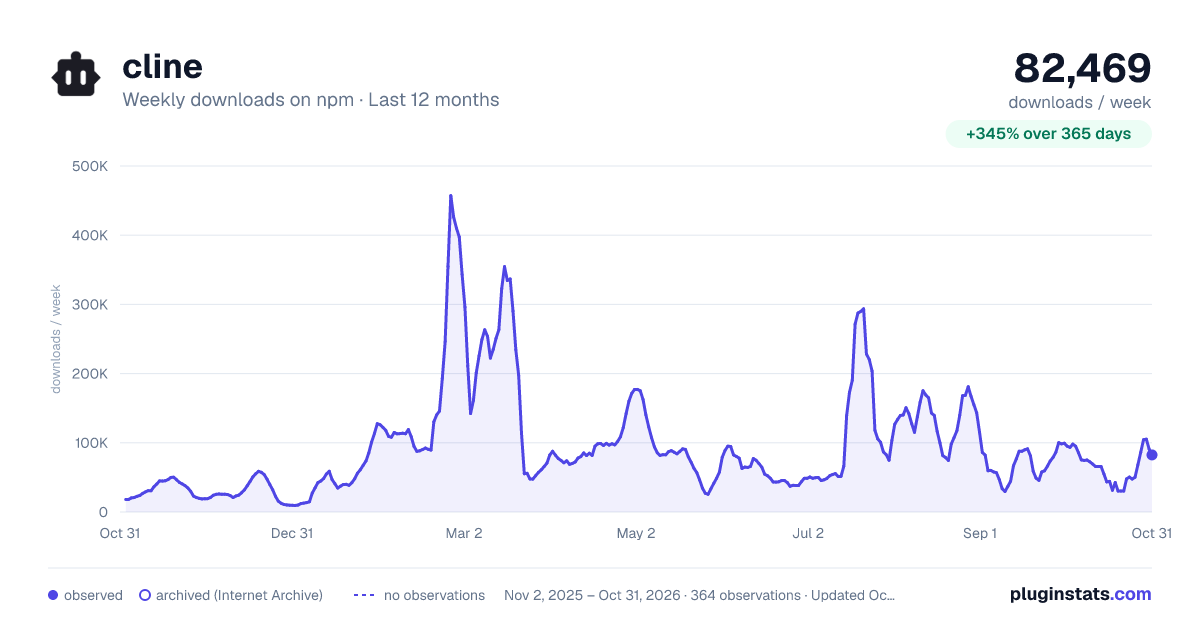
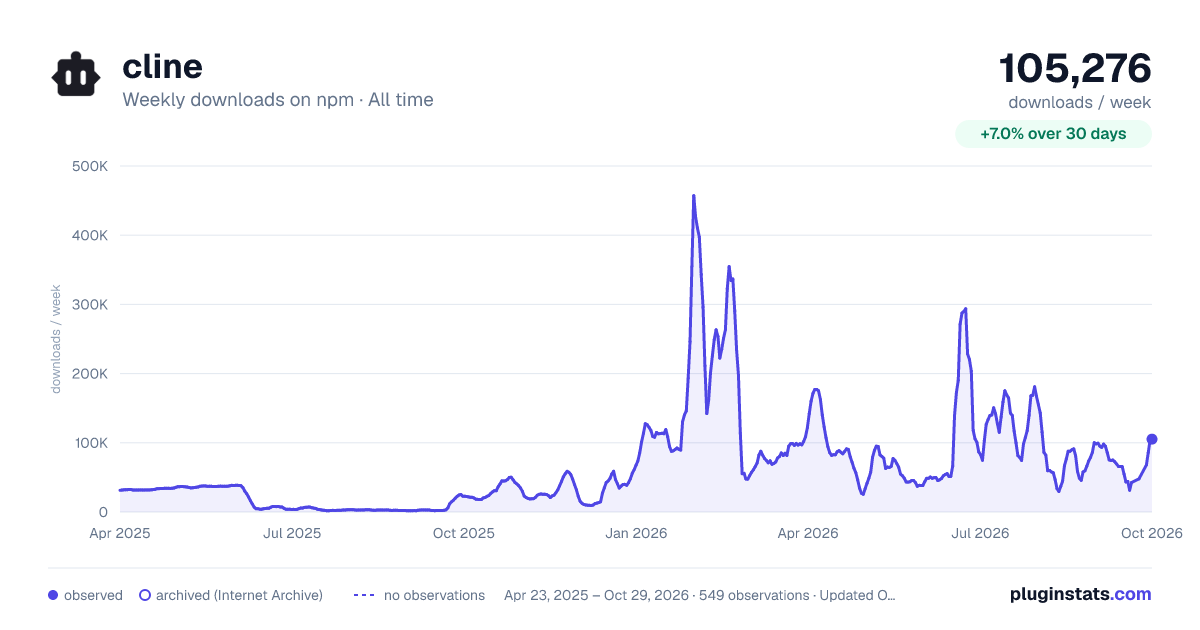

Adoption over time


7/30/90-day growth


Filled points are observed values; hollow points come from Internet Archive snapshots of the listing page. Dashed segments span periods with no observations — values between points are not interpolated.
Recent observations
Full history (543)Similar npm MCP servers plugins
Data source
Weekly downloads (trailing 7 complete days) come from the official npm downloads API. Downloads include CI and mirrors and are not equivalent to installs or users. npm publishes no ratings.
Listing: https://www.npmjs.com/package/cline. First seen Oct 16, 2026; last successful collection Oct 18, 2026. See the methodology.