 PluginStats
toolroll weekly downloads statistics
By ap9000 · npm · Claude Code
A control plane for unattended coding agents — queue tasks, walk away, come back to pull requests. Agents build in leased worktrees, never touch your default branch, and interrupt you only for decisions that need a human.
toolroll has 816 recorded weekly downloads on npm.
It ranks #1427 of 2,251 tracked npm listings by weekly downloads.
Over the past 7 days it changed by -86.0%.
PluginStats has 121 daily observations since Jun 19, 2026; the latest is from Oct 17, 2026.
About toolroll
Your agents build. You decide.
Queue the work, approve the exact terms once, and come back to results that prove themselves — interrupted only for decisions that need a person.
Website · Install · Use cases · Integrations · Guides · Contributing
Tasks across every project: what's building, what's Ready, and the one thing each needs from you. (Demo workspace.)
Quick start
That starts the app and a builder for your projects, then opens the console at http://127.0.0.1:4180. Runs on macOS or Linux with Node.js 22.13+ and git. Try the sandbox first with npx toolroll demo: ask its scripted lead for a change in Chat, approve the plan, and watch it land Ready. It never calls a model, spends or reaches outside.
| Install with | Command |
| npm | npm install -g toolroll | | Homebrew | brew install ap9000/toolroll/toolroll | | bun | bun add -g toolroll | | pnpm | pnpm add -g toolroll | | yarn | yarn global add toolroll | | script | curl -fsSL https://raw.githubusercontent.com/ap9000/toolroll/main/install.sh \| sh |
Install with your agent
Paste this into Claude Code or Codex:
Install Toolroll with npm install -g toolroll and start toolroll up in the background; it keeps running. Then run toolroll onboard in this repository, and run it again with --yes to add it as a project and install Toolroll's skill for you. Tell me the console address, where my login is saved (not the password), how to pair my phone, and what I can ask you next.
toolroll onboard --yes adds the repository (its main checkout) as a project, says which agent CLIs are signed in, and prints the line that adds Toolroll as tools (claude mcp add --scope user toolroll -- toolroll mcp) without running it. toolroll onboard --remove --yes takes the skill out again.
Then read Getting started, Flows and Security. Coming from Standing Orders? It's the same product renamed; the standing-orders command and your data keep working.
One command center, the whole loop
Tell Toolroll what outcome you want. Its planner reads the repository, drafts the scope and proof rubric, and asks only when an answer would materially change the work. You approve the exact contract once; long-running agents can build it while the control plane handles queues, dependencies, crashes, and decisions. The result comes back with the diff, checks, screenshots, and a criterion-by-criterion verdict.
Hand off in one prompt; approve exactly what will run
Project and quality stay close to the prompt; expert fields appear only when you open them. Before execution, the approval card restates the goal, boundaries, evidence requirements, model, and permissions.
One lead, durable crew work
Start in Chat, inspect work in Tasks, and manage guidance in Projects. Browser and CLI chat share the lead conversation. A local database catch-up shows current decisions and results before you authorize any model usage.
Crew work ends at Ready. Open the result, mark it Complete, or request a specific revision of the same task. Actual checks remain visible; there is no separate model reviewer or automatic evidence resubmission loop. Deployment is reported separately and still requires the exact passing native machine check.
Enable Automatic crew updates in a conversation, or use `toolroll chat --follow`. Meaningful updates (a result, a question, completion or cancellation) reach the same lead within its saved permissions and limits, through the same acknowledged inbox an external coordinator reads. Idle scanning uses no model. Restart recovery reuses saved responses; a failed response does not rerun a task. --no-follow pauses automatic responses. This wakes Toolroll's own lead, not an unrelated external agent session.
toolroll brief reads the local database. knowledge search, `knowledge impact, and knowledge refresh` add bounded source retrieval; see repository context. Curated knowledge stays in the database, and crew context stays attached to its original run.
Select a saved checkout once, then use the same task records from the terminal:
task review --brief combines the latest finished build or report's conclusion, file counts, checks, review findings, screenshot paths, plan and next actions. Use --run for an earlier attempt, --json for the same fields, and --all to include LOW findings. Lists stay bounded, with omitted entries counted; missing fields say not recorded. The lead token works through --token or TOOLROLL_LEAD_TOKEN.
Completion and revisions use the local sign-in already saved by up. Completion reports the exact run, commit and check outcome it handled. Agents use a scoped credential (project use /path/to/project --token-file /path/to/credential) and complete only with the exact --digest from assignment show; JSON completion also requires that digest. The profile stores a file reference, never a secret, and grants no additional access. It supplies defaults for database briefs, knowledge commands, assignment commands, and these two task actions.
For an exact revision replay, reuse --run, --source and --key from its JSON result. A revision keeps the original task history and approval boundaries; a stale result cannot create another current version. Actual failed checks remain failed when a result is marked complete.
What is in the current build…
Description from the npm listing.
- agents
- orchestration
- claude-code
- codex
- git-worktree
- ai-agents
- autonomous-agents
- agent-orchestration
- control-plane
- cli
- task-queue
- llm
- openrouter
- telegram
- unattended
Where toolroll sits in the listing
Each band is one page of 20. Weekly downloads on a log scale. Placement is projected from weekly downloads, so it can differ from the marketplace's own sort order. Hover a dot to see the listing.


Charts
Images: 30d · 1y · all time · 1600×900 dark
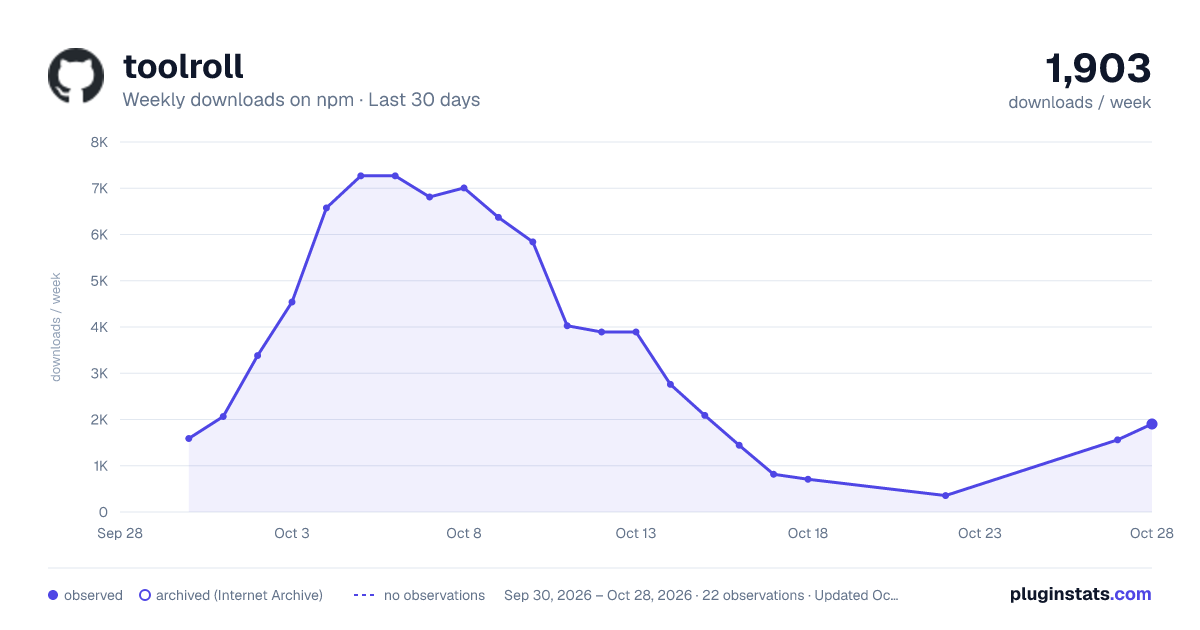
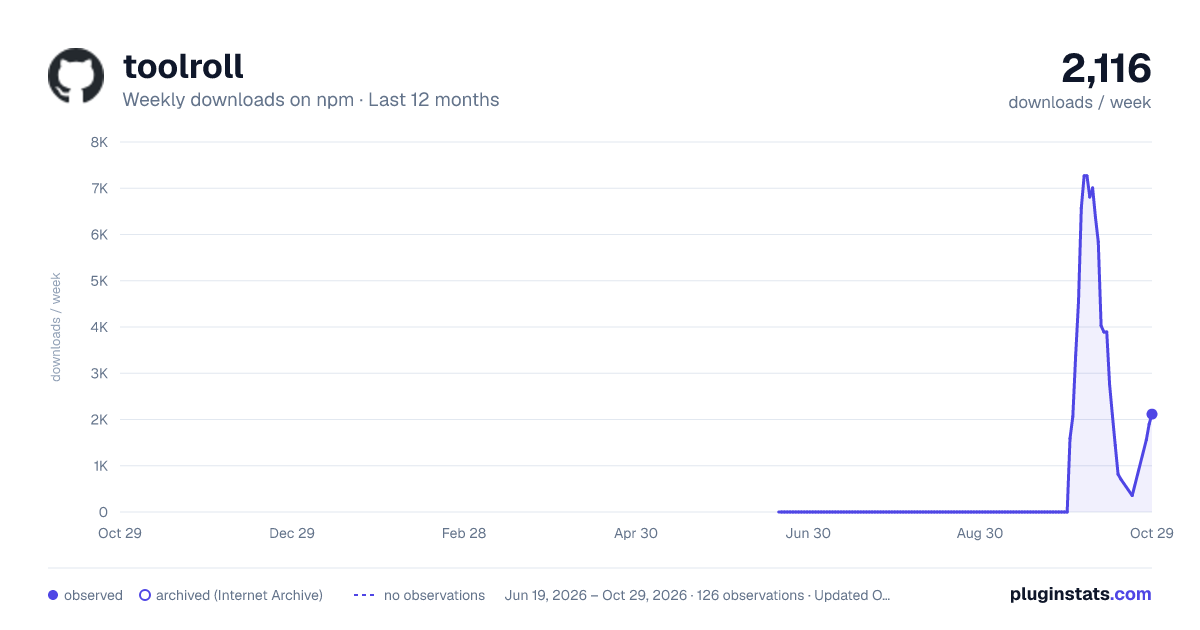
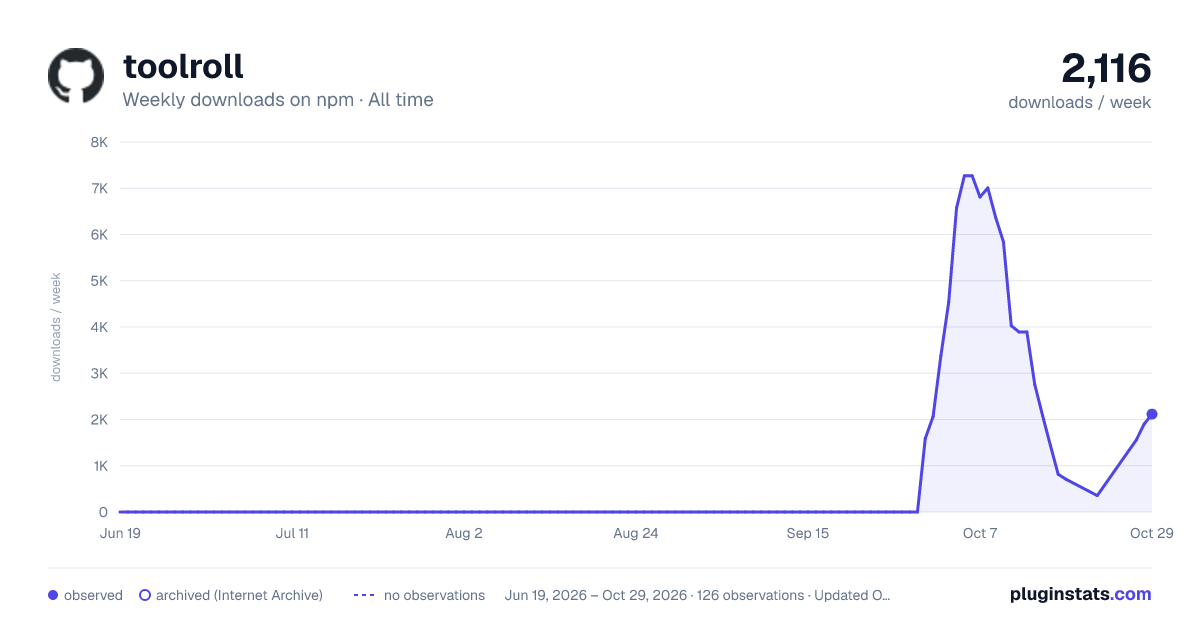

Adoption over time


7/30/90-day growth


Filled points are observed values; hollow points come from Internet Archive snapshots of the listing page. Dashed segments span periods with no observations — values between points are not interpolated.
Recent observations
Full history (121)Similar npm Claude Code plugins
Data source
Weekly downloads (trailing 7 complete days) come from the official npm downloads API. Downloads include CI and mirrors and are not equivalent to installs or users. npm publishes no ratings.
Listing: https://www.npmjs.com/package/toolroll. First seen Oct 16, 2026; last successful collection Oct 18, 2026. See the methodology.