 PluginStats
@lushly-dev/afd-server weekly downloads statistics
By lushly-dev (4 listings) · npm · MCP servers
Server-side utilities for building AFD-compliant MCP servers with Zod validation
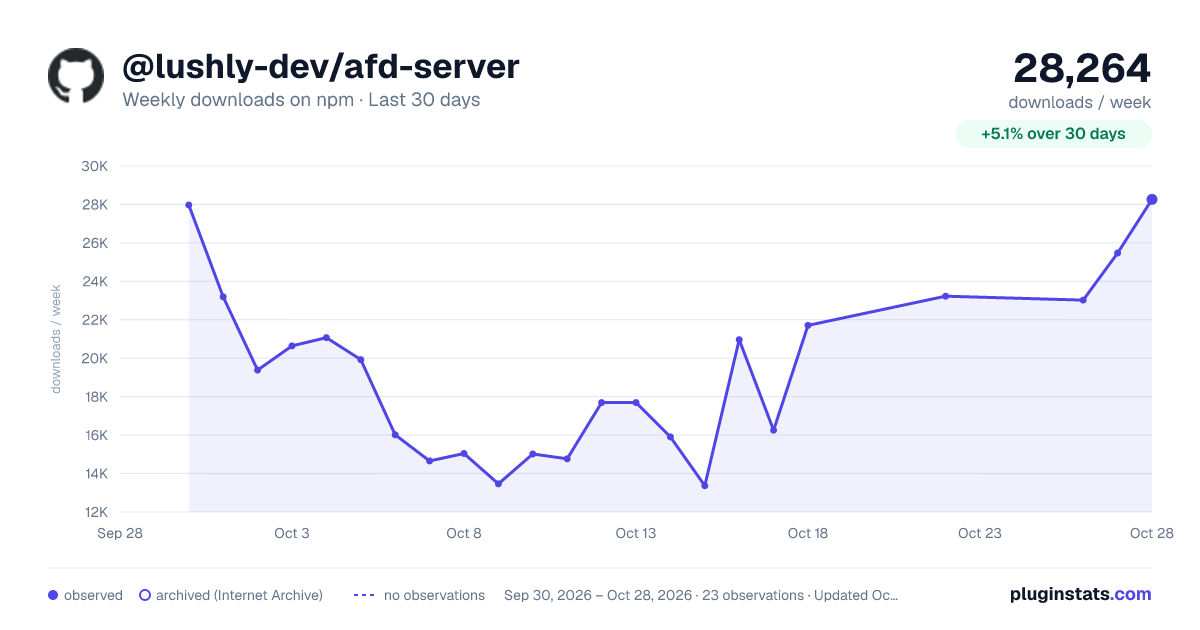
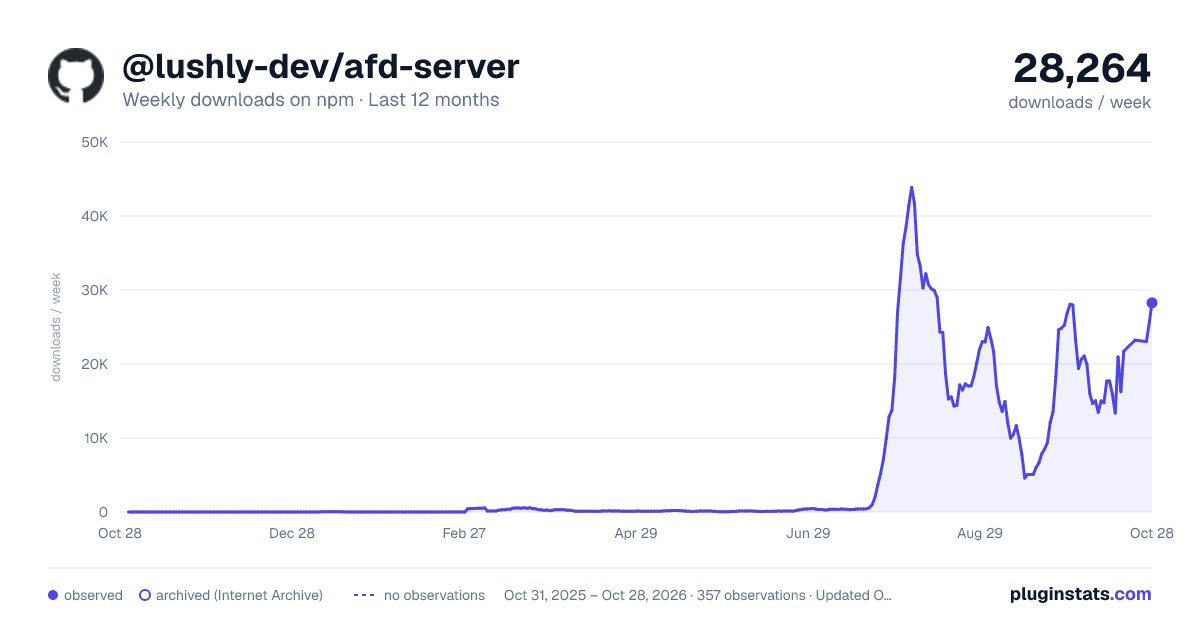
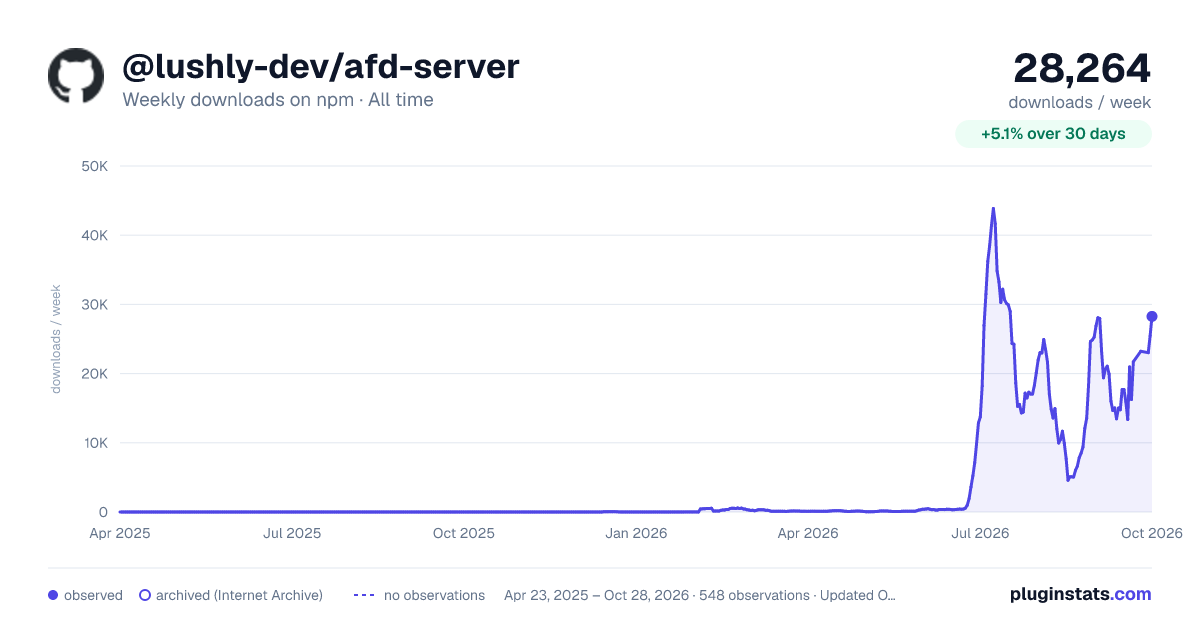
@lushly-dev/afd-server has 16,257 recorded weekly downloads on npm, an increase of 170% over the past 30 days, ranking #807 of 2,300 tracked listings.
About @lushly-dev/afd-server
@lushly-dev/afd-server
Server-side utilities for building AFD-compliant MCP servers with Zod validation.
Installation
npm install @lushly-dev/afd-server
# or
pnpm add @lushly-dev/afd-server
Features
- Zod-based Command Definition - Define commands with Zod schemas for type-safe validation
- Auto JSON Schema Generation - Automatic conversion to JSON Schema for MCP tool definitions
- Multiple Transport Support - stdio for IDE/agent integration, HTTP/SSE for browser clients
- Auto Transport Detection - Automatically selects the right transport based on environment
- Built-in Validation - Automatic input validation before handler execution
- Middleware System - Logging, tracing, rate limiting, and custom middleware
- Command Prerequisites - Declare
requiresdependencies so agents can plan execution order - Agent Discovery - Grouped, individual or lazy tool strategies,
afd-detail, and optionalafd-help/afd-docs/afd-schemabootstrap tools - Full TypeScript Support - Complete type inference from Zod schemas
Quick Start
import { z } from 'zod';
import { defineCommand, createMcpServer, defaultMiddleware, success, failure } from '@lushly-dev/afd-server';

// Define a command with Zod schema
const greet = defineCommand({
  expose: { mcp: true }, // Explicitly allow remote invocation
  name: 'greet',
  description: 'Greet a user by name',
  category: 'demo',
  input: z.object({
    name: z.string().min(1, 'Name is required'),
    formal: z.boolean().default(false),
  }),

  async handler(input) {
    const greeting = input.formal
      ? `Good day, ${input.name}.`
      : `Hello, ${input.name}!`;

    return success({ greeting }, {
      reasoning: `Generated ${input.formal ? 'formal' : 'casual'} greeting`,
      confidence: 1.0,
    });
  },
});

// Create and start the server (auto-detects transport)
const server = createMcpServer({
  name: 'my-server',
  version: '1.0.0',
  commands: [greet],
  middleware: defaultMiddleware(),  // Trace IDs, logging, slow-command warnings
  port: 3100,
});

await server.start();
console.error(`Server running at ${server.getUrl()}`);
Remote Command Exposure
Remote invocation now enforces the core exposure contract: commands require expose: { mcp: true }. Omitting expose, omitting expose.mcp, or setting it to false keeps a command private. This applies to tool listing, discovery, direct MCP calls, afd-call, batch, pipelines, /rpc, and streaming. Existing applications should explicitly opt in their public commands. The server's in-process execute() and executePipeline() remain available for private commands.
Configured contexts automatically register afd-context-list, afd-context-enter, and afd-context-exit. Active contexts scope all remote execution paths. Context state belongs to the client, not the server: stdio has one stack, and each HTTP session has its own (see Context Management).
Embedding In A Host-Controlled HTTP Server
Use createMcpHandler() when your platform owns the HTTP server lifecycle and expects a request handler instead of a self-starting server object:
import { createServer } from 'node:http';
import { createMcpHandler } from '@lushly-dev/afd-server';

const handler = createMcpHandler({
  name: 'my-server',
  version: '1.0.0',
  commands: [greet],
  host: '127.0.0.1',
  port: 3100,
});

createServer((req, res) => {
  void handler(req, res);
}).listen(3100, '127.0.0.1');
Call handler.dispose() when the embedding host shuts down to close active SSE/stream responses and drop HTTP sessions. The host still owns its listener and other connections.
Use createMcpServer() for the batteries-included standalone server. Use createMcpHandler() when you need AFD to plug into an existing Node HTTP host.
Transport Protocols
The server supports multiple transport protocols for different use cases:
Auto-Detection (Default)
By default, the server auto-detects the best transport based on the environment:
const server = createMcpServer({
  name: 'my-server',
  version: '1.0.0',
  commands: [greet],
  // transport: 'auto' is the default
});

// When stdin is piped (IDE/agent context): uses stdio
// When stdin is a TTY (interactive context): uses HTTP
Pitfall:
autopicks stdio whenever stdin is not a TTY. Under Docker without-t, systemd, pm2 or CI, the server therefore speaks stdio and the HTTP port never opens. Settransport: 'http'for any server that must listen on the network.start()logs the resolved transport to stderr, for example[my-server] MCP transport: stdio (auto-detected because stdin is not a TTY; set transport: 'http' to serve HTTP).
stdio Transport (IDE/Agent Integration)
Use stdio for integration with IDE MCP clients like Cursor, Claude Code, or Antigravity:
const server = createMcpServer({
  name: 'my-server',
  version: '1.0.0',
  commands: [greet],
  transport: 'stdio',  // Explicit stdio mode
});

await server.start();
// Server reads JSON-RPC from stdin, writes to stdout
In your IDE's MCP configuration (adjust the path to match your project):
{
  "mcpServers": {
    "my-server": {
      "command": "node",
      "args": ["path/to/your/server.js"]
    }
  }
}
HTTP Transport (Browser/Web UI)
Use HTTP for browser-based clients and web UIs:
const server = createMcpServer({
  name: 'my-server',
  version: '1.0.0',
  commands: [greet],
  transport: 'http',  // Explicit HTTP mode
  port: 3100,
});

await server.start();
console.error(`Server running at ${server.getUrl()}`);
// Exposes /sse, /message, /health endpoints
Defining Commands
Browser-safe entry point: @lushly-dev/afd-server/define…
Description from the npm listing.
- afd
- agent-first
- mcp
- server
- zod
- validation
README badge
Show your rank in a README or on your website. The badge updates automatically.
Charts
Images: 30d · 1y · all time · 1600×900 dark

Adoption over time
7/30/90-day growth
Ranking history
Listing placement
Listing placement
Filled points are observed values; hollow points come from Internet Archive snapshots of the listing page. Dashed segments span periods with no observations — values between points are not interpolated.
Each band is one page of 20. Weekly downloads on a linear scale. Placement is projected from weekly downloads, so it can differ from the marketplace's own sort order. Hover a dot to see the listing.
Recent observations
Full history (544)Similar npm MCP servers plugins
All 20 @lushly-dev/afd-server alternativesData source
Weekly downloads (trailing 7 complete days) come from the official npm downloads API. Downloads include CI and mirrors and are not equivalent to installs or users. npm publishes no ratings.
Listing: https://www.npmjs.com/package/@lushly-dev/afd-server. First seen Oct 16, 2026; last successful collection Oct 20, 2026. See the methodology.