 PluginStats
toga-ai weekly downloads statistics
By agilantsolutions · npm · Claude Code
TOGA Technology Team Claude Knowledge System — shared AI coding harness with skills, knowledge base CLI, and project installer for Claude Code.
toga-ai has 6,371 recorded weekly downloads on npm, a decrease of 19.3% over the past 30 days.
It ranks #1023 of 2,256 tracked npm listings by weekly downloads.
Over 90 days, weekly downloads changed by -42.3%.
PluginStats has 121 daily observations since Jun 19, 2026; the latest is from Oct 17, 2026.
About toga-ai
claude
Shared Claude Code skills, configuration, and the team knowledge base for TOGA Technology projects.
Onboarding — install on a new machine
Do this once per developer. The harness has two independent parts: the ECC plugin (provides the ecc:* reviewer agents the TOGA agents delegate to) and the TOGA harness (npx toga-ai@latest, which installs the skills, agents, rules, and knowledge base). Install order between the two does not matter.
Prerequisites (must already be installed): • Node.js ≥ 18 — required by npx and the installer. • Git — required for /finish to push and for knowledge auto-updates. • Claude Code — the claude CLI.
Steps:
1. Open a terminal in VS Code and launch Claude Code: 2. Add the ECC marketplace and install the plugin, then reload: 3. Open a new terminal, and from inside the project repo you'll work in, run: This installs the harness into that project's .claude/ and clones the shared knowledge repo to ~/toga-tech. Run it once in each project folder you work in. 4. Start a new Claude Code session. Begin every session with /start TRUE-1234 (your ClickUp ticket id), and run /finish whenever you have something to add to the team knowledge base.
Push access is required to contribute. /finish pushes to _main on agilantsolutions/claude. Each developer must be a **collaborator on that repo with git credentials configured** (HTTPS token / credential manager or SSH). Without it, /finish still writes docs locally but the push fails silently — so the developer won't be contributing knowledge back. npx toga-ai@latest then delivers everyone's captured knowledge to the whole team on each run.
Skills
| Skill | Description |
| start | Start of session. /start TRUE-1234 (ClickUp ticket id only). Reads the ticket (apps, clients, task type, pseudocode) and loads the matching coding standards, framework-core architecture, repo knowledge, and client knowledge from knowledge/. | | finish | End of session. Writes the team KB, checks the ticket fields, and pushes, opens the PRs, and comments on the ticket. Figures out what you worked on, matches it against existing knowledge, and proposes create/update/retire changes for one-tap approval — then writes them and keeps registry.json, frontmatter, and INDEX files consistent. | | create-elastic-beanstalk | Interview for a new Elastic Beanstalk environment, then emit a ready-to-paste CloudShell create-environment command. |
The knowledge base (knowledge/)
The team's feature, workflow, client, and architecture knowledge lives under knowledge/, managed entirely by the start and finish skills. **Developers never hand-edit these files** — run /start TRUE-1234 to start a session and /finish to finish one.
• Framework partitions everything: 1.0/ (the App_ framework, core repo library) and 2.0/ (the _underscore framework, core repo _underscore). Each owns its apps/ and standards/. • App folders are keyed by repo name (2.0/apps/worker2/, …); the project name lives in registry.json and doc frontmatter. • Clients are shared at the top level (clients//), each doc tagging its framework. • registry.json maps **repo ↔ project ↔ framework ↔ role ↔ dependsOn**. Every repo implicitly depends on its framework core; dependsOn adds more. • See knowledge/CONVENTIONS.md for the full structure spec (the same spec is embedded in both skills).
knowledge.js
A dependency-free Node helper that keeps the mechanical parts deterministic (the skills call it):
validate enforces that registry.json, the folder layout, and every doc's frontmatter agree, and runs after every finish write.
Where local paths live
Absolute repo paths are machine-specific and are not stored in this repo. The skills keep them in Claude memory (reference entries team-repo-path and repo-path-), resolved lazily and asked for by repo name only when a session needs them. The first time a developer references a repo on a new machine, the skill asks "What is the path to the repository?" and remembers the answer.
How skills are deployed
Claude Code loads skills from .claude/skills/ at the project root. The skills in this repo are the source of truth — npx toga-ai@latest copies them into that directory.
Updating skills
Run this from the project root to install the latest skills, agents, rules, and knowledge:
Works on Mac and PC.
Adding a skill
1. Create a directory under skills/ with your skill name. 2. Add a SKILL.md with YAML frontmatter (name, description) and the instructions. 3. Publish a new toga-ai version; teammates get it on npx toga-ai@latest. 4. Update the table above.
Description from the npm listing.
- claude
- claude-code
- ai
- knowledge-base
- skills
- toga-technology
- php
- developer-tools
Where toga-ai sits in the listing
Each band is one page of 20. Weekly downloads on a log scale. Placement is projected from weekly downloads, so it can differ from the marketplace's own sort order. Hover a dot to see the listing.


Charts
Images: 30d · 1y · all time · 1600×900 dark
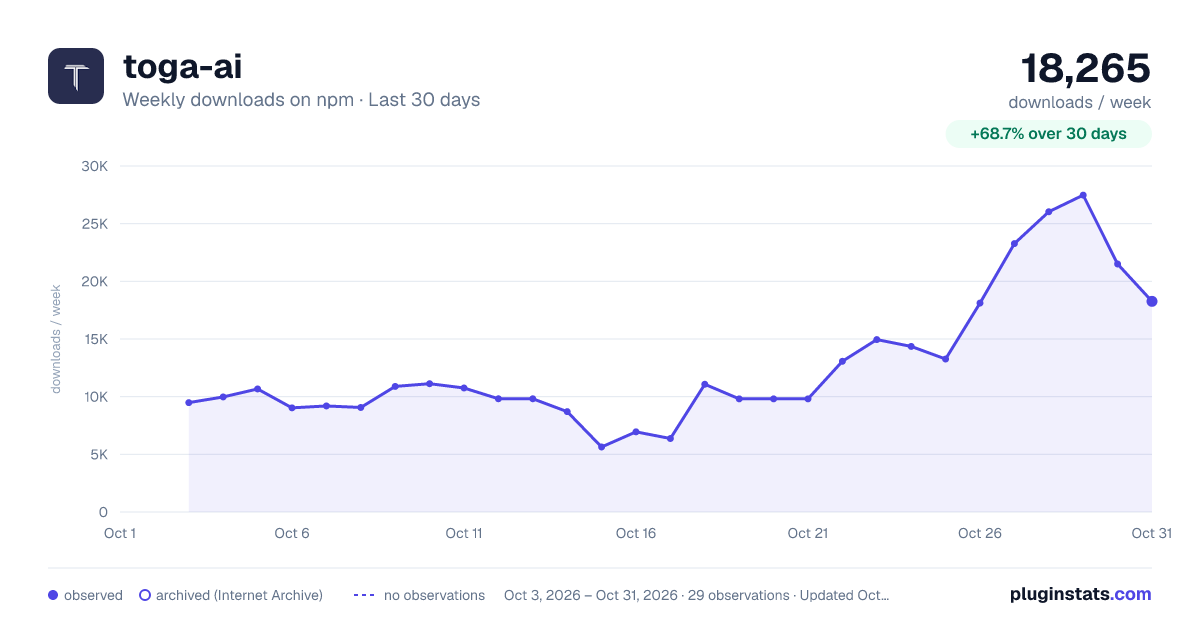
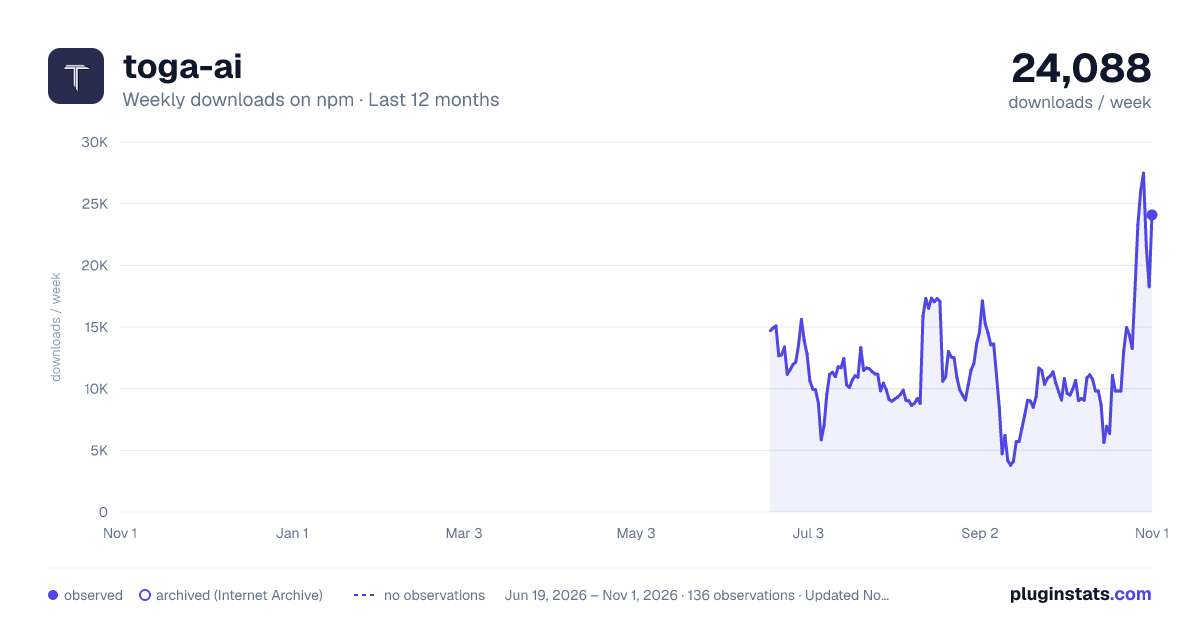
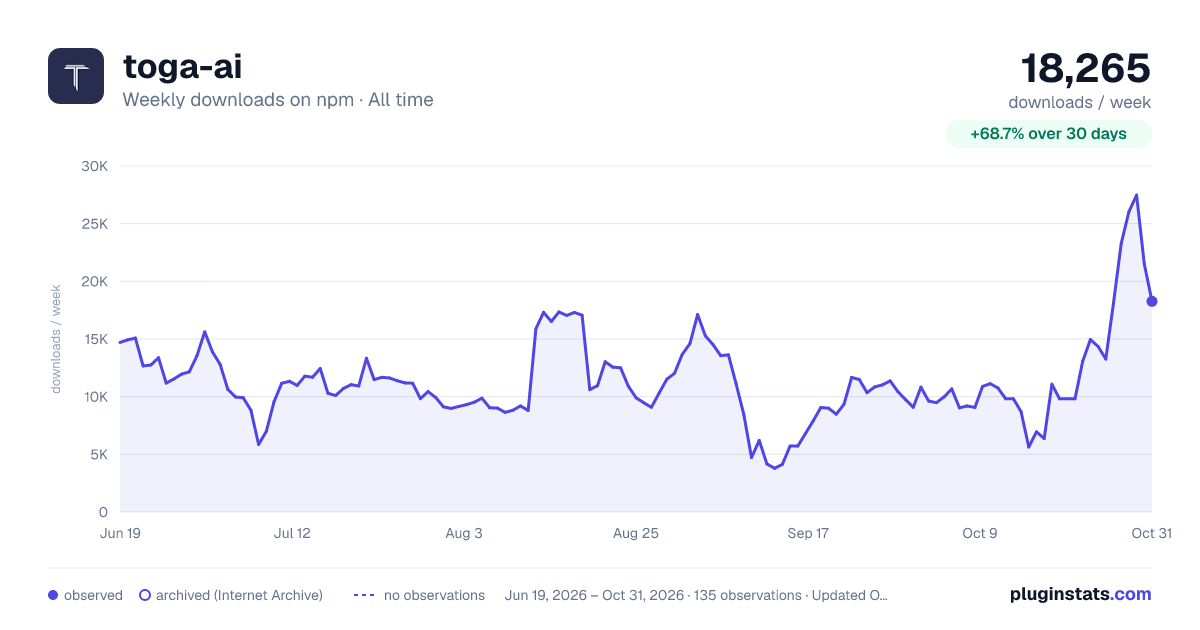

Adoption over time


7/30/90-day growth


Filled points are observed values; hollow points come from Internet Archive snapshots of the listing page. Dashed segments span periods with no observations — values between points are not interpolated.
Recent observations
Full history (121)Similar npm Claude Code plugins
Data source
Weekly downloads (trailing 7 complete days) come from the official npm downloads API. Downloads include CI and mirrors and are not equivalent to installs or users. npm publishes no ratings.
Listing: https://www.npmjs.com/package/toga-ai. First seen Oct 16, 2026; last successful collection Oct 19, 2026. See the methodology.