 PluginStats
prettier-plugin-aiken weekly downloads statistics
By aniadev · npm · Prettier plugins
A Prettier plugin for Aiken language
prettier-plugin-aiken has 5 recorded weekly downloads on npm, a decrease of 50.0% over the past 30 days, ranking #2029 of 2,256 tracked listings.
About prettier-plugin-aiken
Prettier Plugin Aiken
A Prettier plugin for the Aiken smart contract language.
Overview
This plugin integrates Aiken's built-in formatter (aiken fmt) with Prettier, allowing you to format Aiken smart contract code using Prettier's workflow and editor integrations.
Features
• 🎯 Format .ak files using Aiken's official formatter • 🔧 Seamless integration with Prettier • ⚡ Works with popular editors (VS Code, Vim, etc.) • 🔄 Supports Prettier's CLI and API
Installation
Prerequisites
Make sure you have Aiken installed on your system:
Install the Plugin
Usage
CLI
Format a single file:
Format all Aiken files in your project:
Configuration
Add to your package.json:
Or create a .prettierrc.js:
VS Code Integration
- Install the Prettier extension 2. Add this plugin to your project dependencies 3. Configure Prettier as your default formatter for .ak files
Add to your VS Code settings.json:
How it Works
This plugin acts as a bridge between Prettier and Aiken's built-in formatter:
- Prettier detects .ak files using this plugin 2. The plugin passes the file content to aiken fmt --stdin 3. Returns the formatted code back to Prettier
Requirements
• Node.js >= 14 • Aiken CLI tool installed and available in PATH • Prettier (peer dependency)
Example
Before formatting:
After formatting:
Configuration
Setting up Aiken Binary Path
The plugin will automatically try to find your Aiken binary in the following order:
- Environment Variable: AIKEN_BIN (recommended for custom installations) 2. PATH: Using which aiken command 3. Default Location: ~/.aiken/bin/aiken (standard installation path)
Using Environment Variable
If you have Aiken installed in a custom location, set the AIKEN_BIN environment variable:
For VS Code Users
Add the environment variable to your VS Code settings:
Troubleshooting
"aiken command not found"
Make sure Aiken is installed and available in your PATH:
If not installed, follow the Aiken installation instructions.
Custom Aiken Installation
If you installed Aiken in a custom location, make sure to set the AIKEN_BIN environment variable as described in the Configuration section above.
Plugin not working in VS Code
- Ensure the plugin is installed in your project (not globally) 2. Restart VS Code after installing the plugin 3. Check that Prettier is configured as the default formatter for .ak files
Contributing
Contributions are welcome! Please feel free to submit a Pull Request.
Development
- Clone the repository 2. Install dependencies: npm install 3. Make your changes 4. Test with a sample Aiken project
License
MIT License
Related Projects
• Aiken - A modern smart contract platform for Cardano • Prettier - An opinionated code formatter
Changelog
See CHANGELOG.md for release history.
Description from the npm listing.
- prettier-plugin
- aiken
README badge
Show your rank in a README or on your website. The badge updates automatically.
Charts
Images: 30d · 1y · all time · 1600×900 dark
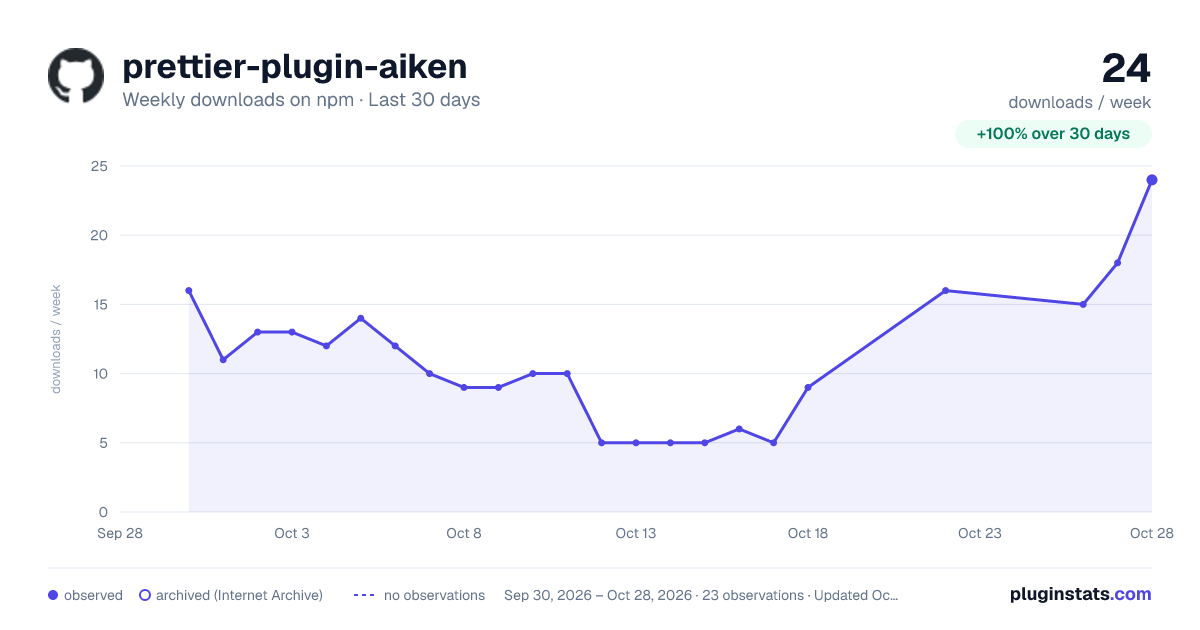
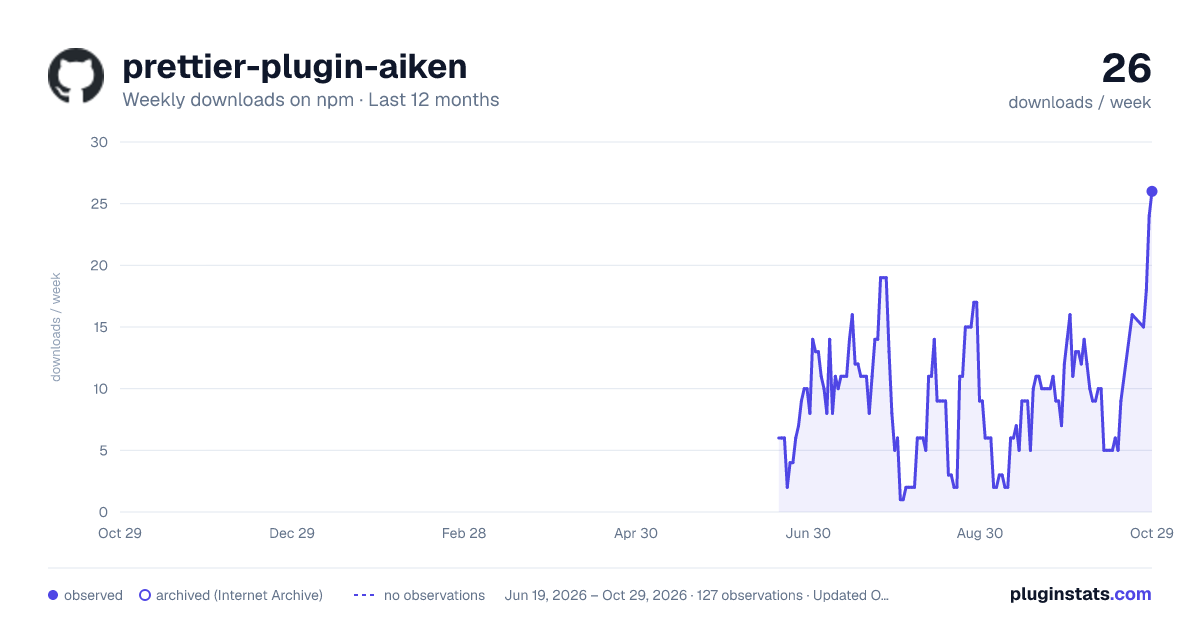
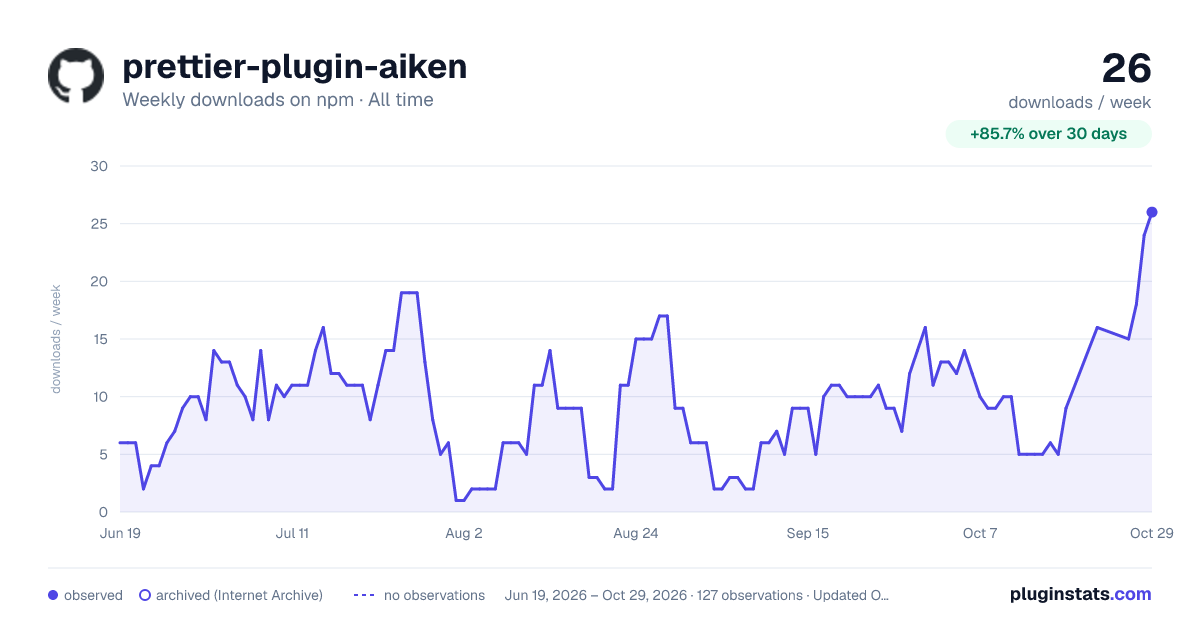

Adoption over time
7/30/90-day growth
Ranking history
Listing placement
Listing placement
Filled points are observed values; hollow points come from Internet Archive snapshots of the listing page. Dashed segments span periods with no observations — values between points are not interpolated.
Each band is one page of 20. Weekly downloads on a linear scale. Placement is projected from weekly downloads, so it can differ from the marketplace's own sort order. Hover a dot to see the listing.
Recent observations
Full history (121)Similar npm Prettier plugins plugins
All 20 prettier-plugin-aiken alternativesData source
Weekly downloads (trailing 7 complete days) come from the official npm downloads API. Downloads include CI and mirrors and are not equivalent to installs or users. npm publishes no ratings.
Listing: https://www.npmjs.com/package/prettier-plugin-aiken. First seen Oct 16, 2026; last successful collection Oct 19, 2026. See the methodology.