 PluginStats
@atlassian-dc-mcp/jira weekly downloads statistics
By atlassian-dc-mcp (2 listings) · npm · MCP servers
Community-maintained MCP server for Atlassian Jira Data Center. Not affiliated with Atlassian.
@atlassian-dc-mcp/jira has 5,853 recorded weekly downloads on npm.
About @atlassian-dc-mcp/jira
Atlassian Jira Data Center MCP
This package provides a Machine Comprehension Protocol (MCP) server for interacting with Atlassian Jira Data Center edition.
Interactive Setup
The easiest way to configure this server is the built-in setup subcommand:
npx @atlassian-dc-mcp/jira setup
It prompts for host, API base path, default page size, and API token, then stores them in the most secure place available:
- macOS — token in the login Keychain (service
atlassian-dc-mcp, accountjira-token); host / base path / page size in~/.atlassian-dc-mcp/jira.env(mode0600). - Linux — everything in
~/.atlassian-dc-mcp/jira.envwith POSIX mode0600(read/write for your user only). - Windows — everything in
%USERPROFILE%\.atlassian-dc-mcp\jira.env. Node passes the mode bits but Windows ignores them, so the file inherits the ACL of your user profile directory (typically readable only by your user, SYSTEM, and Administrators).
After setup, you can launch the server without any environment variables:
{
  "mcpServers": {
    "atlassian-jira-dc": {
      "command": "npx",
      "args": ["-y", "@atlassian-dc-mcp/jira"]
    }
  }
}
Environment variables still override stored values — see Configuration sources below.
Scripted / non-interactive setup
For CI, remote sessions, or shell scripts, pass values as flags and add --non-interactive to skip prompts:
npx @atlassian-dc-mcp/jira setup --non-interactive \
  --host jira.example.com \
  --token "$JIRA_TOKEN"
Available flags: --host/-H, --api-base-path/-b, --token/-t, --default-page-size/-s, --non-interactive/-n, --help/-h. In --non-interactive mode, missing values fall back to existing configuration and the run exits non-zero if a host (or full-URL --api-base-path) and token cannot be resolved. An existing token is reused when --token is omitted. Run npx @atlassian-dc-mcp/jira setup --help for full usage.
Claude Desktop Configuration
To use this MCP connector with Claude Desktop, add the following to your Claude Desktop configuration:
macOS:
~/Library/Application Support/Claude/claude_desktop_config.json
Windows:
%APPDATA%\Claude\claude_desktop_config.json
{
  "mcpServers": {
    "atlassian-jira-dc": {
      "command": "npx",
      "args": ["-y", "@atlassian-dc-mcp/jira"],
      "env": {
        "JIRA_HOST": "your-jira-host",
        "JIRA_API_TOKEN": "your-token"
      }
    }
  }
}
To reuse one shared dotenv file across multiple tools or MCP hosts, point the server at an absolute file path:
{
  "mcpServers": {
    "atlassian-jira-dc": {
      "command": "npx",
      "args": ["-y", "@atlassian-dc-mcp/jira"],
      "env": {
        "ATLASSIAN_DC_MCP_CONFIG_FILE": "/Users/your-user/.config/atlassian-dc-mcp.env"
      }
    }
  }
}
Windows example:
{
  "mcpServers": {
    "atlassian-jira-dc": {
      "command": "npx",
      "args": ["-y", "@atlassian-dc-mcp/jira"],
      "env": {
        "ATLASSIAN_DC_MCP_CONFIG_FILE": "C:\\\\Users\\\\your-user\\\\AppData\\\\Roaming\\\\atlassian-dc-mcp.env"
      }
    }
  }
}
Note: Set JIRA_HOST variable only to domain + port without a protocol (e.g., your-instance.atlassian.net). The https protocol is assumed.
Alternatively, you can use JIRA_API_BASE_PATH instead of JIRA_HOST to specify the complete API base URL including protocol (e.g., https://your-instance.atlassian.net/rest). Note that the /api/2/search/ part is static and added automatically in the code, so you don't need to include it in the JIRA_API_BASE_PATH value.
Features
- Search for issues using JQL (Jira Query Language)
- Get issue details by key
- Get issue comments
- Create and update issues
- Add and update comments on issues
- Link and unlink issues
- Watch and unwatch issues
Setup
-
Install dependencies:
npm install -
Create a
.envfile in the packages/jira directory, or put the same values in a shared dotenv file and setATLASSIAN_DC_MCP_CONFIG_FILEto its absolute path:JIRA_HOST=your-jira-instance.atlassian.net # OR alternatively use # JIRA_API_BASE_PATH=https://your-jira-instance.atlassian.net/rest # Note: /api/latest/ is added automatically, do not include it JIRA_API_TOKEN=your-personal-access-token # Optional: default page size for paginated read tools (fallback: 25) JIRA_DEFAULT_PAGE_SIZE=25See Configuration sources for the full precedence chain.
Attachment filesystem access (opt-in)
By default this server is an API-only client: the attachment tools never read from or write to the local filesystem, and
jira_uploadAttachmentis not even registered.jira_downloadAttachmentis always available but can only return file bytes inline (base64/text) — it cannot touch local disk.Local filesystem access is opt-in and confined to operator-configured directories that the model cannot choose:
# Enable each direction separately (default: false)
JIRA_ATTACHMENTS_UPLOAD_ENABLED=true
JIRA_ATTACHMENTS_DOWNLOAD_ENABLED=true

# Allowed roots (os path-separator list). Uploads may only read from these,
# downloads may only write into the first configured download root.
JIRA_ATTACHMENTS_UPLOAD_ROOTS=/srv/jira-exchange/in
JIRA_ATTACHMENTS_DOWNLOAD_ROOTS=/srv/jira-exchange/out

# Convenience: a single dedicated exchange directory used as both roots
JIRA_ATTACHMENTS_DIR=/srv/jira-exchange

# Hard per-file size limits in bytes (default: 25 MiB)
JIRA_ATTACHMENTS_MAX_UPLOAD_BYTES=26214400
JIRA_ATTACHMENTS_MAX_DOWNLOAD_BYTES=26214400
```…
Description from the npm listing.
- mcp
- atlassian
- jira
- data-center
- model-context-protocol
README badge
Show your rank in a README or on your website. The badge updates automatically.
Charts
Images: 30d · 1y · all time · 1600×900 dark
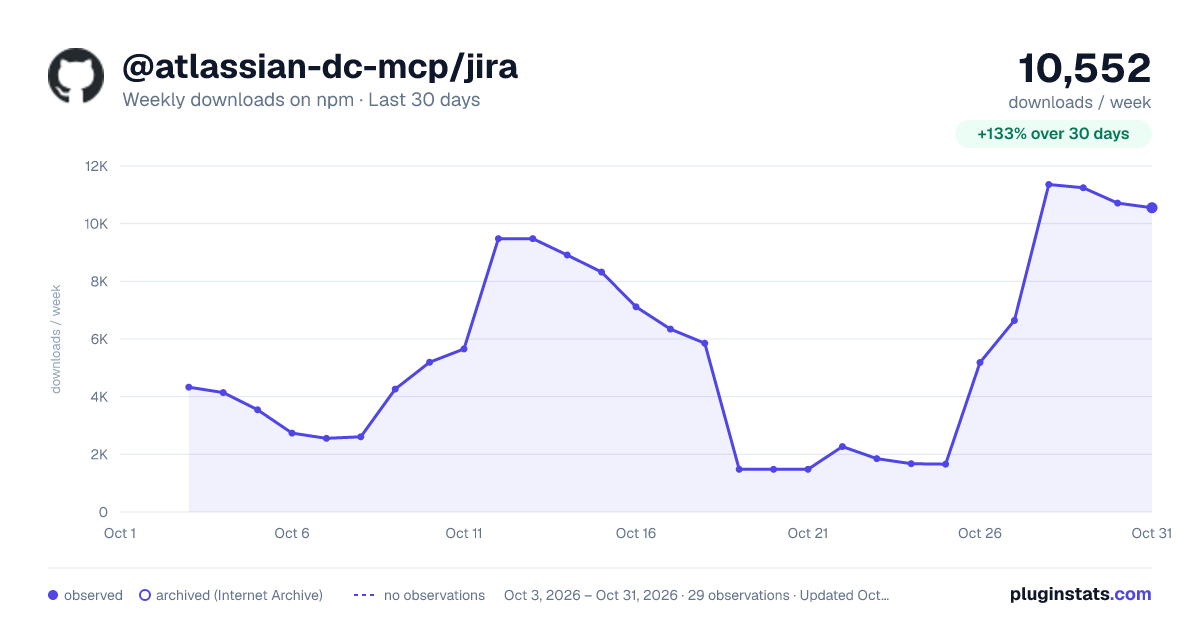
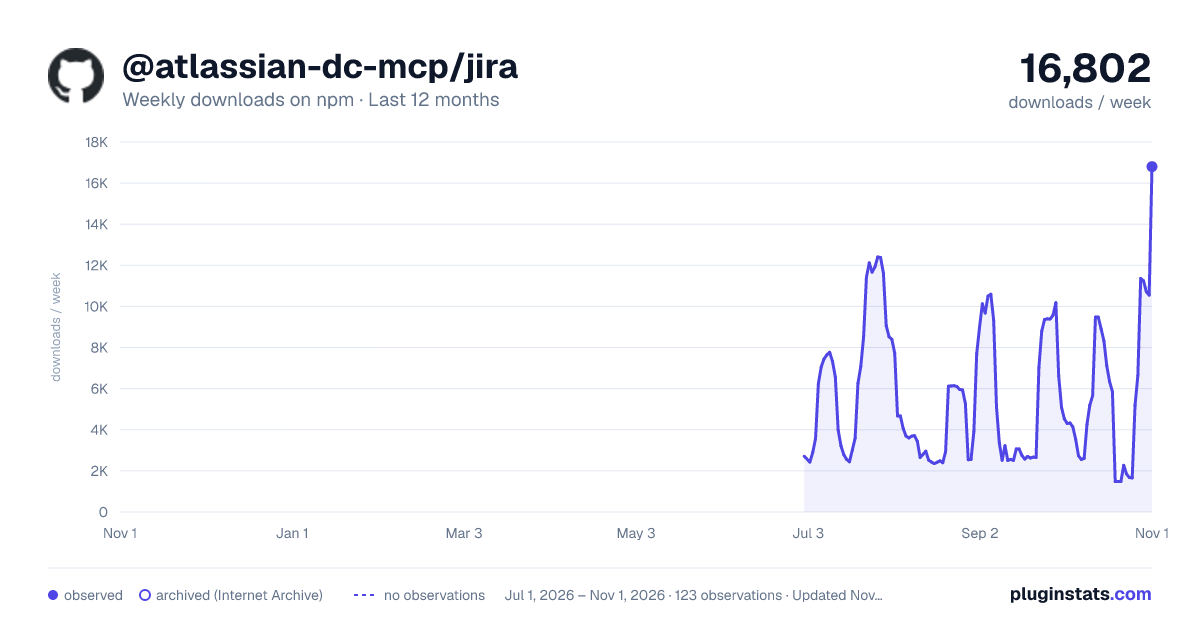
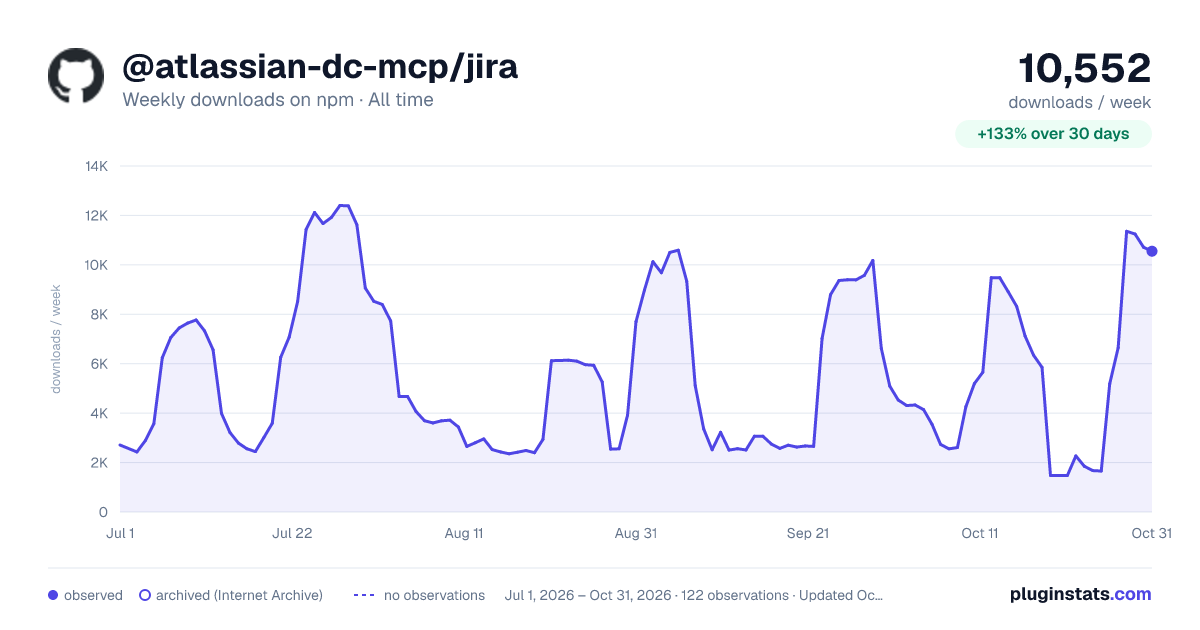

Adoption over time
7/30/90-day growth
Ranking history
Listing placement
Listing placement
Filled points are observed values; hollow points come from Internet Archive snapshots of the listing page. Dashed segments span periods with no observations — values between points are not interpolated.
Each band is one page of 20. Weekly downloads on a linear scale. Placement is projected from weekly downloads, so it can differ from the marketplace's own sort order. Hover a dot to see the listing.
Recent observations
Full history (1)Similar npm MCP servers plugins
All 20 @atlassian-dc-mcp/jira alternativesData source
Weekly downloads (trailing 7 complete days) come from the official npm downloads API. Downloads include CI and mirrors and are not equivalent to installs or users. npm publishes no ratings.
Listing: https://www.npmjs.com/package/@atlassian-dc-mcp/jira. First seen Oct 20, 2026; last successful collection Oct 20, 2026. See the methodology.