 PluginStats
eslint-plugin-html weekly downloads statistics
By BenoitZugmeyer · npm · ESLint plugins
A ESLint plugin to lint and fix inline scripts contained in HTML files.
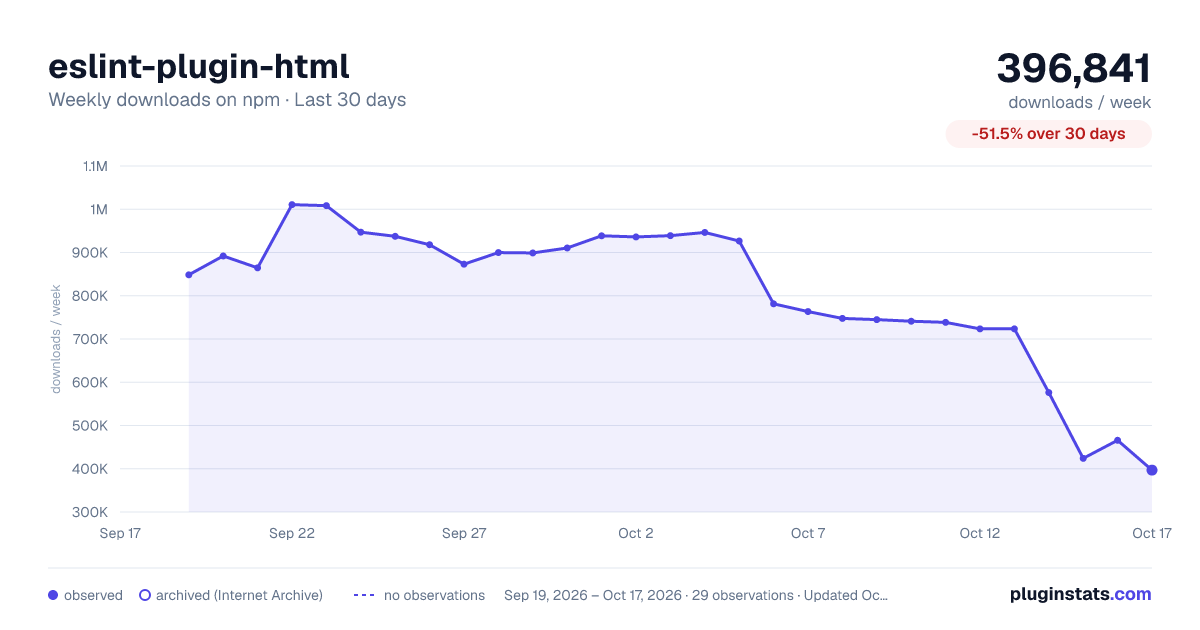
eslint-plugin-html has 396,841 recorded weekly downloads on npm, a decrease of 51.5% over the past 30 days.
It ranks #273 of 2,251 tracked npm listings by weekly downloads.
Over 90 days, weekly downloads changed by -55.1%.
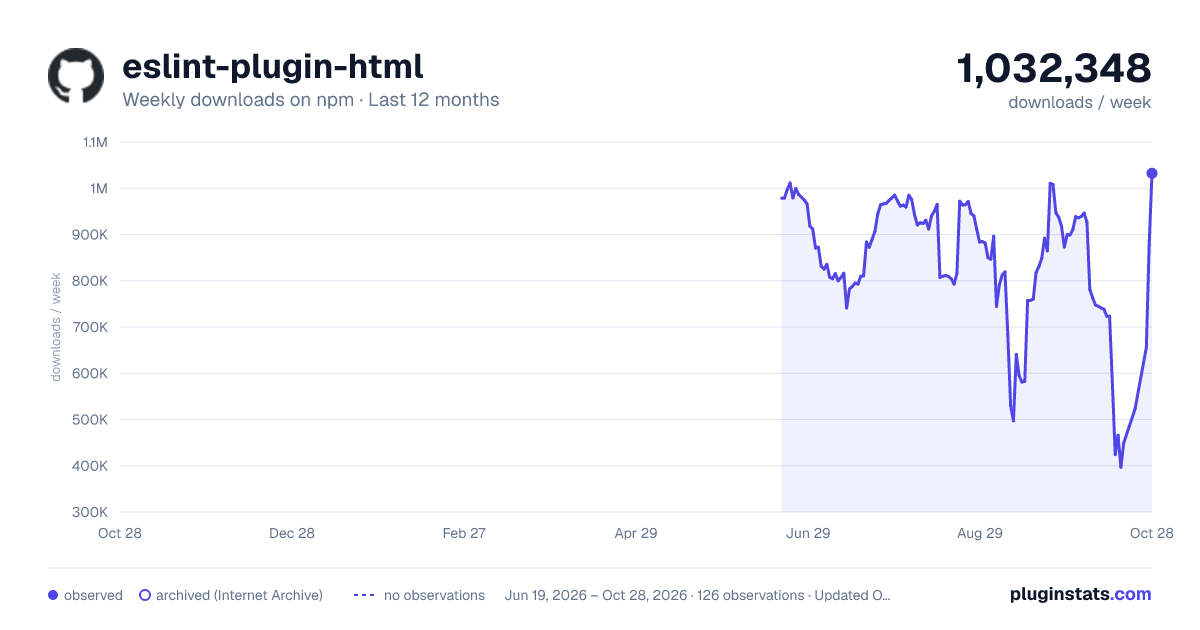
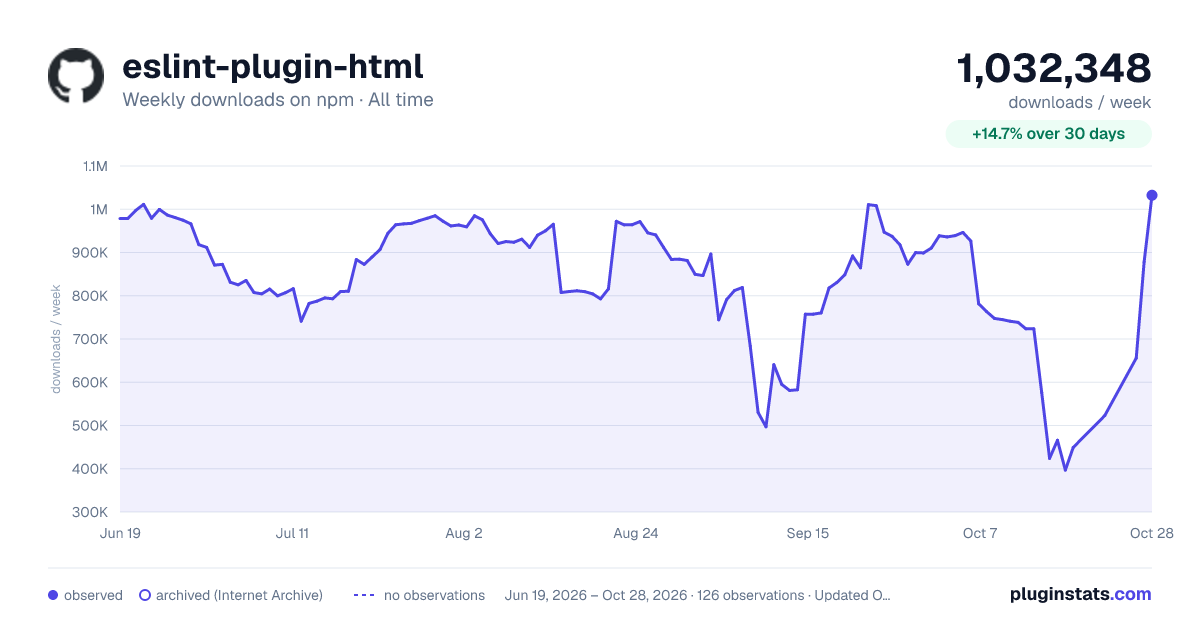
PluginStats has 121 daily observations since Jun 19, 2026; the latest is from Oct 17, 2026.
About eslint-plugin-html
eslint-plugin-html
A ESLint plugin to lint and fix inline scripts contained in HTML files.
• Usage • Disabling ESLint • Linting HTML • Manual configuration • Use two configuration files • Multiple scripts tags in a HTML file • History • XML support • Settings • html/html-extensions • html/xml-extensions • html/indent • html/report-bad-indent • html/javascript-tag-names • html/javascript-mime-types • html/ignore-tags-without-type • Troubleshooting • No file linted when running eslint on a directory • Linting templates (or PHP) • Linting VUE files • Migration from older versions • To v4 • To v3 • Credits
Usage
Simply install via npm install --save-dev eslint-plugin-html and add the plugin to your ESLint configuration. See ESLint documentation.
Example with ESLint 9 and above (flat config)
Example with ESLint 8 and below
Disabling ESLint
To temporarily disable ESLint, use the HTML comment. Re-enable it with . Example:
To disable ESLint for the next script tag only, use the HTML comment. Example:
Disabled script tags are completely ignored: their content will not be parsed as JavaScript. You can use this to disable script tags containing template syntax.
Linting HTML
This plugin focuses on applying ESLint rules on inline scripts contained in HTML. It does not provide any rule related to HTML. For that, you can use other plugins like @html-eslint or @angular-eslint. This plugin is not compatible with the ESLint language option (this is an ESLint limitation). To lint both HTML and JS within script tags, you have two alternatives:
Manual configuration
Provide the html-eslint plugin option manually, without relying on the language option:
Use two configuration files
eslint.config.js with the eslint-plugin-html plugin to lint all JavaScript code and eslint.config-html.js with the html-eslint plugin for HTML rules.
Run ESLint once with each configuration:
This alternative works well in CI and hooks, but might be limited in text editors where only one config is applied.
Multiple scripts tags in a HTML file
When linting a HTML with multiple script tags, this plugin tries to emulate the browser behavior by sharing the global scope between scripts by default. This behavior doesn't apply to "module" scripts (ie: and most transpiled code), where each script tag gets its own top-level scope.
ESLint has already an option to tell the parser if the script are modules. eslint-plugin-html will use this option as well to know if the scopes should be shared (the default) or not. To change this, just set it in your ESLint configuration:
ESLint 9 and above (flat config)
ESLint 8 and below
To illustrate this behavior, consider this HTML extract:
This is perfectly valid by default, and the ESLint rules no-unused-vars and no-undef shouldn't complain. But if those scripts are considerated as ES modules, no-unused-vars should report an error in the first script, and no-undef should report an error in the second script.
History
In eslint-plugin-html v1 and v2, script code were concatenated and linted in a single pass, so the scope were always shared. This caused some issues, so in v3 all scripts were linted separately, and scopes were never shared. In v4, the plugin still lint scripts separately, but makes sure global variables are declared and used correctly in the non-module case.
XML support
This plugin parses HTML and XML markup slightly differently, mainly when considering CDATA sections:
• in XML, any data inside a CDATA section will be considered as raw text (not XML) and the CDATA delimiter will be dropped ; • in HTML, there is no such thing for tags: the CDATA delimiter is considered as normal text and thus, part of the script.
Settings
Note: all settings can be written either as "html/key": value or in a nested object "html": { "key": value }
html/html-extensions
By default, this plugin will only consider files ending with those extensions as HTML: .erb, .handlebars, .hbs, .htm, .html, .mustache, .nunjucks, .php, .tag, .twig, .we. You can set your own list of HTML extensions by using this setting. Example:
ESLint 9 and above (flat config)
Note: you need to specify extensions twice, which is not ideal. This should be improved in the future.
ESLint 8 and below
html/xml-extensions
By default, this plugin will only consider files ending with those extensions as XML: .xhtml, .xml. You can set your own list of XML extensions by using this setting. Example:
ESLint 9 and above (flat config)
Note: you need to specify extensions twice, which is not ideal. This should be improved in the future.
ESLint 8 and below
html/indent
By default, the code between tags is dedented according to the first non-empty line. The setting html/indent allows to ensure that every script tags follow an uniform indentation. Like the indent rule, you can pass a number of spaces, or "tab" to indent with one tab. Prefix this value with a + to be relative to the tag indentation. Example:
ESLint 9 and above (flat config)
ESLint 8 and below
html/report-bad-indent
By default, this plugin won't warn if it encounters a problematic indentation (ex: a line is under indented). If you want to make sure the indentation is correct, use the html/report-bad-indent in conjunction with the indent rule. Pass "warn" or 1 to display warnings, "error" or 2 to display errors. Example:
ESLint 9 and above (flat config)
ESLint 8 and below
html/javascript-tag-names
By default, the code between tags is considered as JavaScript. You can customize which tags should be considered JavaScript by providing one or multiple tag names.
Example:
ESLint 9 and above (flat config)
ESLint 8 and below
html/javascript-mime-types…
Description from the npm listing.
- eslint-plugin
- eslintplugin
- eslint
- html
Where eslint-plugin-html sits in the listing
Each band is one page of 20. Weekly downloads on a log scale. Placement is projected from weekly downloads, so it can differ from the marketplace's own sort order. Hover a dot to see the listing.


Charts
Images: 30d · 1y · all time · 1600×900 dark

Adoption over time


7/30/90-day growth


Filled points are observed values; hollow points come from Internet Archive snapshots of the listing page. Dashed segments span periods with no observations — values between points are not interpolated.
Recent observations
Full history (121)Similar npm ESLint plugins plugins
Data source
Weekly downloads (trailing 7 complete days) come from the official npm downloads API. Downloads include CI and mirrors and are not equivalent to installs or users. npm publishes no ratings.
Listing: https://www.npmjs.com/package/eslint-plugin-html. First seen Oct 16, 2026; last successful collection Oct 18, 2026. See the methodology.