 PluginStats
@mrciphersmith/keryx weekly downloads statistics
By mrciphersmith · npm · Claude Code
Version-controlled project context for AI coding agents: code graph, architecture wiki, project memory, relevant tests, quality signals, and task flows.
@mrciphersmith/keryx has 1,887 recorded weekly downloads on npm, a decrease of 46.0% over the past 30 days.
It ranks #1295 of 2,251 tracked npm listings by weekly downloads.
PluginStats has 121 daily observations since Jun 19, 2026; the latest is from Oct 17, 2026.
About @mrciphersmith/keryx
keryx
One project-local brain for your AI agents and your team.
Version-controlled repository context for Codex, Claude, Cursor, and any other AI coding agent.
keryx turns what agents keep rediscovering about your repository into durable Markdown and JSON under .metaproject/: code relationships, architecture, project memory, relevant tests, quality signals, agent skills, and task state. Every agent and every teammate reads the same context, and it is reviewed in a diff like the rest of the code.
The core is deterministic, local, offline, and has no required runtime dependencies. keryx does not take your coding agent away and does not make engineering decisions for you — it gives every agent the same project context instead of letting each one reconstruct the repository from scratch.
It also ships an agent runtime of its own, built directly on that context: durable sessions, an allow/ask/deny policy engine, kernel-enforced sandboxing, child agents and evidence-gated completion. Keep using Codex, Claude or Cursor, run keryx shell, or do both — they all read the same project brain. You can delegate the work, not the responsibility: a managed flow freezes its acceptance criteria before the work starts, lets them change only through a recorded update with a reason, and completes only when every one is confirmed against recorded evidence — under a named owner, with every confirmation and the completion itself signed.
Quick start
Requirements: git (>= 2.24) and bun (>= 1.3.14 — older Bun can close the terminal input of keryx shell; see onboarding).
No bun, git, or node? Install the standalone binary instead — same CLI, no runtime dependency:
The package is scoped, and the scope matters. The unscoped name keryx on npm belongs to an unrelated project. Install @mrciphersmith/keryx; the executable it installs is called keryx.
All four install paths — the npm package above, the standalone binary, the managed installer (~/.keryx with a wrapper in ~/.local/bin) and a project-local install — are compared side by side, with what each one needs on the machine first, in the onboarding guide.
Local-first · deterministic core · offline by default · MIT
keryx init creates the .metaproject/ workspace and connects your agents to it, so they are routed to the right module automatically. It imports your AGENTS.md / CLAUDE.md as project rules and writes its routing block and Claude hooks to per-developer, gitignored files (CLAUDE.local.md, AGENTS.override.md, .claude/settings.local.json, ignore rules in .git/info/exclude), so the files your team tracks stay untouched and git pull never meets an edit made by keryx. A team that wants the block committed opts into scope: "shared"; see where the block goes.
Connect a model provider
keryx shell needs one configured provider. The first run with none configured opens a picker: choose a built-in provider (Anthropic, Ollama, OpenRouter, DeepSeek, Z.AI, Cerebras, Groq, Moonshot, Grok, …) or add a custom OpenAI-compatible endpoint, paste an API key if the provider needs one, then pick a model.
To set one up before the first run, or add another later:
Inside a running session, /provider reopens the same add/reconfigure wizard and /connect switches between providers you already configured.
ChatGPT / Codex model discovery reads the current stable Codex version from npm metadata and caches it for one day. Test in /connect (or keryx providers test openai-codex) always checks for a newer version before listing models. This does not install Codex or poll npm in the background. If npm is unavailable, a previously discovered version is reused; without a cached version, discovery reports the problem instead of guessing a version.
Once you have more than one provider connected, keryx routing (and, inside a session, /routing) maps a task category — review, subagents, and a catalogue of others — to a specific model, so reviews and subagent spawns can run on a different (cheaper, or stronger) model than your main session without switching /model before every turn. Leave a category unset and a sensible default is built automatically from your connected provider's own models and their recorded price/strength profiles (keryx routing profile list) — cheap models for high-volume work, strong ones for planning/review. See the CLI reference.
Your first session
Bare keryx prints the main commands; keryx shell starts the agent harness described below. A few commands worth knowing from the first session:
• /theme [name] opens the theme picker; a choice applies immediately. • /settings opens one modal with the permission mode, plan, guards, routing, reasoning, theme and external switches, each with its On/Off or value buttons; /mode and /plan are marked session, the rest saved. • /mode [ask|trust|auto] shows or switches the permission mode for the rest of the session — see permission modes. • /help lists every slash command available in the current mode. • /resume, /sessions, /new move between sessions from inside the shell; keryx sessions list does the same from outside it.
Where to go next
Full documentation site: , starting with Onboarding for the complete first-run walkthrough. keryx help groups every command by task; the same table is a generated reference page, Commands by task. Run keryx --help for the live flag surface of any command. Delivery orchestrators can also ask Jev to flag rule-breaking edits and triage failed CI jobs — see Jev in the delivery loop. The review orchestrator can ask Jev to triage CI and pick which reviewers to dispatch — see Jev in review for what was measured and what was not.
Why keryx
An agent starts every task by re-deriving what your repository already knows:
• which files and symbols are connected; • what a change is going to affect; • which architectural decision constrains it, and why; • which tests verify the behaviour; • what broke the last time someone tried this; • which project rules apply.…
Description from the npm listing.
- ai-agents
- coding-agents
- agent-harness
- agent-context
- repository-context
- code-graph
- project-memory
- test-impact-analysis
- developer-tools
- model-context-protocol
- mcp
- claude-code
- cursor
- codex
- cli
- bun
Where @mrciphersmith/keryx sits in the listing
Each band is one page of 20. Weekly downloads on a log scale. Placement is projected from weekly downloads, so it can differ from the marketplace's own sort order. Hover a dot to see the listing.


Charts
Images: 30d · 1y · all time · 1600×900 dark
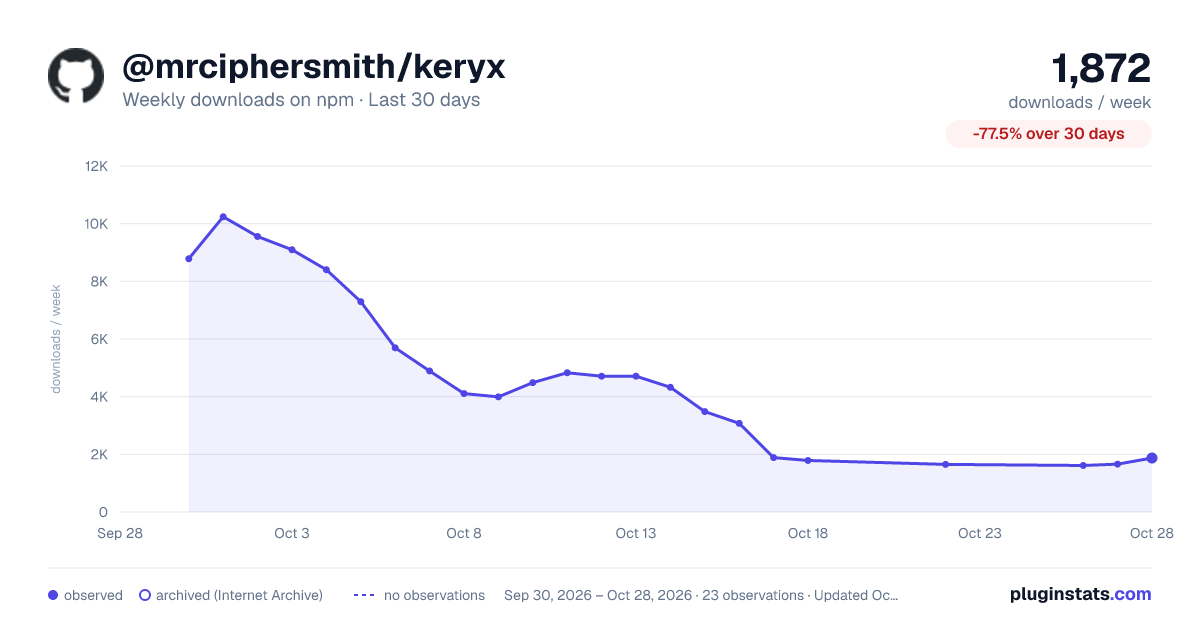
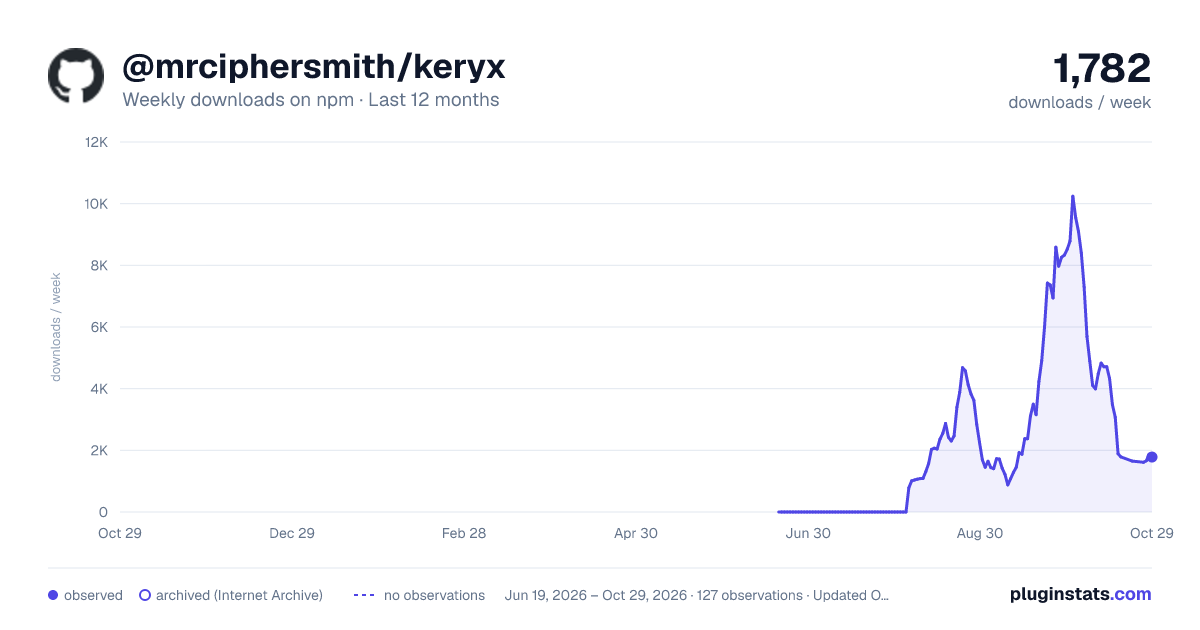
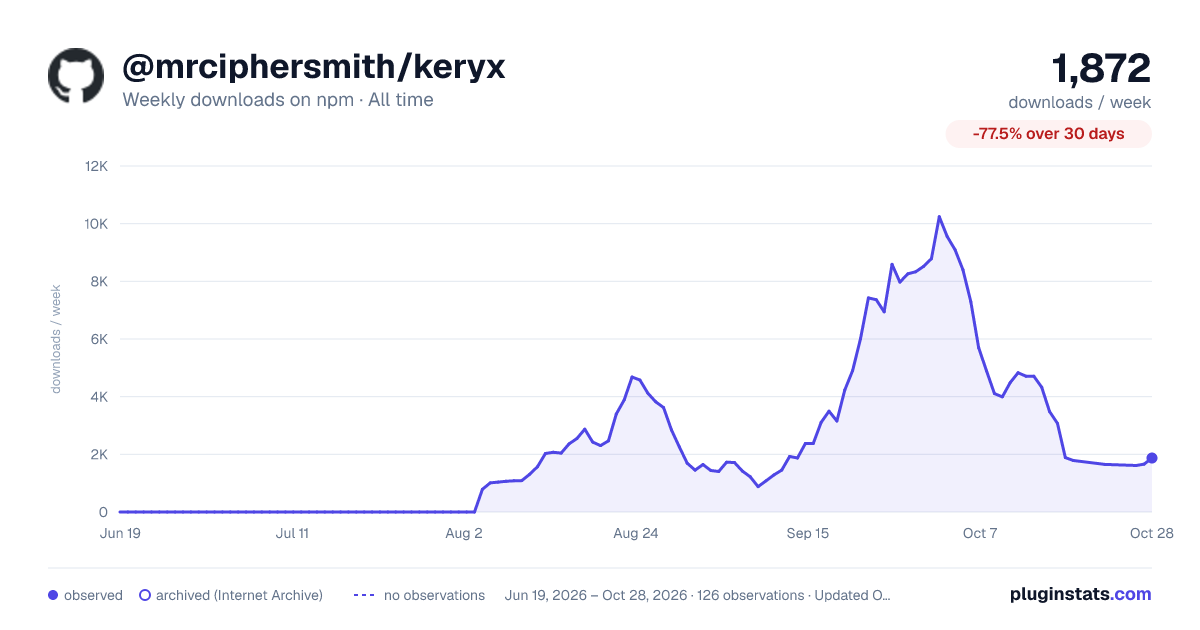

Adoption over time


7/30/90-day growth


Filled points are observed values; hollow points come from Internet Archive snapshots of the listing page. Dashed segments span periods with no observations — values between points are not interpolated.
Recent observations
Full history (121)Similar npm Claude Code plugins
Data source
Weekly downloads (trailing 7 complete days) come from the official npm downloads API. Downloads include CI and mirrors and are not equivalent to installs or users. npm publishes no ratings.
Listing: https://www.npmjs.com/package/@mrciphersmith/keryx. First seen Oct 16, 2026; last successful collection Oct 18, 2026. See the methodology.