 PluginStats
xray-react weekly downloads statistics
By loogle18 · npm · Webpack plugins
React layout debugger inspired by Xray-rails.
xray-react has 15 recorded weekly downloads on npm, a decrease of 71.2% over the past 30 days.
It ranks #1868 of 2,251 tracked npm listings by weekly downloads.
Over 90 days, weekly downloads changed by -21.1%.
PluginStats has 121 daily observations since Jun 19, 2026; the latest is from Oct 17, 2026.
About xray-react
X-Ray React ==========
React UI layout debugging tool inspired by Xray-rails
Overview
Xray-react is a development tool that reveals your React UI's component structure. Press Cmd+Shift+X (Mac) or Ctrl+Shift+X (Windows/Linux) to reveal an overlay of the React components that rendered your UI, and click any component to open its source file in your editor.
Full Mode (default)
Simple Mode
Features
• React 18+ Support - Works with React 18+ using React DevTools protocol, with fallback support for React Layout -> Component) • Modern UI - Clean overlay interface with component search and scrollable component paths • Editor Integration - Automatic detection for VSCode, WebStorm, Cursor, Sublime, and more • Fast & Lightweight - Minimal performance impact
Requirements
• Node.js: >= 22.0.0 • React: >= 16.0.0 (React 18+ recommended for best experience)
Installation
Usage
Webpack
Legacy export (backward compatibility):
Vite
Next.js
For Next.js applications, you can use either the webpack plugin or manual imports.
Using Webpack Plugin
The webpack plugin automatically detects Next.js client builds and injects scripts into the appropriate chunks.
Configure xray-react in next.config.js:
Manual Import (Without Plugin)
If you're not using a bundler plugin, you can manually import the UI:
Note: When using manual import, the Socket.IO server won't be started automatically. You'll need to run the standalone server separately (see Standalone Server below).
Standalone Server
For manual imports or local development, you can run the xray-react server separately:
The server will: • Auto-detect your project root (via package.json or XRAY_REACT_PROJECT_ROOT env var) • Scan your source files to build component mappings • Start Socket.IO server for file opening • Send project configuration to connected clients
Note: The client bundle dynamically loads Socket.IO from a CDN, so an internet connection is required for file opening functionality.
Configuration
Environment Variables
Environment variables are primarily for standalone server usage or global settings. When using bundler plugins, plugin parameters take precedence.
• XRAY_REACT_EDITOR - Path or alias for your editor's executable file (truly global setting) • XRAY_REACT_PROJECT_ROOT - Explicitly set the project root path (primarily for standalone server)
Note: When using bundler plugins, this env var has lower precedence than plugin parameters.
• XRAY_REACT_PORT - Set the port for the Socket.IO server (primarily for standalone server, default: 8124) Note: When using bundler plugins, this env var has lower precedence than plugin parameters. The port is automatically injected into the client bundle. For manual imports, you need to set window.XRAY_REACT_PORT before the client script loads. • XRAY_REACT_MODE - Set the display mode (primarily for standalone server, default: full) Note: When using bundler plugins, this env var has lower precedence than plugin parameters. See Display Modes for more information.
Plugin Options
All plugins accept the following options:
• output (string, Webpack only) - Name of the output filename. Defaults to 'bundle.js' or the first available asset. • server (boolean) - Whether to run the Socket.IO server for handling file opening. Defaults to true. • sourcePath (string) - Absolute path to your source files (e.g., /home/user/project/src). Takes precedence over auto-detection and env vars. • port (number) - Port for the Socket.IO server. Takes precedence over XRAY_REACT_PORT env var. Defaults to 8124. • mode (string) - Display mode: 'full' or 'simple'. Takes precedence over XRAY_REACT_MODE env var. Defaults to 'full'. See Display Modes for more information.
Note: All plugins automatically detect and skip server-side builds (SSR, Next.js server builds, etc.). The plugin only runs for client-side builds.
Display Modes
xray-react supports two display modes:
Full Mode (default)
In full mode, all component overlays are visible immediately when xray-react is activated. This is the traditional behavior where you can see all React components at once.
Simple Mode
In simple mode, only the action bar is visible initially (the search component is hidden). Component overlays are shown only when you hover over their corresponding DOM elements. This provides a cleaner, less cluttered view and is useful when you want to inspect components one at a time.
• Action bar: Always visible at the bottom • Search component: Hidden in simple mode • Component overlays: Hidden by default, shown on hover • Screen border: Thin blue border around the viewport to indicate xray-react is active
Keyboard Shortcuts
• Mac: Cmd+Shift+X • Windows/Linux: Ctrl+Shift+X • Esc: Turn off the overlay (when active)
Press Cmd+Shift+X / Ctrl+Shift+X to toggle the xray-react overlay on/off. Press Esc to turn off the overlay when it's active.
Supported File Types
• .js - JavaScript files • .jsx - JSX files • .ts - TypeScript files • .tsx - TSX files
Editor Support
The plugin automatically detects editors by checking common installation paths, then falls back to platform defaults:
• VSCode (code) - Detected from common paths or PATH • Cursor (cursor) - Detected from common paths or PATH • WebStorm (webstorm) - Detected from common paths or PATH • Sublime Text (subl) - Detected from common paths or PATH • macOS default (open) - Falls back if no editor detected • Windows default (start) - Falls back if no editor detected • Linux default (xdg-open) - Falls back if no editor detected
You can also specify a custom editor using the XRAY_REACT_EDITOR environment variable.
Troubleshooting
Components not showing
• Make sure you're using React 18+ or the plugin will fall back to legacy detection • Check that your components are actually rendered in the DOM • Verify that the plugin is only enabled in development mode • Ensure source maps are enabled in your build configuration
External components showing in path…
Description from the npm listing.
- component-inspector
- css
- debug
- debugging
- development
- development-tool
- devtools
- inspector
- layout
- nextjs
- react
- react-component
- react-inspector
- reactjs
- style
- typescript
- ui
- vite
- vite-plugin
- webpack
Where xray-react sits in the listing
Each band is one page of 20. Weekly downloads on a log scale. Placement is projected from weekly downloads, so it can differ from the marketplace's own sort order. Hover a dot to see the listing.


Charts
Images: 30d · 1y · all time · 1600×900 dark
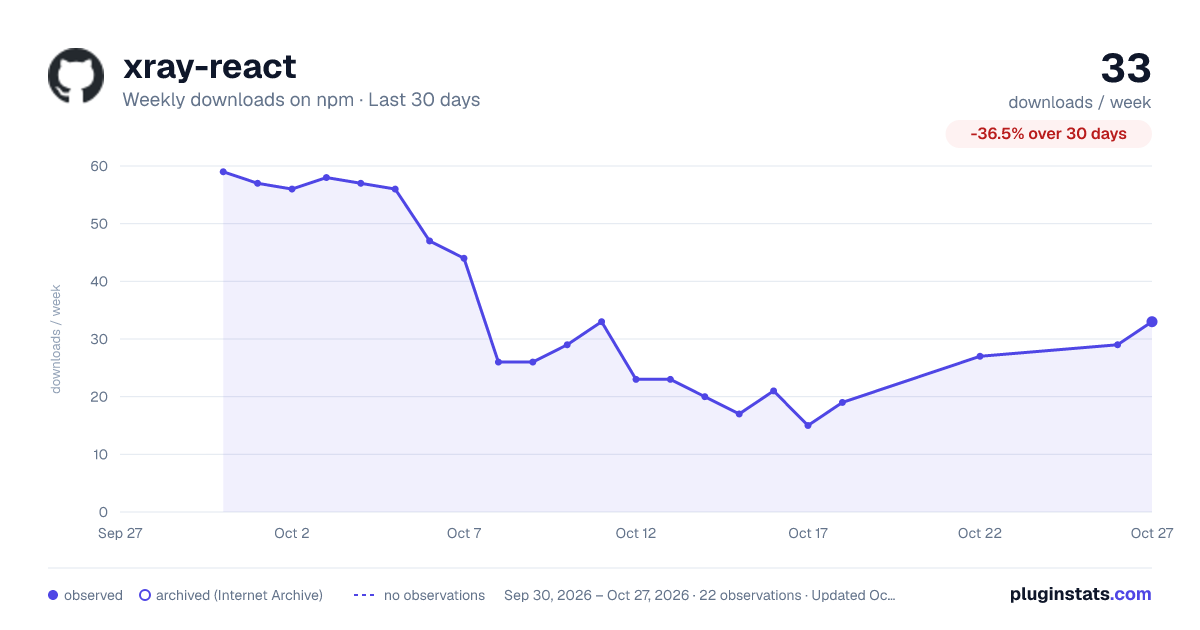
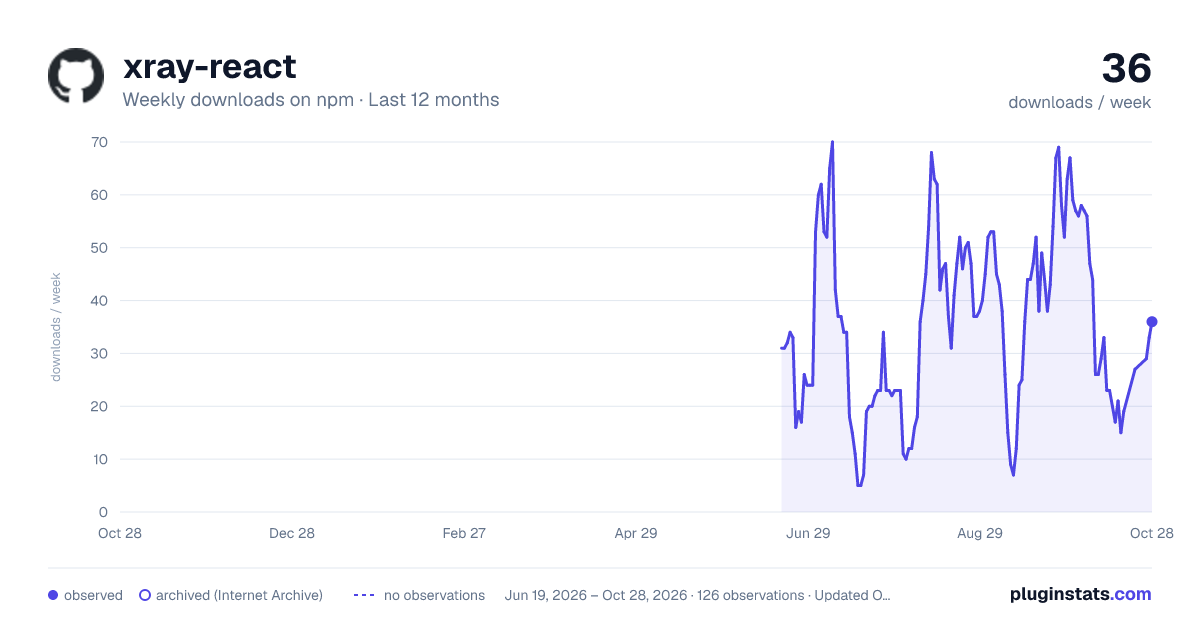
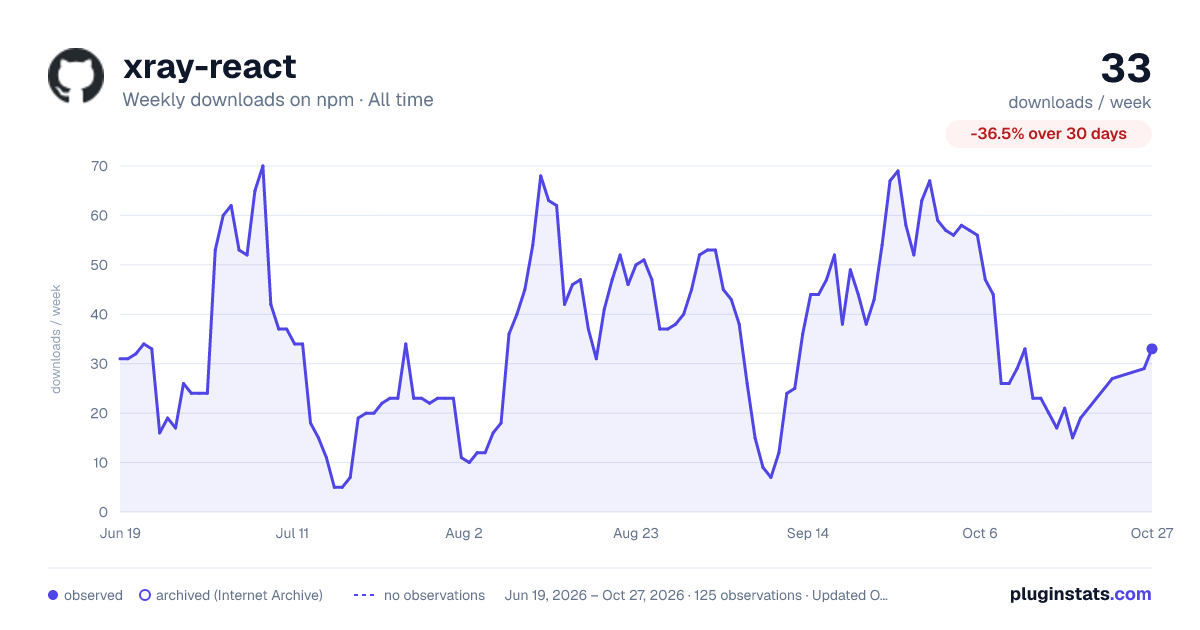

Adoption over time


7/30/90-day growth


Filled points are observed values; hollow points come from Internet Archive snapshots of the listing page. Dashed segments span periods with no observations — values between points are not interpolated.
Recent observations
Full history (121)Similar npm Webpack plugins plugins
Data source
Weekly downloads (trailing 7 complete days) come from the official npm downloads API. Downloads include CI and mirrors and are not equivalent to installs or users. npm publishes no ratings.
Listing: https://www.npmjs.com/package/xray-react. First seen Oct 16, 2026; last successful collection Oct 18, 2026. See the methodology.