 PluginStats
prettier-plugin-sort weekly downloads statistics
By xueelf · npm · Prettier plugins
A Prettier plugin for sorting ES module imports, export specifiers, and fields in package.json and tsconfig.json.
prettier-plugin-sort has 65 recorded weekly downloads on npm, a decrease of 46.7% over the past 30 days.
It ranks #1709 of 2,251 tracked npm listings by weekly downloads.
Over 90 days, weekly downloads changed by +242%.
PluginStats has 121 daily observations since Jun 19, 2026; the latest is from Oct 17, 2026.
About prettier-plugin-sort
prettier-plugin-sort
A Prettier plugin focused on sorting code and configuration files.
• Sort top-level import and export { ... } in JavaScript, TypeScript, and Flow • Sort fields in package.json • Sort fields in tsconfig.json
Read this in other languages: English | 中文
Preview
Alongside Prettier's regular formatting, the plugin sorts relevant declarations and fields. For example:
Are formatted as:
Install
Requires Prettier 3.x, version 3.9 or later.
Add the plugin to your Prettier config:
Continue running Prettier as usual after adding the plugin. Every sorting feature is enabled by default and can be adjusted independently.
Import sorting
Top-level static imports are first gathered at the location of the first import, then grouped and sorted by module source. Named imports inside braces are also sorted by name, with aliased imports using their local names.
Dynamic import() calls and import-like text in strings or comments are left untouched. Set esmImportSort to false to disable all import sorting.
Grouping
esmImportGroups accepts these values:
| Group | Matches |
| builtin | Modules beginning with node: or bun:, plus bun | | external | Packages and module paths not matched by any other group | | internal | Path aliases from compilerOptions.paths in the TypeScript project containing the current file | | parent | Parent-relative paths such as ../utils | | sibling | Sibling paths such as ./Button | | index | ., ./, ./index, and ./index with an optional extension |
Modern Node.js code should reference built-ins explicitly with node: URLs. The plugin also classifies only node:-prefixed modules as builtin. Module specifiers without the prefix, such as fs and path, belong to external.
The table also shows the default order. Duplicate entries are removed automatically, and omitted default groups are appended in their default order.
The plugin searches upward from the current file for the nearest tsconfig.json, then uses files, include, and exclude to select the TypeScript project containing the file, following references when necessary. Each project is resolved through extends before matching the file and reading compilerOptions.paths. Only paths from the selected project are used to classify internal; paths from other referenced projects are not merged. Non-relative paths not declared there remain external. The catch-all pattern * is ignored because it cannot distinguish project modules from third-party packages.
With esmImportSeparation set to false, blank lines are removed both between groups and around side-effect imports.
Type-only import style
esmImportTypeStyle controls how type-only imports are written. It accepts these four values:
| Value | Input: import { c, type B, a } from 'mod' |
| separate | import type { B } from 'mod'; import { a, c } from 'mod'; | | inline-first | import { type B, a, c } from 'mod'; | | inline-last | import { a, c, type B } from 'mod'; | | mixed | import { a, type B, c } from 'mod'; |
separate is the default. import type T from 'mod' and import type * as ns from 'mod' keep their original form.
Under verbatimModuleSyntax, import type { T } and import { type T } have different runtime behavior. The plugin converts between them only when the same module also has a value import. Otherwise, it preserves the original form to avoid changing module loading behavior.
Merging
With esmImportMerge enabled, imports from the same module are merged when safe.
Imports are not merged when their import attributes differ, comments cannot move safely, or default and namespace bindings conflict. Side-effect imports always remain separate.
An import with an attached comment keeps its position relative to surrounding declarations from the same module, preserving the merge boundary after sorting.
Export sorting
esmExportSpecifierSort sorts top-level export { ... } and export type { ... } entries by name. Aliased entries use their exported names.
Before sorting:
After sorting:
Export declarations themselves are not moved or merged.
package.json sorting
$schema comes first in package.json. Other fields follow the default rules from sort-package-json 4.0.0. These rules also determine the internal order of scripts and exports.
npm sorts dependency names with String.prototype.localeCompare(..., 'en'). pnpm uses the default order of Array.prototype.sort(), while Yarn compares strings with . The latter two use UTF-16 code unit ordering, so punctuation can produce different results. For example, npm places a_b before a-b, while pnpm and Yarn use the opposite order. Because package.json uses npm's definition as its canonical reference, the plugin always uses npm's dependency comparator. sort-package-json instead switches the dependency comparator based on the package manager. This is the only difference between the plugin's sorting rules and those of sort-package-json.
Before sorting:
After sorting:
Set packageSort to false to disable field sorting without affecting Prettier's regular formatting.
tsconfig.json sorting
The TypeScript Handbook inheritance examples place extends before other settings, while its file configuration examples place files, include, and exclude after compilerOptions. The plugin follows this layout and places $schema first by common JSON Schema convention. The resulting order is $schema, extends, other top-level fields, files, include, and exclude. Other top-level fields keep their relative order.
Options in compilerOptions follow the groups and order from the tsc --init template in TypeScript 5.8.3. Objects and arrays inside individual options keep their original order.
Before sorting:
After sorting:
Groups are separated by a blank line by default. Set tsconfigSeparation to false to remove these blank lines.…
Description from the npm listing.
- imports
- order
- organize
- package.json
- plugin
- prettier
- prettier-plugin
- sort
- tsconfig
Where prettier-plugin-sort sits in the listing
Each band is one page of 20. Weekly downloads on a log scale. Placement is projected from weekly downloads, so it can differ from the marketplace's own sort order. Hover a dot to see the listing.


Charts
Images: 30d · 1y · all time · 1600×900 dark
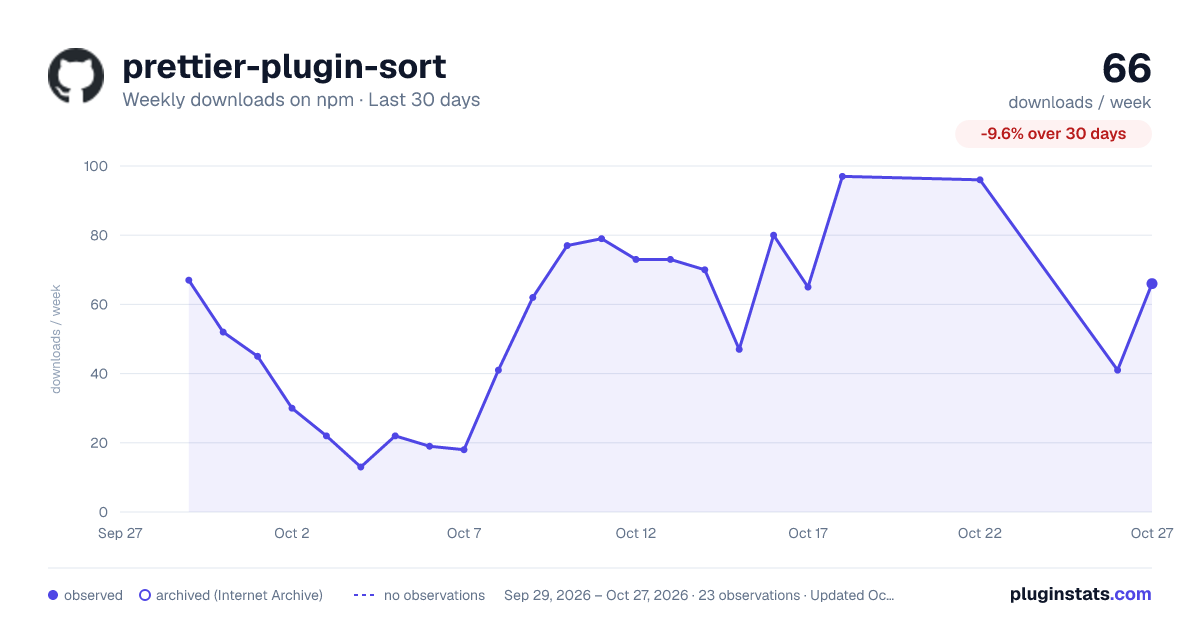
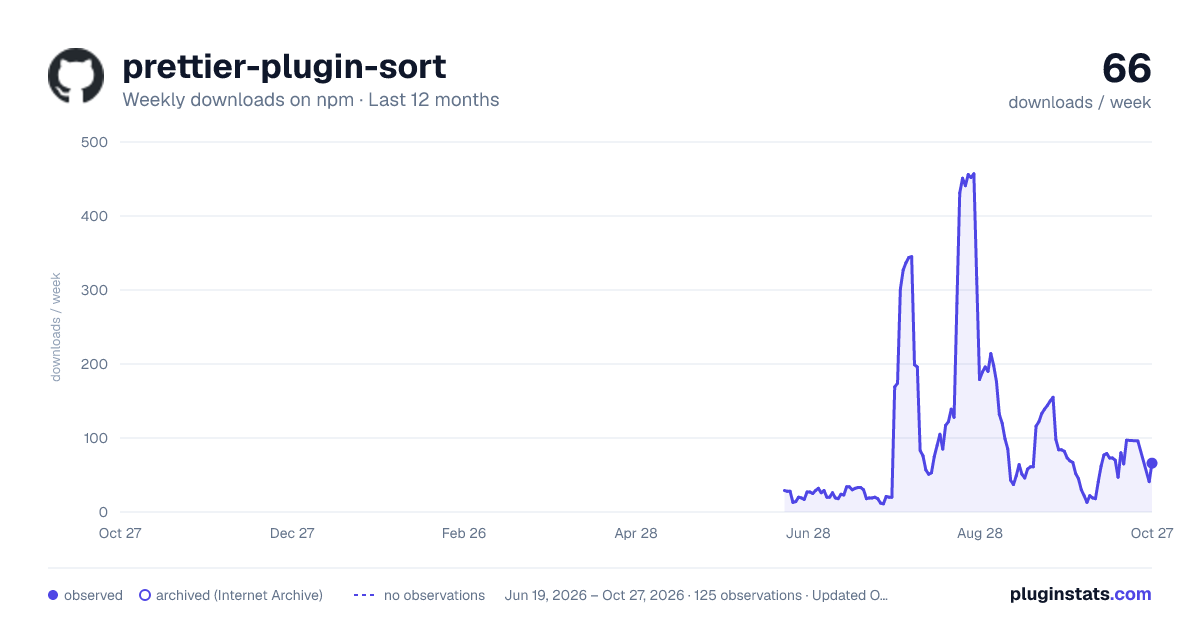
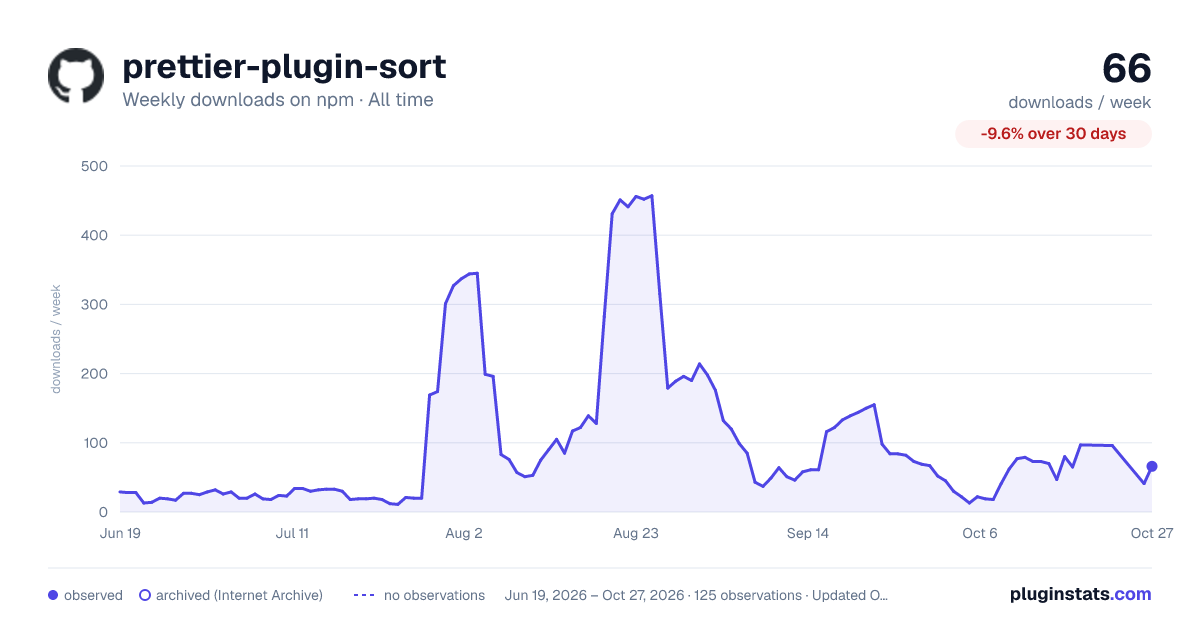

Adoption over time


7/30/90-day growth


Filled points are observed values; hollow points come from Internet Archive snapshots of the listing page. Dashed segments span periods with no observations — values between points are not interpolated.
Recent observations
Full history (121)Similar npm Prettier plugins plugins
Data source
Weekly downloads (trailing 7 complete days) come from the official npm downloads API. Downloads include CI and mirrors and are not equivalent to installs or users. npm publishes no ratings.
Listing: https://www.npmjs.com/package/prettier-plugin-sort. First seen Oct 16, 2026; last successful collection Oct 18, 2026. See the methodology.