 PluginStats
@google-cloud/observability-mcp weekly downloads statistics
By google-cloud (5 listings) · npm · MCP servers
MCP Server for GCP environment for interacting with various Observability APIs.
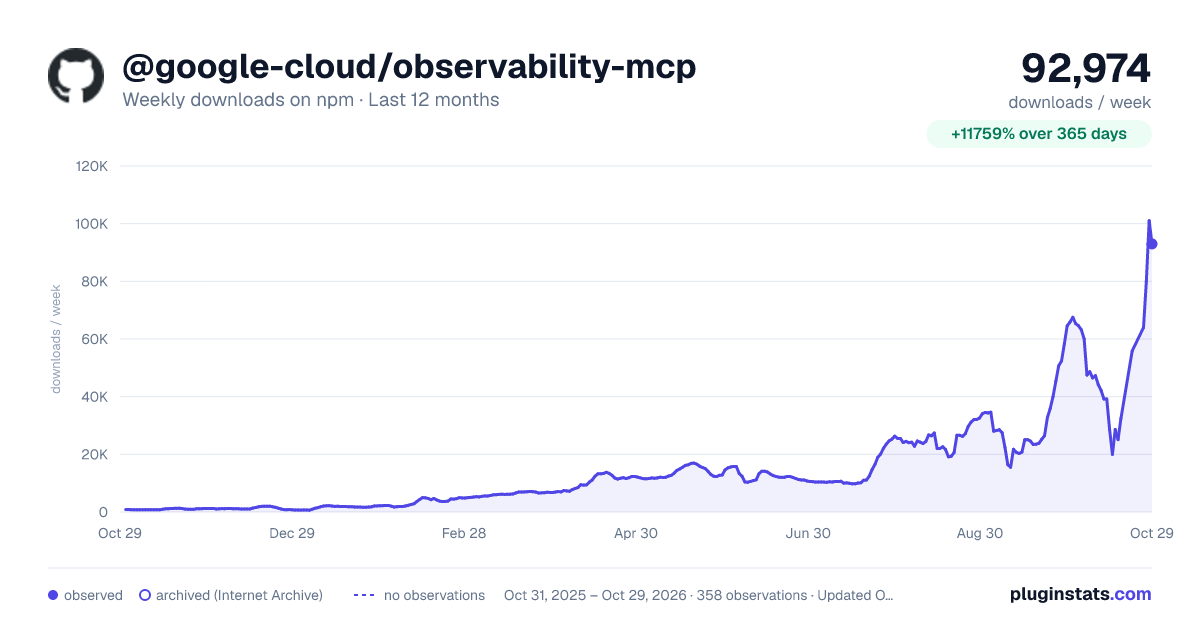
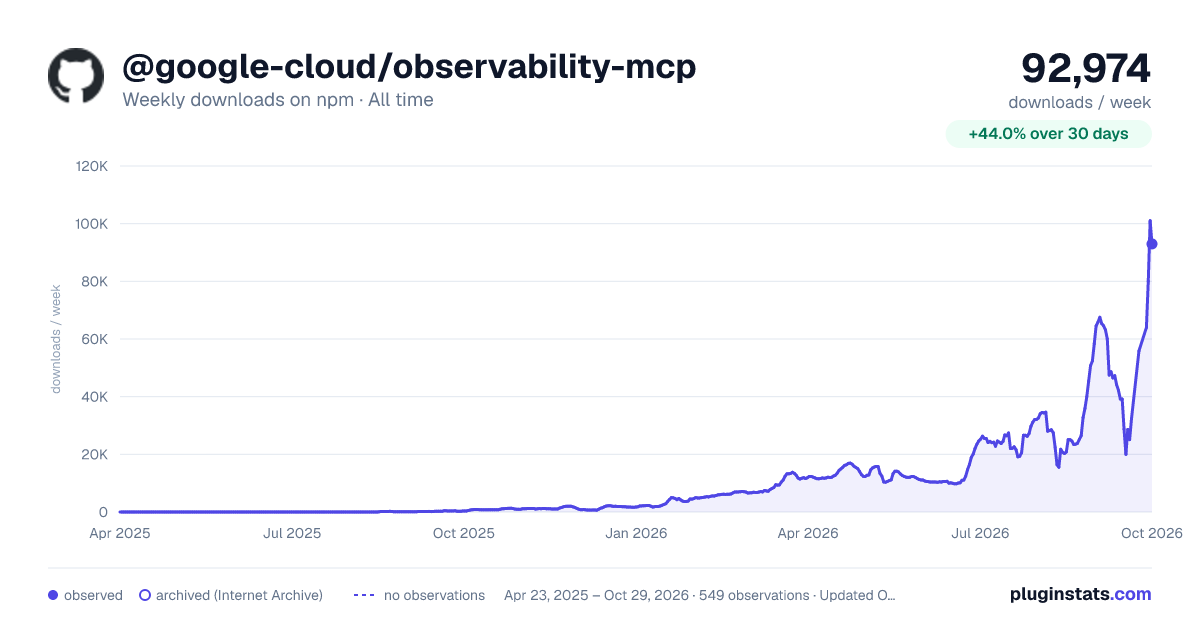
@google-cloud/observability-mcp has 25,092 recorded weekly downloads on npm, an increase of 7.2% over the past 30 days, ranking #698 of 2,256 tracked listings.
About @google-cloud/observability-mcp
Google Cloud Observability MCP Server ☁️
This server connects Model Context Protocol (MCP) clients (like the Gemini CLI) to Cloud Observability APIs to search for logs, view metrics, return traces and view error reports. It acts as a local bridge, translating natural language commands from your CLI into the appropriate API calls to help you understand, manage, and troubleshoot your Google Cloud environment.
To learn more about the underlying services, see the official documentation:
- Cloud Logging - Cloud Monitoring - Cloud Trace - Error Reporting
🚀 Getting Started
For prerequisites and setup instructions, please see the root README.
Authentication
You need to authenticate twice: once for your user account and once for the application itself.
Setting the Quota Project
All API requests made by this server require a Google Cloud project for billing and API quota management. This is known as the "quota project". This project will likely already be set in the gcloud CLI. The project selected as the quota project will need to have the APIs you wish to use in Observability enabled or you will see errors when attempting to use their related tools (e.g. you need the Cloud Logging API enabled in the quota project to use the list_log_entries tool).
If you need to control which project is used for quotas, run the following command (https://cloud.google.com/sdk/gcloud/reference/auth/application-default/set-quota-project):
This ensures that all API usage from this server is attributed to the correct project.
Usage
Once the server is configured, you can ask your MCP client natural language questions about your Google Cloud environment. Here are a few examples:
• "Show me all logs with a severity of ERROR." • "What is the average CPU utilization for my GCE instances over the last hour?" • "List all traces from the past 30 minutes." • "Are there any new stack traces in my logs in the last day?"
Your MCP client will translate these questions into the appropriate tool calls to fetch the data from Google Cloud.
Tools Reference
The server exposes the following tools:
| Service | Tool | Description |
| Logging | list_log_entries | Lists log entries from a project. | | | list_log_names | Lists log names from a project. | | | list_buckets | Lists log buckets from a project. | | | list_views | Lists log views from a project. | | | list_sinks | Lists log sinks from a project. | | | list_log_scopes | Lists log scopes from a project. | | Monitoring | list_metric_descriptors | Lists metric descriptors for a project. | | | list_time_series | Lists time series data for a given metric. | | | list_alert_policies | Lists the alert policies in a project. | | Trace | list_traces | Searches for traces in a project. | | | get_trace | Gets a specific trace in a project. | | Error Reporting | list_group_stats | Lists the error groups for a project. |
📄 Important Notes
This repository is currently in preview and may see breaking changes. This repository provides a solution, not an officially supported Google product. It is not covered under Google Cloud Terms of Service. It may break when the MCP specification, other SDKs, or when other solutions and products change. See also our Security Policy.
👥 Contributing
Please read our Contributing Guide to get started.
📝 License
This project is licensed under the Apache 2.0 License - see the LICENSE file for details.
Description from the npm listing.
- gcp
- google cloud
- mcp
- mcp server
- observability
README badge
Show your rank in a README or on your website. The badge updates automatically.
Charts
Images: 30d · 1y · all time · 1600×900 dark


Adoption over time
7/30/90-day growth
Ranking history
Listing placement
Listing placement
Filled points are observed values; hollow points come from Internet Archive snapshots of the listing page. Dashed segments span periods with no observations — values between points are not interpolated.
Each band is one page of 20. Weekly downloads on a linear scale. Placement is projected from weekly downloads, so it can differ from the marketplace's own sort order. Hover a dot to see the listing.
Recent observations
Full history (543)Similar npm MCP servers plugins
All 20 @google-cloud/observability-mcp alternatives- 25.6K weekly downloads-30.0%
Data source
Weekly downloads (trailing 7 complete days) come from the official npm downloads API. Downloads include CI and mirrors and are not equivalent to installs or users. npm publishes no ratings.
Listing: https://www.npmjs.com/package/@google-cloud/observability-mcp. First seen Oct 16, 2026; last successful collection Oct 19, 2026. See the methodology.