 PluginStats
@automattic/mcp-wordpress-remote weekly downloads statistics
By automattic (6 listings) · npm · MCP servers
MCP WordPress Remote proxy server
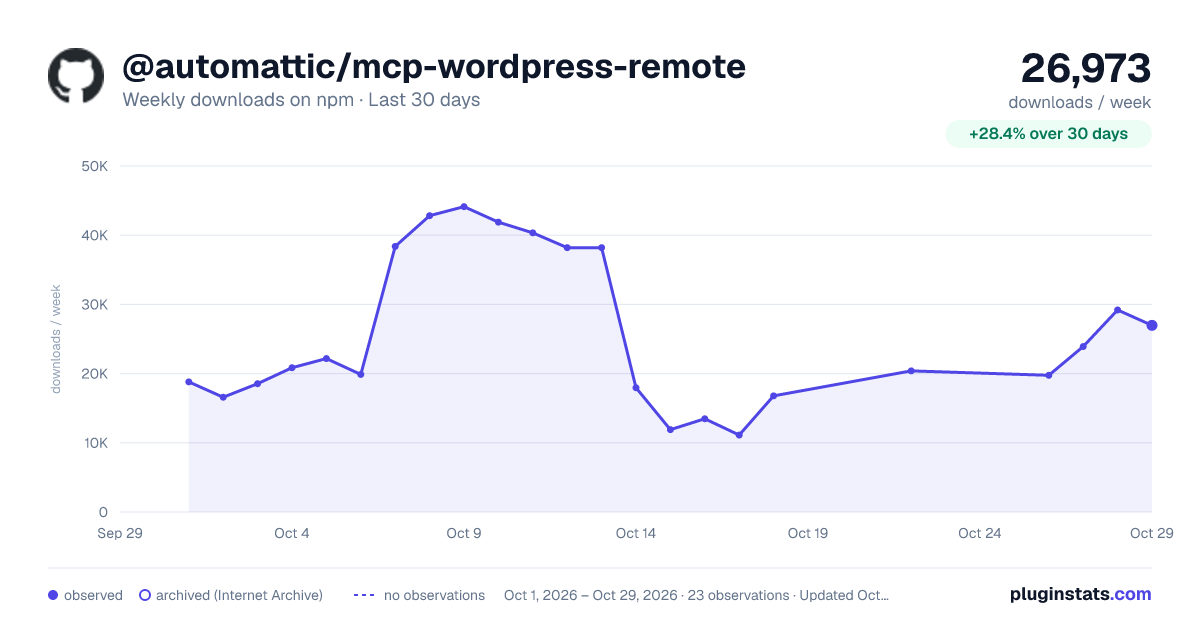
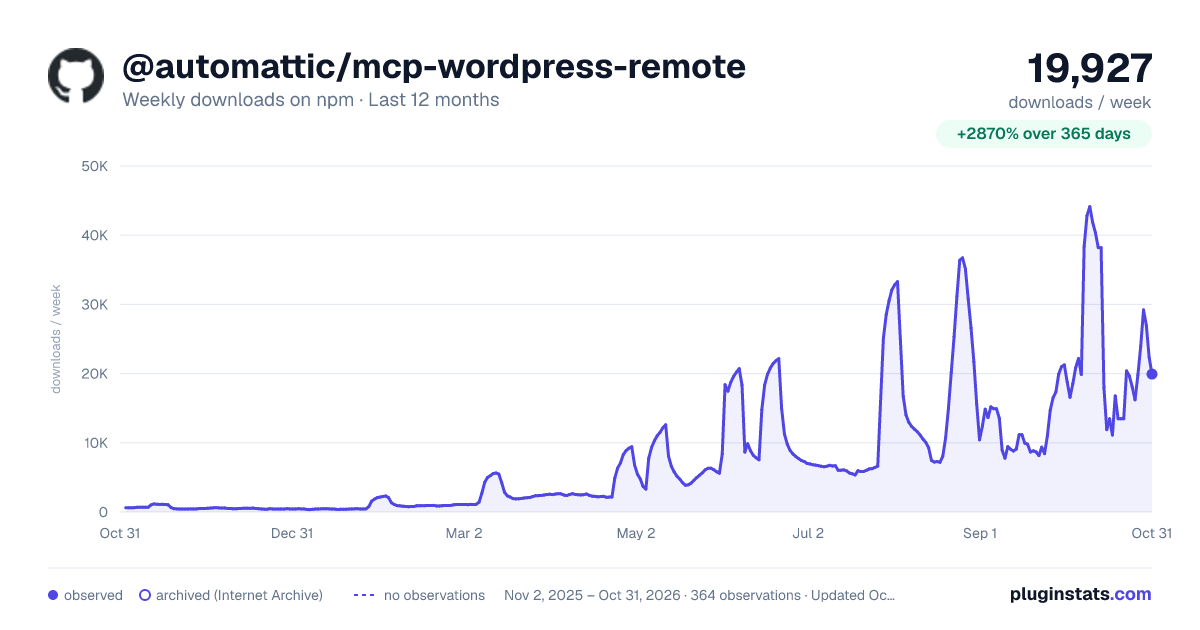
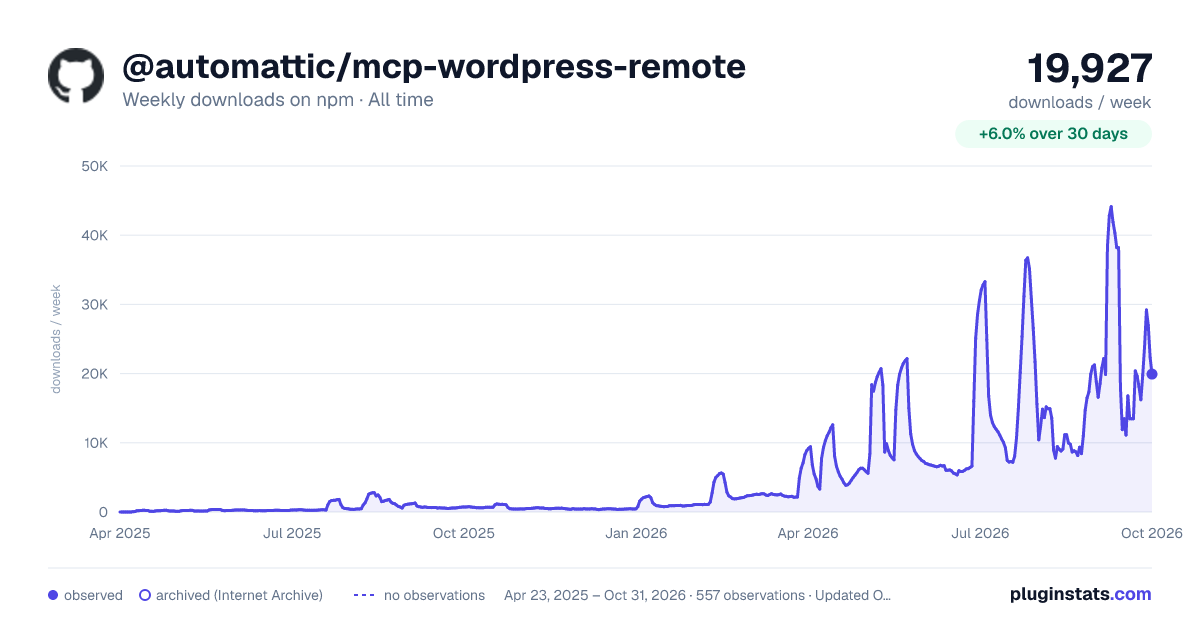
@automattic/mcp-wordpress-remote has 11,120 recorded weekly downloads on npm, an increase of 13.5% over the past 30 days.
It ranks #884 of 2,251 tracked npm listings by weekly downloads.
Over 90 days, weekly downloads changed by +86.4%.
PluginStats has 543 daily observations since Apr 23, 2025; the latest is from Oct 17, 2026.
About @automattic/mcp-wordpress-remote
MCP WordPress Remote
A stdio-to-HTTP pass-through proxy for WordPress MCP servers
Connect AI assistants like Claude Desktop to your WordPress sites with multiple authentication methods including OAuth 2.0, JWT tokens, and application passwords.
Features
• MCP Authorization Specification Compliant - Implements MCP Authorization specification 2025-06-18 • OAuth 2.1 with PKCE - Secure authorization code flow with PKCE (RFC 7636) • Resource Indicators - RFC 8707 compliance for token audience binding • Dynamic Client Registration - RFC 7591 support for automatic client registration • Protected Resource Metadata Discovery - RFC 9728 for automatic endpoint discovery • Multiple Authentication Methods - OAuth 2.1, JWT tokens, and WordPress application passwords • Persistent Token Storage - OAuth tokens stored securely with automatic validation • Multi-instance Coordination - Lockfiles prevent authentication conflicts • Automatic Token Management - Handles validation, refresh, and cleanup • Enhanced Error Handling - Detailed error messages with proper categorization • Comprehensive Logging - Structured logging with categories and levels • Complete MCP Support - Tools, resources, prompts, and more
When to use this proxy
If your MCP client supports the Streamable HTTP transport and can authenticate to your site, connect it to the MCP Adapter endpoint directly. You don't need this proxy. For example, in Claude Code (.mcp.json), using an application password:
Other clients use their own config format. Check your client's documentation for remote or HTTP MCP servers.
Use the proxy when one of these applies:
1. Your client only supports stdio. It can launch a local command but cannot connect to an HTTP MCP server. 2. Your client can't authenticate the way your site requires. The proxy can send application passwords, JWT tokens, WooCommerce keys, or custom headers, and it can run the OAuth flow and store tokens for clients that can't. 3. Your traffic must go through a proxy. Set SOCKS_PROXY, HTTPS_PROXY, ALL_PROXY or HTTP_PROXY to route requests through it. On macOS, set USE_SYSTEM_PROXY=true to use the system PAC file or SOCKS proxy instead. 4. Your site is slow or unreliable. WP_API_TIMEOUT_MS and WP_API_INIT_TIMEOUT_MS set the timeouts, and a failed initialize returns a degraded response instead of a broken connection (see Forwarding behavior). 5. You need a local record of the connection. LOG_FILE with LOG_LEVEL=3 logs each forwarded method plus connection and authentication events (see Log Analysis). 6. You are building a packaged integration. Tool-call hooks from the /lib bundle can send extra requests over the proxy's authenticated connection, for example for usage telemetry.
Quick Start
Installation
Configuration
Add to your MCP client configuration (e.g., Claude Desktop's claude_desktop_config.json):
Custom Headers
You can add custom headers to all API requests using the CUSTOM_HEADERS environment variable. This is useful for API keys, custom authentication, or other header requirements.
JSON Format (Recommended):
Comma-Separated Format:
Command Line Usage:
Custom headers are included in:
• All WordPress API requests • OAuth discovery requests • OAuth token exchange requests • OAuth client registration requests
First Run
1. Start your MCP client (Claude Desktop, etc.) 2. Choose authentication method based on your preference: • OAuth 2.0: Enable OAUTH_ENABLED=true to open the browser for authorization • JWT Token: Set JWT_TOKEN environment variable • Application Password: Set WP_API_USERNAME and WP_API_PASSWORD 3. Start using WordPress features in your AI assistant
WordPress MCP Plugin
Install the MCP Adapter plugin on your WordPress site. Once active, it registers a default MCP server at /wp-json/mcp/mcp-adapter-default-server — set WP_API_URL to that full URL (examples throughout this README show the pattern). To target a custom server id or namespace, pass the full URL of that server instead.
Forwarding behavior
The proxy forwards the MCP client's messages to the configured endpoint and returns the server's messages. It does not send its own initialization probe, select an MCP version, or register a fixed set of methods. The client and server own version negotiation, capabilities, and result validation. Requests, notifications, server requests, IDs, and metadata travel through the bridge; JSON and SSE responses are supported.
For initialization-based MCP connections, the server's selected version and session ID are used in subsequent HTTP headers. Requests carrying io.modelcontextprotocol/protocolVersion in params._meta use that version directly and do not require a proxy-generated handshake. This removes the proxy's version allowlist; it does not translate between protocol revisions or establish full compliance with every newer transport feature.
Existing authentication, custom headers, timeout, logging, token-storage, and system-proxy settings remain available. A bare-domain WP_API_URL now resolves to /?rest_route=/mcp/mcp-adapter-default-server. Full endpoint URLs remain configurable. The archived wordpress-mcp plugin's method-only request format and automatic transport fallback have been removed.
If the upstream connection fails during initialization, the proxy retains its degraded response with experimental.connectionFailed and no usable capabilities, using the client's offered version. Follow-up requests are rejected locally. Server-generated JSON-RPC errors are forwarded rather than converted to a successful handshake. The proxy does not silently reinitialize or retry failed client requests.
Tool-call hooks and wpRequest from the /lib bundle share the live authenticated connection when the proxy is running. Hook responses remain internal and hook failures cannot change the client response. Standalone wpRequest retains its result-returning interface and optional session recovery; both its existing argument shapes are encoded as standard JSON-RPC.…
Description from the npm listing.
- mcp
- wordpress
- remote
- proxy
Where @automattic/mcp-wordpress-remote sits in the listing
Each band is one page of 20. Weekly downloads on a log scale. Placement is projected from weekly downloads, so it can differ from the marketplace's own sort order. Hover a dot to see the listing.


Charts
Images: 30d · 1y · all time · 1600×900 dark

Adoption over time


7/30/90-day growth


Filled points are observed values; hollow points come from Internet Archive snapshots of the listing page. Dashed segments span periods with no observations — values between points are not interpolated.
Recent observations
Full history (543)Similar npm MCP servers plugins
Data source
Weekly downloads (trailing 7 complete days) come from the official npm downloads API. Downloads include CI and mirrors and are not equivalent to installs or users. npm publishes no ratings.
Listing: https://www.npmjs.com/package/@automattic/mcp-wordpress-remote. First seen Oct 16, 2026; last successful collection Oct 18, 2026. See the methodology.